Are you looking to improve Employee Performance Managment program in your organization?
Want to have automated reports that can be easily refreshed with the click of a button?
Would you like to visualize and interact with the 9-Box grid instantly for any review period?
Look no further. We present a simple and effective solution: Employee Performance Dashboard Template in Power BI.
Employee Performance Dashboard Template in Power BI – Home page with KPIs
Get instant access to 29 relevant Training metrics in 5 actionable HR reports and take infinite smart HR decisions.
Employee Performance Dashboard Template – Power BI – Metrics Reports and Decisions
Let’s take a look at the reports and metrics included in the template.
5 Automated Reports
The Employee Performance Dashboard template in Power BI has 5 automated reports out of the box.
9-Box Grid Report
View the 9-Box grid for all employees or filter to employees in a specific department or grade.
Performance Dashboard Power BI template – 9 Box Grid
Performance Dashboard
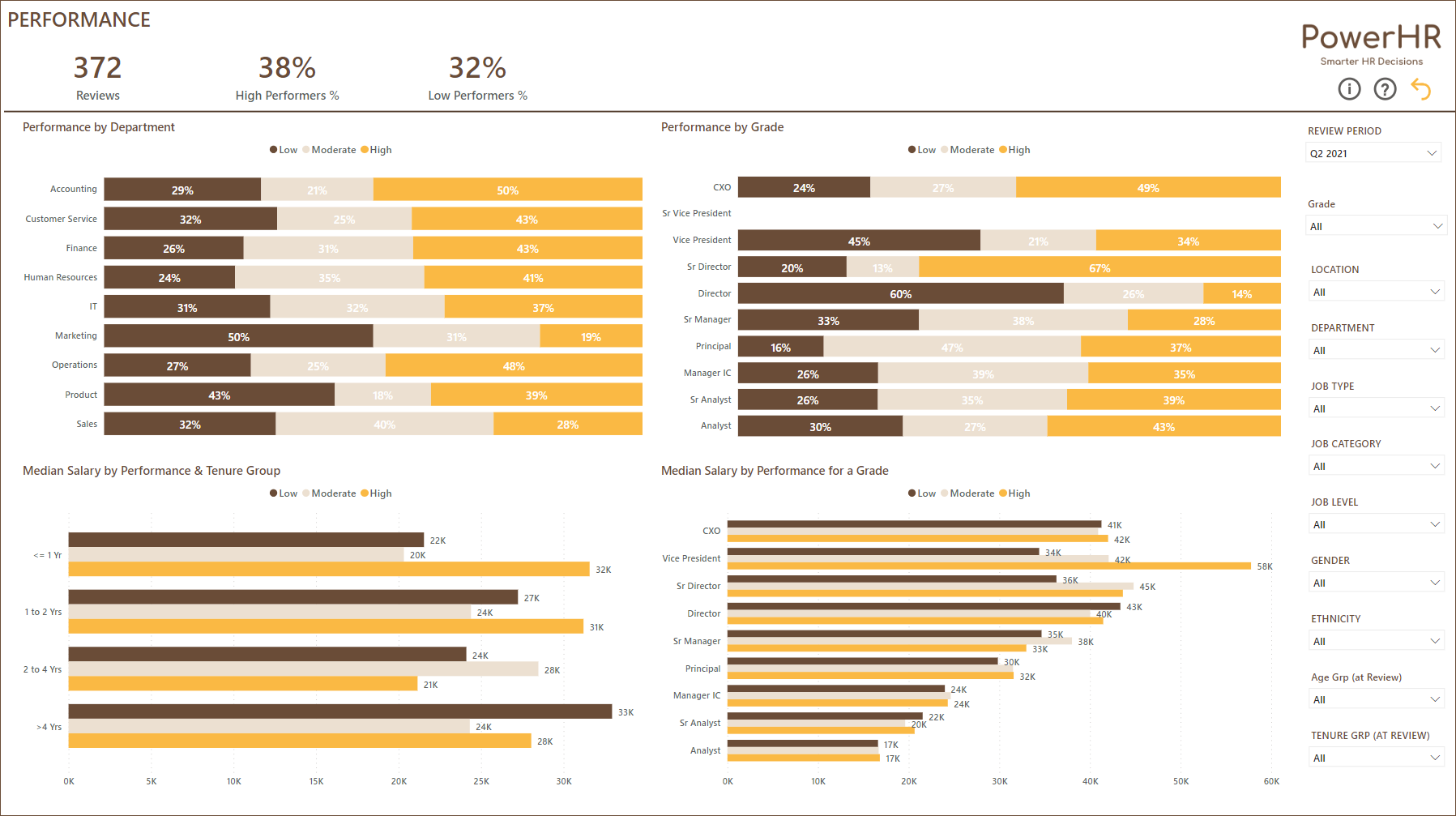
Select a review period and view the mix of High/Moderate/Low performers within each department and grade. Compare median salaries of High/Moderate/Low performers.
Employee Performance Dashboard Template in Power BI – Performance Dashboard
Performance Trends Report
View the performance mix trend over time, within each department.
Performance Dashboard Power BI template – Performance Trends
Skills Report
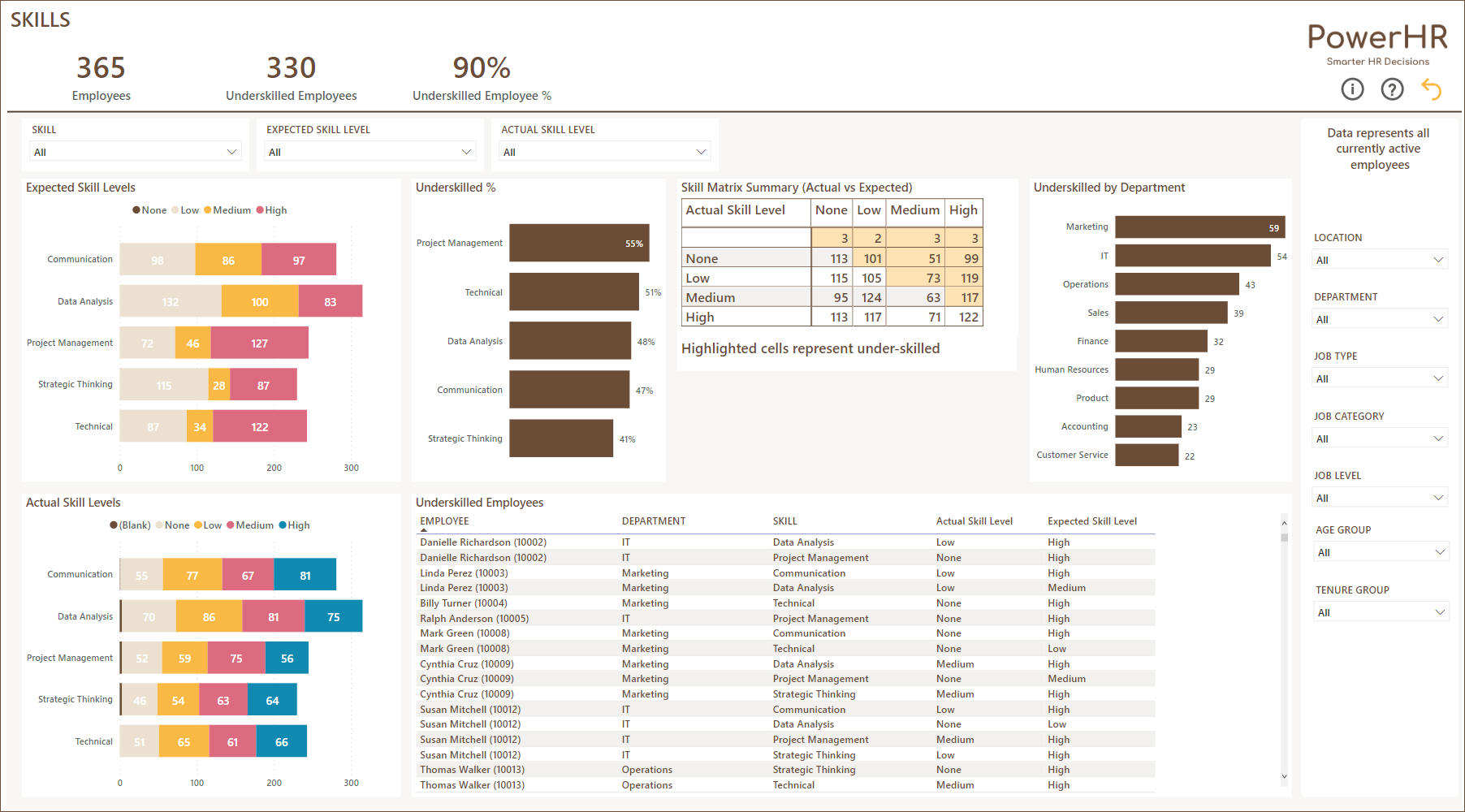
Identify which skills are needed for employees and prepare training programs to improve those skills.
Quantify the number of employees who need to be upskilled in each department.
Training Dashboard Power BI Template – Skills Dashboard
Exits Report
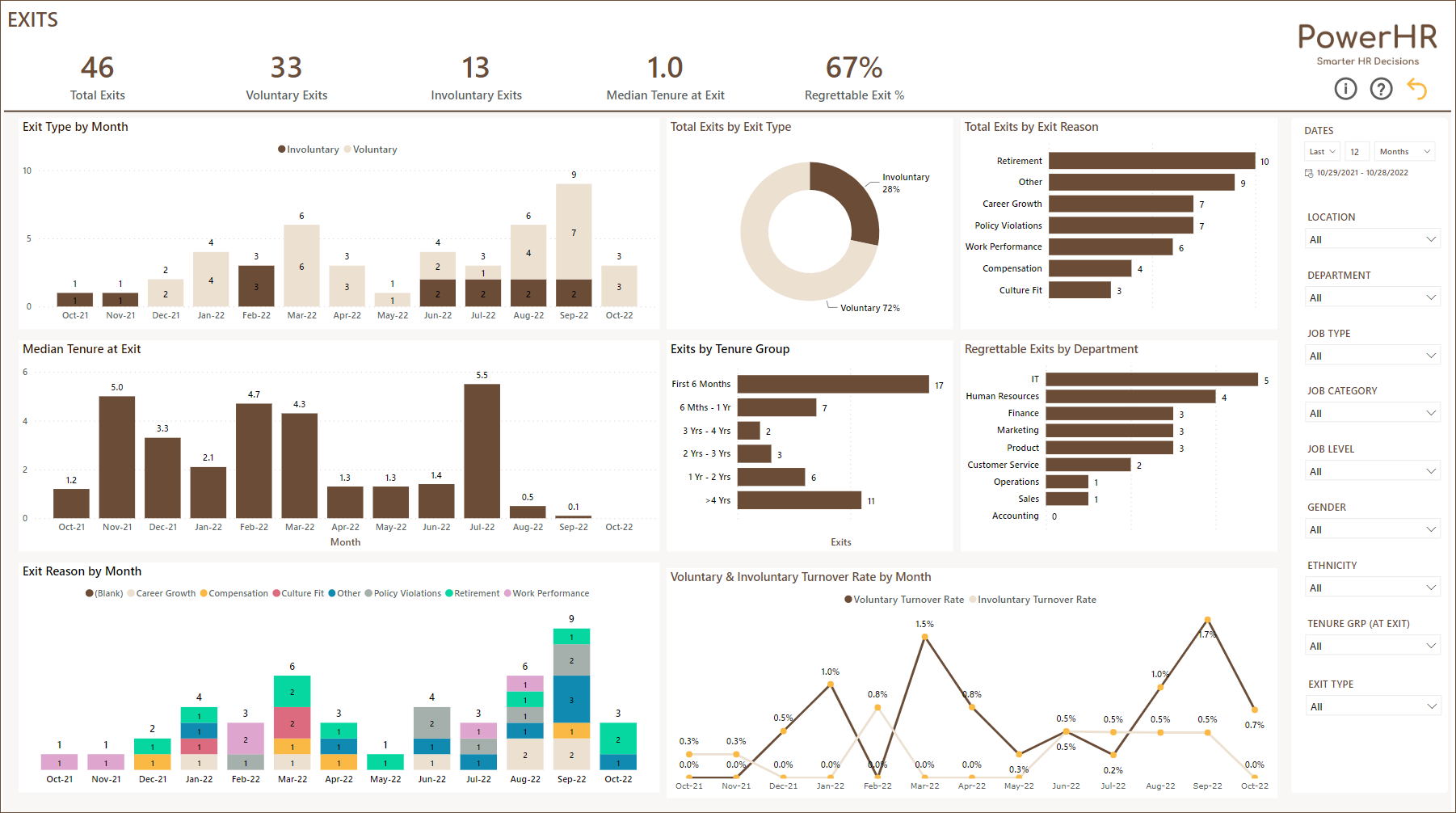
View number of people leaving the company (voluntary vs involuntary).
Identify reasons for leaving and make modifications to reduce regrettable (high performer) exits.
Performance Dashboard Power BI template – Exits
29 Metrics
You will have instant access to 29 Training metrics in the Power BI file. They are used in the 5 reports. You can also create your own reports and visuals using the metrics.
Employee Performance Dashboard Template in Power BI – 29 Metrics
Interactive, Customizable & Expandable Reports
All the reports have filters that allow you to narrow down the data according to your needs.
You can easily customize the entire Power BI report by modifying the theme colors/fonts or customize specific visuals individually.
If you have used Power BI before, you can add more reports in the Power BI file or modify existing reports easily.
Simple 3 Step Setup
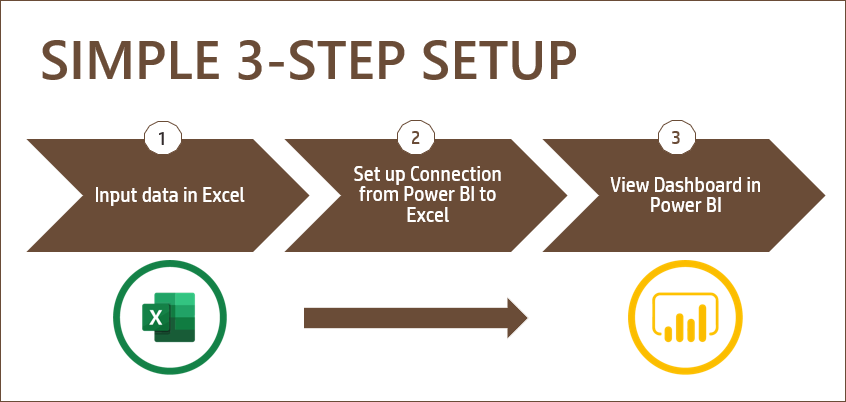
The Employee Performance Dashboard Template in Power BI uses a simple 3-step process to get you started immediately and get instant reports.
You will receive a Power BI file and an Excel file when you download. You can download both and save in your local desktop or on cloud drive such as One Drive or SharePoint.
Enter input data in Excel file
Set up connection from Power BI file to the Excel file.
View reports in Power BI
3 Step Setup – Power BI Template
Employee Performance Dashboard Template in Power BI – Demo
Our Promise
Our promise to you is that after downloading this Employee Performance Dashboard Template in Power BI, within 15 minutes,
You will have a clear and simple streamlined process to enter and manage Performance Review data.
You will have automated interactive reports and analysis including Skills Dashboard, 9-Box Grid and Performance Dashboard.
You will have insights about employee performance that you can use to take decisions to improve productivity.
Downloads
The file is free to download.
Some sheets are protected so their formulas aren’t changed by mistake. To unprotect a sheet, choose Review › Unprotect Sheet and type the password HRRT (how to unprotect sheets).
2 reviews for Performance Dashboard – Power BI Template
5.0
Based on 2 reviews
5
100
100%
4
0%
3
0%
2
0%
1
0%
1-2 of 2 reviews
Sudarshan KR
Verified owner
The Performance Dashboard Power BI template has been a game-changer for our team. It’s a visually appealing and insightful tool that has revolutionized the way we track and analyze performance metrics. Highly recommended!
(0)(0)
Nabil El Hady
Verified owner
Great template as usual that saves a lot of time and deliver amazing results
(0)(0)
Sorry, no reviews match your current selections
Add a review
Performance Dashboard – Power BI Template
Rating*
0/5
* Rating is required
Your review
* Review is required
Name
* Name is required
Email
* Email is required
Questions and help
Is this template free?
Yes. Every INDZARA template is free to download, and there are no recurring fees.
Some sheets are protected so their formulas aren’t changed by mistake. To unprotect a sheet, choose Review › Unprotect Sheet and type the password HRRT (how to unprotect sheets).
Where can I get help with this template?
Start with the guides below. Our knowledge base has step-by-step articles for every template, and you can always ask us.





 Performance Dashboard – Power BI Template
The Performance Dashboard Power BI template has been a game-changer for our team. It’s a visually appealing and insightful tool that has revolutionized the way we track and analyze performance metrics. Highly recommended!
Great template as usual that saves a lot of time and deliver amazing results