Gantt chart is the most common method used to visualize project schedules. The Gantt Chart Maker Google Sheet template allows one to easily create Gantt charts instantly.
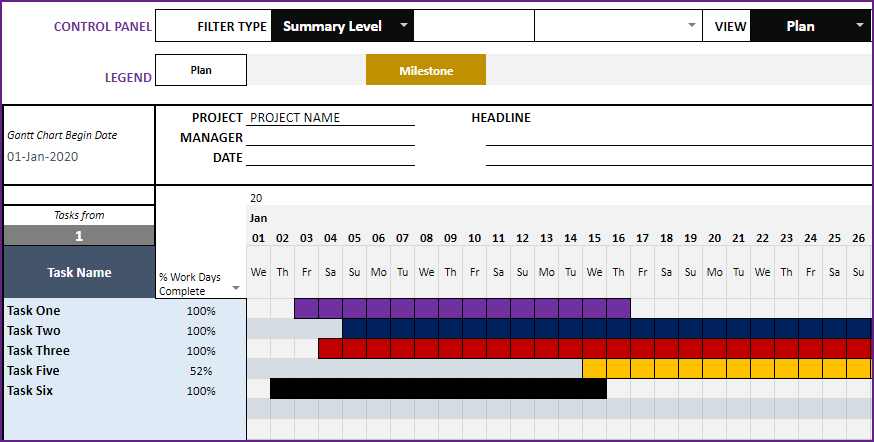
Gantt Chart Maker Google Sheet Template – Gantt Chart
Features of Gantt Chart Maker Google Sheet Template
Applicable to projects of any size (that span across days, weeks, months or years)
Create two levels of Tasks (WBS – Summary tasks and subtasks)
Summary Tasks’ dates are automatically calculated based on subtasks
Multiple views (Plan, Actual, Actual vs Plan or Current Status)
Simple and easy data entry
Automatic End Date calculation
Exclude Holidays & Weekends as non-working days
Enter Actual dates only where there is variance
Option to use automatically calculated % of Work Days complete or user input
Control which tasks are displayed
Filter to select tasks easily
Show only summary level tasks or Milestones
Show tasks of one resource
Incomplete tasks, and delayed tasks are automatically identified
Visualization
Assign each task a color. Assign each resource a color.
10 colors available (4 of them are theme based)
Milestone markers are automatically created
Output
Ready to print. Or export as PDF and share
Extension possibilities
52 periods (days/weeks/months/years) are shown at a time. Can be extended.
View 40 tasks at a time by default. Can be extended.
Applicable to projects of all sizes
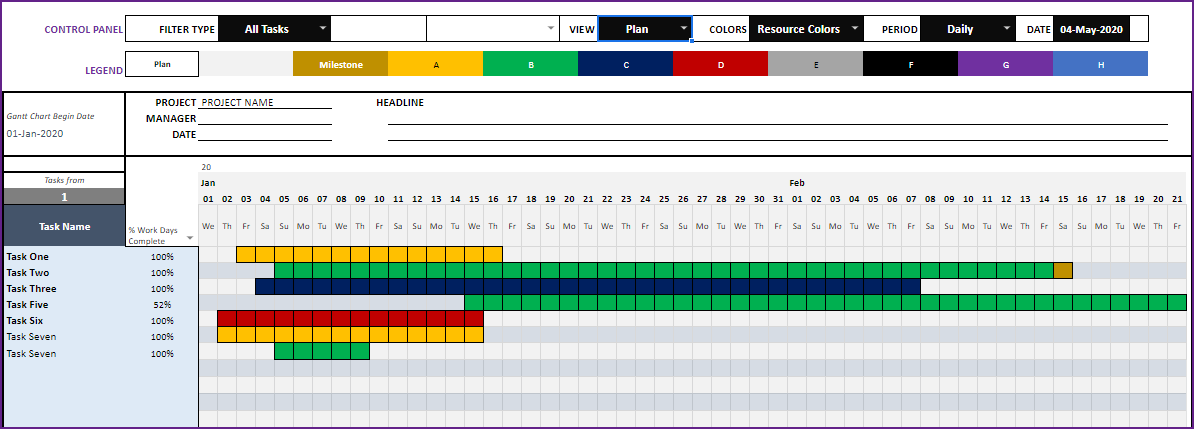
The Gantt Chart Maker Google Sheet template can be used for projects of all sizes. You can choose to view the Gantt chart by Daily / Weekly / Monthly / Yearly.
Gantt Chart Maker Google Sheet Template – Daily/Weekly/Monthly/Yearly
Work Breakdown Structure (WBS) – Two Levels of Tasks
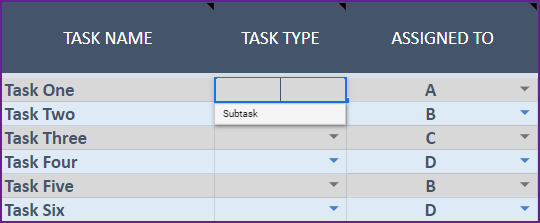
You can create two levels of tasks (Summary and Subtask) easily. By default all tasks are summary tasks. Just choose ‘Subtask’ in task type while entering. For summary tasks, Start and End Dates are automatically calculated based on Subtasks. They are also shown in bold font.
Gantt Chart Maker Google Sheet Template – WBS
Four different views
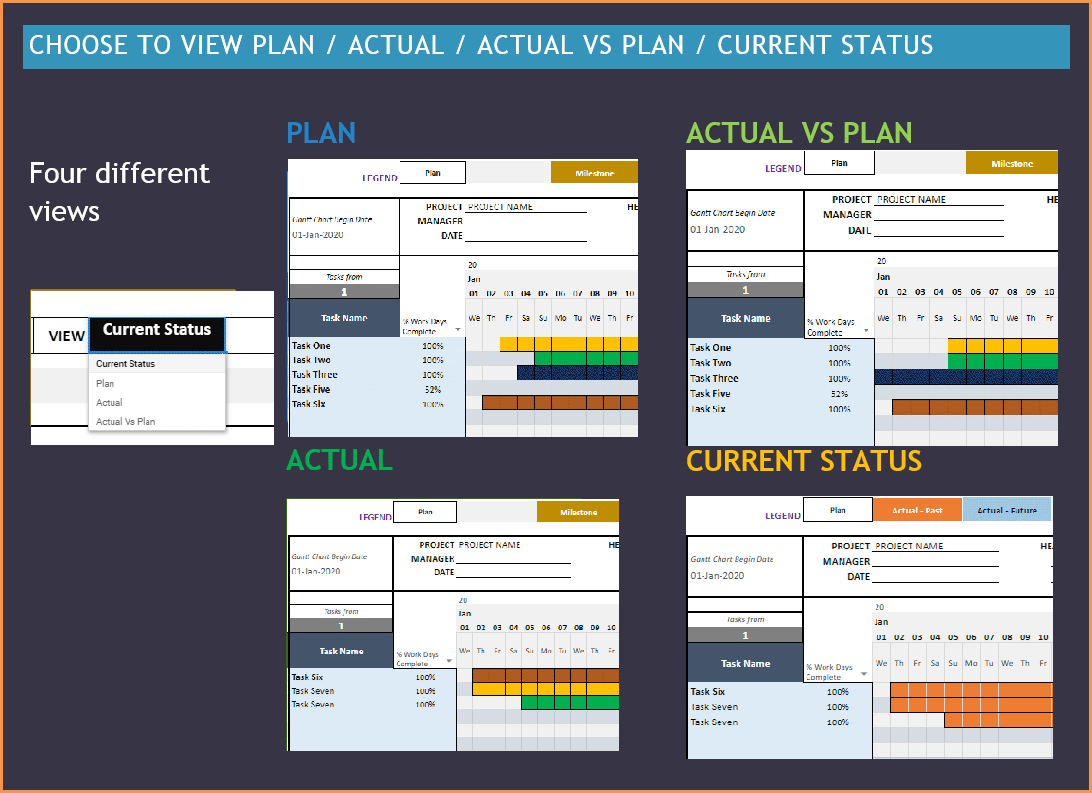
You can choose from 4 different views of the data. View 1) Plan, 2) Actual, 3) Compare Actual vs Plan or 4) Current Status.
Plan represents the plan schedule.
Actual represents the Actual schedule.
Actual vs Plan shows actual schedule in comparison against the plan schedule.
Current Status shows the Actual schedule, but it shows the work completed as of today vs the future.
Gantt Chart Maker Google Sheet Template – 4 Views Plan, Actual, Actual Vs Plan, Current Status
Simple and Easy Data Entry
Data entry is simplified to save time.
Enter Task Name.
Choose Task as Subtask if it is one.
Assign the task to a resource
Enter Planned Start date and duration. Plan End Date will be calculated by the template.
For Actuals, enter change in duration if there is variance from plan.
Enter Actual Start date only if there is variance from plan.
Gantt Chart Maker Google Sheet Template – Data Entry
Optional inputs are available to meet your additional needs.
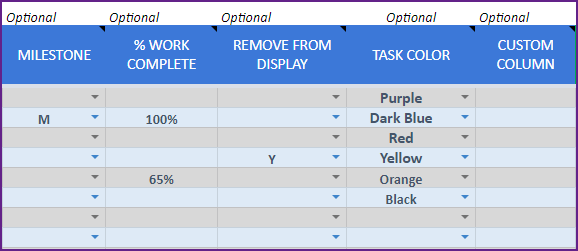
You can flag certain tasks as Milestones.
You can track % Work complete
A custom column is available to track additional information on each task.
Gantt Chart Maker Google Sheet Template – Optional Data Input
Holidays and Weekends are accounted for.
Gantt Chart Maker – Google Sheet Template – HolidaysGantt Chart Maker – Google Sheet Template – Weekends
% Complete
There are two options here.
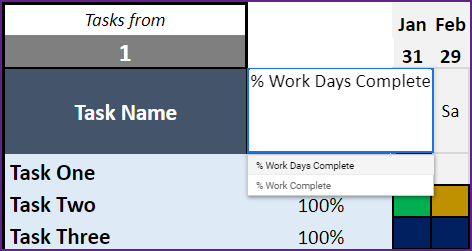
You can use the % of Work Days Complete that is automatically calculated as ‘number of work days of actual work done as of today’ divided by ‘number of work days of actual work scheduled for the task’.
Or you can choose to enter your own ‘% Work Complete’ in the input table.
Gantt Chart Maker – Google Sheet Template – % Complete
It will appear on the Gantt Chart with conditional formatting showing 0% complete as Red, 100% complete as Green and in between as Yellow.
You can also decide to not to show any % Complete information by choosing blank in the drop-down menu. It’s all about user control.
Control tasks to display
You can choose not to show certain tasks on the Gantt chart by entering Y in the ‘Remove from Display’ field in the Data entry sheet.
Also, on the Gantt Chart itself, you have several options.
Gantt Chart Maker Google Sheet Template – Filter Types
Choose to view only Summary Level, only Milestones or all tasks. You can also easily filter to delayed tasks (Actual End Date > Plan End Date) and Incomplete tasks (Actual End Date > Today).
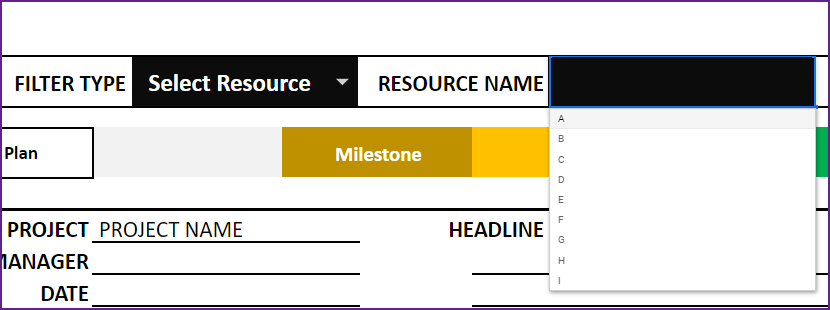
In addition, choose a specific resource and only see the tasks assigned to that resource.
Gantt Chart Maker Google Sheet Template – Resource Tasks
Visualization
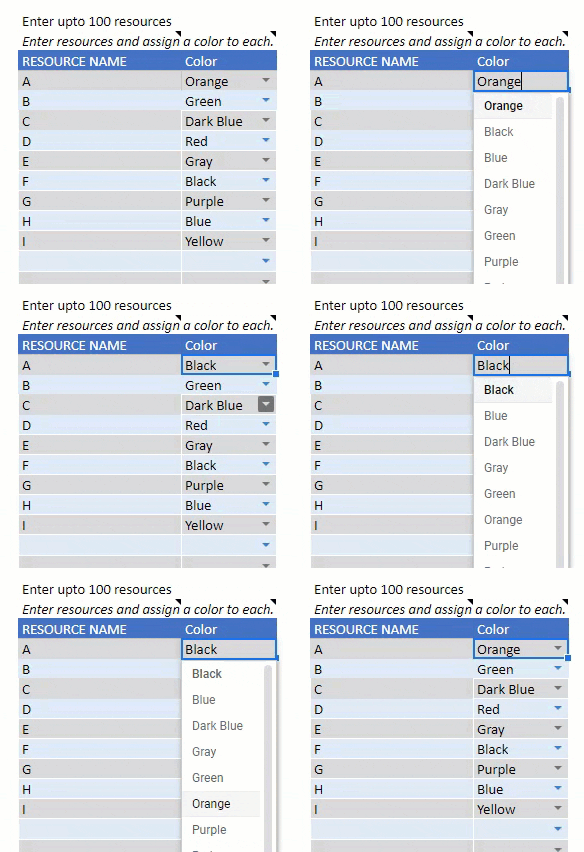
You can assign each task a color. You can also assign each resource a color. 10 colors are available.
Gantt Chart Maker – Google Sheet Template – Colors
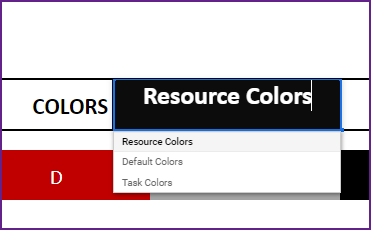
On the Gantt Chart, you can choose to view default colors, task colors or resource colors. It’s all up to what view you would like to present for the specific purpose. Of course, you can switch back and forth as needed.
Gantt Chart Maker – Google Sheet Template – Color Choice
Output
The Gantt chart is set ready to print. If you would like to print only a portion, you can change the print settings in Google Sheet as usual. You can also export to PDF and share.
Gantt Chart Maker Google Sheet Template – Gantt Chart
Extension
52 periods and 40 tasks are displayed at a time. You can extend easily as needed. Calculation sheet (hidden) accounts for up to 100 tasks. This can be extended if needed.
This Gantt Chart Maker Google Sheet Template is a regular Google Sheet file with formulas and conditional formatting. No macros or programming. Hence, you can extend this as needed. The Gantt sheet is protected to avoid making unintentional edits. You can unprotect using indzara as password and make changes.
Notes
Task duration is entered in days (not hours).
Predecessors are not automatically handled. User will input each task’s plan start date directly.
Automatic scheduling based on resource availability is not available.
2 reviews for Gantt Chart Maker – Google Sheet Template
5.0
Based on 2 reviews
5
100
100%
4
0%
3
0%
2
0%
1
0%
1-2 of 2 reviews
joansamson
Verified owner
I have the Gantt Chart Maker for excel, but as many people uses GSheet, having a version of it for Google meant I don’t have to find another template to use. Thank you!
(0)(0)
Glen Sabatier
Verified owner
This is a great tool for managing small to medium sized projects. With the Google Sheets version the team can see the whole project and their specific tasks. The sponsor can also see the whole project and where we are at. I like how clean it looks and that it’s easy to use.






 Gantt Chart Maker – Google Sheet Template

I have the Gantt Chart Maker for excel, but as many people uses GSheet, having a version of it for Google meant I don’t have to find another template to use. Thank you!
This is a great tool for managing small to medium sized projects. With the Google Sheets version the team can see the whole project and their specific tasks. The sponsor can also see the whole project and where we are at. I like how clean it looks and that it’s easy to use.