Pick the files you need in the download list below.
Overview
If you are in HR you need an effective tool to measure and present the performance indicators that reflect the state of HR in your company. This is key for the HR leadership and the company leadership to understand the current state and measure the progress against the company’s targets. In addition, you can identify areas of opportunities that need more attention.
KPI Dashboard View
With our HR KPI Scorecard Excel template, you can have an effective and elegant Scorecard and Dashboard completely customized for your organization, within a few minutes.
BENEFITS OF KPI SCORECARD TEMPLATE
Take effective informed business decisions in a timely manner
Save weeks of development effort to create such a KPI scorecard
Impress your company leadership with an elegant scorecard within minutes
HIGHLIGHTS
Immediately useful – Automated HR KPI Scorecard and Dashboard; Sample file with 30 HR KPIs
Practical functionality to address common business scenarios
Highly customizable – Customize to your business needs
Action-oriented design to enable effective and quick business decisions
Immediately useful
Automated HR KPI Scorecard and Dashboard
The KPI Scorecard template will allow you to create HR KPI Scorecard and Dashboard within a few minutes. Once you enter your KPIs and their values, the Scorecard and Dashboard are immediately ready. The template is designed to be simple to input data and produces highly effective outputs instantly.
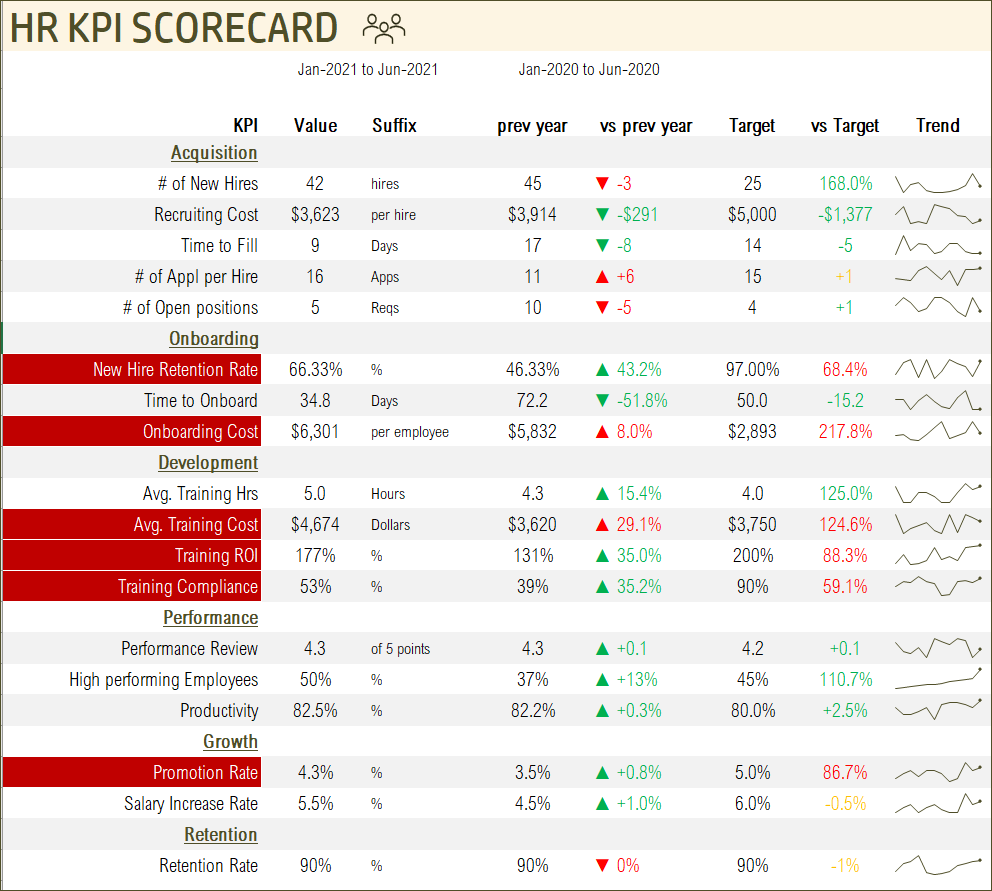
HR KPI Scorecard Template – HR KPI Scorecard
Scorecard design allows comments to appear along with the KPI data, to provide more context to the numbers.
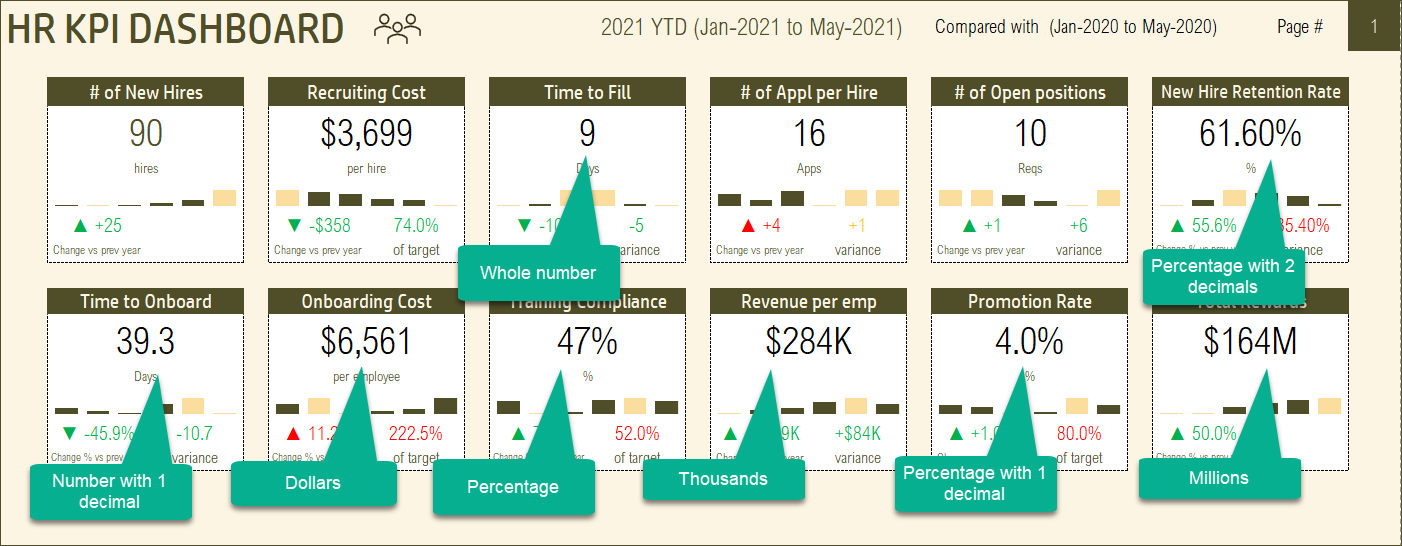
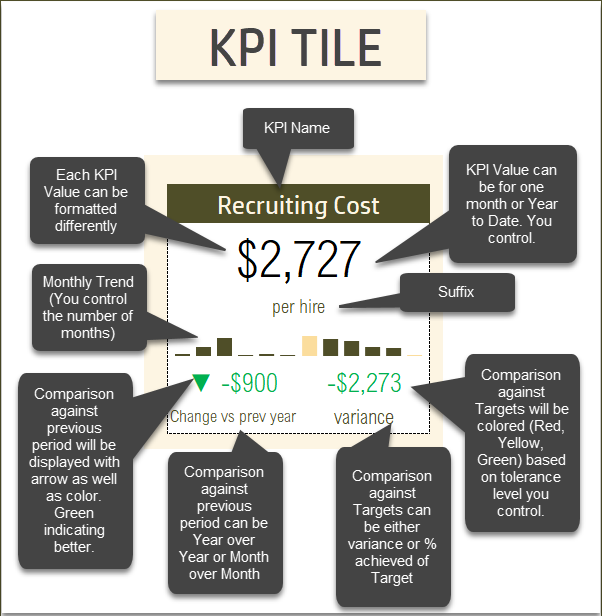
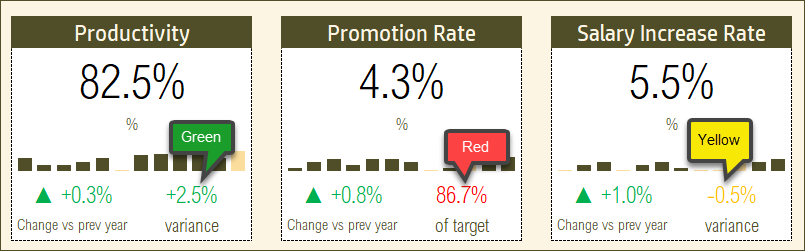
The Dashboard in KPI Scorecard template provides similar information but using a KPI Tile or KPI card style.
HR KPI Scorecard Template – HR KPI Dashboard
Sample file with common HR KPIs
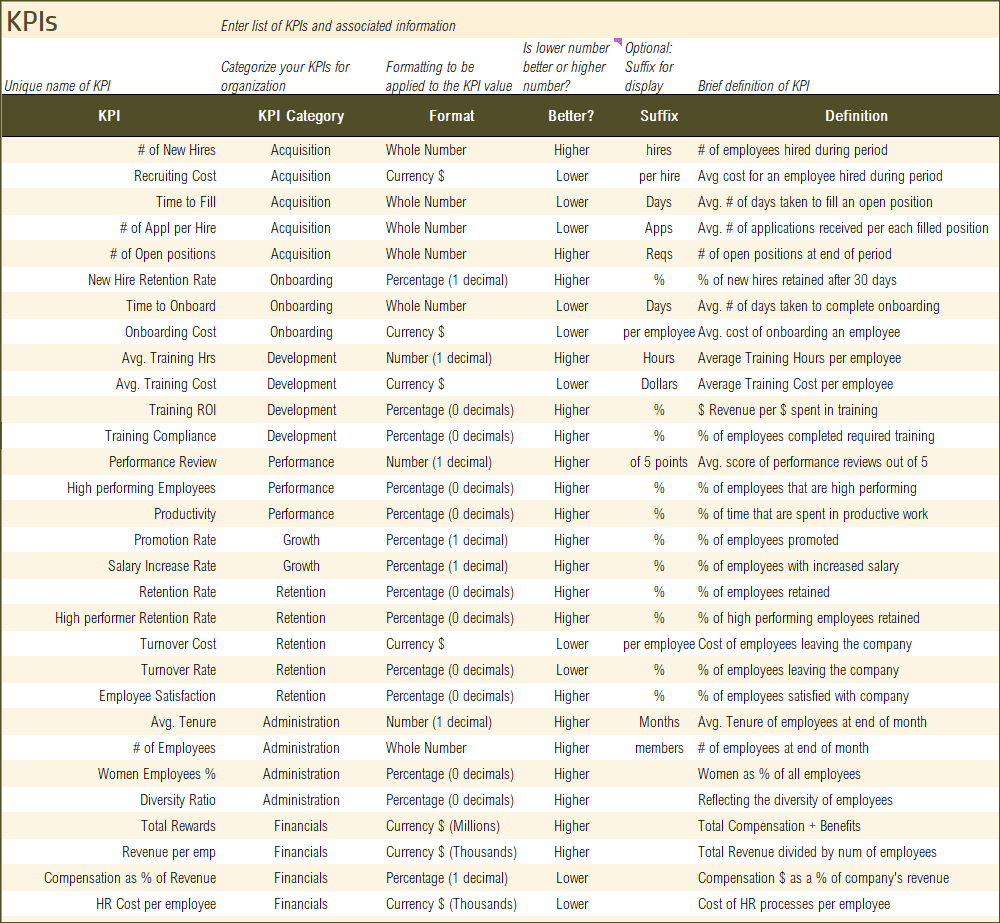
If you are looking for a base set of KPIs, we also provide a sample file which has 30 KPIs with sample data.
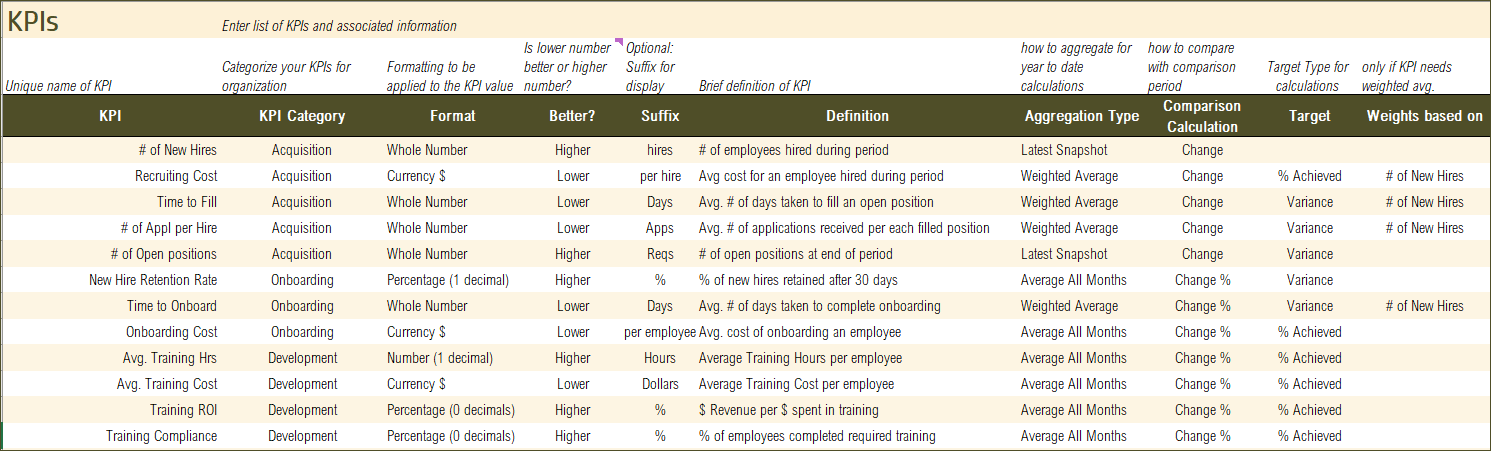
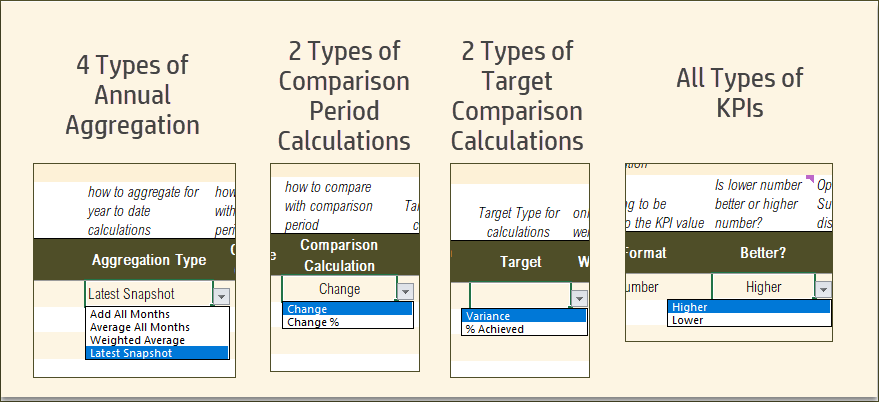
KPIs can be aggregated as Sum, Average, Weighted average or Latest snapshot
KPIs can be configured to be compared as Change or Change %. This allows calculating absolute change in KPI value or as a %.
Targets can be compared as Actual % of target or Actual – Target variance
Both types of KPIs are supported – whether Lower or Higher value is better.
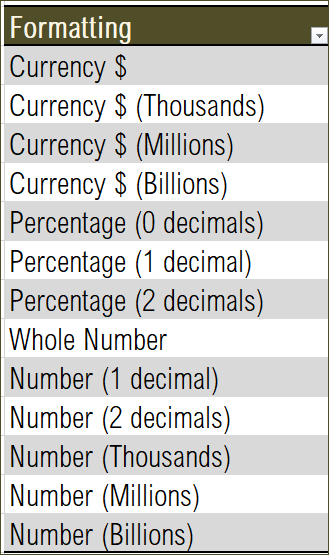
Accommodates KPIs with different formats (Currency, Whole numbers, Decimals, Percentage)
KPI Formatting types
List of Formatting options
List of Formatting options
Customize to your business needs
Enter your own KPIs and customize the settings to make it truly your own KPI scorecard
Period over Period comparison and Target comparison are optional. If you don’t need those comparisons, you can set them to off. The tiles will appear as below.
Period over Period comparison is controlled for all KPIs together while Target comparison can be controlled for each KPI individually.
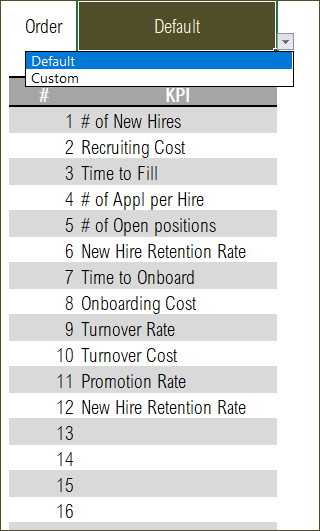
Order of KPIs in Dashboard can be adjusted for display
By default, the KPIs will be displayed in Dashboard in the order of entry. However you can completely control the order by choosing ‘Custom’ order and choosing each tile/card slot in the Dashboard.
Customize the order of tiles KPIs in Dashboard
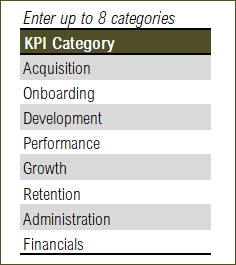
Order of KPI Categories can be changed easily for display
KPIs belonging to a category are grouped automatically in KPI Scorecard. You control the order by entering the KPI categories in the Settings sheet. If you need to modify the order, just change the order in the Settings sheet in the KPI Scorecard template.
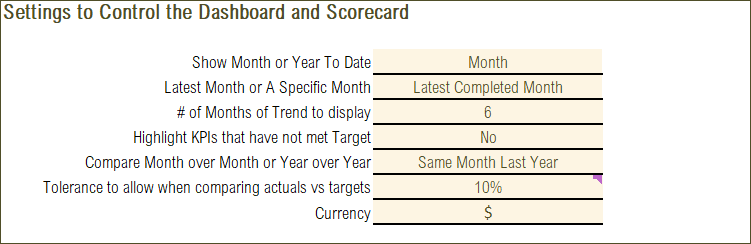
Number of Months to display in trendlines can be customized.
Tolerance to allow when comparing against targets is user controlled You can enter the tolerance % allowed when comparing against targets. This will control whether the comparison value is colored Green, Red or Yellow.
Currency can be modified to meet your business needs
Action-Oriented Design to enable business decisions
Commentary can be recorded for each KPI for each month in the KPI Scorecard template.
Commentary
This will be displayed on the Scorecard automatically. This approach also allows you to have history of all comments for 2 years in one file.
Scorecard and Dashboard allow quickly viewing KPIs which have not met targets
KPIs not meeting targets
KPI Scorecard – KPIs not meeting targets
KPI view allows visualization of monthly actuals vs targets and Year over Year.
KPI View – HR KPI Scorecard
HR KPI Scorecard Template Demo
Try it out yourself with this demo below. Use the filters and see the dashboard get updated instantly. For the fully unlocked version, download the template for free.
Requirements
Excel 2013 and above
Excel Online/Excel for the Web
Limitations of HR KPI Scorecard template
Supports 100 KPIs by default
Up to 8 KPI categories by default
Handles 2 years of monthly data
Product Tour Video
Downloads
All files are free. Download only the ones you need.
Some sheets are protected so their formulas aren’t changed by mistake. To unprotect a sheet, choose Review › Unprotect Sheet and type the password indzara (how to unprotect sheets).
This template is amazing, very easy to use, and really improves management.
(0)(0)
Subhash Nair
Verified owner
This is also one of the best dashboards to keep a track of key performance indicators in all the HR parameters.
Again another 5-star rating for it.
Thank you very much Indzara.
(0)(0)
Ghassan Samman
Verified owner
I believe its a great tool, using it periodically to inject data and monthly to present Dashboard.
highly customizable and a must for HRBP or HR manager
(0)(0)
nabil_el_hady
Verified owner
One of the best KPIs Dashboard ever. Really liked it and highly recommended
Some sheets are protected so their formulas aren’t changed by mistake. To unprotect a sheet, choose Review › Unprotect Sheet and type the password indzara (how to unprotect sheets).
Where can I get help with this template?
Start with the guides below. Our knowledge base has step-by-step articles for every template, and you can always ask us.







 HR KPI Scorecard & Dashboard

This template is amazing, very easy to use, and really improves management.
This is also one of the best dashboards to keep a track of key performance indicators in all the HR parameters.
Again another 5-star rating for it.
Thank you very much Indzara.
I believe its a great tool, using it periodically to inject data and monthly to present Dashboard.
highly customizable and a must for HRBP or HR manager
One of the best KPIs Dashboard ever. Really liked it and highly recommended