


As a hiring manager/recruiter, are you currently navigating the challenges of talent acquisition? If you’re in search of a simple yet powerful solution to streamline your recruitment process and gain valuable insights through key recruiting metrics, we’ve got you covered, so read along!
Introducing our simple yet versatile Recruitment Tracker Excel template, designed to help you efficiently manage and monitor applicant progress. With this template
With the recruitment dashboard, you’ll gain instant visibility into the number of applicants moving through your hiring process and pinpoint where they drop off. Furthermore, our hiring tracker enables you to effortlessly identify the key reasons why certain candidates were not chosen, facilitating smarter hiring decisions.
Download Recruitment Tracker
Recruitment Tracking – Simple & Effective
This Excel template is designed for Microsoft Excel, but if you are looking for a Google Sheet template, please visit Recruitment Tracker in Google Sheets. We also have a comprehensive Recruitment Dashboard in Microsoft Power BI.
This template is designed to handle one job opening only, check our Recruitment Tracker Dashboard in Excel that handles multiple job openings and multiple hires with additional features.
Lets take a look at each of the components of the recruitment tracking Excel template. We will go over the dashboard first and then the data entry steps.
Recruitment Tracker Dashboard
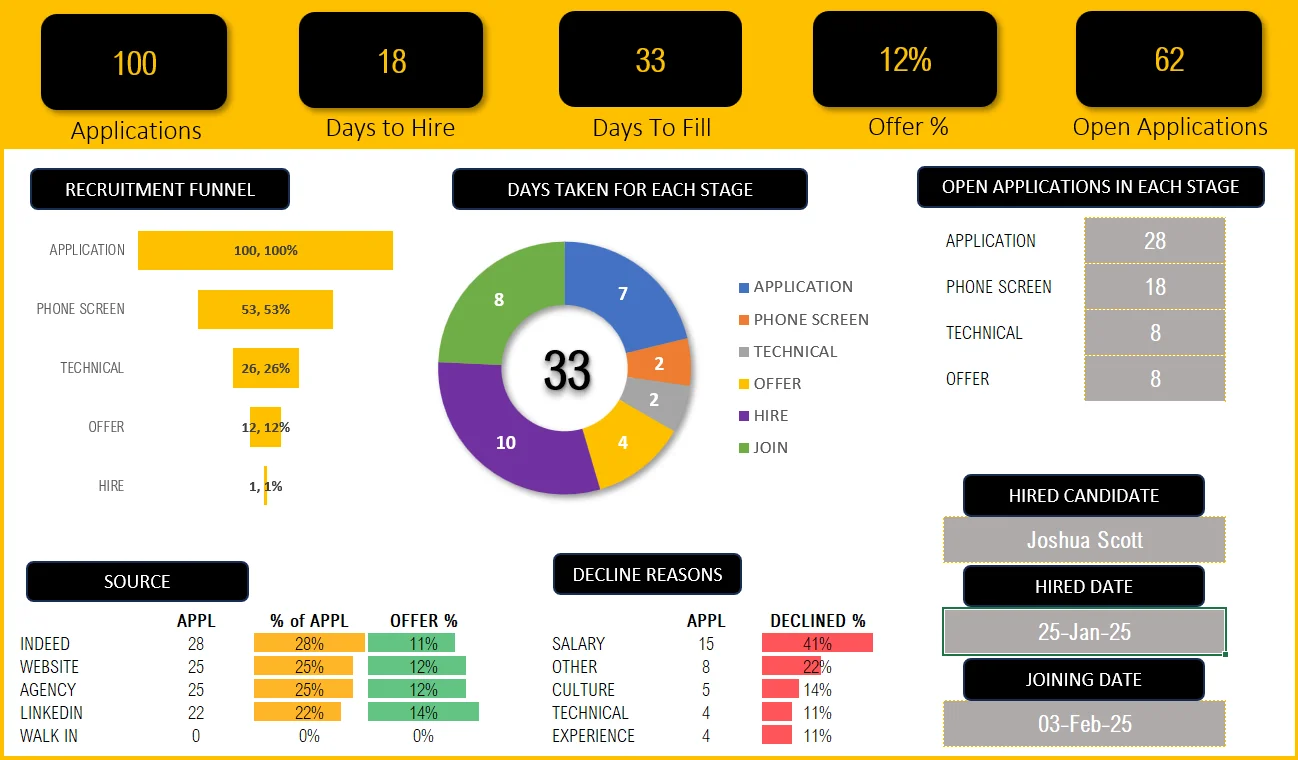
Our meticulously designed dashboard is fully automated, allowing you to gain key insights almost immediately.
Key Hiring Metrics (KPIs)

As a recruiter, it’s crucial to know how effective and efficient your recruiting process is. The metrics in the dashboard give you just that!
Take a look at all the additional, key recruitment metrics available in the premium Recruitment Dashboard in this article.
Know how many applications were received and how many are open; See how many offers are given and the average days it takes to hire an open position. These insights drive important hiring decisions like how to fill a position faster, thereby reducing time to hire and much more.
Need more metrics and visuals on the quality of applications, active pipelines, do take a look at our Premium Recruitment Dashboard Template using Microsoft Excel.
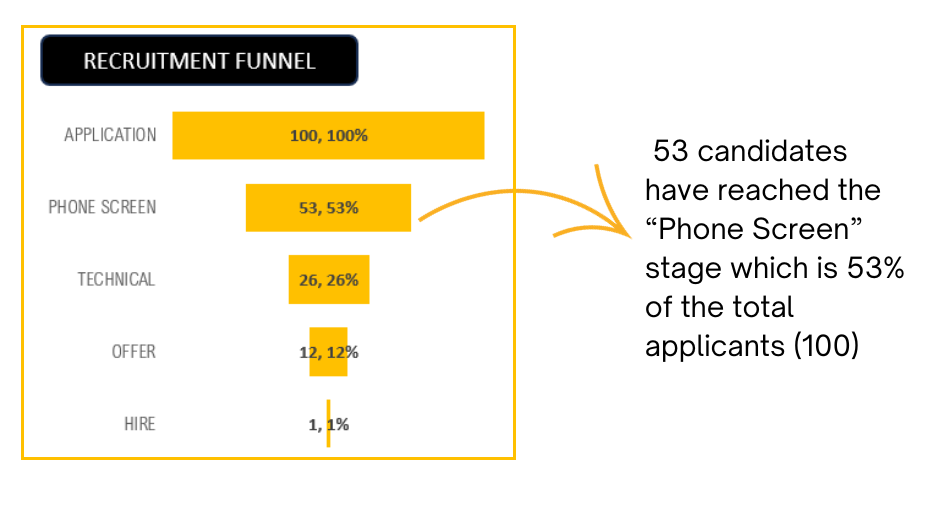
Recruitment Funnel
To know at which stage candidates are more likely to drop off is crucial. The recruitment funnel shows you just that:
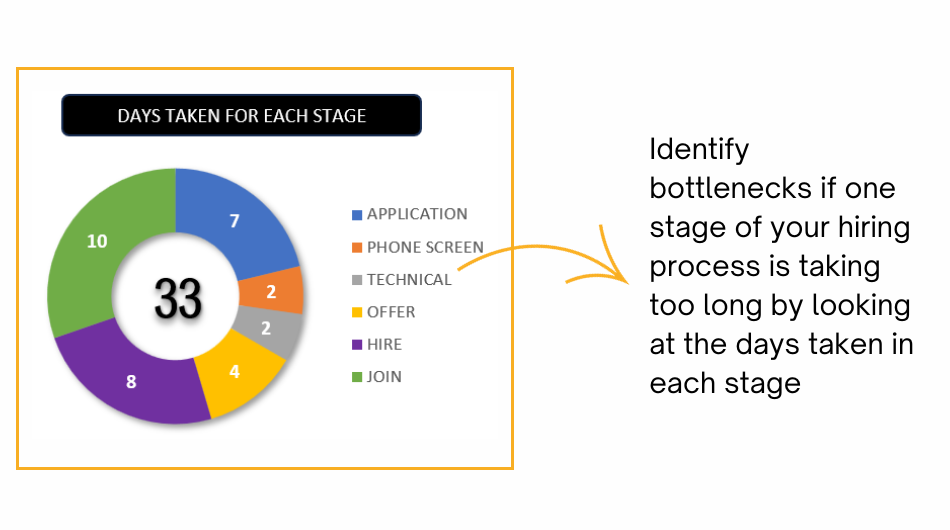
Time taken for each stage
Determine whether there’s a bottleneck – if a specific stage in your recruitment process is causing significant delays and prolonging the time it takes to fill a job vacancy.
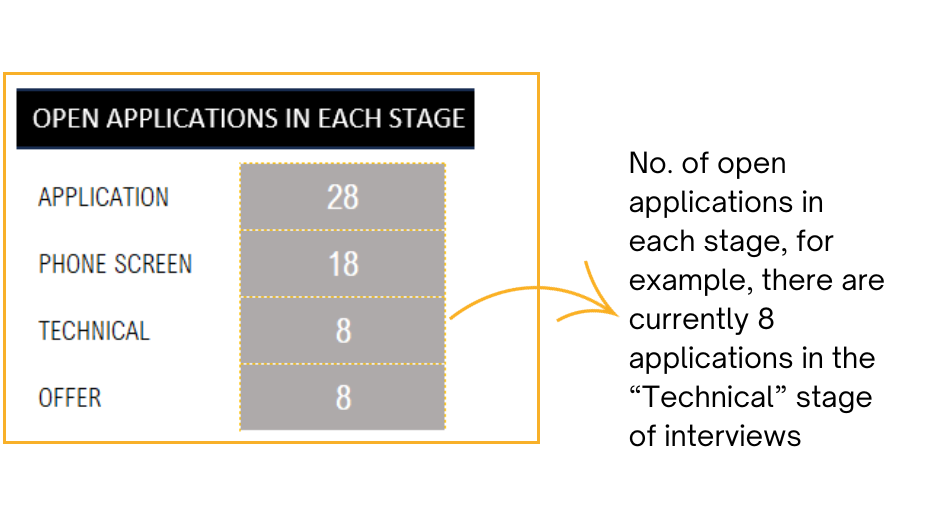
Open Applications in each stage
Know exactly how many applications are in which stage of recruiting with the following visual:
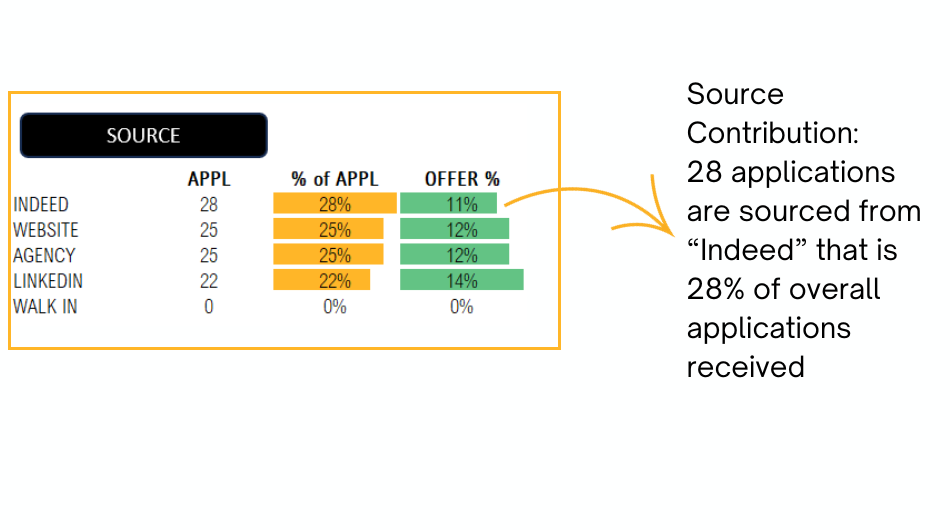
Source Contribution
You can identify which application sources bring you better quality of candidates as you can compare the offer % through these channels. This aids in your recruiting source channel decisions.
Application Decline Reasons
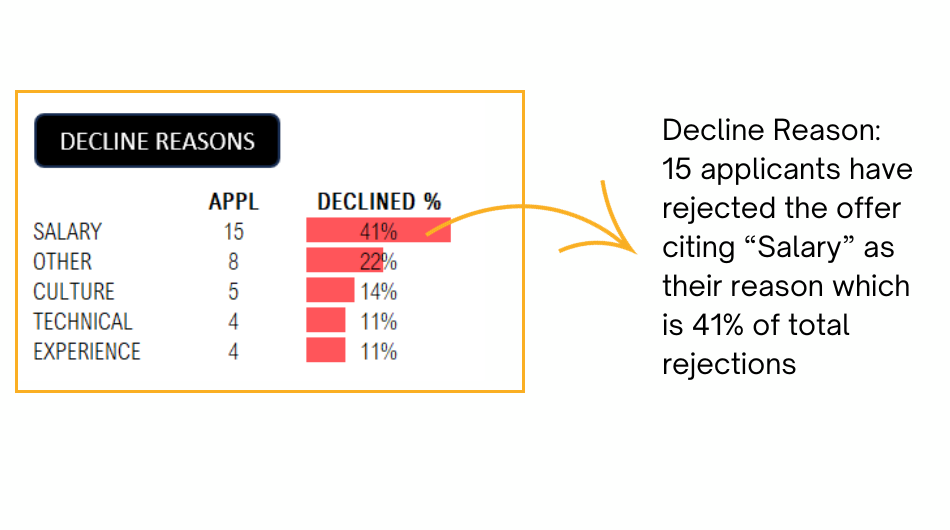
Understanding the reasons for candidate rejections will enable you to pinpoint any shortcomings in the application process. Likewise, comprehending why candidates reject your offers empowers you to adjust the job description or align expectations effectively with your company’s leadership.
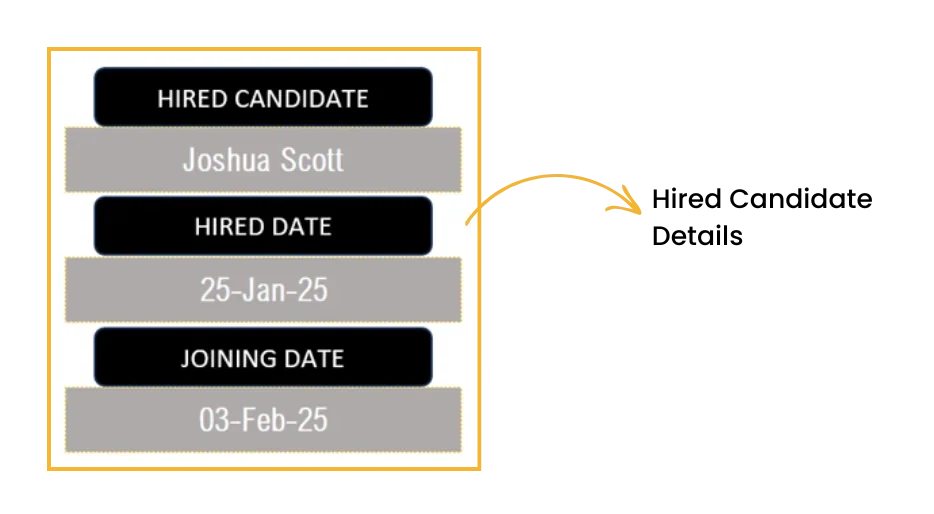
Once an opening is closed with a successful recruit, you can view the details of the new recruit with this visual:
Data Input
To get the amazing dashboard, the data entry steps are really simple and straightforward:
All that’s needed is just two steps, which are explained here:
Step 1: Customize the template for your needs
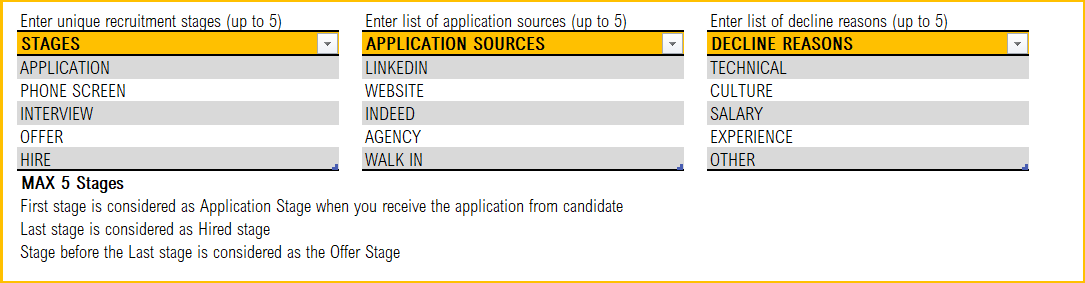
In the Settings sheet, define your recruitment tracking templates’ key details like the stages of application, source channels and the decline reasons as per your organization.
Step 2: Enter Job Details
The Applications: This is where you’ll enter all the information related to the candidates/applicants for the open position.
Begin with the job title, the recruiter and the job posting date

Step 3: Enter Applications information
Once applicants start coming in, the details can be entered as shown below along with their source in the respective columns.
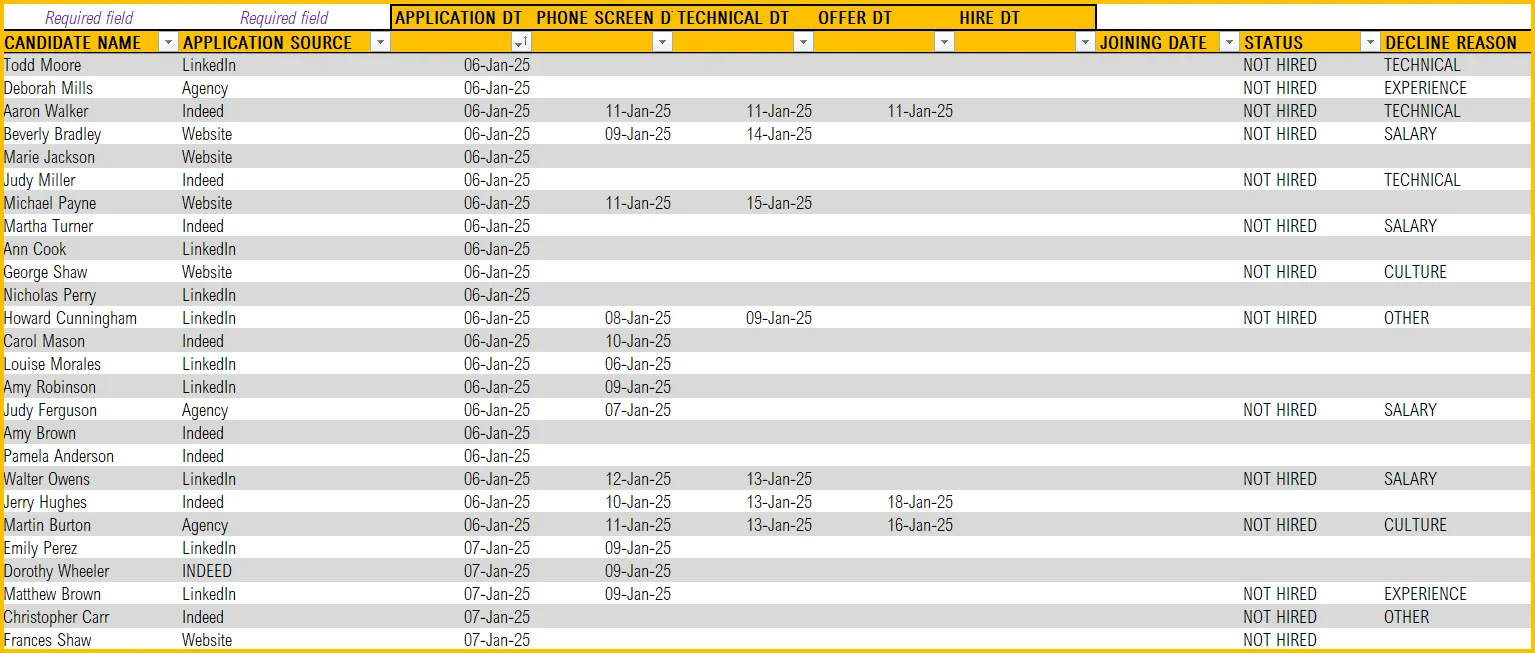
- Enter the candidate name and the source of the application (example: LinkedIn, Indeed, etc.)
- As candidates flow through various stages of their recruitment funnel, enter the dates when the candidate reaches a particular stage (Application received, phone screen, hiring manager interview, etc.).
- Once a hiring decision is made, enter the hire date and joining date in the corresponding columns.
- If the candidate gets rejected, give the status as “Not Hired”, enter the decline reason in the column for the same.
- We have additional columns for your comments and cost. Enter them if available.
That’s all the data entry steps that are needed to get your fully automated recruitment applicant tracking system in place.
Now, you can open the Dashboard sheet and use the metrics and visuals for crucial hiring decisions or present them to senior management.
Happy recruiting!
Recommended Template
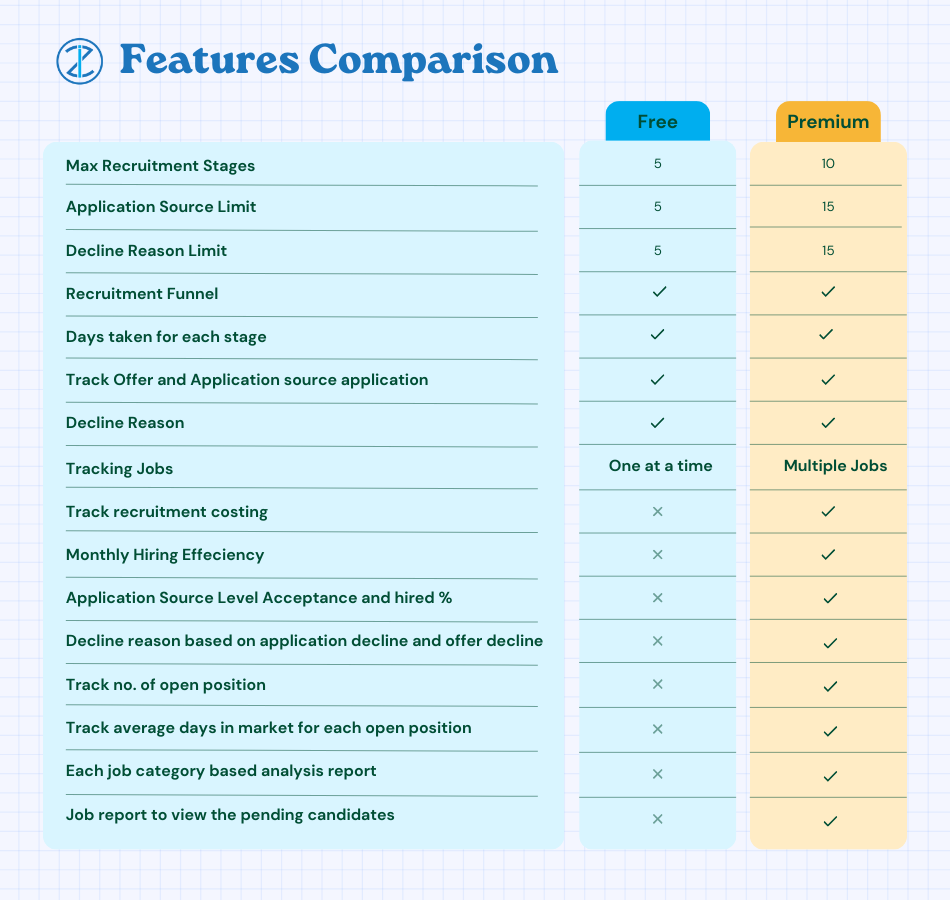
If you are looking to manage multiple jobs and get advanced reporting, please try Recruitment Tracker Dashboard Excel Template
156 responses
This recruitment tracker template is a game changer! It’s so well-organized and easy to use. Can’t wait to implement it in our hiring process. Thank you for sharing!
This recruitment tracker template is exactly what I needed! The layout is user-friendly, and I appreciate that it’s free. Can’t wait to start using it to streamline my hiring process. Thank you for sharing!
Thank you for your kind words. We’re glad the Recruitment Tracker template suits your needs. If you have any questions while setting it up, please reach out to us at support@indzara.com.
Best wishes.
Hi!
I recently removed the table format in some sheet, which changed certain formulas in the Dashboard tab. For example, in cell K19 under “Hired Candidate,” instead of referencing CALC[CANDIDATE NAME] and CALC[APPLICATION STATUS], the formula now shows CALC_APP!$A$4:$A$2000 and CALC_APP!$J$4:$J$2000.
I’m trying to correct the formula to its original format, but the sheet is protected. Would you be able to share the password to unprotect the sheet so I can make the necessary adjustments?
Thank you for your assistance!
Best regards,
Zack
We regret the inconvenience caused.
The password to unprotect the sheet is indzara.
However, I recommend moving the data to a fresh copy of the template instead of fixing the formulas since fixing the formulas in the CALC table will be time-consuming.
Best wishes.
Question: I have over 300 open requisitions and scores of candidates for each requisition. It would be unreasonable to enter each applicant individually. Is there a way to pull a report from my company ATS and upload the information to the premium spreadsheet? Assuming the answer is yes, can you suggest a way to update the spreadsheet using a weekly upload?
Thank you for showing interest in our template.
Yes, we can use power query to get data from an API or database, if you company ATS has a API or a database where the requisitions and basic candidate information are stored.
We can take it as a customization project for a fee. Please write to us at support@indzara.com for estimation.
Best wishes.
When will you make a tracker for multiple jobs?
Thank you for reaching out to us.
The recruitment tracker for multiple jobs is available at the below link:
https://indzara.com/product/hr-templates/recruitment-manager-excel-template/
Best wishes.
The report does not track how many days on average candidates sit in one stage before moving to the next, this is imperative to know to identify where the hold up is in the process.
Thank you for showing interest in our template.
The requested feature is available in our Premium version of the template. Following is the link to the same:
https://indzara.com/product/recruitment-manager-excel-template/
https://indzara.com/product/recruitment-manager-google-sheet-template/
Best wishes.
Highly appreciated what a way of teaching Sir would you please teach me how to make KPI in organization .want to make dynamic chart
Is it possible for the employee information to be placed on a separate sheet , instead of below the dashboard?
Thank you for using our template.
You can cut the entire table and past it in a new tab.
Best wishes
I would like to see incoporated some space for internal recruitment tests (in house tests)
Thanks for using our template.
This template is designed to handle a single vacancy and up to 4 stages of the recruitment process. You may review our premium template ” Recruitment Manager – Excel Template ” at https://indzara.com/product/recruitment-manager-excel-template/, which can handle multiple vacancies and up to six recruitment stages.
Best wishes
Dear Indzara
You have built nice template however we are dealing with many category of vacancy with huge quantity simultaneously, How you could support us to track the recruitment process to keep the data updated in easy way
The free template which you considered for the demo video consist only one category with single quantity which is not beneficial for us. also we required more process from CV screening, approval of cv , preliminary interview by our comapny, second round client interview, hired, visa issues, medical completed, visa stamped, ticket booked, deported from hme country, iqama prepared, Plant ID prepred, Mobilized to sit etc
Thanks for your interest.
Please review the premium Recruitment Manager template https://indzara.com/product/recruitment-manager-excel-template/ which allows for more stages, and also supports multiple jobs with multiple positions in each job.
If you need further customization, we also take on custom development. Please reach out to support@indzara.com with requirements for an estimate.
We look forward to hearing from you.
Best wishes.
In the premium Recruitment Manager template, how many position will it hold? I’m currently recruiting for 20+ positions.
Thank you for showing interest in our template.
There is no limit on the number of position. It is only limited to number of recruitment stages (10).
Best wishes.
is it possible you show post tutorial step by step how to create such recruitment template for multiple jobs
Thanks for your message.
Please review our Recruitment Manager – Excel Template at https://indzara.com/product/recruitment-manager-excel-template/. It can handle multiple vacancies.
Best wishes
Hi,
1. If there are four or five positions under one job title how to update as the Hiring stage closes to hired?
2. Source of candidate is missing?
3. how to add one more selection process if required?
Hello
This template is designed for a single vacancy. Please review our premium template at https://indzara.com/product/recruitment-manager-excel-template/
Thanks
The template is not automatically updating can you help me
Thanks for using our template.
Please ensure that you have updated the fields as advised in the blog. Also, ensure that none of the formulas or links are broken. In case you still face any issue, please email your file with the list of issues to contact@indzara.com.
Best wishes
Can you adjust the template to manage multiple hires for the same position?
Thanks for using our template.
Please review our premium template Recruitment Manager – Excel Template at https://indzara.com/product/recruitment-manager-excel-template/.
This template can handle multiple hires for the same position.
Best wishes
I’m trying to make multiple tabs for different positions on the excel file. When I copy and paste a tab to a new tab the formulas won’t stay. For example the days in hiring is incorrect and the active pipeline table doesn’t work. Can you create multiple tabs for different positions without messing up the forumulas?
Thanks for your message.
This feature is available in our premium recruitment manager https://indzara.com/product/recruitment-manager-excel-template/
Best wishes
Hi Sir,
any discount in the recruitment manager premium report price?
thanks
anoop
Thanks for your interest in our template.
We do not have any offer for this template now.
However, under Buy One, Get One Free: You will then receive a coupon code with an equal discount value as the paid amount. For more on offer details, please visit https://indzara.com/2015/03/buy-one-write-review-get-one-free/.
Best wishes
is the Recruitment tracker meant for only one Job title? can this tracker summarize how many job positions and candidates that have been interviewed in a year?
Thanks for using our Recruitment Tracker, which is a free template with very limited features. It can handle only one vacancy at a time.
We have a premium template named Recruitment Manager – Excel Template, https://indzara.com/product/recruitment-manager-excel-template/. This can handle multiple vacancies and generate reports as needed
Best wishes
Hi,
I downloaded the free tracker but I cannot use it because it is protected by a password.
Thanks for using our template.
Please use “indzara” as a password.
Best wishes
Hello
Why does the active pipeline only track 4 stages? What if I have more stages that I want to track and reflect on the active pipeline. Will the formula stay the same?(=COUNTIFS(T_Apps[WAITLISTED],””,T_Apps[STAGE],HELP!B4))
Thanks for using our template.
Please review our premium Recruitment Manager at https://indzara.com/product/recruitment-manager-excel-template/. It can handle more stages.
Best wishes
Hi
I am trying to put Hired date in the dashboard, its not reflecting in the main record, what i belive once i write the date, the cell should become blank and the value should be transfered to main record
Please advise on this
Thanks and Regards
Mahmood Shahbaz
Hello
Please enter the dates in the Applications tab and refresh the dashboard.
Thanks
Hi, Can you add a stage in the process to the pipeline and funnel. We use a one way video interview before the in person interview. I would like to track the dates of the one way video interviews similar to the other stages.
The ideal stages to include would be Application, Phone Screen, One Way Video Interview, In Person Interview , Offer.
Thanks for the feedback.
Have you checked our premium template “Recruitment Manager”? This can be customized as per your needs. Please visit https://indzara.com/product/recruitment-manager-excel-template/
Best wishes
Hi, I watched the video and I am not clear on where to enter in my data … applicant, phone screen etc. I don’t see the spreadsheet. Is it only there if you actually purchase the template?
Hello
Thanks for using our template.
The free version is just a tracker of all the applications received. However, the paid version has a sheet to record the details of the applications received.
Best wishes
Ok, so I have to purchase it to use it?
The Recruitment Tracker above (https://indzara.com/2015/09/recruitment-tracker-free-excel-template/) is a free template to download. You will find the link inside the blog post. You can use this to track applications for a single job at a time.
The Recruitment Manager template (https://indzara.com/product/recruitment-manager-excel-template/) is a premium template available for purchase. This can be used to track applications for multiple jobs, with automated recruitment dashboard.
Please let us know if there are any questions.
Thanks & Best wishes.
Hi I would like to purchase the Recruitment Manager Template. How can i go about this? Also is there a way to add these list to Excel sheet – Budgeted positions for 2018 and forecast for 2019/2020.
Thanks for your interest.
We are currently not taking new customization projects. However, customers can make modifications by adding sheets as needed.
Please let us know if there are any questions.
Thanks & Best wishes,
Loved it! However, I would like to add the source where I got the resume from and the candidate phone number. Can I do it without messing up the spreadsheet?
Thanks. Glad to hear. Please add more columns to store additional information. You can add columns except for in-between the stages.
Best wishes.
Awesome template for the single position.
Cheers
Saket
Thanks for your feedback.
Best wishes
Hi,
I tried to track several recruitment in different tabs of the same workbook but it messed up summary dashboard. Do you necessarily need a new workbook to track another recruitment?
Thanks
Hello
The template uses a hidden sheet where calculations are made. So, just copying the summary sheet will not duplicate the calculations. Each position’s data has to be in a separate workbook. Or you can try the https://indzara.com/product/recruitment-manager-excel-template/ which allows tracking multiple positions in the same file.
Best wishes.
How do you get the stage to calculate if you decline the applicant before phone interview due to lack of experience?
Hello
In this free template, you can track the dates only. Maybe based on the credentials you can reject an application and not call for a phone interview.
However, the premium template has many features where an applicant can be rejected based on their credentials and that can be tracked as well. Please visit https://indzara.com/product/recruitment-manager-excel-template/
Best wishes
Is this good for only single position?
Yes, this template can track only one position. For multiple positions and more features, please see Recruitment Manager template https://indzara.com/product/recruitment-manager-excel-template/
Thanks & Best wishes.
Is there a way to have the dashboard portion of the spreadsheet to update as the filters are applied to the data below? For example, if I filter the data to show me the last 30 days how would I get the top portion to update to just the data that is showing?
Hello
The dashboard is designed to show an overall picture of all the applications.
Best wishes & regards
I must be missing something. Where is the link to actually download the file? Thanks!
Hello
Please download it from https://indzara.com/2015/09/recruitment-tracker-free-excel-template/
Best wishes
Hi! I love this product. But, for some reason the active pipeline is not calculating correctly. Thanks!
Hello
Thanks for using the template.
Please ensure that you have filled the relevant dates as the applications crosses each stage.
In case it still does not work, please share your file with us at contact@indzara.com.
Best wishes
Heya,I am using this template.Can i have any user help line number.
Hello
Thank you for using the template. We provide email based support. Please write to us at contact@indzara.com.
Please mention the issues that you wish to clarify. We will reply as soon as possible.
Best wishes
How do I update the help worksheet in order to copy the recruitment tracker worksheet and just keep all my candidates in one Excel template!
You can keep all candidates for one job in this worksheet. But to track multiple jobs in one workbook, please see Recruitment Manager template. https://indzara.com/product/recruitment-manager-excel-template/
Best wishes.
Hi, I can’t seem to download the free recruitment tracker?
Can you please clarify what the error message is? I tried the download above and it works fine. Please let me know.
Best wishes.
Hi there indzara,
I really like your recruitment tracker. I read through some of your replies to comments. I needed further details about this explanation you provided a user in 2016
Thank you.
Please try the following steps:
1. Add stages in cells C10 and C11
2. Add columns for new stages in the table in Recruitment_Tracker_V1 sheet
3. Update formula for STAGE column
4. Unhide hidden sheet ‘Help’
5. Add rows (with formulas) to account for new stages (see columns B to G)
6. Update the summary section now to include the new rows.
https://indzara.com/product/recruitment-manager-excel-template/ supports 6 stages including Hiring stage.
WITH REGARD TO YOUR #4, HOW DO I UNHIDE THE HIDDEN SHEET ‘HELP’?
Thanks. Please right click on any sheet name and choose Unhide in the menu.
Best wishes
Trying out to free version to see of we would like to upgrade to the premium. I downloaded the free version but the recruitment funnel is not populating or the decline reason numbers. How can I fix this?
Please reply to my email with the file and specify your Excel version and Operating system. I will review and get back to you.
Best wishes.
I am trying to use the Recruitment Tracker that I downloaded. But, Recruitment Funnel and Top Decline are not working. Can I have your email ID, please?
Please email support@indzara.com
Thank you.
Hello I love this recruitment tool.
Following your steps to include extra stages, I am now up to the updating the summary section to include the extra stages, however am unclear on the instructions to do this.
Would you be so kind as to advise please.
Thank you. I have received your email. I have responded asking for more details on your question. Best wishes.
Is there a place where we can add (or include) candidate data? Such as name, email, phone number?
Yes, you can insert columns to store that data. Please do not insert between the stages. Please insert before and after the stage date columns. Please let me know if there are any questions. Recruitment Manager template provides separate sheet to store candidate data (not linked to apps)
Best wishes.
I am not able to download this sheet
I tried just now and it downloads fine. Please let me know what error message you received. Thank you.
it is redirecting to the same page again
It is the link to the file and not the page.
I have emailed the file. Thanks.
I have seen the demo for Recruitment Manager template and found awesome.I need only”Recruitment Manager template”. what will be the cost in Indian currency.
Thanks for your interest. The cost is US$30 as of now and the exchange rate to Indian currency is based on the date when the order is placed. It is automatically calculated by PayPal.
Please let me know if there are any questions. Thanks & Best wishes,
Hi,
Thanks for your sharing but I faced with problems with the downloaded version. I opened it in Excel 2016 and the active pipeline didn’t work well. The data doesn’t fit with the input. Can you reveal the formula used for the active pipeline? Thanks and wait for your support
I am sorry about the delayed response.
The active pipeline represents applications that are not closed yet. the formula is in the hidden sheet called HELP. Please see column G. It is counting applications that have blank status.
I have also emailed you this information.
Please let me know if there are any questions. Best wishes.
Hai this great but
1. it will be more easy if we can have multiple positions in same sheet
Thank you. For a template that supports multiple positions, please see https://indzara.com/product/recruitment-manager-excel-template/ It has several additional features as well. Best wishes.
Will it work with Excel 2007? I couldn’t download it with that version. Any suggestions?
Can you please let me know what error message you get? I don’t think there are any incompatible features. Unfortunately I don’t have Excel 2007 for testing now and it’s been a while since I used it.
Best wishes.
Thank you for providing this wonderful template. It’s a great tool. Does it work with any older versions of Excel?
You are welcome. It should work with older versions than the latest, but I am not sure how far back you are referring to. Thanks. Best wishes.
Hello,
To begin, this is an amazing template.
I have a question around the Counta(T_APPDATA) formula that generates the candidates and days to hire numbers. I was trying to write another formula to count core staffing, which i have added to the Applicant’s Information table, but I am unable to write this formula for some reason. I tried =COUNTA(T_APPDATA[CORE]). I noticed that you somehow have made “applicant name” as an option for this formula.
Your advisement would be much appreciated!
Thank you.
Thank you for the feedback.
The COUNTA function counts non-blank values in the column APPLICANT NAME in T_APPDATA table. If CORE is a column name in the T_APPDATA table, then your formula should work.
Thanks & Best wishes,
Hi Indzara,
Great template. The active pipeline formatting looks a little off for some reason. Only one colour appears at a time, not all four colours as shown on this blog entry. Perhaps I can email you a copy of what I see? I may also be interested in purchasing the full version if it works.
Thanks.
Jiten
Thanks for the feedback.
Please email me the file and highlight the issue. I will be happy to review and get back to you. Please mention the Excel version and Operating system.
I have emailed a note to you as well.
Best wishes.
Thanks for reply..
I can see that this sheet is meant for corporate. Do you have any excel for Recruitment Agency?
Is recruitment tracker inbuilt with recruitment manager Sheet?
Any updated version expected?
do we have buy new sheet and move data, if you develop new sheet?
Where to get this sheet from?
Thanks & Regards
You are welcome.
The Recruitment Manager https://indzara.com/product/recruitment-manager-excel-template/ can be used by agencies too. If there are specific requirements, please let me know.
Recruitment Manager has features in the recruitment tracker plus a lot more.
Upgrade will be planned and prioritized based on customer feedback. There is currently no upgrade planned.
When a upgrade is published, I will email the file to all customers. Mostly, it should be easy to copy and paste (special as values) the data and would not take more than 5 to 10 mins one-time. I will also be available to help with that if needed.
You can purchase Recruitment Manager from the product page https://indzara.com/product/recruitment-manager-excel-template/
Please let me know if there are any questions.
Best wishes.
Thanks.. Bought it, want to understand can we arrange the coloums as per our nee or it will change the calculations in sheet.
Hi I am filling date in application sheet in below coloums, if there is one month difference than its showing error in error coloumn and not showing effect in dashboard. since we received calls post one month of applications, then how to manage that.
Eg.
APPLICATION DT – 10/11/2016
PHONE SCREEN DT – 11/11/2016
MGR INTERVIEW DT
ONSITE INTERVIEW DT
OFFER DT
HIRE DT
The template does not have any limitations around the time between job posted date and recruitment stage dates. Even if it is post one month, it should work.
The errors happen if job posted date is after the recruitment stage dates or if any of the needed recruitment stage dates are left blank. I have provided more explanation of the errors and how to avoid them in the User guide: https://indzara.com/2016/07/user-guide-enter-data-recruitment-manager-template/
Please let me know if there are any questions.
Thanks & Best wishes.
Thanks for purchasing. Columns can be rearranged except the 6 stage date columns in Applications sheet. Those 6 stage dates should be together in the order of recruitment stages. This should not be changed.
Best wishes.
Hi Indzara,
What are the restriction in rows, I have data point of around 1000 candidates can this spreadsheet accommodate and reflect exact details which is shown in The Recruitment Manager template https://indzara.com/product/recruitment-manager-excel-template/ video. Please confirm & also let me know that do you have any template for Business development / Sales or Lead Generation funnel Report.
There are no restrictions on candidates/applications. Please let me know if you see any.
I don’t have a template for Lead Gen/Sales funnel yet. It is in the road map for 2017.
Thanks & Best wishes.
Hello Indzara, I’m just now seeing your Excel template, and I have been wanting something like this. I’m going to try to download this now and hope this will work for me. I will send you my feedback. if this works for me- You are a lifesaver!
Dora
Glad to hear. Please share your feedback. Thanks & Best wishes.
Hi, Thank you for such a wonderful spreadsheet. When I downloaded the template, I entered practice names to see how it would work. However, the Active Pipeline and the Recruitment Funnel sections do not populate after each entry as it shows in the video.
I have not changed or added anything to the template. Have I done something incorrect? I am not very knowledgeable in Excel, but this template would really be a valuable asset for me in my recruiting function.
Please let me know what I may need to do to have the template work as shown in the video.
Much appreciated.
Thank you
You are very welcome. Thanks for the feedback.
I have sent an email to you. Please email me the file. I will take a look at it and get back to you. Thanks. Best wishes.
I really like this template . However, I am having issues with the Recruitment Funnel not populating the accurate numbers and the Active Funnel formatting looks off. Could you help me?
Thanks for using the template. Thanks for emailing the file. It looks like you have added a stage in between the four stages. This has affected the STAGE calculated column and thus shows incorrect calculations. Please correct me if I am wrong. The Recruitment Manager template https://indzara.com/product/recruitment-manager-excel-template/ can handle up to 6 total stages (including hiring stage). Please let me know if there are any questions. Thanks.
For some reason my template does not look like the video. The Active pipeline does not work correctly for example. Is there a way to fix this?
The template posted on this page should match the one in the demo video above. Please feel free to email me the file and mention your questions specifically. I will be glad to help. Thanks. Best wishes.
I am having the same issue. When I open the file, the summary section does not populate the way it does not screen and when I input information, it does not populate the funnel/pipeline.
Please email file to contact@indzara.com
I will review and get back to you.
Best wishes.
Hello!
Thanks for this great recruitment tracking tool! On Auust 23rd you shared steps for adding additional stages to the v.1 Recruitment tracker. When I try to add columns for the new stages, however, I receive an alert that this operation is not allowed. It says “The operation is attempting to shift cells in a table on your worksheet.” Are you able to further information on how to do this?
Also, when you say to update the Summary Section in the last sep, do you mean update the chart data? Thanks in advance for your help!
Please excuse the typos. 🙂
Not a problem.
1. When I tried to insert columns to the left of Decline Reason column, I didn’t receive this error. Can you clarify how you are inserting columns?
If you right click on the cell inside the table and choose Insert – ‘Table Columns to the Left’, it should insert columns.
2. Yes, the summary section charts might have to be adjusted to fit the new stages.
Best wishes. Thanks.
Hi, Am am amazing by the Recruitment Tracker. I Have a question , where is the spreadsheeet for applicants information in step 3.. Please advise?
Regards
Bobby
Thank you.
There is only one visible sheet in this template (named Recruitment_Tracker_v1). This is where all the data for this template are entered. Best wishes.
hi
veery niiice
thanks alot and helpful
how can we use it if more than one has been hired in the same postion
Thank you. I am glad it is helpful. For managing jobs with multiple openings, please use Recruitment Manager template https://indzara.com/product/recruitment-manager-excel-template/
Best wishes.
Hi There. I love this sheet.
I am looking at adding a couple of extra stages. Can you let me know how I can do this so the summary section updates.
Thanks,
Nelson
Thank you.
Please try the following steps:
1. Add stages in cells C10 and C11
2. Add columns for new stages in the table in Recruitment_Tracker_V1 sheet
3. Update formula for STAGE column
4. Unhide hidden sheet ‘Help’
5. Add rows (with formulas) to account for new stages (see columns B to G)
6. Update the summary section now to include the new rows.
https://indzara.com/product/recruitment-manager-excel-template/ supports 6 stages including Hiring stage.
Best wishes.
Do you have a tutorial for these edits? I love your spread sheet and want to add two more stages but am terrible with Excel… Any help would be great.
Thanks!
I am sorry this is the level of detail I have as documentation. I take customization projects for a fee. If interested, please email me with requirements. I am not trying to push towards paying me. It’s just that it takes time to build tutorials and I am working on other projects now. Hope you understand.
Thanks & Best wishes.
Hi,
very nice an easy to use… any idea to create a similar template for Recruitment consultancy where they will handle multiple clients and multiple jobs.. it will very useful for entry level consultancy / independent recruiters.
Thank you. Please see the Recruitment Manager template https://indzara.com/product/recruitment-manager-excel-template/ for handling multiple jobs. Please let me know if there are any questions. Best wishes.
what if I have 8 stages of the interview process? How do I add more?
The template would have to be modified to include more stages. I do take on customization projects for a fee. Please email indzara@gmail.com for customization projects with your requirements. Thanks. Best wishes.
Thank you for providing access. if there is more than one hired than how it has to show in hired applicant box and date?
You are very welcome. In scenarios where multiple candidates are hired, please use the Recruitment Manager template. https://indzara.com/product/recruitment-manager-excel-template/ Thanks & Best wishes.
Can this be used if the position you filling has several openings? I don’t wan the pipeline to stop after I hire 1 person if I need 10.
Thank you. I am sorry that the feature is not supported yet. It is being incorporated in the next version of Recruitment Manager. https://indzara.com/product/recruitment-manager-excel-template/ I will then come back to this template to incorporate the feature. Thanks. Best wishes.
So what if I am hiring for a position that has more than one opening? Example: I am hiring swim coaches and I have 5 open positions.
i am not able to use this in Ubuntu systems
I am sorry to hear that. I don’t have experience in Ubuntu. Sorry. Best wishes.
When i open on office 365 cannot see the bottom section to enter data.
I expect it to work in Office 365 as usual. Can you please email me (indzara@gmail.com) a screenshot so that I can understand? Thanks.
Hi Indzara,
I am wondering if there are any updates on this template for compatibility with Mac. We really loved using it, but were hoping we could move it to our Macs. Thanks!
Excellent work.
I am glad to hear that you like using this.
I am sorry that I don’t have an update for Mac yet. It might be a couple of months before I get to it. Best wishes.
Thank you for creating this tool. It saves correctly on my desktop, but when I attempt to drop it into Google Drive, it is no longer useable. It’s almost as if the document locks up and only about 20 lines are viewable. Do you have any idea what might be happening and how to correct the issue? Thank you!
You are welcome. I have not tested this with Google Drive, as I use primarily only Excel. I am not surprised that it is not compatible, as there are still several differences between the two applications. I am sorry about that. thanks & Best wishes.
need clear explanation for this ..tnq
Are you referring to how to create this template from scratch? Please feel free to look through the formulas used to understand how it works. If there are specific questions about any formula, please let me know. Thanks & Best wishes.
Hello how to get the correct formula as I want to make a copy sheet only instead of copy work book? But it shows that not all formula will copied.
Please help.
There is a hidden sheet called HELP which has the calculations that create the funnel, pipeline and top decline reasons. When you copy the ‘Recruitment Tracker’ sheet, the new sheet will also point to the same HELP sheet and thus not reflect the new job’s calculations. If you are familiar with Excel, you can edit the formulas/charts and point to a new HELP sheet that you can copy.
Or Please review the Recruitment Manager Excel template https://indzara.com/product/recruitment-manager-excel-template/ that allows tracking multiple job postings in one file. Thanks.
hi can u pls help me..how to do this one..
Great tool, however i was trying to copy the sheet (for another job posting) and i noticed that the metric “Top decline reasons” all the way on the right does not populate a list, it remains blank. on the original worksheet it works fine
Thank you. To use this for multiple jobs, please make a copy of the workbook itself (not worksheet).
There is a hidden sheet called HELP which has the calculations that create the funnel, pipeline and top decline reasons. When you copy the ‘Recruitment Tracker’ sheet, the new sheet will also point to the same HELP sheet and thus not reflect the new job’s calculations. If you are familiar with Excel, you can edit the formulas/charts and point to a new HELP sheet that you can copy.
Or Please review the Recruitment Manager Excel template https://indzara.com/product/recruitment-manager-excel-template/ that allows tracking multiple job postings in one file.
Best wishes.
I’m not that familiar with the formula, would you mind to give a guide so that we can copy sheet only?
like what is the formula I have to make to this ‘active pipeline’ recruitment panel’ and ‘decline reason’ will match correctly?
I am really sorry. It is not a single formula. But here are the steps.
1) Create a copy of the Help sheet (HELP_1)
2) In the new HELP_1 sheet, note the formulas that look to the recruitment_tracker sheet table (T_APPDATA). For example, column G in HELP sheet – Change the formulas to point to the new recruitment_tracker sheet’s (that you had created) table.
3. Then, in the chart in the new recruitment_tracker sheet, change the data series to the new HELP_1 sheet’s column G.
You can repeat steps 2 and 3 for decline reasons and recruitment funnel.
thanks & best wishes,
This tracker template is not working . Are the cells frozen ? After download I am not able to enter or even see step 3
Please clarify which version of Excel you are using and which Operating system. Thanks.
The cells are not locked. Please specify Excel version and Operating System.
Best wishes.