This Resource Capacity Planner Excel template is designed to determine the available resource capacity, compare with demand, and identify surplus/deficit in capacity. It also allows us to modify the resource availability or demand (to meet our objectives) and see impact of the changes instantly.
This workforce planning tool can be used in different contexts. For example, a HR manager or a team manager can use this to plan capacity of the team every month and hence determine how much work can be taken up and fulfilled. A project manager who is working on a multi-month-long project can plan the resource capacity of the project for the entire duration. This can also be used outside corporate environments wherever you want to compare demand vs capacity.
The capacity planner excel template can also be used for non-human resources as well, for example, machines’ capacity in an industrial setup.
FEATURES
Simple and easy
Simplified data entry
Simple Excel spreadsheet with no macros
Automated relevant output
Interactive Dashboard
Customizable Calendar view
Cost calculation
Print or export as PDF and share
Practical Functionality
Multiple aggregation periods (Daily, Weekly, Monthly, Quarterly and Annual)
Planning Units (Hours and Cost)
Supports company Holidays
Allocate same resource to multiple projects and/or skills
Resource can start and end any day
Limitations
Default: Maximum 200 Resources, 100 Skill Groups, 100 Projects and 200 Holidays.
If you need a custom solution expanding these limits, please reach out to support@indzara.com
The capacity planner template is designed to be very simple and easy to use.
Holidays
You can enter your company holidays and the template will set the availability of resources to 0 by default.
Projects
You can enter the list of projects. The template can handle multiple projects.
Enter list of Projects
Skill Groups
You can enter the list of Skill Groups. Skill Group (in other words, called as Resource pool) is how you can group resources for planning. For example, you may have 3 resources who are skilled in Marketing. Marketing is the skill group in that case and if you have demand for marketing work, all the three resources have the skills to complete the tasks.
Enter list of Skill Groups
Resources
The template uses the term ‘Resource’. The most commonly used resource in most scenarios is the human resource (can be called as Employee). But a machine could be a resource too. Hence instead of using ‘Employee’, the term ‘resource’ is generally used.
Enter list of Resources
Capacity of Resources
You can enter resources’ standard availability in the CAPACITY sheet.
Enter capacity for resource skill group and project
Resources can be hired anytime and similarly, resources may leave a company anytime. The template will assign 0 availability before the start date and after the end date of each resource.
Standard working hours for each weekday can be entered for each resource. The template will use this to calculate capacity automatically.
Each resource can be assigned to one or more Skill groups.
Each resource must be assigned to one or more Projects.
Enter cost per hour for each resource and the template can calculate costs in planning.
Vacation / Overtime Though we have entered standard availability above, we know that employees may take a vacation or sometimes work overtime. You can enter any vacation or overtime taken by resources in the VACATION_OVERTIME sheet.
Enter vacation or overtime for resources
Please enter -ve hours for vacation and +ve hours for overtime.
Demand Enter demand data in the DEMAND sheet. Required fields are the Date of the task, the Resource assigned to do that task and Hours of work required, Project assigned and Skill assigned.
Resource Demand
Automated Relevant Output
There are two output sheets in the capacity planner excel template: Dashboard and Calendar.
The dashboard shows the summary of metrics across all projects, skills, and resources.
Resource Capacity Planner – Excel Template – Dashboard with Slicers
On the left side, you will have the slicers (filters) that you can use to drill down to specific Project(s), Skill group(s), and Resource(s).
In the next page of the dashboard, you can see the charts of Capacity vs Demand in Hours.
The charts show the overall capacity vs demand for each Project, Skill group, and Resource.
Dashboard – Charts – Capacity vs Demand in Hours
In the final page of the dashboard, you can see the charts of Capacity vs Demand in Cost.
The charts show the overall capacity vs demand for each Project, Skill group, and Resource.
Dashboard – Charts – Capacity vs Demand in Cost
The Dashboard provides the metrics for the entire planning period duration in aggregate.
The Calendar sheet allows us to view capacity/demand by time periods within the planning duration.
Calendar
The calendar is very flexible as it has many options to choose from. It also has the slicers (filters) just like the Dashboard.
Calendar – Capacity by Demand – Hours – Weekly
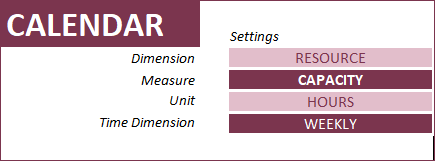
There are four selections (Dimension, Measure, Unit, Time Dimension) to make and each selection has several options.
Resource Capacity Planner Calendar Settings
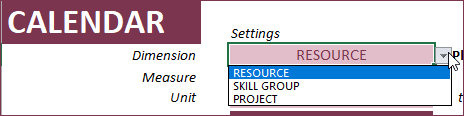
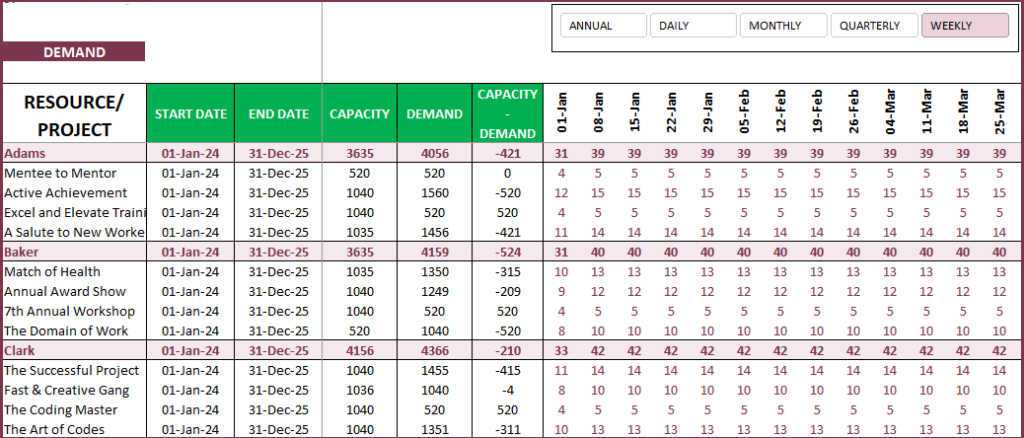
Dimension The calendar can be created for the list of resources or list of skill groups or list of projects.
Calendar Settings – Dimension Resource Skill or Project
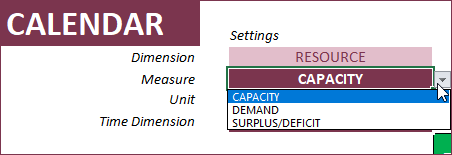
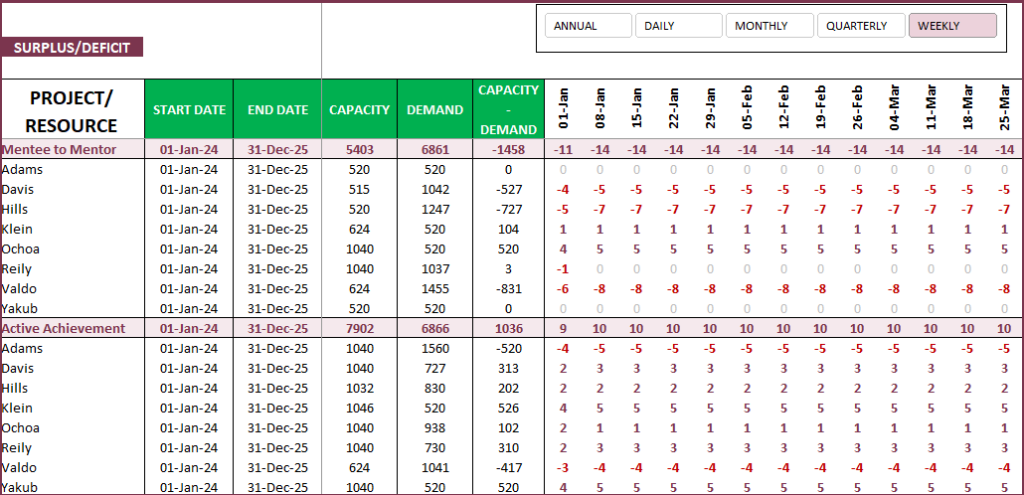
Measure You can select to display Capacity data or Demand data or Surplus/Deficit data.
Calendar Settings – Measure Capacity Demand or Surplus Deficit
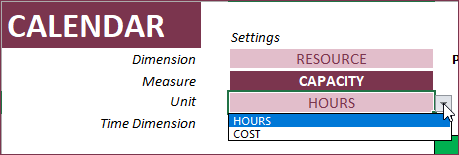
Unit The options for Units are Hours and Cost.
Calendar Settings – Unit Hours or Cost
Time Dimension Finally, you can choose to show daily, weekly, monthly, quarterly or annual data.
Calendar Settings – Time Dimension Daily Weekly Monthly Quarterly or Annual
The capacity planner excel template will display up to 53 periods (53 days, 53 weeks, 24 months, 8 quarters, 2 years).
When you make the selections, the calendar display will update automatically to reflect the selections.
Project View
Similar to the calendar, get a project level overview of the capacity/demand or the surplus-deficit. This visual shows, for a chosen time dimension (from Daily to Annually) the Projects and the list of resources currently on these projects.
Project View
Resource View
To get a better understanding of the resource’ capacity or demand allocations, the Resource view can come in handy. This too, like the project view can be aggregated for various time dimensions.
Resource View
View each resource and the projects they handle with this visual.
Addressing Over-utilization and Under-utilization
The Dashboard and Calendar provide the information that will be helpful in identifying the over utilized and underutilized resources.
In order to address the overutilization and underutilization, we have to do one or more of the following:
Change Capacity
Adjust standard availability of resources in the Resources sheet. Increase (to increase capacity) or Decrease (to reduce capacity) available hours
Add overtime (to increase capacity) or vacation time (to reduce capacity)
Change Demand
Change the demand hours if possible. This would reduce the demand and allow the capacity to fulfill the demand.
Change Allocation/Assignment
Change assignment of tasks (demand) to a different resource.
Change capacity allocation of resources to Projects.
You will find a detailed step-by-step user guide for how to use this capacity planner excel template.
If there are any questions about this template, please see the Product Support page for more information. You can also leave a comment there if you have any suggestions or unanswered questions.
Product Demo Video
Downloads
All files are free. Download only the ones you need.
Some sheets are protected so their formulas aren’t changed by mistake. To unprotect a sheet, choose Review › Unprotect Sheet and type the password indzara (how to unprotect sheets).
71 reviews for Resource Capacity Planner Excel Template
4.7
Based on 71 reviews
5
69
69%
4
29
29%
3
1
1%
2
0%
1
0%
1-5 of 71 reviews
Daniel
Verified owner
It is a great tool and the team’s support as well, given the time difference. Appreciate very much the dashboard capacity vs. demand
(0)(0)
Sudarshan KR
Verified owner
The Resource Capacity Planner Excel template has exceeded my expectations. It’s a powerful tool that helps us effectively manage our team’s workload and resource allocation. It has significantly improved our project planning and execution.
(0)(0)
Zbyslaw Sondka
Verified owner
It’s a great product. I use it at my last company. Now, I am using it for my new company that I recently started.
(0)(0)
Servio K
Verified owner
It is very useful template and know I can plan my production capacity. Great support
(0)(0)
jeffreyluke
Verified owner
Awesome. I’ve appreciated the capacity vs. demand dashboard. It is precisely what I need.
Some sheets are protected so their formulas aren’t changed by mistake. To unprotect a sheet, choose Review › Unprotect Sheet and type the password indzara (how to unprotect sheets).
Where can I get help with this template?
Start with the guides below. Our knowledge base has step-by-step articles for every template, and you can always ask us.




 Resource Capacity Planner Excel Template


It is a great tool and the team’s support as well, given the time difference. Appreciate very much the dashboard capacity vs. demand
The Resource Capacity Planner Excel template has exceeded my expectations. It’s a powerful tool that helps us effectively manage our team’s workload and resource allocation. It has significantly improved our project planning and execution.
It’s a great product. I use it at my last company. Now, I am using it for my new company that I recently started.
It is very useful template and know I can plan my production capacity. Great support
Awesome. I’ve appreciated the capacity vs. demand dashboard. It is precisely what I need.