


An Excel template for questions and answers that can be used to conduct quizzes. Customize Questions and Answers easily.
FREE DOWNLOAD
PURPOSE
- Suited for conducting quiz events at work, school or home
- Suitable for groups of people forming teams, or individuals (1 to 4)
- Font sizes have been chosen to suit presentations using projectors
- Works well with multiple choice questions
VIDEO DEMO
QUIZ GAMEPLAY
- A quiz conductor asks the first question to the first participant and the other participants get to answer in a sequence
- Each question will be answered by every one of the participants regardless of whether a participant’s answer is correct or not
- Quiz conductor enters the participants’ answers in the template
- Only the quiz conductor will use the Excel template to conduct the quiz; Participants will not be using the document
- Answer is revealed for each question after all participants have answered
- Points are awarded for every correct answer
- Second question begins with second participant and others answer in the sequence
- Participant with the highest points at the end of all questions is the winner
FEATURES
- Customizable number of questions (1 to 50)
- Customizable number of participants (1 to 4)
- Customizable participant names
- Value of each answer can be customized
- Displays whose turn it is to answer next question
- Scoreboard gets updated automatically
- Revealing answers with a button
- Moving to the next question with a button
- Correct answers are highlighted
- Quiz progress bar shows the progress
- Easy to enter new questions for a new quiz
- Message board captures errors
WHAT IS IN THE QUIZ IN EXCEL TEMPLATE?
Three worksheets
- Introduction: Information about the template and how to use it
- Questions: Where the quiz master will enter questions, answer choices, points and correct answer for each question in the quiz
- Quiz:
- Input about number of questions, number of participants and participant names
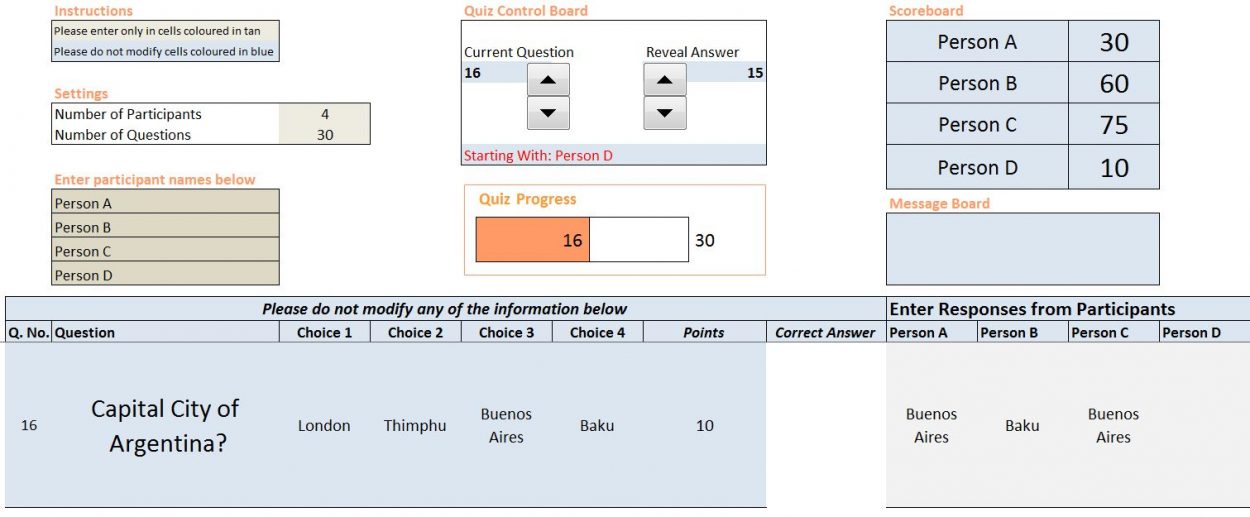
- Quiz conducting interface where participants’ answers will be entered
- Scoreboard with scores updated for each participant
PREPARATION FOR THE QUIZ
- Create questions and answers or collect from outside sources such as books or the internet
- Enter Information in the Questions worksheet
- Enter number of participants, number of questions and participant names
CONDUCTING THE QUIZ
- Click Up button in Current Question
- This makes the next question appear along with answer choices and points
- You may have to scroll down to view the next question
- Enter Participants’ answers
- Every participant will answer the questions in a sequence
- Use the drop downs to answer the questions
- Click Up button in Reveal Answer
- Reveals the correct answer for the question
- Highlights the correct answers from participants
- Updates the scores in the scoreboard
RESTARTING THE QUIZ
- Delete any responses from participants
- They are in rows 18 to 67 in columns J,K,L and M, in Quiz worksheet
- Set the Current question to 0 (zero)
- You can enter directly in cell F5 or use the down button
- Set Reveal Answer to 0 (zero)
- You can enter directly in cell H5 or use the down button
- (Optional) If you would like to change the questions, then update the Questions worksheet with new information
- Start conducting the quiz
I have also prepared a document that summarizes the above information. The screenshots are attached below.


8 responses
Hi Sir,
with help of macro(VBA), it will help to reduce the process time.
using conditional format and formula are take more time to processed.
Thanks for the feedback.
is it possible to print the Quiz section…..showing all the questions and answers given? I need to have a paper copy for records? Great template!!
Thank you.
Please select cells B18 to M67. Copy. Then paste them (as values) in a new sheet. You can then print that as needed.
Answers we enter and the questions are all in the Quiz sheet. Only one question shows up as visible because all the others are given white font color in white background (thus appear invisible).
Best wishes.
HOw to use for more than 50 questions
It requires multiple steps. After entering the additional questions in Questions sheet, we need to enter formulas in Quiz sheet in row 67 need to be dragged down to extend. Then, the named ranges in the Name Manager have to be updated to accept the new questions, answers and points. Please try and let me know if there are questions.
Best wishes.
Great idea ! Just love it, love it so much that the greedy gnome in me wants more !
Hi Sir, it is a very good template, but can it be customized for about 50 candidate with 50 number of questions