
2024 New Employee Checklist – Free Excel Template
This Excel template is designed to document completion of activities in a checklist. HR departments in companies can use this to track or document new employee on-boarding activities. Typically, there is a list of activities that each employee has to complete to ‘on-board’ to the new company. We can use this one file to track such on-boarding for all employees.
This Excel template is designed for Microsoft Excel, but if you are looking for a Google Sheet template, please visit New Employee Checklist in Google Sheets.
Benefits of New Employee Checklist template
- Customize activities for your business (maximum 12 activities)
- Printable checklist for each employee
- Choose whether to print dates
- Customize header with ordering fields as you prefer
- Rename fields as needed (except the activity dt fields)
- Customize footer with your business information
- % Complete progress bar
- All employees’ data in one file
Free Download
Requirements
Microsoft Excel for Windows (2010 or above); Microsoft Excel for Mac (2011 or above);
Video Demo

How to use a new employee checklist in Excel?
The template has three sheets – Settings, Employees and Print. It uses Excel tables feature to store information.
If you are new to Excel Tables, please see article (with video) on Excel tables.
Settings
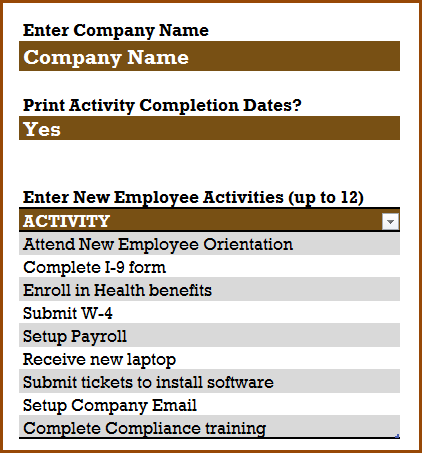
In the Settings sheet, let’s enter company name. If we don’t want to print activity dates, then choose No to that.
Finally, enter the list of activities.
Employee Data
In the Employees sheet, let us enter each employee and their information.
Tip: If you would prefer to print empty checklists and check items in the hard copy, then skip entering the Employee Data and directly move to Print step below.
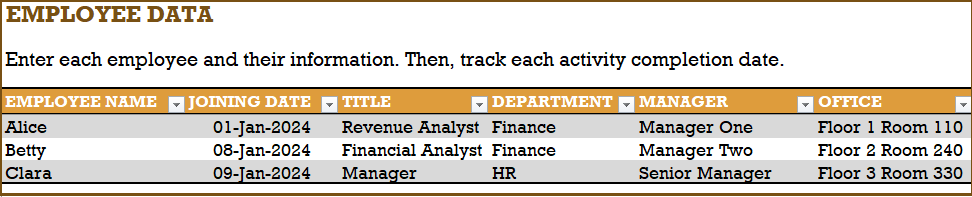
These fields can be renamed as needed.
Then, we enter the activity completion dates for each employee, as they complete the activities.

Please do not rename these date fields, as they will impact the formulas used.
In the Print sheet, we can print the certificate for each employee separately by choosing the employee name.
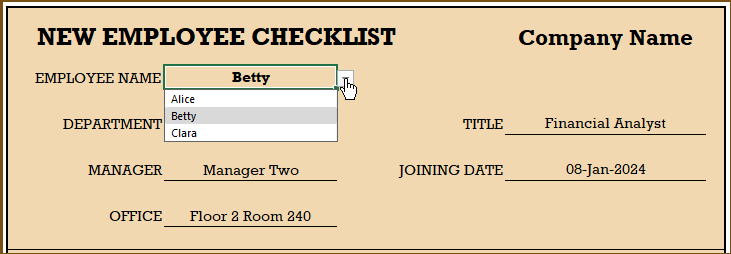
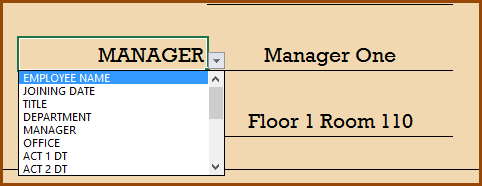
We can change the fields in the header by using the drop down. This allows us to re-order fields to suit our needs. Also, if you had renamed the employee fields earlier, they will automatically appear here. 🙂
If you need to change the format of any of the cells (for example date to text or text to date), just select the cell and press Ctrl+1 to open the format cell dialog box.
There is no need to change the Activities section of the certificate.
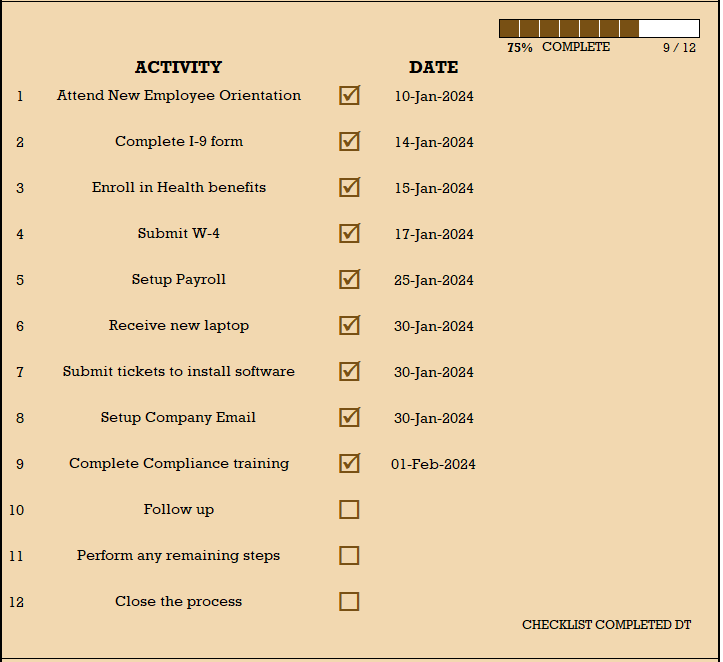
At the end of the activities section, a Checklist Completed Dt will appear if the employee has completed all activities.
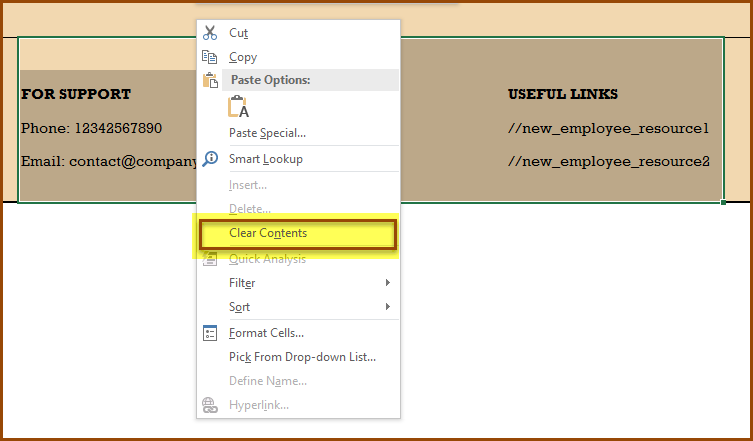
We can customize the footer area by providing contact information for your business and any internal links for reference for new employees. There are no formulas here. We can just type directly.

If you prefer to not have anything, you can select the cells, right click and clear contents.
Now that you have the certificate customized, we can print (Press Ctrl+P to print) or export to PDF using Excel’s built-in options.
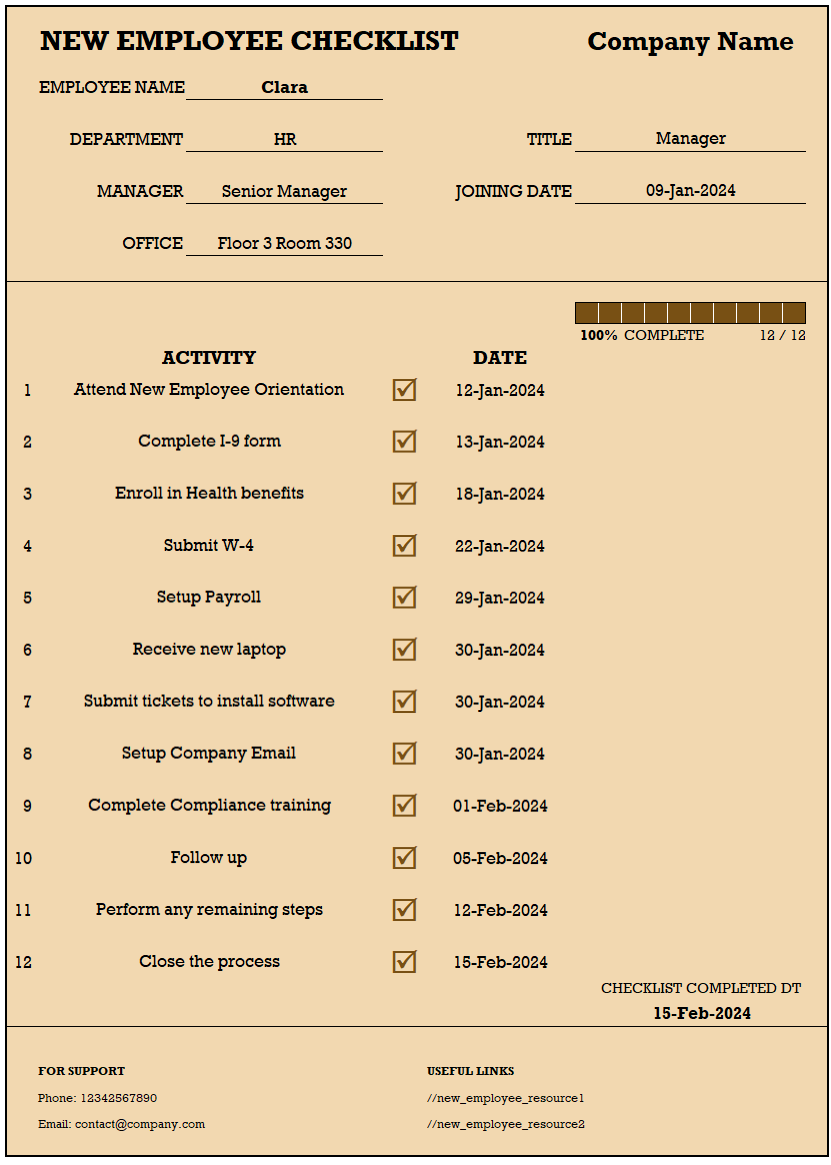
The following are a couple of sample certificates printed.
Related Free Templates
Recommended Template

Related HR Templates
-
 Compliance Training Dashboard Excel Template$40
 -
HR KPI Scorecard & Dashboard$50
-
 Employee Retention Dashboard Excel Template$50
 -
Recruitment Tracker Dashboard Excel Template for Simplified Hiring ProcessOriginal price was: $89.$69Current price is: $69.



63 Comments
This is an amazing spreadsheet. Is there an updated version that allows for more than 12 activities to be tracked?
Thank you for showing interest in our template and sharing your valuable feedback.
We have premium version of the template with a limit of 25 and more advance reports. Following is the link to the same for quick reference:
https://indzara.com/product/hr-onboarding-dashboard-excel-template/
Best wishes.
Hi Sir.
i am trying to learn about this work book so i can make my own to present in my upcoing job interview. but print sheet is protected with password and i cant edit it.
please help.
Thank you for showing interest in our template.
The password to unprotect the sheet is indzara.
https://support.indzara.com/support/solutions/articles/62000137281-how-to-unprotect-sheets-
Best wishes.
Thank you for the amazing simple template im sure thousands of people finds it extremely useful
Thank you for sharing your valuable feedback.
Best wishes.
Dear Sir,
could you please tell me how to change the color of the completion bar?
Thank you
Following are the steps to change the completion bar colour.
1. Select the 10 cells of completion bar (G16 to P16)
2. Goto Home -> Conditional Formatting -> Manage Rules
3. Click Edit Rule to change the colour.
Best wishes.
Is it possible to add more activities?
Thanks for using our template.
As of now, only 12 activities can be added. We will try to add more in our future release.
Best wishes
Agreed, i can only use the template if i can add more than 12 options. I need many more. Disappointed. thx
Hello
As of now, only 12 activities can be added. We will try to add more in our future release.
Best wishes
Hello,
Is there a way to have the check boxes checked on the PRINT page when there is either a Date of completion OR N/A ? I need it to include both as being COMPLETE.
Thanks for using our template.
In case you enter NA for dates, it means that the stage is anyways not applicable for the employee, so the checkbox remains unchecked.
Best wishes
I am using this as a training matrix and do not want to include the N/A’s – is there a way to do this?
Hello
The checkbox will be ticked if a date is entered for that stage.
Else, it would remain unchecked.
Best wishes
Request you to make a similar tracker that works in google sheets as well please..!!! let me know if you can send me one. Thanks.
Thanks for your message.
We have designed and tested all our templates on MS Excel.
Best wishes
Hi there! I am editing this to include some tasks that need completing rather than on-boarding employees, as this template seemed to better fit my needs rather than a few of the other templates I reviewed. However, I am having trouble with getting the fields to display on the Print tab, & I’m sure it has something to do with the formulas. Any ideas on how to help? Thank you for creating something like this to aid in managing tasks better!!
Hello
Thanks for using the template.
This template is fairly simple, the issue could arise in case a formula has been edited by mistake. You download a fresh copy and see if it works. Else, email the file to contact@indzara.com.
Best wishes
Thank you sir,would you like to send me this format to my mail.
Hello
Thank you for your interest in our template.
Please download the file from https://indzara.com/2016/06/new-employee-checklist-free-excel-template/
Best wishes
The print sheet is protected with password, can you provide me password for continuing my work.
Thanks
Please use indzara as password. Thanks.
I am only using 6 of the 12 columns however in the progress bar it is showing xof12 so I never get to 100% even though an employee has completed all 6 items.
Can you please clarify how many activities are entered in the Activity table in the Settings sheet? If that is 6. then the progress will be measured out of 6.
Thanks. Best wishes.
I did have to change the format to text on the EMPLOYEES worksheet. I am still having issues with the status bar though – any suggestions?
Please email the file to support@indzara.com. I can take a look at it and get back to you. Best wishes.
A couple of issues remain – the complete bar does not include all 18 of my activities (I had to add a few)
=IFERROR(COUNTIF(OFFSET(T_E[[#Headers],[EMPLOYEE NAME]],MATCH(I_E,L_E,0),MATCH(“ACT 1 DT”,L_H,0)-1,1,N_S),”>0″)/N_S,””)
Then rows 13-18 the box will not check even though there is data present
=IFERROR(IF(B41=””,””,IF(ISTEXT(INDEX(T_E,MATCH(I_E,L_E,0),MATCH(“ACT “&B41&” DT”,L_H,0))),”R”,CHAR(163))),””)
do I need to adjust something with the formulas?
Thank you – it worked this time 🙂
Glad to hear. Best wishes.
The check boxes have the current formula as follows;
=IFERROR(IF(B19=””,””,IF(ISNUMBER(INDEX(T_E,MATCH(I_E,L_E,0),MATCH(“ACT “&B19&” DT”,L_H,0))),”R”,CHAR(163))),””)
I thought maybe changing the ISNUMBER to ISTEXT would help although it does not – would you have an idea what I need to adjust so we can input yes or no verses a date?
I appreciate your assistance. 🙂
Glad to hear that it worked for you. Best wishes.
Thank you for password – I would like the check boxes on the print sheet to be checked when anything is in the data boxes with employees – For example – Signed Application = Y verses inputting a date. How can I adjust this?
You are welcome.
Please change the formula that creates the checkbox. We use a ISNUMBER function to check if there is a number in the date columns. Please change that to ISTEXT.
Best wishes.
I need to adjust the print sheet – can you send me the password to unprotect it?
Please use indzara as password. Best wishes.
Hello sir,
I am working with rental company. Can you please help us to get one excel sheet template to make daily report & keep record of our accessories & manpower utilization.
Please review the Rental Business Manager template https://indzara.com/product/rental-inventory-sales-manager-excel-template/ to see if it will meet your needs.
Please let me know if there are any questions. Thanks. Best wishes.
is there any template available to rate/rank the warehouses based on various parameters such as cleanliness, staff punctuality, stacking etc…with sub parameters..? if it is there pl. let me know pl.
Thanks for the comment. Unfortunately, I don’t have a template that ranks warehouses.
Best wishes.
My question is the same as Zubair. I would like to add more than 12 activities. Is this possible?
To add more activities, it would require the following steps
1. Add 13th activity in Settings sheet
2. Add a column to table in column S in Employees sheet. Type ACT 13 DT in cell S3.
3. Unprotect PRINT sheet using indzara as password.
3. Copy rows 41 and 40. Insert Copied cells above row 42.
4. Edit formula for the cell B43. In the formula, replace 12 with 13.
Follow the above steps to add more lines.
Best wishes.
Hi,
The worksheet is a great tool to track the check-in process – thanks for sharing it. Would you please let me know if it is possible to add more than 12 activities. Also when I add activity No. 10, 11 and 12, the serial numbers do not update on the print sheet and I rather get a # sign. Is there a way to fix it. Your assistance is really appreciated.
Best Regards.
Thank you. First – about the 10, 11, and 12 not showing correctly. This is due to the column width being narrower. You can widen column B to show the numbers fully. If you don’t see column header, click on View ribbon and check the box for ‘Headings’. I have made this change in the file and uploaded above. If you download the new file this issue should not exist.
To add more activities, it would require the following steps
1. Add 13th activity in Settings sheet
2. Add a column to table in column S in Employees sheet. Type ACT 13 DT in cell S3.
3. Unprotect PRINT sheet using indzara as password.
3. Copy rows 41 and 40. Insert Copied cells above row 42.
4. Edit formula for the cell B43. In the formula, replace 12 with 13.
Follow the above steps to add more lines.
Best wishes.
This is really helpful. Can’t thank you enough.
Best Regards
Glad to hear. You are very welcome. Best wishes.
Hi,
Good job on this sheet sir!
Just 1 question, how can i change the Date to General format on the Certificate?
if few items on the list does not involve dates;
sample: COMPLIANCE TRAINING: PENDING
Thank you.
The display format can be changed by just selecting any cell on the PRINT sheet and change the number format.
However, for calculations to adapt to non-dates, we need to modify formulas as well.
Best wishes.
hi how can i change the color of completion bar? currently it is set to brown
Please select one of the cells in the completion bar and then open the conditional formatting menu – rules manager. There is a rule where we apply the color. Please edit the rule and change color as needed.
Best wishes.
Thanks alot….appreciated for your effort and helping people sort out there issues.
Regards,
You are very welcome. Best wishes.
Can i please know the password to unlock the sheet for editing?
Please use password indzara to unlock. Thanks.
Wonderful, Amazing; I am really short of words, this is one of the tool which can keep the policy & actual process in place, best tool for audit purpose
Thank You!! God Bless
Thanks for the kind words. Glad to hear that it is useful. Best wishes.
Thanks for u this useful for HR and F.M
Thank you. Best wishes.
That is so good HR form i have seen before
Thank you for the feedback. Best wishes.
This is very useful of my job for this sheet.
I am very glad to hear. Thanks for taking the time to provide feedback. Best wishes.