
All-Purpose Calendar Maker (Free Excel Template)
I have published a couple of calendar templates earlier. The Custom Calendar (U.S.) works for any year and automatically calculates the U.S. Holidays. The Custom Calendar – 2013 (Tamil) displays the Tamil Nadu Government holidays for 2013. Both templates allowed a lot of flexibility such as starting your week with any day and entering up to 100 of your personal events.
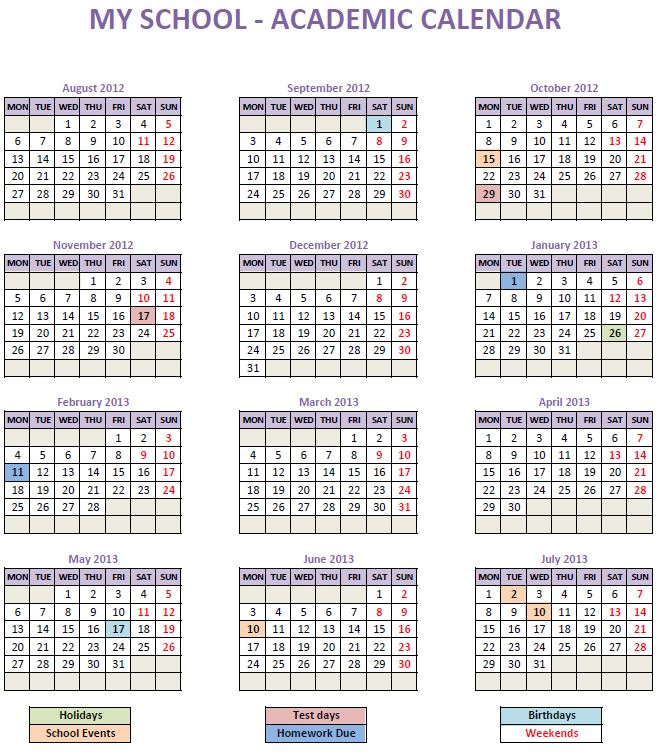
I am now publishing a calendar template which I am calling All-Purpose Calendar Maker. It can be used in any scenario (schools, companies, libraries, etc.) and any country (as it does not have any feature that is country specific). It has more flexibility: you can choose the weekend(s) as any day(s) of the week and you get to choose up to 5 different types of events (100 events – grouped in up to 5 types) you want to have displayed.
FREE DOWNLOAD
All purpose Calendar Maker Excel Template
(Excel 2007 or above for Windows; Excel 2011 or above for Mac)
FEATURES
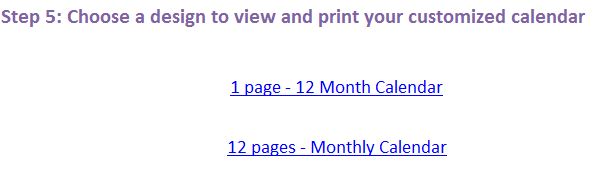
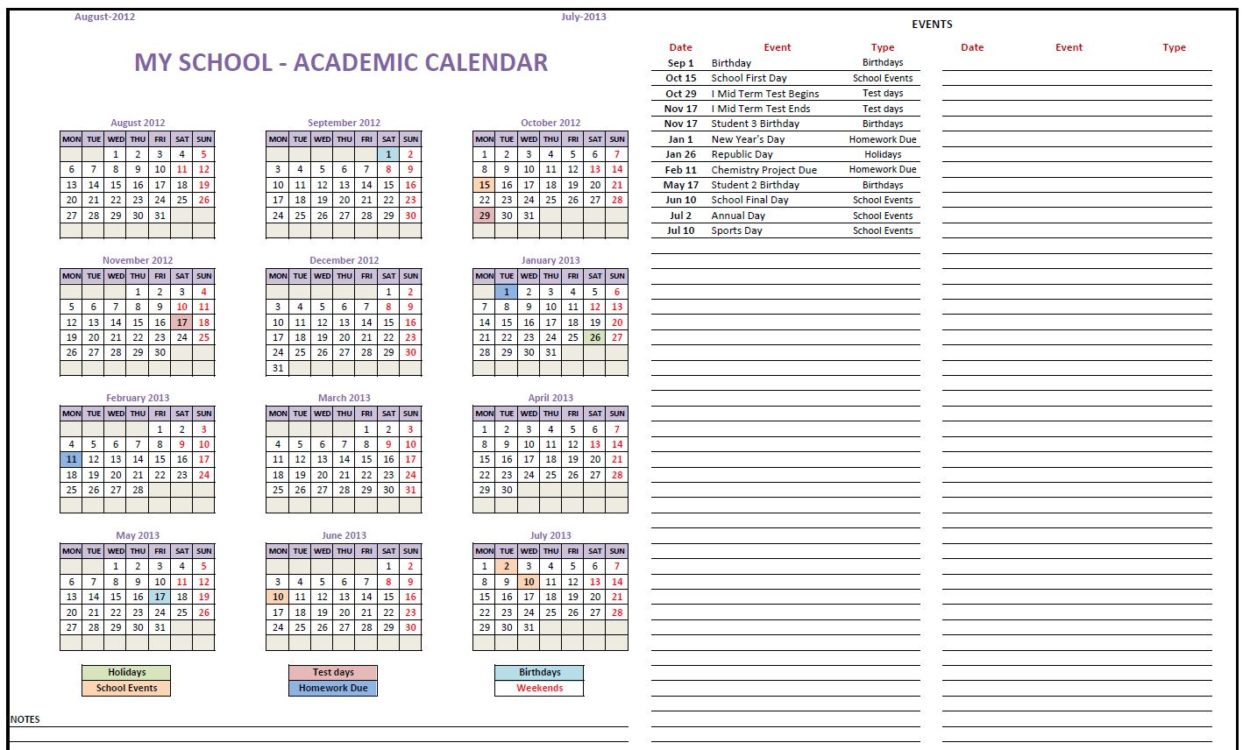
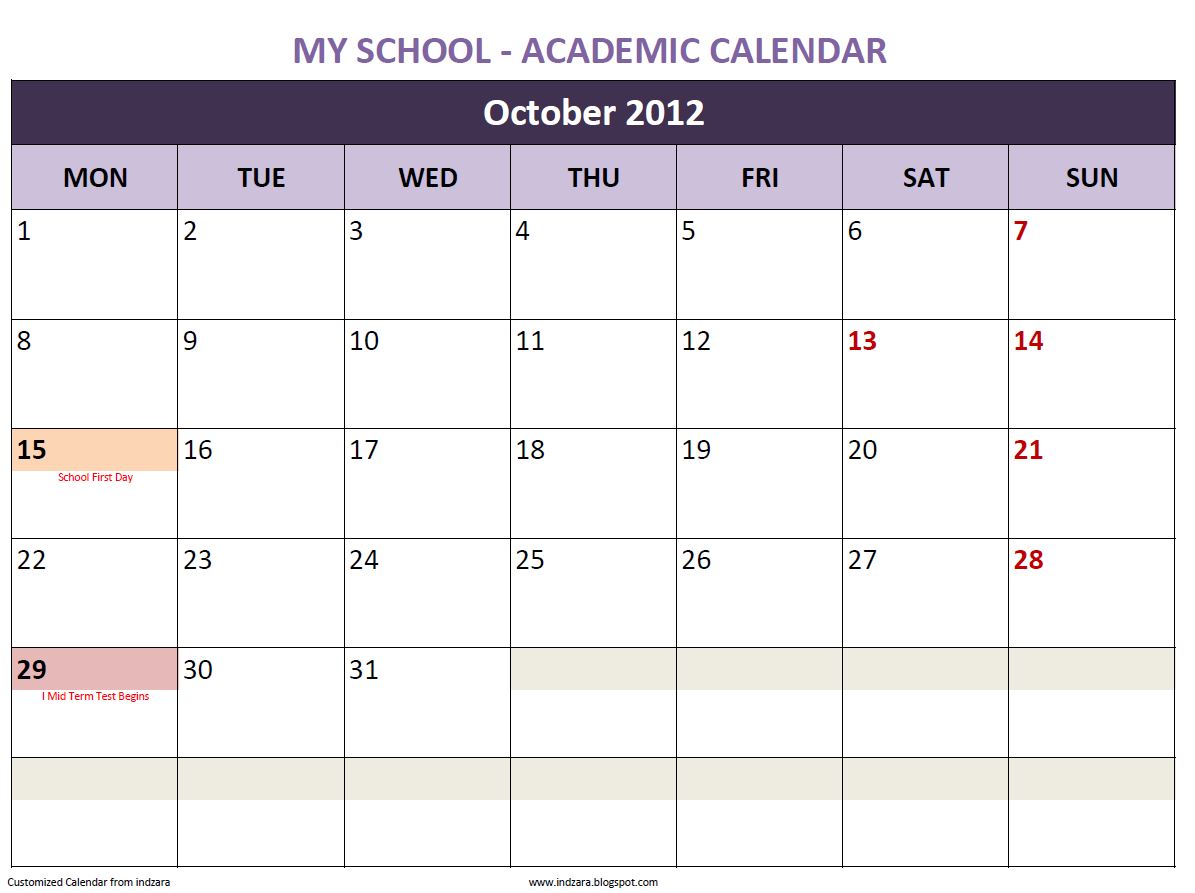
- Choice of two designs (12 month calendar on 1 page or a monthly calendar in 12 pages)
- Works with any year after 1900
- Start with any month
- 12 Month calendar (12 months beginning with the month you choose)
- Start the week with any day
- Displays up to 100 of your personal events (nicely sorted)
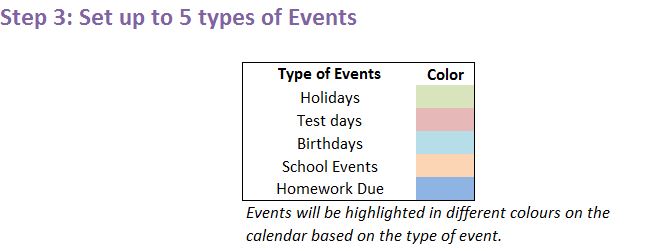
- Choice of up to 5 different types of events
- Event dates are highlighted on the calendar
- Each event type is highlighted with a different colour
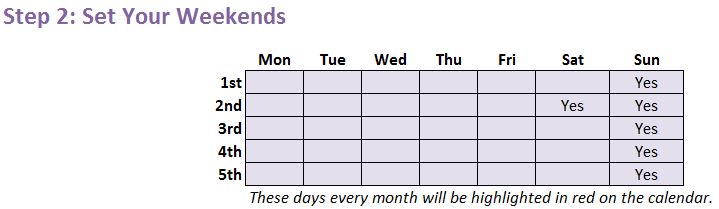
- Customizable Weekends: You chose which days of the week are usually non-working days or weekends. They will be highlighted in red font on the calendar
- Readily printable
- No Macros
For more features, please try Event Calendar Maker.
300 events & 1200 instances,
12 Event Types, 15 color choices,
7 calendar designs (Yearly, Monthly, Weekly, Daily)
Handles 12 types of recurring events (Daily, Weekly, Monthly, Nth Wkday of Mth, Last Wkday of Mth, Last Day of Mth, Nth Busn Day of Mth, etc.)
HOW TO USE THE TEMPLATE
Step 1: Enter basic information
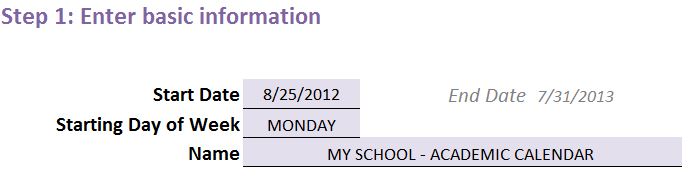
- Start Date
- Choose any date and your calendar will have 12 months beginning with the month of this Start Date
- Starting Day of Week
- This allows you to start your week on any of the 7 days
- Name
- This will be displayed on the calendar. For example, you can enter your organization name.
Step 2: Set your Weekends
Step 3: Set up to 5 types of events
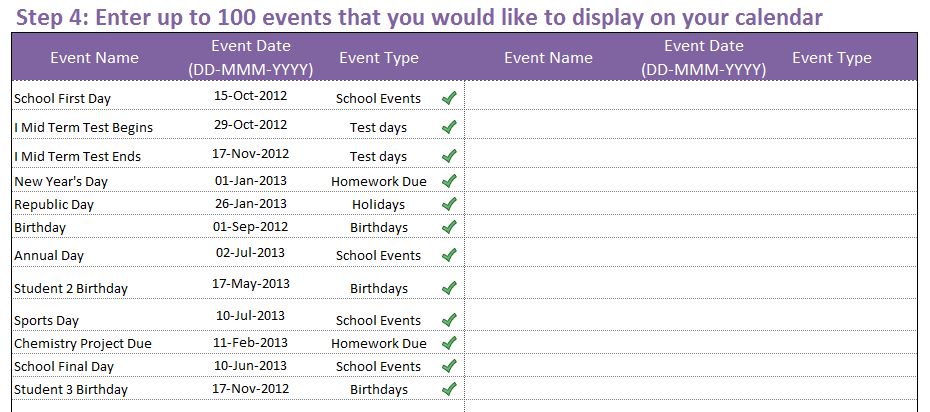
Step 4: Enter up to 100 events
Step 5: Choose a design
64 Comments
I THINK ONLY CALENDER WITHOUT EVENTS OPTION IS NOT AVAILABLE IN UR FARMAT
un protected it by indzara password, issue resolved, Thanks for ur free templaes
Will this work with LibreOffice?
Thank you for showing interest in our template.
Currently, our template is designed to work on Excel and we have not tested on other worksheet applications. We used simple Excel formulas, hence you can download and test the same and please do let us know if it works.
Best wishes.
HOW DO I UPDATE MY 15 SPREADSHEET THAT I HAVE ALREADY BOUGHT. THE ONE I HAVE ACTULLY BOUGHT A SECOND TIME.
You can login to your account at the below link to download the latest version of the purchased template:
https://indzara.com/my-dashboard/
You do not have to purchase the template twice to get the latest version of the template. Please let us know the template that you purchased again for new version and we will initiate the full refund for the same.
Best wishes.
Hello,
Very Useful Template that comes Free.
Can I add more than 5 types of event ? example 6 or 7 ?
Thank you for sharing your valuable feedback.
Currently, this template is limited with 5 event types. For more event types, requesting to check our Event calendar maker premium template at the below link:
https://indzara.com/product/event-calendar-maker/
Best wishes.
I would like to add more than 100 events. Is that possible?
Thanks for using our template.
As of now the number of events is limited to 100.
Please see Event Calendar Maker template for up to 300 events. https://indzara.com/product/event-calendar-maker/
Best wishes
Hi Ind Zara,
Thanks a lot for providing this template which helps me a lot to create a release calendar.
Wondering about the ‘Notes’ section which I cannot edit due to password restrictions.
Any help or advise is more than appreciated!
Have a nice day 🙂
Thanks for using our template.
Please use “indzara” as a password.
Best wishes
Dear Sir,
I am from Pakistan and utilizing your various template for my academy, so kindly intimate you have some template for student fee and teacher’s salary template.
Thanks
Azeem Afrasiyab Adv
Hello
Do keep track of our new releases. We might come up with a similar template soon.
Best wishes
Hello Indzara,
Thanks for sharing this amazing template.
Regards from Spain,
Thanks Joan for your feedback.
Hello Indzara
Wonderful Calendar, works beautifully.
I’m using the Calendar for work related jobs instead of Events. Can I change the name from events to a Customer’s Name? Or is there no editing?
Thanks
Keith
Thank you. Yes, you can edit the sheets. If Password is needed, it is indzara. Best wishes.
Hello Indzara!
I just like to thank you so much for all your efforts that you’ve done to create such a wonderful template and provided to the whole world for free .. You’re such a great man!
I’m a university student, and I’m so happy to find and use your template to mange my timetable. I’m gonna have an organized university life from now on because of You 🙂
I got a question regarding this wonderful template
I’m trying to change the Highlighted color of the 5 Types of Events but, they never changed when i change the Fill Color of them .. any solution for this problem?
Thank you so much again Indzara!
Ah, and i also forgot to ask also, is there any possibility to create more than 5 Types of Events?
Thanks! 🙂
The premium version of the template https://indzara.com/product/event-calendar-maker/ can handle 12 event types. You can also choose from 15 color choices for event types.
Best wishes,
You are very welcome.
Colors provided cannot be changed without making changes to Conditional Formatting logic. I am sorry.
Hello, I was wondering how I can input customized events into the monthly calendar. I’m trying to create a calendar for my students so both myself and my students can be organized on a monthly basis. I tried to right click and unprotect the sheet but it requires a password and any modification to the calendar is read only. Any help would be appreciated.
Sincerely,
Jonathan
indzara is the password for all free templates. Best wishes.
Hi Indzara,
I was looking for a calendar events maker and yours is the closest one I can find to fit my needs.
I am very much considering purchasing your premium version as I see that most of the things I need in a calendar can be found there and I am comforted with the fact that you are answering all of the people leaving a comment here and actually helping them use your free version. My boss won’t let me purchase anything for a calendar, so while I am still in search for other options at the moment, I just wanted to leave this message because I am moved with how much you help others even if they are only using your free version. Thank you. You make a difference in the world.
Thank you. I am just glad that I can be of some help. Regardless of whether it is a free download or paid, if someone benefits from my products, it gives me immense satisfaction. For those whose needs are met by the free version, they should use the free one.
Comments like yours provide invaluable motivation to me. Without such support, I will not be able to continue doing what I do.
Thank you & Best wishes,
How can I add the same monthly meeting with out having to type them in 12 times.
Recurring events are handled automatically in the premium version. https://indzara.com/product/event-calendar-maker/ Please review and let me know if there are any questions.Thanks.
I plan to purchase your product, but before I do, have you address the limitations regarding only 5 events per day? I will need at least 8 events per day and quite possibly up to 10? Also, if I have 8-10 events per business day, that over 160 events per month.
Hello Charles,
The product Event Calendar Maker will display only 5 events per day in the monthly calendar view. In the annual calendar view it can list 200 events. In the next upgrade (planned for September), displaying 10 events per day is planned to be added.
Hope this helps. Please let me know if there are any questions.
Hi Indzara;
Tqvm for sharing this great calendar. I noticed that some months, a get an empty row ( row 6). I would like to use your template to print monthly calendar for my planner. Removing the empty row and increasing the heights for the row would be very useful.
You are welcome.
Since the template is built to capture all possible scenarios, there are six rows. Removing a row would mean that some months will not be complete. If you would like to edit the row height or other formats, please unlock the calendar using the word ‘indzara’.
Hi Indzara
I would like to find out as to how to export my calendar to Outlook and set constant reminders 2 or 3 months before each event takes place.
Kindly advise
Babalwa
Currently, that feature is not available in the template. Sorry. Thanks for your comment.
Thanks for the templete its works fine on 2010. on customization how to i extend the cells as there is protection security. please advice.
You can unProtect the sheet from the Review ribbon. When asked for the word, use indzara. You can then make any modifications you would like. However, please make sure that the formulas are modified correctly.
Many thanks for the template.How can i modify the temp to add more lines for more events.
You are welcome. The free template has to be edited (formulas) in multiple places in order to support more events. It’s not a one-step process.
The premium version supports 300 events and 1200 event instances, among other enhanced features. Available here: https://indzara.blogspot.com/2014/02/EventCalendarMaker.html
Best wishes,
Hi
I am using Win 7 & Excel 07 .. Problem with the Sheet is that when you fill a New Dates … The 12 Month Calendar ./… the Dates in Each Month is Not shown
You Only See the Month the Sat-Fri Banner but not the actual dates inside the cells (15/16 / 17)
I have tested the template in only Excel 2010 and 2013. It doesn’t work with Excel 2007. I will be receiving a copy of Excel 2007 next week. I will work on a version that works with Excel 2007, and publish soon.
The template is now compatible with Excel 2007 for Windows. Thanks.
Hi.. i’m using excel 2007 and i’m having the same problem with those using the same version. Possible for you to do some adjustment so that it can cater to us?
I am looking into this. If you can e-mail me (indzara at gmail) screenshots of what you see in the calendar sheets, that would be helpful. Thank you.
The template is now compatible with Excel 2007 for Windows. Thanks.
Hello Ind Zara!
I’ve downloaded your template a few weeks ago and I realized that I needed to add more than 100 events to fit in my calendar.
I also want to set up more than 5 categories of events and be able to have additional column to provide the time and location of the events.
Aside from that, it’s a very great and useful template!
Thanks
Thank you. I plan to publish a calendar with more features sometime in the next couple of months. For now, if you would like to customize the calendar for your business needs, please e-mail me at indzara at gmail. Thanks.
Hi I’ve just downloaded this for one of the businesses I work for and having been so put off by complicated stuff on excel forums about how to populate calendars cannot belief how simple and straightforward this is to use!! Just a couple of questions:
1. We have a lot more than 100 events to populate the calendar with – how can we do this please?
2. Is it possible to set up more than 5 categories of events – we have up to 10
Best regards
Carol
Hello Carol,
Thanks for the compliments. Please e-mail me at indzara at gmail, with your specific requirements.
Please advise what is the password to unprotect the sheet?
Geoff, it is ‘indzara’.
Mine isn’t working as well. I have a Windows 8 operating system and use Excel 2007
Please explain what is not working well. If possible, e-mail me screenshots at indzara at gmail. I can take a look.
Thanks.
The template is now compatible with Excel 2007 for Windows. Thanks.
My template does not seem to work. The instructions are very simple but when I input the data, only the title seems to transfer over. Where I should see a green checkmark I only see a 0 and ‘###’ below where there is no input.
Please let me know which version of Excel you are using.
I’m using Excel 2007 with Windows Vista. I’m going to upgrade my software and my Excel and see what happens. I’ll let you know how it goes.
Thanks for responding so quickly.
Please keep me informed after you upgrade. I build and test the templates in Excel 2010 and Excel 2013. I use Windows 7 operating system. I know that somethings don’t work as expected in Mac operating system.
The template is now compatible with Excel 2007 for Windows. Thanks.
As soon as I change the date the calendar becomes useless. The dates are not number on the calendars.
The calendar seems to work well during my testing. Please send me screenshots so that I can understand what you mean.
Thanks.
Thank you for creating this template. It works well for my application, but I do have a couple of changes that would make it 100% applicable. 1) Some of my events occur over several days. It would be nice to have an end date field and have your template then show the event across multiple days. 2) Can we get more than 100 events? I am getting close to having more than 100 events, especially if #1 above is not added.
Thank you for your time.
Chris
Hello Chris,
I am glad that the template is useful. Implementing your first request may require a different set-up and hence more work. Getting more than 100 events might be easier.
Please e-mail me your request (indzara at gmail), so that I can add it to my queue and will inform you when I get to it. I have numerous items in my queue and am unable to address your request immediately. However, I will do my best.
Thanks for sharing your feedback.
Thanks. It’s a very useful template. But I have the same 2 queries as Chris. Plus, can’t we have more than 5 types of events?
Another issue is, what if i need to show times for those events as well? Can we have an additional column for that?
Also, some events occur every week – weekly meetings at same day, same time over the entire year – 52 times. Right now, I’m putting manual dates. Is there a better way to do it?
Preeti
Hello Preeti,
Thanks. I received your e-mail and have responded to it. Hope it helps.