
Inventory Management Software 2023 for Rental Businesses
If you are a business owner of a rental business where you rent equipment or assets to your customers, you will find this template handy in tracking inventory.
This Excel rental inventory management template can help you know how many items are in stock and how many have been rented out. In addition to knowing the current inventory, you can also determine the expected inventory in future based on future dated rental orders/contracts.
Use this free equipment rental software to get organized and be in control of your rental inventory. You can use this template for any rental business, such as event rental, party rental, equipment rental, furniture rental to parties or events, renting wedding items to weddings, construction equipment rental, audio video equipment rental, bike rental, sports equipment rental or book rental.
This Excel template is designed for Microsoft Excel, but if you are looking for a Google Sheet template, please visit Rental Inventory Tracker in Google Sheets.
Free Download
Video Demo
How to track rental inventory in Excel
Overview of Steps
- Enter Assets and # of items in Assets sheet
- To enter a rental contract order, enter the order details in Orders sheet
- Check availability in Orders sheet before committing to the order (max 90 days window)
- To see current availability of assets, view Assets sheet
- To view at any time availability over a month, use Calendar sheet
Detailed Steps
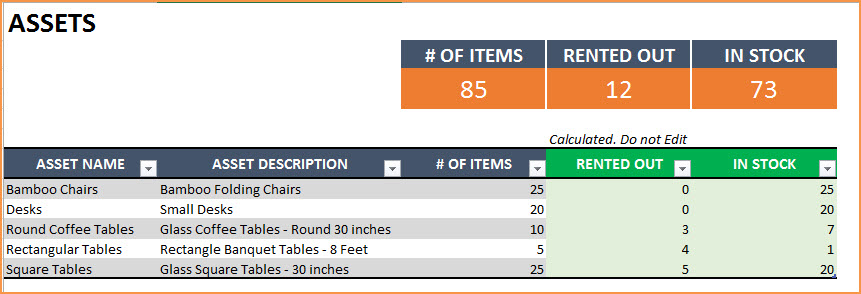
Enter the list of assets or equipment in the Assets sheet.
If you are new to Excel Tables, please read this article first: Introduction to Excel Tables.
Enter Asset Name, Description and # of Items you have of each asset. The last two columns are automatically calculated. When you begin, Rented Out will be 0 and all the items will be In Stock.
Enter Rental orders in Orders sheet
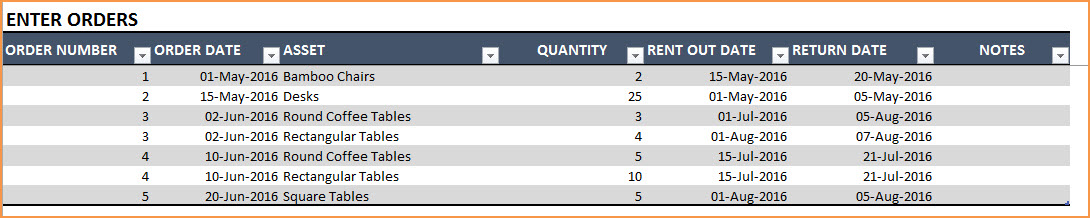
Enter Order Number, Order Date, Asset being rented and Quantity being rented in this excel equipment rental spreadsheet. Enter Rent Out Date (date when the asset needs to be given to customer) and Return Date (date when asset will be returned by the customer).
Use the Notes column to keep track of any information related to the order. For example, you can enter contact information of the customer.
Check Availability of Rental Asset
At the top of the Orders sheet is a simple availability calculator, which will provide the quantity available to rent for a specific asset given the rent out and return dates.

If the available quantity is negative, that indicates that there is not enough inventory.

This availability calculator can handle rental windows of up to 90 days long.

View Availability Calendar
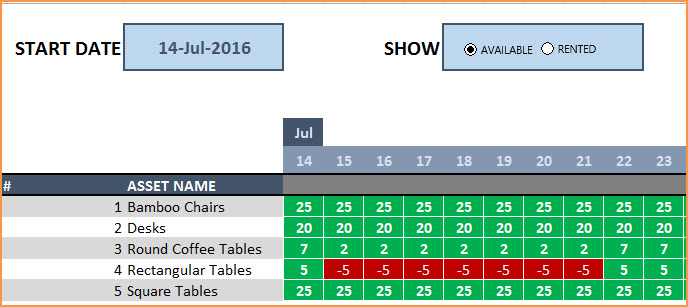
The Calendar sheet provides a flexible and useful calendar that shows the availability of rental assets over 31 days. You can choose any start date for this calendar view. Also, you can choose to see Available Quantity or Rented Quantity. Here is a screenshot of how to track rental inventory with the available quantity selected.
The red colored cells indicate days when assets will not have enough inventory to cover the rental orders. You need to make sure that you re-do the rental order by working with the customer or may have to cancel the order.
Here is a screenshot of Rented Quantity from this equipment rental tracking spreadsheet.
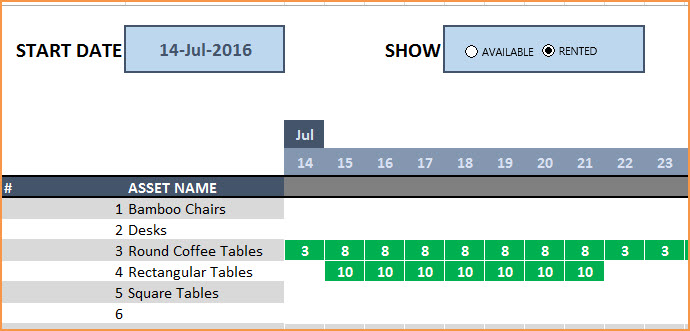
This will help you to be aware of how many items will be rented out on any specific day.
Additional Functionality
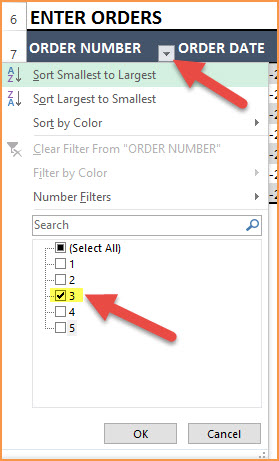
To view one order’s details, use filter on Order Number in Assets table
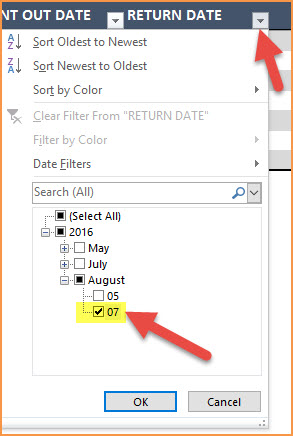
To view orders/assets with return date of today, use filter on Return Date in Assets table
By default, the Calendar sheet shows 25 assets. It’s easy to extend Calendar for more days and more assets. To unprotect Calendar sheet, use password: indzara. (Article on Unprotecting sheets). Then, just expand the table to more rows to include more assets.
Recommended Template
If you find the above template useful, please see premium templates that provides accounting, invoicing, and reporting features for rental businesses.
153 Comments
Good Morning. this really is a fabulous Rental Inventory Tracker. Would u p[lease include the following:RENTED OUT QTY RETURNED QTY REMAINING QTY CURRENT CLOSING QTY REMARKS. If possible it wud really serve our purpose. Thanks and Regards.
Good morning, and thank you so much for your kind words about the Rental Inventory Tracker — I truly appreciate your feedback.
The additional fields you suggested (Rented Out Qty, Returned Qty, Remaining Qty, Current Closing Qty, and Remarks) are very helpful, and I can definitely see how they would enhance the template for many users. I’ve noted this as a future enhancement.
Thank you once again for taking the time to share your suggestions. If you have any other requirements or ideas, please feel free to let me know.
Best wishes.
Do you have a way to display the rental information on a monthly calendar for pick ups and deliveries.
Thank you for sharing your requirement.
This template will provide you the available and rented quantity in the monthly calendar. Can you please let us know what are the rental informations that are required to be displayed in the monthly calendar.
We take customization projects for a fee. You can share your requirement in detail at the below link for estimation.
https://support.indzara.com/support/tickets/new
Best wishes.
Hi there, can you please walk me through the formula on your calendar page?
Thank you for showing interest in our template.
Currently, we do not have a video on how to build the calendar on this template. We will update you once we post the same.
In the mean time, you can write to us about your query on the formula at the below link and we will respond to your email ID:
https://support.indzara.com/support/tickets/new
Best wishes.
For the rent out and return dates, does the sheet not account for inventory coming back in and going back out same day? If not, is there a way to edit it to do so?
Thank you for showing interest in our template.
Yes, the template will not account inventory if the rent out and return are in the same date. We take customization projects for a fee. We can split a day in the calendar to 2 (0-12/12-24) or 4 (0-6, 6-12, 12-18,18-24) different time for each day in the calendar. And you will need to enter the rent out and return date along with the time to capture the same in the calendar.
If you want to proceed further with the customization, please write a request on the below link for estimation of the project:
https://support.indzara.com/support/tickets/new
Best wishes.
Hello,
Template has been super useful for our basic hire inventory.
I am having an issue when I enter in the orders tab and the product not then pulling through to the calendar page and adjusting the quantities being used on certain dates.
I’m not sure what is going wrong or how to fix it?
Thank you for showing interest in our template and sharing your feedback.
We are unable to replicate the issue in our end. Hence please share your sheet at the below link to check further:
https://support.indzara.com/support/tickets/new
Best wishes.
I like the look of your template!
Is there a way to keep track of what an individual customer has on rental?
Is there a way to record the return date of items (not scheduled, but actual return date) and calculate the number of days the item was rented? We charge monthly for ongoing rentals, but upon return for partial weeks/months.
I there a way to track when invoicing has been done (not just orders)?
Thank you for showing interest in our template.
Most of the requested feature is available in our Rental Business Manager template. Following is the link to the template for quick reference:
https://indzara.com/product/rental-inventory-sales-manager-excel-template/
Best wishes.
I’m having some problems with the sheet. I have 230 order lines but it’s not reading and calculating the last 8 or so lines. How can I fix this
Thank you for using our template.
This usually happens when you enter the data outside the Order table. To know more about the Excel tables, please check the below link:
https://support.indzara.com/support/solutions/articles/62000201896-introduction-to-excel-tables-data-entry
If you are still facing issue, please share your sheet to support@indzara.com to check further.
Best wishes.
I’m having trouble adding more days to the calendar view so that I can see more than one month. The formulas are not calculating correctly when copied to the right. How can I fix this?
Thank you for using our template.
Requesting to share your sheet to support@indzara.com with some screenshot highlighting your concern to check further.
Best wishes.
Hello Indzara,
May I please check something with you,
Our orders listing has gone a bit high and the calendar does not seem to show me the correct balance. Infact it does not catch the new orders that are added to the list.
We have reached row 1175, I am not sure if adding more rows to the orders lists needed some ammendment to the calendar formula.
Hope my question is clear,
Thank you for the support and a great worksheet!!
Regards
Thank you for using our template.
The calendar formula is not limited with the number of rows in order table. The order data may not be reflecting in the calendar if data is entered outside the order table. Last line of the order table will be highlighted with dark like in the default format of our template.
If this is not your concern, requesting to share your sheet to support@indzara.com to check further.
Best wishes.
The password doesn’t work to unlock and edit the assests
We regret the inconvenience caused.
I just tested the password indzara and its working. Requesting to share your sheet to support@indzara.com to check further.
Best wishes.
Hey thanks for this amazing sheet ! I’m struggling to do something tho…
I would like to have 2-3 assets lists that i can directly integrate into the order sheet, and select a list of assets instead of just 1 per row. any clue on how to achieve this ?
Thanks again !
Thank you for showing interest in our template and you are welcome.
We take customization project for additional fee. Requesting to share your requirement to support@indzara.com for estimation.
Best wishes.
Hey man,
I found this really helpful. But I’m having a hard time trying to add number of days in between as all your columns automatically go to date format. How do i change that?
We are glad that you find our template helpful.
To change the date format to number format select the cell and press CTRL+SHIFT+~ (Tilde key below Escape key) and if you want to change the number to date, you can press CTRL+SHIFT+3.
Best wishes.
This template looks great and is exactly what I was looking for. I have an extensive inventory with about 18 different categories. Will this work or do you think I should use multiple tables?
Thank you for showing interest in our template.
Requesting to check our Rental Business Manager template, which supports inventory upto 30 categories. Following is the link to the template:
https://indzara.com/product/rental-inventory-sales-manager-excel-template/
Best wishes.
I would like to be able to open this sheet on any computer. Am I able to download this on a thumb drive and use on another computer or only able to use it on the computer I created it? Thanks.
Thank you for showing interest in our template.
You can use this template in any system offline with Excel version 2010 or higher for windows and Excel version 2013 or higher for MAC. You can also upload the template in Microsoft OneDrive and use Excel online to have live updates and more.
Best wishes.
How do I add additional assets on the calendar calculations? I have more assets listed than appear on the calendar.
Thank you for your assistance.
Thank you for using our template.
Requesting to select cell AG32 and click dot present in the right bottom of selected cell and drag down to expand for more assets.
Best wishes.
Thank you so much for this! I look for something simple and useful….like your work! I have a request: is it possible to distinguish between AM and PM? Sometime I rent in the evening with return in the morning and there’s the possibility to rent the morning with return in the evening. Many thanks again!
Thank you for using our template and thank you for sharing your valuable feedback. We take customization project for additional fee. Requesting to make a copy of your template and modify the same with your required input and sample required output. Then share the sample template to support@indzara.com to get an estimation.
Best wishes.
Hi,
I have used this template for our rental business. I have added an additional column for order status as we would like to keep track of cancelled and pending orders as well. In this case, how can i have the calendar show availability based on “confirmed” orders only ? Please advise.
Thank you for using our template.
Requesting to share your sheet with some screenshot of the requirement to support@indzara.com to check further.
Best wishes.
I tested this and like it !
But I have 2 warehouse and need to keep track of then (in two different town)
Also rental over more than 90 days sometime.
The premium version same limitations?
I dont need billing funktion (only “rental” intern in the company for different project)
Thank you for sharing the feedback. I would like to inform you that we also take customization projects for additional fee. Requesting to contact our support team at support@indzara.com for an estimation.
Best wishes.
I’ve started getting an error when I type the Asset info into an order. It matches the asset name from column A in the assets worksheet, but it pops up “The value doesn’t match the data validation restrictions defined for this cell.” Please help.
We can help you in this regard. Can you please send a copy of the sheet with the issue to support@indzara.com?
Hello, I am the volunteer treasurer for a local charity called HELP INTERNATIONAL BENIDORM (Spain),
& we have a scheme to help people in need with mobility aids such as wheelchairs, wheeled walking frames etc.
This template seems to be what we are looking for, fairly easy to use by anyone. what it needs for our purpose is to have a ‘Date Returned’ column, so the item loaned is not brought onto stock until this cell has a date inputted. I have tried just changing ‘Return Date’ to ‘Returned’ and leaving it empty but that doesn’t show the item being out on loan if the cell is blank. I would like to keep ‘Return Date’ column but have the extra column for ‘Date Returned’ & have the inventory not showing the item returned until that cell has a date inputted. I am not very au fait with
‘SUMPRODUCT’ & ‘IFERROR’ Formulae. Can you help please.
Thank you & best wishes
Thanks for using the template. We have opened a support ticket for this and reached out to you for the file.
Best wishes.
Hello, this is somehow getting messed up when importing it to Google Spreadsheets, is there a version avaible to import it without the template getting broken?
Thanks for using our template.
Please use the Google sheet version available at https://indzara.com/2020/03/rental-inventory-tracker-free-google-sheet-template/
Best wishes
Hi, this is really a great temple, thank you. I am starting a sign business and want to spread out the asset information into three columns on the “Asset Sheet” so that I can filter my searches by what the sign says (A, B, C, D, 1, 2, 3, Basketball, etc), color of the sign and whether the sign is a letter, number or symbol (like a basketball) . That was not an issue but I would like to add these columns to the order sheet and the calendar sheet so that I can filter items rather than go through 400 lines in my sign catalog. What formula should I add for the two new columns on the order sheet and the calendar sheet?
Thank you
Thank you.
Are you looking for a way to use three different attributes to choose an asset? Assets – choose color first, then choose letter, then choose symbol, etc. We would have to modify multiple formulas to make that work. I don’t believe it is simple enough to explain in one or two lines.
I have a video that explains dependent drop down. https://youtu.be/VuSbh4dIrb4
Please correct me if I have misunderstood your question.
Best wishes.
Thank you for this awesome template! I’d like to expand the calendar to include more than 31 days (6 months or so). How do I do this?
Thanks for your message.
The calendar is designed to show status for the next 31 days from the day entered.
Best wishes
Good afternoon,
I have entered all information, however when looking at the availability (qty available to rent out) it isn’t taking into consideration what is out. It is simply giving me the total qty (both in stock and rented out). Is there something I’m missing?
thanks
Thanks for using our template.
At times a missing formula or a broken link can give rise to these issues. Please check if you have deleted any formula by mistake. If the issue persists, please email your file along with the list of issues to contact@indzara.com
Best wishes
Can i have it on Google spreadsheet?
Thanks for your interest in our template.
Our templates are designed and tested in MS Excel. Therefore, we cannot assure the performance of the templates used in any other environment.
Best wishes
Hi your ltemplate is good, but can add some functions for me?like putting some formula in returned items
Thanks for using our template.
Due to the high workload, we are not accepting any customized projects due to high workload.
Best wishes
Hi
Please help me to make packages. For example 20×20 tent has 10 different components.
Is there anyway we can add sub lines to each assets ?
Thanks for your message.
You may rent out based on the component, or as a finished product.
Suppose, you have a tent that has 20 components, out of which, 5 are optional, then when you mention tent, it would mean that you have rented out 15 components. However, 5 optional components can be mentioned if they are rented, else ignored.
Best wishes
Great template!
One question though. How does the button on the calendar work to show available and rented? I see no macros or formulas?
Thanks for your message.
We have not used macros in our templates. The formulas are hidden.
Best wishes
Love the Inventory Tracker! But when I first started using it, if I entered an order item and it wasn’t listed in my assets (due to me calling it something else) it showed a yellow ! that let me know that item wasn’t listed in my assets. I must have done something because it no longer does that, so if I make a typo or something, that line item does not get figured into my order inventory. Is there a way to restore the feature that lets me know I’ve entered an ite that I do not show in my assets?
Thank you.
Thanks for using our template.
You may download a fresh copy and try to add the inventory. Else, please send the file to contact@indzara.com with the list of issues that you are facing.
Best wishes
Hi , can you add barcode scanning?
Thanks for the suggestion. We will try to incorporate it in the future release.
Thank you for this
This is a very great help,but the tab Orders is not working
Thanks for sharing the positive feedback.
Sometimes a broken link or a formula can compromise the functionality of the template. Please check the links and the formula. In case it still does not work, please email your template along with the list of issues to contact@indzara.com
Best wishes
Thank you so much for your speedy response.
Great costumer service!
You guys such a big help
Found this really helpful and appreciate the fact that I don’t have to create this file from scratch, but I noticed that the calendar indicates 0 available for beginning of month until the piece comes back. However, I only put that the piece would be rented from June 16th – 19th. But showing 0 availability from June 1st – 19th. Any chance you can share the password for me to look at the formula and make any appropriate changes? Thanks!
Thanks for using the template.
Please use password ‘indzara’.
Best wishes
Excellent and very useful template thank you very much
I want to see the full year (2019) in the calendar. how can I do this
Thanks a lot for your help.
Thanks for sharing positive feedback.
Please refer to https://indzara.com/product/event-calendar-maker/ for 2019 calendar.
Best wishes
Hi thank you so much for this. I am currently trying to apply your template for the company I work for. We are in the business of leasing out heavy machinery. I need to keep track which client is hiring which equipment and a history of that, even after the equipment is returned and hired out to the next client. Can you please advise me how do I go about doing that?
Your soonest respond is appreciated. Thank you
Hello
The feature you are looking for is not available now on this template. More enhanced features are available on our premium template Rental Inventory and Sales Manager Excel Template, https://indzara.com/product/rental-inventory-sales-manager-excel-template/
Best wishes
Hi there,
thanks for the template it is awesome. Do you have a google sheet doc for the same?
Thanks
Rizad
Thanks for using our template and sharing positive feedback.
Our templates are designed for MS Excel. Many features will not work on Google Sheets.
Best wishes
HELLO,
I have more than 25 Line items that we rent. I notice only the first 25 items I enter as assets only come up on the calendar. is there any way to increase the number of line items?
Thanks for using the template.
Please extend the table in the Calendar tab to accommodate more items.
Best wishes
Hello you spreadsheet looks super useful and i downloaded it on my mac. it seems things are missing. is there a way for you to update please!
Can you please specify what is missing and what version of Excel you are using?
Thanks & Best wishes.
Im not using excel im using Numbers on mac. On your assets page under rented out this pops up:
The formula couldn’t be imported and was replaced by the last calculated value. Original formula: =IFERROR(SUMPRODUCT(–(T_ORDERS[ASSET]=T_ASSET[[#This Row],[ASSET NAME]]),–(T_ORDERS[RENT OUT DATE]=TD),T_ORDERS[QUANTITY]),””)
On you calendar page all blocks are saying this: The formula couldn’t be imported and was replaced by the last calculated value. Original formula: =IFERROR(IF($B8=””,””,IF(I_CH_CAL=2,SUMPRODUCT(–(T_ORDERS[ASSET]=$B8),–(T_ORDERS[RENT OUT DATE]=C$6),T_ORDERS[QUANTITY]),INDEX(T_ASSET[‘# OF ITEMS], $A8)-SUMPRODUCT(–(T_ORDERS[ASSET]=$B8),–(T_ORDERS[RENT OUT DATE]=C$6),T_ORDERS[QUANTITY]))),””)
and this as well:
The formula couldn’t be imported. The name “L_ASSETS“ couldn’t be imported. The formula was replaced by the last calculated value. Original formula: =IFERROR(INDEX(L_ASSETS,A8),””)
I’m having the same problem. I am using windows excel – the most current.
My “Asset, in stock column’ says =IFERROR(([@[‘# OF ITEMS]]-[@[RENTED OUT]]),””)
Any ideas?
Hello
Please send your file along with the list of issues to contact@indzara.com
Best wishes
Can this be used on an iPad?
Hello
We have tested these templates on MAC machines. It works well in Excel 2013 and later editions.
Best wishes
I love the rental tracker. Can you please tell me how to extend the calendar to 90+ days?
Hi,
This is very useful but I do not understand one of the calculations. In the calendar tab, the IF statement includes “IF(I_CH_CAL=2…” and this value is found in the hidden sheet H. However, I do not see any precedent to this value. In other words, what does this value signify and when is it NOT equal to 2?
Thanks for your feedback. Glad it is useful.
The I_CH_CAL is referring to the Radio Button Input (Available vs Rented). I am storing the I_CH_CAL value in the hidden sheet H. The choice made is used in the IF formula to show either the Available Qty or Returned Qty in the Calendar.
Best wishes.
Hi,
This is very useful but I do not understand one of the calculations. In the calendar tab, the IF statement includes “IF(I_CH_CAL=2…” and this value is found in the hidden sheet H. However, I do not see any precendent to this value. In other words, what does this value signify and when is it NOT equal to 2?
Thanks for your feedback. Glad it is useful.
The I_CH_CAL is referring to the Radio Button Input (Available vs Rented). I am storing the I_CH_CAL value in the hidden sheet H. The choice made is used in the IF formula to show either the Available Qty or Returned Qty in the Calendar.
Best wishes.
HI – Thank you so much for this amazing template.
Hopefully going to make lift a lot easier.
question – on the orders tab – Asset Colom – drop down box – we have over 1000 assets – is there anyway that I can start typing and all the products start coming up in the drop down box that match or have the same spelling?
like when booking a flight and looking for an airport – you start typing the letters and they only show you what has the same letters till you find what you need?
Thanks for using the template.
The feature that you have mentioned, needs a macro in the template. Our templates do not have macros embedded in them.
Best wishes
Hi, this is a really great template, helps us big time! Thank you for coming up with this
Just one question: Is there a way to merge rows on the Orders tab? The ‘merge¢er’ button is greyed out on mine.
This is because we sometimes loan multiple items in the same order, with the same return date. It would be a lot easier if we could just merge the order number, rent out date and return date rows.
Thanks!
Thank you. Glad to hear that it is useful.
Merging inside the table is not allowed. Merging is mostly done for display purposes. It is not advisable for situations where we calculate (count, add, etc.) using the data. Here we need each entry to be individually recorded.
Thanks & Best wishes.
Hi this is great but it seems to only work down to row 41 on the amount of orders you can enter, I need to be sending out multiple items to people so I have filled this up with 10 orders.
Is there a way to extend the amount of orders I can add to the list (i.e make it work further down in Excel).
Many thanks
Hello
Please unprotect the sheet with “indzara” and extend the table.
Best wishes
Hi. This template is just what we’ve been looking for for our furniture rental company. However; once I have entered the assets and quantities it is not recognizing the total. Can you please help? Thanks.
Hello
Thank you for using our template.
Please ensure that you have entered the rent out and the return dates correctly.
Best wishes
Is there a way to quickly manage the calendar and flip through months without having to type them in? this would be helpful when on the phone with a customer and need quick answers.
Thank you for using the template.
In the present version, this feature is not available. We might introduce in the next release.
Best wishes
I like the tracker but sometimes we have partial returns of items how do we manage this? Thank you Jane
Hello
If 2 chairs are rented out and only one was returned so far, then we have to create a new record in Orders. We have to split the 2 chairs into 1 each in 2 separate rows thus allowing us to record 2 different return dates.
Best wishes
Hello. This spreadsheet is extremely helpful! However, for one item, it doesn’t not seem to be calculating properly…says we don’t have inventory when we should. I tried entering a new item and the problem repeated itself. Any suggestions?
Hello
Thank you for using the template.
Please ensure the dates when the item is rented out and returned are clearly mentioned. Also, ensure that the item is available on that particular date.
In case you still face issues. Please email your file with your queries to contact@indzara.com
Best wishes
I really like the spreadsheet! I was wondering if there is a way to show/print the calendar in an actual calendar format?
Hello
Thanks for using our template.
Please refer to the additional functionality at https://indzara.com/2016/08/free-rental-business-excel-inventory/ to print the calendar or change the format.
Best wishes
Hello, I’m wondering if there’s a way to adjust the calendar so that it shows hourly per day as opposed to just whole dates?
Hello
That’s a limitation.
We will try to incorporate this in the next upgrade.
Best wishes
Love your template, very nice. I have one question however; how can i change the language of the Available / Rented selector at the Agenda tab?
thanks in advance!
Thank you. Are you referring to the drop down? If so, please see DATA VALIDATION menu in the DATA ribbon.
Best wishes.
Hi, love this template! However, suddenly something has changed. When entering the order, the item drop down arrow has disappeared so I cannot select from the list of items. I can manually type the item I want to log out and if i do it exactly as it is listed on the items tab, it does log it out in the calendar however this is obviously not ideal. CAn you help? Many thanks!
Hello
Sometimes, by mistake, a data validation can get tampered and these issues may arise.
You can download a fresh copy of the template and work on it.
Best wishes
My totals are not pulling through from the calendar to the assets tab that shows how many are rented out? Its like the formula didn’t download.
Hello
The calendar tab is a dashboard of any inventory for a period of 30 days. It shows if any particular asset is available or not on that day to fulfill an order. All details are required to be filled in the order tab.
Please watch the video demo below the download link at https://indzara.com/2016/08/free-rental-business-excel-inventory/
Best wishes
My check availability page is not calculating a number under available to rent. I have the asset and dates to rent out and return and it doesn’t calculate how many are available to rent. That is the key information that we need for our inventory. Please help!
Hello
The template should work well. It could be that a formula might have got deleted accidentally. Could you please share your file with data. Please email it to contact@indzara.com
Best wishes & regards
Hi. Loving this template and would like to use it in our furniture rental company. However; once entering the assets and quantities, it is not pulling through the information I have inputted; it is not showing the total in stock, and thus is not working. Please assist?
Thanks. The data was not entered inside the table. That’s why they were not included in calculation.
I have replied to your email with additional information.
Best wishes.
This looks amazing and just what we are lookng for….. Quick question? Once I download the Tracker Sheet, is there anyway to share it with my assistant so she can access on her computer? We are currently using google docs but noticed this is not compatible with google sheets?
Hello
This template works well when used on one device. Google sheets will not work. You can use OneDrive to work simultaneously.
Best wishes
Nice tracker. Wondering if it’s possible to add a product ID code on the Assets sheet. Much thanks!!
Hi, I was wondering if this template can be used for self-service laundry? Thanks.
Hello
Thanks for using the template.
This template can be used where you are renting out equipment. For a self service laundry, the time when each machine is engaged needs to be tracked.
We have noted down your feedback and will try to design something similar.
Best wishes
Hi,
Suppose I have 8 items of the same kind and all are bar coded. How do I integrate that to this excel and track exactly which code has returned. Same while sending out how do i scan and track which exact code has gone out.
Thanks
In order to track individual items, we would have to enter each as a separate asset.
Please let me know if this helps.
Best wishes.
Have you got an easy step by step to adding all my assets onto the calendar somehow please i only have 45 but calendar only shows 25 and i don’t know how to see the rest?
Please unprotect the calendar sheet with indzara as password. How to unprotect https://indzara.com/faq-items/unprotectingprotectedsheets/
Then go to cell AG32. You will see a little downward arrow in that cell. Click and drag down to more rows (for example to row 52). Now, the calendar will display 45 assets.
Best wishes.
hello
can you make this into an app?
Thank you. I will try to do that in the future.
Best wishes.
The only addition I would have on the sheet would be a drop down calendar on the Order sheet. This way you could just click the order dates as opposed to typing them out.
But other than that, awesome job
Thanks for your feedback. Best wishes.
Thanks for sharing the excellent spread sheet.
The Rental Tracker spread sheet that I download not in function on Rental Calendar – Available Quantity. I would like to seek for your help to send me the functional file.
angielam0627@gmail.com
You are welcome. The file posted is a functional one. Please specify your Excel version and Operating system. If there are further questions, please email your file with data to support@indzara.com. I can review and get back to you.
Best wishes.
Thanks for your prompt reply.
I have sent the spread sheet according the email mentioned above.
Hope to hear your reply soon.
Very cool spreadsheet. Thanks for sharing!
You are welcome. Best wishes.
Is there a fully fleshed out template I could download that I could simply switch out the assets with my own. I am attempting to get the formulas to work but I can’t seem to increase the number of assets or have them reflected in the calendar. Please bear in mind that I am working on Google sheets as well, I am assuming this may be an issue in and of itself.
Thanks for your interest. The templates are not compatible with Google sheets. Sorry.
Best wishes.
I Love you tracker we are using it and it helps big time. No Issues with it.
Question:
Now I need a template where i can keep track of customer purchases. Where in one template all i enter is name and amount purchased. On 2nd template it will have a list of customers with total amount they have purchased. Its for loyalty program. Do you know if there is anything avaible out there.
Thank you. Glad to hear that the template is useful.
If you have name and amount, in one table, then you could use SUMIF function to create the total amount purchased in a separate sheet. Unfortunately, I don’t have anything specific for that.
Best wishes,
So far so good. But you need Foreign Keys for Customer and Pump in your Invoices table. How is Due Date arrived at? Is it a field in your Invoices table? Do you have a field for Returned Date? in your Invoices table?
Thank you.
Yes, the Rental Business Manager template https://indzara.com/product/rental-inventory-sales-manager-excel-template/ has the framework for invoices and customer data.
Due Date is entered along with the order. There is no field built-in for Returned Date. But it is easy to add columns.
Best wishes.
Is is possible to increase the number of catagories from 30 to 60 ? Also to have 50 subcategories for each of the 50 assets
I am assuming you are referring to Rental Business Manager template. https://indzara.com/product/rental-inventory-sales-manager-excel-template/
Yes, the limit on categories impacts the drop down list for asset names in Order Details sheet, when you choose a category. This is done using calculations the hidden sheet named ‘Lookup’. We can edit that to increase support to 60 asset categories. Thanks. Best wishes.
Thank you for this great Excel sheet. I am really impressed how well it works.
You are welcome. Glad to hear that it is useful. Best wishes.
Nice simple tracker. HOwever i cannot seem to get this to work properly. After i have added the plant items and the ordered items, the ordered items and the “not enogh inventory” items do not show. Everything is identified as available
Thank you. Please email the file with data so that I can see what is happening. I have sent you an email about this. Best wishes.,
Hello, very good job,
But i have a question when I copy past the above sheet to my master sheet the button ( Available or Rented ) is not working.
I am not sure that I completely understand your question. Why do we need to copy paste the sheet? Which sheet?
Thanks & Best wishes.
Hi Indzara
First of, very nice Rental Tracker 🙂
I am filling in my machines right now. But i noticed that when i look i the calendar, every line is all white!?
The shifting, gray and white is gone, so very hard to tell the lines appart 🙁 I use the rented mode, not the avalibel mode.
is there any way to get this back!? so that it is still gray and white, in every other line, and green when rented out!?
Best regarz, Morten
Thanks. Can you please email me the file? I will review and get back to you. Thanks.
Hi Indzara,
love the rental inventory tracker!
I would really like to extend the days of the calendar out to 60 but I am having difficulty. I can get the dates correct but the inventory levels below don’t match up, can you help?
Thanks
Thanks for the feedback. I am glad you like it.
The formula uses reference to Excel tables and hence just dragging to fill new columns would result in incorrect references.
Please click on cell AG8. Then, select all the new cells (for additional days) along with formula cells in column AG. Now, click inside the formula in cell AG8 and press ctrl+1.
This should apply formulas to all the cells we need.
Best wishes.
CAN U PLEASE EXPLAIN BETTER I WANT TO SHOW THE ENTIRE CALENDAR YEAR INSTEAD OF JUST PROJECTING 2 MONTHS ON THE CALENDAR
Can you please share the issue you noticed while following the instructions above? That will help me understand how to explain better.
Thanks & Best wishes.
This is a great spreadsheet! I tried following the same directions but nothing happened when I pressed ctrl+1 inside the formula bar of AG8. I wanted to expand the calendar to 60 days.