
Retail Inventory and Sales Manager – Excel Template – Support
The Retail Inventory and Sales Manager is suited for managing inventory and sales if you are running a business of buying products from suppliers and selling to customers. This Excel document will assist in knowing the inventory levels of each product and understanding which products to re-order. You can also create invoices instantly and print or save as PDF. In addition, you can quickly view the purchases/sales patterns over time and identify the best performing products.
REQUIREMENTS
You need a copy of Microsoft Excel to open this file. The product has been tested in
- Excel for Windows (2007 or 2010 or 2013)
- Excel for Mac (2011) – Since Excel for Mac doesn’t support Slicers and Pivot Charts, Analysis sheet is not available. Analysis Details sheet provides tables but not the charts. Please e-mail at indzara at gmail if there are questions.
LIMITATIONS
CLICK HERE TO GO TO PRODUCT PAGE WHERE YOU CAN BUY
SUPPORT TOPICS
1. Migrate data from free to premium version in less than 10 minutes
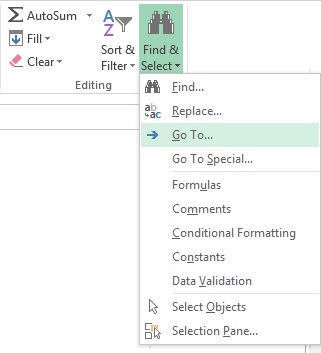
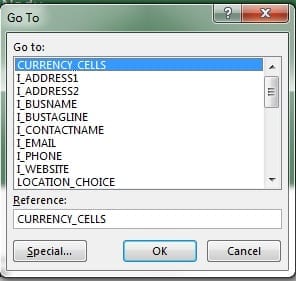
Choose CURRENCY_CELLS
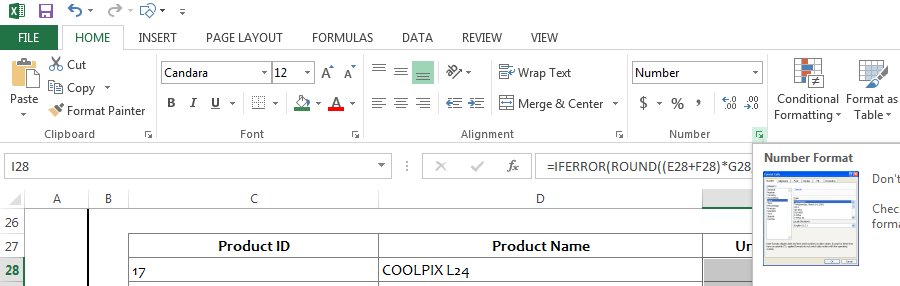
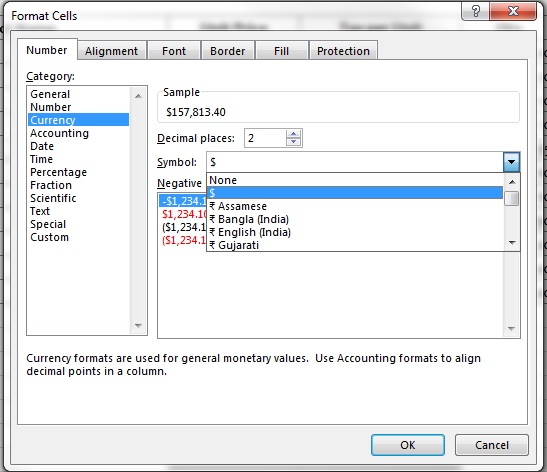
Press Ctrl+1 or click on the Number format menu.
3. WORKING WITH EXCEL TABLES
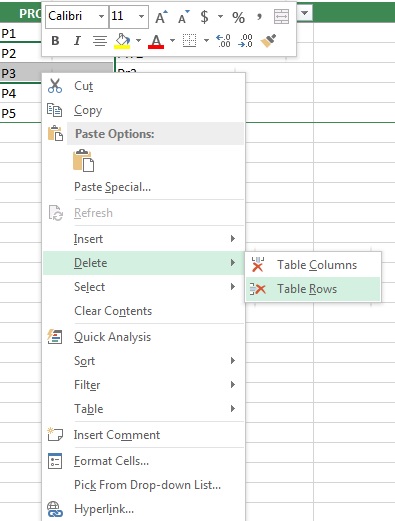
The template has several Excel Tables (link to Microsoft help). If you type data in the row after the last row of the table, then the table expands and includes your new row of data automatically. For deleting rows from a table, select cells from rows that you would like to delete. Right Click and select Delete—> Table Rows. This is the recommended way of adding and deleting data from tables.
60 Comments
Hi IndZara,
I’ve purchased this template yesterday #130070, wrote a review and sent you an email. But I still don’t have the coupon code for the Project Manager Excel Template and the passwords for editing the templates to my needs. I would like to start working on my projects.
Kind regards,
Hello
We have emailed your coupon to the email id provided. The password is “indzara”
Best wishes
I have bought the Retail inventory sales manager , and I have started entering the datas ,initially I was getting the filter drop down list whilst entering new data , but after some time I cannot get the drop down in the cells , I only get a dot on the right hand corner of the cell the drag symbol dot. Please help
Hello
Please ensure that none of the formulas are missing. Also, there is a limitation on the number of rows. Please refer to the support page. In case the issue persists, please email the file along with the list of issues to contact@indzara.com.
Thanks
Hi Indzara,
I’ already purchase the premium version, I have a question is how to entry an order but it supplied from more than 1 warehouse?
Do I have to put duplicate order with different warehouse location?
Looking for your help
Thanks in advance
Thanks for purchasing.
You are correct. Each order needs to be for only one warehouse location. If there are multiple locations, we have to create separate orders.
Best wishes.
I want retail store seals manager excel
Thank you for your interest in our template.
Please visit https://indzara.com/product/retail-inventory-and-sales-manager-excel-template/ to purchase the template.
Thanks and regards
I have an online retail business from home and need to track inventory and sales on a weekly basis. I need to be able to add and subtract inventory based on purchases and sales. Which program for excel would you recommend?
We have about 750-800 products to track.
Thanks for your help.
I am going to use the Retail Inv Tracker free template to get familiar with them.
DF
Thanks for your interest.
Please try the https://indzara.com/2017/02/free-retail-inventory-management-template/ .
Best wishes.
Hi IndZara,
I’ve purchased this template yesterday (Order #124531), wrote a review and sent you an email. But I still don’t have the coupon code for the Project Manager Excel Template and the passwords for editing the templates to my needs. I would like to start working on my projects.
Kind regards,
Thanks for purchasing and posting the review. I have emailed you the coupon code and the passwords.
Best wishes.
Hello,
I have bought the Retail Inventory sales manager basic windows v1_1
The template looks good for me. So when I started to enter all my data in the template I found this template is for profit porpoise only.
I was confused where should I have to enter my damaged goods?
Example: if I enter one of my goods which are 100 bottles quantity and ORDER NO P1 in my warehouse 1. During working inside the warehouse 1. It was broken 5 bottles (Damaged) so please help me where should I enter these damaged bottles in the table? Which I can understand I have lost 5 bottles in my data.
Thanks for purchasing. I am glad you like the template.
To account for damaged goods in the purchasing process, you can enter a new purchase order (P2) and put negative quantity (-5) for this product. This will reduce the inventory by 5 units.
Please let me know if there are any questions. Thanks. Best wishes.
Hello! I have purchased this product and entered data. When I enter a sale, the invoice sheet has no data on the first line other than price. The Product ID and Product Name are not shown. Can you help? Thank you!
Thanks for purchasing. I have responded to you by email. Please let me know if there are any further questions. Best wishes.
I have purchased this and all ifnromation is correct but the Invoice does not update automatically – I thought that it would do this from the order.
The invoice should automatically pull the data from the order for the order numbered entered at the top. Please make sure that the order details are correctly entered in the ORDER_DETAILS table. This video explains the data entry https://www.youtube.com/watch?v=LInmjM_5qQQ Or you can email me the file at indzara@gmail.com and I will look into it and get back to you.
Thanks for purchasing. Best wishes.
I came to know about your (Retail Inventory & Sale Manager) excel template while I was searching the web for a software transfer data from excel to tally. We are working with auto parts business. I discussed with my staff 3 scenarios as follow:
-First Scenario: Our inventory location numbers exceed 20000 items. This figure can go up to five times if we introduce different brands. If I adopt this scenario i think your template will not support this situation..
2- Second Scenario: Daily transaction between sale and purchase 300 different items on daily base. This mean 2000 – 3000 product items. This also seems to outside your template scope.
3.Third Scenario: We are now classifying our inventory in 10 main groups Ex.(A-Engine Items-Electrical Items-Suspension Items and so on).If we buy for each group one template. This means we shall require 10 templates. Each templates each group.
The only problem with all scenarios is the followings:
a- manual data entry since there is no integration facility in your template with (Tally- our account and inventory program).This shall cause some delays in the ordering process specially once back log is there due to the manual data entry process.
b-Since we have four branches the data entry problem shall increased accordingly.
Finally i would like your advice before we commence the purchase of your template.
Regards
Bader Hammam
Thank you very much for your message. I have answered your questions below.
1. The template supports 2000 products. Unfortunately, if you are looking for a solution for hundreds of thousands of products, then this might not work. Excel becomes slow when the number of products is high and hence I limited to 2000 products.
2. It can handle 50,000 order line items very easily. The file can be archived (saved) then and a new copy of the template can be used to record new orders.
3. If there is no interaction or co-ordination between each of the 10 groups, then you can use separate templates for each group. But if you want to have them all in one, you can categorize each group in the single template. Product Category is a field that is available to categorize products.
a. Data Entry is manual and the file is not integrated with other systems. It’s a simple Excel file.
b. Template can handle 10 locations/branches.
I hope this helps. Please let me know if there are any questions. Thank you.
Hi , ind zara
i have downloaded your excel template of inventory and sales manager and i entered all my products but in that after entering purchase order in order and inventory sheet so in that the above right side it has to show the re – order items pending purchses automatically but its not updating automatically i have to do manually in that , so please help me to figure out on this
thank you
ahmed
I am assuming you are referring to the free template https://indzara.com/2013/07/inventory-and-sales-manager-excel-template/
The re-order items should automatically update. Please e-mail me the file to indzara at gmail.com so that I can look into it.
Thank you.
Thanks for e-mailing. I have responded to your e-mail. Hope that helps.
Just so that other readers can become aware, the re-order items on the top right are calculated using formulas. If the formulas are removed, they won’t get updated automatically.
Hello Indzara,
I have at lease 100 different location in my warehouse, will I be able to input all of them or is it limited to 10 as stated in the features??
Thanks for your message. The template supports only 10 locations. I am sorry that your scenario is not supported yet.
Best wishes,
Hi Indzara! Thank you so much for creating this template. I am entering data into the template and can’t seem to load up the “Analysis” and “Analysis Details” as when I click “Refresh All” from the Data ribbon, I get the error message “Cannot open PivotTable source file”
Any advice and suggestions would be much appreciated. Thank you so much in advance for your time and I look forward to hearing from you soon.
You are welcome.
I have not seen the error before. Please let me know which Excel version and which operating system (Windows/MAC) you are using. Also, please e-mail me the the error screenshots and the file to indzara at gmail. I will look into it.
Thanks for your support.
Thank you for getting back to me! I’m currently using Microsoft Office Professional Plus 2010 on Windows 8.
I’ll be on my way to mail you the error screen shots as well as the file to you now.
Thank you. I have responded to your e-mail. Please let me know if there are further questions.
how can I add a column that calculate automatically, the benefits for each cell operation and the total of benefits for week or month , thank you
Without knowing specific details, It’s hard to answer. Please refer to my free Excel course on YouTube where I have videos on calculation and functions. https://indzara.blogspot.in/p/useful-excel.html
Hey, Thank you for an amazing template.
I would immediately purchase it if you could implement a barcodescanner.
So instead of typing in all products – i scann them.
I hope you can add this feature.
Best
Thanks for your feedback. I will look into integration with bar code scanner. Best wishes,
I ordered it today, hope you can address my issue statted above and modify program to address my concern….any ways it is very good product and excellent work and will recommend strongly
Thank you for purchasing the product. I am glad to know that you find it useful. Best wishes,
Sorry you missed my point, let me explain. Let us assume I have 3 products A, B and C. From my supplier I need to buy every month 45 piece of A and 50 piece of B and 60 Piece of C. So I know that I need to buy specified amount of A, B and C irrespective of what I have in my inventory and I order daily couple of each. So I need to know at the end of every month how many A, B and C I ordered and how many is left to reach my monthly target. This aspect is missing in current program I feel – depending on sales and purchase it will give me net inventory, but doesn’t give me how many more I need to order to complete my sales target. Thanks for help in advance
I am not sure I fully understand the scenario. The template doesn’t provide a way to track sales targets. It can help track feasibility of future sales orders. If there is a future sale order (say expected date of Jan 1, 2015), the template can determine if you will have enough inventory on Jan 1, 2015 to meet the sales orders. Based on that you can create a new purchase order of enough quantity to meet the Jan 1, 2015 deadline.
Please e-mail at indzara at gmail with details if this doesn’t address your question. Thank you.
Hi,
I am looking to purchase this and have a question. Every month we need to order certain number of particular product to meet our target and we need to track it. Is this feature already inbuilt or can this be added. Can you do it for us or we need to do it with your guidance. Please let me know. Do you have number where I can reach you and discuss this. Regards
Details of every purchase and sale order will be entered once. The inventory will be automatically calculated/updated. The template is simple to use and does not require any ongoing assistance from me. If there are any questions, please feel free to e-mail.
Please let me know if I have not addressed your question. Unfortunately I don’t have phone support yet. I respond to e-mails and comments here as soon as I can. Thank you.
Thanks, Can I get your email id please
indzara at gmail
but how can we get Retail Inventory and Sales Manager template for try?
I am sorry for the inconvenience. There is no trial version of this product. It combines the inventory and sales management along with invoice creation. The free Inventory and Sales Manager and Invoice builders are available for download. I have done my best to provide all the information with screenshots and description on this page. I have also provided YouTube videos to demonstrate the usage of the template. If the template does not meet the business needs, please e-mail me for full refund. Please leave a comment if there are further questions about the product. Thanks.
Best wishes,
Thanks for reply.
I understand your template completely and its really nice work. For more flexibility i was thinking if we type in invoice if it could save data directly in those sheet. there are 2 different sheet we need to save the order details that is why I was requesting such feature. invoice would always be of type sales and would be more flexible.
Thanks for your feedback. Storing data in one sheet based on input in another sheet (and removing it from input sheet) will likely need programming. Until now, I have tried to use just formulas to build the template. I will continue to explore ways of simplifying data entry. Thanks again for providing valuable feedback.
Best wishes,
hi
template is good but it should have few more basic updates like
1. while entreing invoice it should save the invoice and also it should remove quantity
2. in retail business we buy from various vendors so it should have some form to enter such information and it increase and decrease the quanity based on that it should make the product sheet. more flexibility
Thank you.
The details of the orders are entered only in the ORDER DETAILS sheet. The inventory updates automatically. Inventory increases for Purchase orders and reduces for Sale orders. You can look at current inventory of all products anytime in the Product Report.
The Invoice just looks up the order details and creates the invoice instantly on-demand. If you would like to save a specific invoice, you can save the invoice sheet as PDF.
Please let me know if I have not understood your questions. Please e-mail indzara at gmail with file/screenshots.
Thank you for your answer – I really find useful your template Would you mind giving me an indication of cost for 100,000 products and perhaps more columns?.
Regards
You are welcome. While expanding the number of products, Excel becomes very slow. Since the template uses several calculations, Excel takes more time to compute them as the number of products increases. I will try to expand the number of products in the next version, but it might just be pushing to 3000 or 5000 at best. 100,000 products will be unlikely. I am sorry. Adding columns should be relatively easy. You can try adding new columns by unlocking the sheets with the password provided to your e-mail address on purchase.
Thank you.
Hi there – how can i enter more rows as this files are up to 2000 products?
The current version of the template is designed for only up to 2000 products. Modification in formulas across the workbook will be required to expand that. In the next version, I will try to expand the number of products.
Please let me know if there are any questions. Thank you.
I ordered the spreadsheet, but it looks different than https://www.youtube.com/watch?v=Jm7l5dfbsTw
Did I order the wrong one?
The video you refer to is the free version template. https://indzara.blogspot.com/2013/07/InventorySalesManager.html
That is available for free to download, but it does not have many features such as invoice. If that meets your needs, please let me know. I will refund your payment. Thank you.
Hi Ind Zara, will I be able to Add 2 More columns and customize the sheet once purchased ?
Please let me know where you would like to add columns, and I can provide guidance. You can easily add columns to the tables (Products, Orders, Order Details). After purchase, you will receive an e-mail with the password to edit the file.
Thanks again Indzara for this great tool with both reports combined. I have a question as Im working on this template…
Once i upload the Starting Inventory, will I have to update it at any point? Also, can you explain the difference between the Order tab and the Order Details? When a transaction is made, will I have to update both? Finally, my Dashboard is still showing zero after all products and inventory are entered..what am i doing wrong?
Thanks in advance!!
Once you update the starting inventory, you will not have to update it again. When you reach 50,000 line items in the Order Details sheet, you will have to archive (as explained in the blog post) and start a new file. Only then, you will have to update the starting inventory.
Did you refresh the data from the Data ribbon, as explained in the blog post? If you still see no change in the dashboard, please e-mail me the screenshots (of order details, order, products sheets) or the file? I will look into it.
Thanks for purchasing. I am glad that it’s useful.
I realized that I didn’t answer your question about the difference between Orders and Order Details.
‘Orders’ is where you would enter the high level information about orders. Each row is a different order. You would be able to enter the Order Date, Location and Partner information. By entering this here, you do not have to enter them again in the Order Details sheet.
Order Details sheet is where you would enter each line item of orders. For example, in one order if you have 10 different products, you will enter them in 10 different rows. They all will have the same Order number. You can enter the Expected Date (date when you expect the products to leave/reach your inventory) for each row separately.
In summary, both sheets are important and required. Please let me know if this doesn’t clarify your question.
Thank you Indzara, the questions are answered. Dont get me wrong, this is a purchase very much worth every penny. I definitely recommend it.
Thank you. I am very glad to hear. Best wishes.