
Retail Inventory Tracker 2025 – Free Retail Inventory Management Template
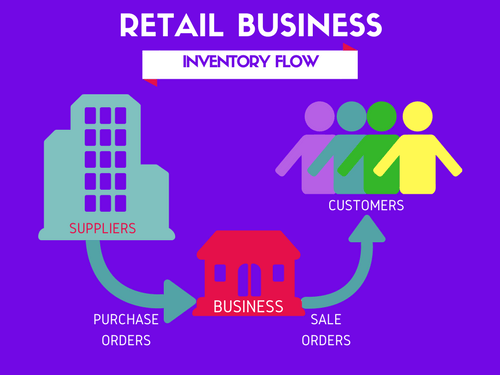
I am glad to present a simple and effective way to manage orders and inventory for your retail business. If you are getting started with a retail business where you plan to buy products from your suppliers and then sell them to customers with a margin, then you would need a tool to track your business in an effective way.
This Excel template is designed for Microsoft Excel, but if you are looking for a Google Sheet template, please visit Retail Inventory Tracker in Google Sheets.
Why do we need an Inventory and Sales Management tool?
I am sure you will agree that you need to know the following information in order to manage your business better.
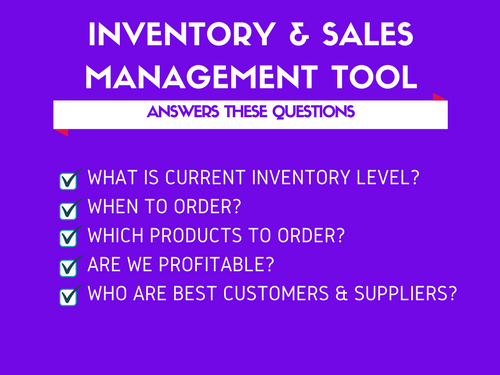
- How many items you currently have in inventory of each product so that you can take orders from your customers accordingly? If you cannot fulfill orders from your customers on time, you will be losing credibility as a business.
- Which products are low in inventory (compared to a Re-order point)? This helps in deciding when and what to buy in purchase orders to your suppliers.
- Which products are selling well and which products are not? This will help you decide to buy profitable products and not buy those that are not.
- What is the profit/loss you make from your business? This is obvious. If you are not turning in profit, you need to improve the business strategy.
- Who are the best customers and best suppliers? Building great relationships with the suppliers who bring in most revenue will be helpful. Providing special service to your best customers will likely result in more sales in future.
In order to get to this information easily and quickly, we need some kind of software. There are several sophisticated and expensive cloud based software available to manage inventory and sales for retail businesses.
For small and medium size businesses, especially when we are starting up, it is important that any software we choose is easy to use, customize and not expensive. This is why I am excited to present a free Excel template as a solution.
This template is a follow up to the most popular template on indzara.com – Inventory & Sales Manager. This new template provides several improved features but I have decided to keep the older template online as well. For example, this new template has automatic price population on order line items which the old one doesn’t. There are some users who do not want to auto-populate the prices as they want flexibility to change prices for different customers. For those, the old template would be useful. Hence, it would be better to have both templates available to our users.
Features of Retail Inventory Tracker Excel Template
Order Management
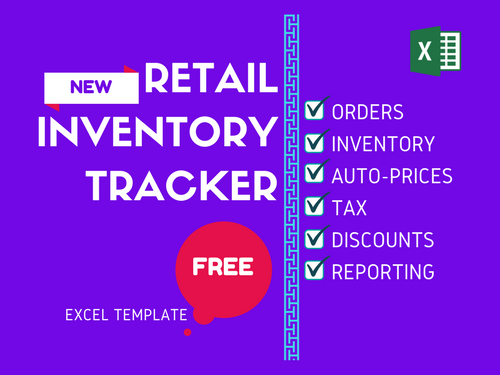
- 3 types of orders (Sale, Purchase, Adjust)
- Handles product returns
- Auto-Populate product prices in orders
Inventory Management
- Calculates current inventory of each product
- Set re-order points and know what to order
Finance
- Handles tax
- Handles product level and order level discounts
- Calculates Cost of Goods Sold (COGS) and Profit
Data Management
- Easily access Product, Partner (Customer and Supplier) and Order Lists
- Maintain history of Product price data
Reporting
- 6 page interactive report of business metrics
- 12 month trends of key metrics
- Identify best products and partners
- Calculates Inventory value
Video Demo
How to Use Retail Inventory Tracker
Before we get started, I highly recommend reading these articles if you are new to Excel templates or Excel Tables.
- Important tips about using Excel Templates from indzara.com
- Do not edit calculated cells (ones with formulas).
- Input data is always visible and can be edited easily.
- Backup by saving copies of this file regularly.
- Introduction to Excel Tables (How to use Excel tables to enter data)
To make it easy for you to identify which fields are input fields, calculated and custom fields, I have followed the following color scheme in column headings (or labels).
- Color Legend for this template
- Columns with Purple colored labels – Input cells for user to enter pre-defined information.
- Columns with Green colored labels – Calculated cells. Should not be edited.
- Columns with Blue colored labels – Custom Input cells for user to store any information needed.
Overview of steps
- Initial Setup
- Enter Business Information in Settings sheet
- Enter Product Categories in Settings sheet
- Enter list of Products in Products sheet
- Enter current Prices of products in Prices sheet
- Enter list of customers and suppliers in Partners sheet
- Creating Orders
- Enter list of Orders in Order Headers sheet.
- Enter each order’s details (line items) in Order Details sheet.
- Viewing business report
- View summary of business performance in Report sheet
Detailed Step by Step instructions (with screenshots)
Initial Setup
These Initial Setup steps are to be done first as a one-time activity.
Step 1: Enter Business Information
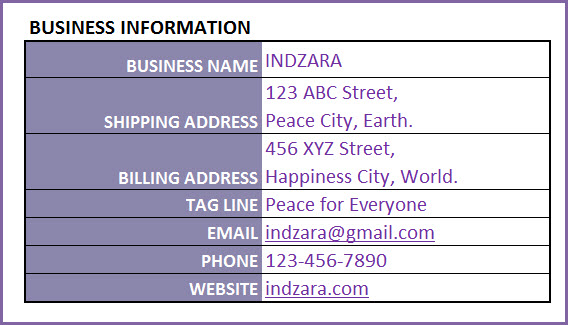
In Settings sheet, Enter your business information such as address, email and phone number.
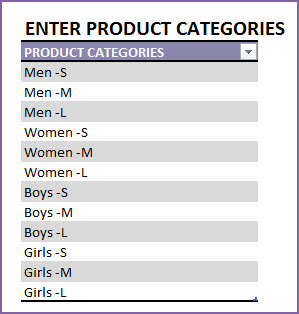
Step 2: Enter Product Categories
If you are selling several products in your business, it is recommended that you categorize your products. This helps a lot in managing them and understanding their sales performance.
Step 3: Enter Products
It’s time to enter our products. In the Products sheet, let’s enter each of our products in a separate row.
Please start entering from row 4
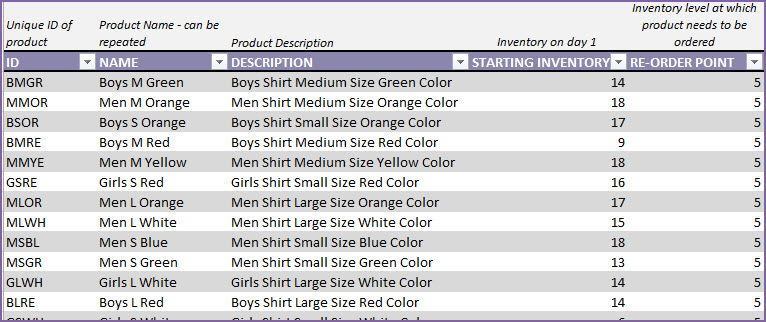
Let’s see each of the fields in the Products table.
- ID: Unique identification of product. This has to be unique. Please do not repeat the same ID or leave the field blank.
- NAME: Name of the product
- DESCRIPTION: Description of the product, as needed in our business.
- STARTING INVENTORY: This is the quantity of the product we have when we begin using the template. This is entered only once and does not have to be updated daily.
- RE-ORDER POINT: The quantity of product at which you would like to replenish by ordering.
There are a few more columns of product information we can input.
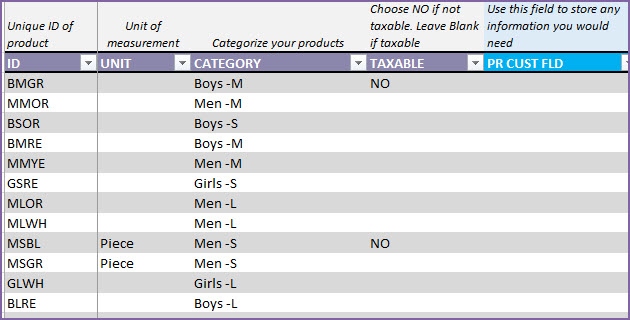
- UNIT: This is how we measure this specific product.
- CATEGORY: Product category to which this product belongs.
- TAXABLE: In our business, if we have products that are not taxable, we can enter NO. If tax is applicable, just leave it blank. By default, tax will be applicable.
- PR CUST FIELD: This field is provided as a placeholder for you to enter any information you need at Product level. You can rename the field and use it as needed.
The other columns in this sheet are all calculated columns. We will discuss more about this later in this article.
The columns that have Green colored labels are all calculated columns. Please do not edit the formulas in them.
Step 4: Enter Product Prices
In Prices sheet, we will be entering Purchase and Sales prices. This information will be used to auto-populate prices in our orders. This will save a lot of time in data entry of orders.
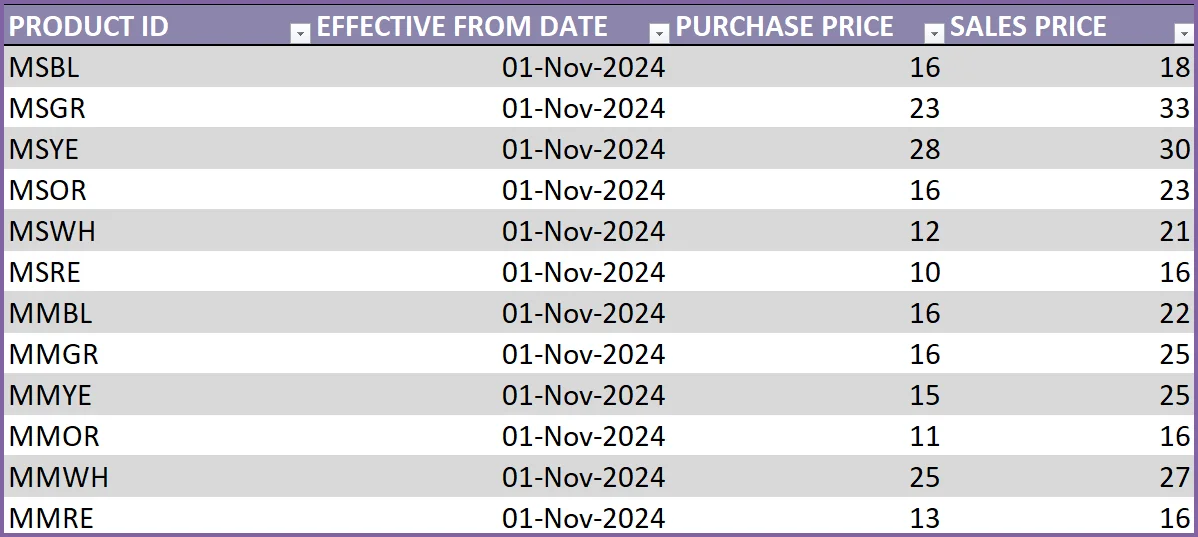
Purchase Price is the price we pay our suppliers to purchase products. Sales Price is the price we sell the products to our customers at.
To begin with, let’s assume we start using this template from Nov 1, 2024 to enter orders.
We enter each product in this Prices table and enter Nov 1, 2024 as the Effective Date. The Purchase and Sales prices we enter will be the prices effective as of Nov 1, 2024.
What if price changes?
The template is designed to accommodate price changes for products. You may have an increase in prices of certain products over time. Not a problem.
If price changed for a product from Jan 1, 2024, we will just add a new row, enter the Product ID, Effective date (as 01-Jan-2024) and the new Purchase and Sales prices. Please note that we have to add new rows whenever prices change, and not to replace the older data.
We have to enter both purchase and sales price in each row, even if only one of them changes.
Step 5: Enter list of Partners
In the Partners sheet, we store the list of our partners. Partners include Suppliers and Customers.
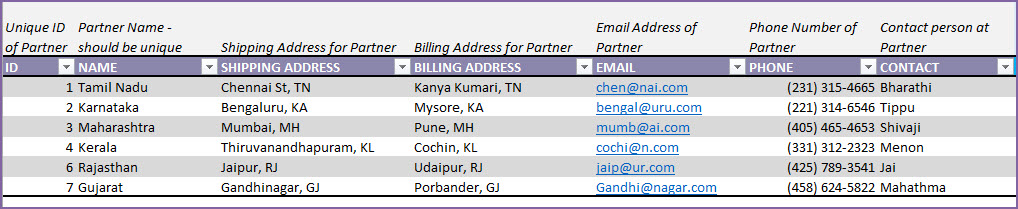
If a partner is both a customer and a supplier (it is possible in some scenarios), enter the partner only once.
- Partner ID and Partner Names should be unique.
- Enter Shipping and Billing address, E-mail address and Phone number.
- Enter the primary person of contact for each company in the CONTACT field.
This sheet now serves as a nice organized set of data about your partners.
We have completed the initial set up now. It’s time to enter our first order.
Creating Orders
Before we enter our order, let’s learn about the types of orders. You can create 3 types of orders in this template.
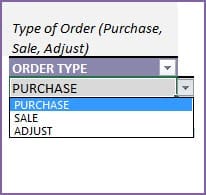
- PURCHASE: When we purchase products from our suppliers, we enter a PURCHASE order. This order will add the purchased items to inventory on the Expected Date.
- SALE: When we sell products to our customers, we enter a SALE order. This order will subtract sold items from the inventory on the Expected date.
- ADJUST: We can create an ADJUST order and enter negative quantity values to reduce inventory or positive values to increase inventory as needed. This can be used to adjust our inventory numbers to ensure that the numbers match the inventory on hand. For example, we may lose products due to damage or expiry or other reasons. We would want to adjust our inventory accordingly and that’s where we can use ADJUST order type.
Creating a Purchase Order
Orders are entered in this template in 2 stages – 1) Order Header and 2) Order Details. Let’s use an example. The products here are shirts for boys and girls. They are available in different colors.
In the Order Headers sheet, we enter the following information.

The Order Number should be unique. In other words, each order should be entered in one and only one row. The field should not be blank.
We can enter any method of numbering orders. The template does not limit that and does not create any pre-defined order numbers. Here, we have entered ‘P1’ as order number, to reflect that it is the first purchase order we are entering.
Order Date and Expected Date
Each order will have 2 dates. Order Date and Expected Date. Order Date is the date when the order is placed. Expected Date is the date when the inventory is impacted.
For example, if you place a purchase order on Nov 5th. The supplier says the products will reach your inventory on Nov 25th. Here, Nov 5th is Order Date and Expected Date is Nov 25th. If there is a delay later and the supplier says it will only reach on Nov 27th, then we have to update the Expected Date of our order to Nov 27th.
Order Type is ‘Purchase’ and we have chosen our supplier in the Partner Name field.
There are additional information we can enter in the Order Header.
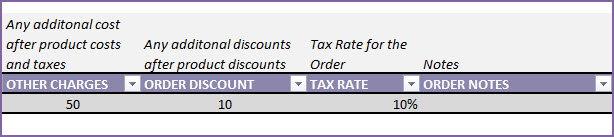
- OTHER CHARGES: Any additional cost on the order. For example, shipping charges.
- ORDER DISCOUNT: Any additional order level discount amount (not %). We will be entering product level discounts later.
- TAX RATE: Tax Rate % applicable for this order. We can have different tax rates for different orders.
- ORDER NOTES: Enter any notes for your reference to this specific order.
Now, we enter the items on the order in the Order Details sheet.
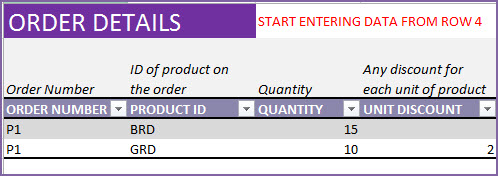
It is very simple. Enter Order Number, Product ID, Quantity and any Unit Discount.
Here, we have entered a purchase order to purchase 15 units of Boys Shirt in Red color and 10 units of Girls Shirt in Red color. There is a discount of $2 (any currency you use) for each of the 10 Girls shirts and no discounts for the Boys shirts.
The template will calculate amounts for each line item. Let’s understand how the calculations work.

Unit Price is automatically pulled over from the Prices sheet. Price chosen will be the one that was effective as of the Order Date of the order.
BRD (Boys Shirt – Red color)
- Amount Before Tax = Quantity * (Unit Price – Unit Discount) = 15*(20-0) = 300.
- Tax = 10% of 300 = 30
- Amount After Tax = 300 + 30 = 330
GRD (Girls Shirt – Red color)
- Amount Before Tax = Quantity * (Unit Price – Unit Discount) = 10*(25-2) = 230.
- Tax = 10% of 230 = 23
- Amount After Tax = 230 + 23 = 253
This purchase order will automatically update the inventory by adding 15 units to BRD and 10 units to GRD. We can view the inventory levels in two places in this template. One is the Report sheet. Another is the Products table. We will cover these later in the Reporting section below.
Creating a Sales Order
Entering a sales order is very similar to the purchase order, except that our Order Type is ‘Sale’ now.

As shown in the image above, to add an order, we just add our entry in a new row in Order Headers sheet.
We enter S1 as Order Number. This sale order was placed on Nov 26th and products were given to customer on the same day (Nov 26th).
In the Order Details sheet, we add 2 rows as we are selling two products (BRD and GRD). 10 units of BRD and 5 units of GRD.
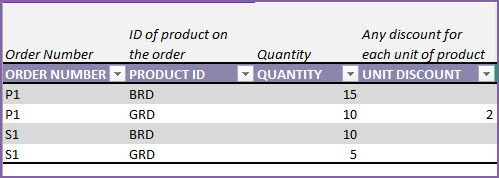
This order will now automatically reduce inventory for each of the products, effective as of Nov 26th (Expected date).
Handling Supplier Return
If we have a situation where we want to return products back to our supplier due to some reason (example: defective products), we can do so easily.
We will enter a new Purchase order.
Tip: For easier identification of return orders, you can enter order number differently. For example, use a prefix of PR for purchase return orders.
In our example, after receiving the products on Nov 25th, we notice that there are 5 defective BRD units. We want to return them.
So, on the next day (Nov 26th), we send the products back to the supplier.

In the Order Details sheet, we will enter the information on returning product and quantity.
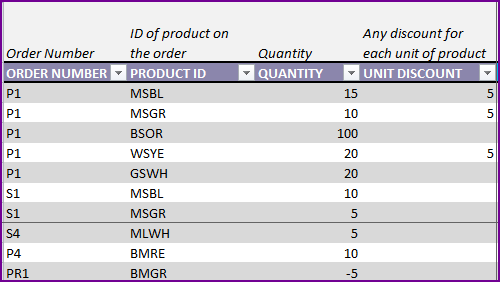
Since we are returning 5 units of BRD, I have entered -5 as Quantity. Entering a negative value is important. That ensures that our inventory is reduced by 5 units for this product.
Handling Customer Return
Similar to the Supplier Return, we can also handle customer returns. If customer decided to return products to us, we can enter that information in the template. We use a Sale order for that purpose.

In this example, SR1 is the sale return order that is placed on Nov 30th.
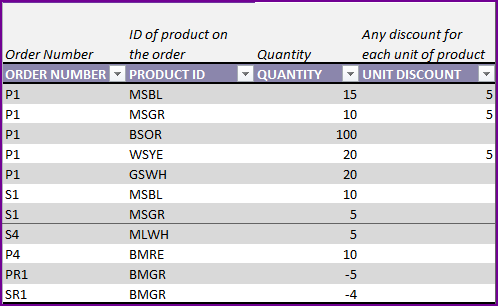
4 units of GRD are returned by the customer. We enter -4 as Quantity. This will be used by the template to add 4 units to GRD inventory, effective as of Nov 30th.
Creating an ADJUST order
On some occasions, we may find that a product is either expired or damaged locally at the warehouse. We cannot return it to the supplier, and we cannot sell that to customer too. We need to make sure that our current inventory calculations reflect the true available inventory to sell. This is where we can use the order type ‘Adjust’.
In the Order Headers sheet, we first create a new Adjust order.

For example, one GRD shirt was damaged in the warehouse and we notice it on Dec 1st. So, we enter it as shown below.
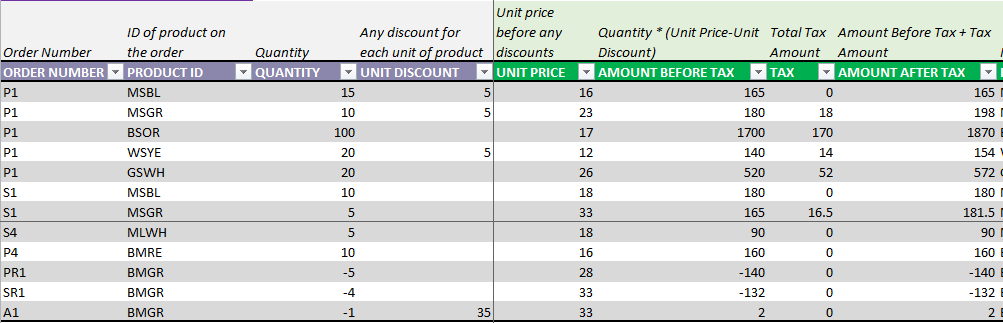
We enter -1 as Quantity. This will reduce the inventory by 1.
If we want to increase inventory levels without entering a purchase order, we can use an ADJUST order where we enter positive values as Quantity.
We enter 35 as Unit Discount (as that is the sales price of the product). This is to zero out the impact on cost. If we are not incurring any additional cost by disposing the shirt, then this method is recommended.
If we incur any additional cost, then we enter the appropriate Unit Discount so that the total Amount after Tax reflects the disposal cost.
Business Performance Reporting
The template has extensive automated and interactive reporting in the Report sheet.
Current Status (Inventory level and Inventory value)
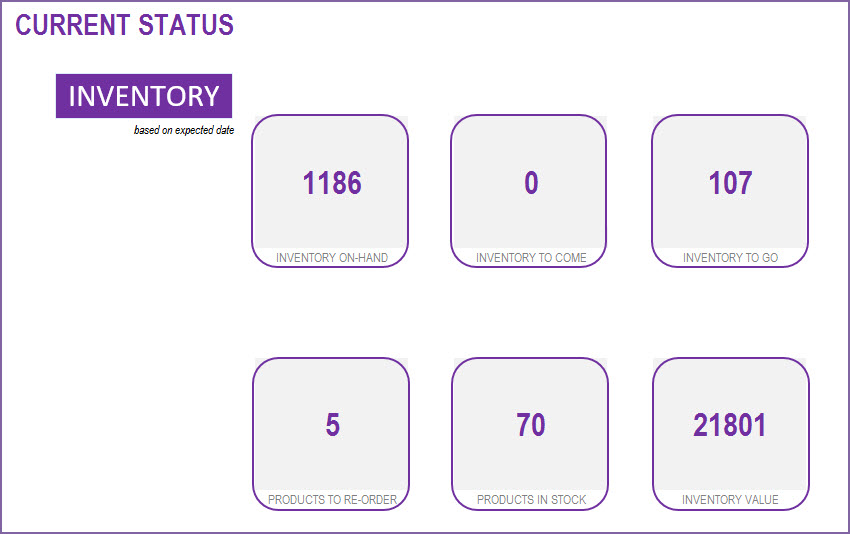
The following metrics are displayed to reflect the status as of today.
- Total inventory (quantity) on hand
- Total inventory to Come (ordered from suppliers already and will reach our inventory in future)
- Total inventory to Go (ordered by customers already and will leave our inventory in future)
- Number of Products to re-order (products whose current inventory is at or below its Re-Order Point)
- Inventory Value (calculated based on current purchase price of the products on hand)
The above presents the overall summary of all products together. We would also want to see this information individually for each product. To do that, we go to the Products sheet.
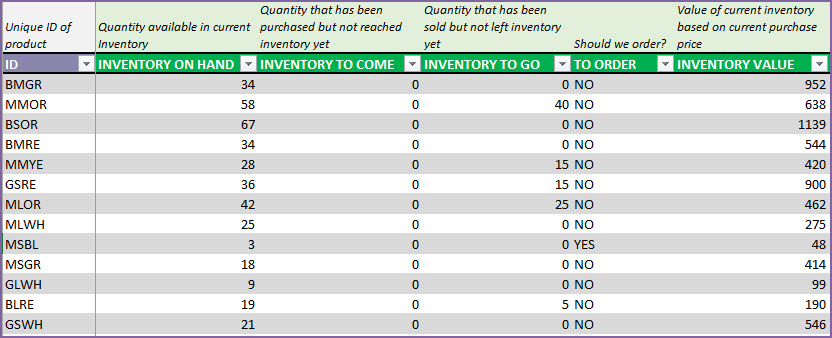
Now, the rest of the Report sheet presents an interactive way of accessing business performance metrics.
We can customize the date range for the report by choosing any start and end dates.
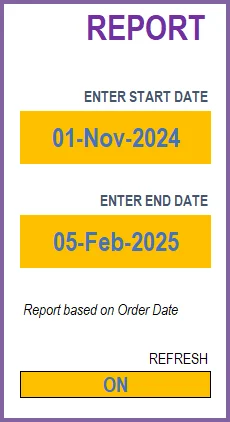
We leave the Refresh as ON. If you enter a lot of order data over time and if you notice the file is getting slower, you can turn this OFF. It will stop the report from refreshing constantly and that will improve performance.
For the date range we entered, we can see the summary metrics.
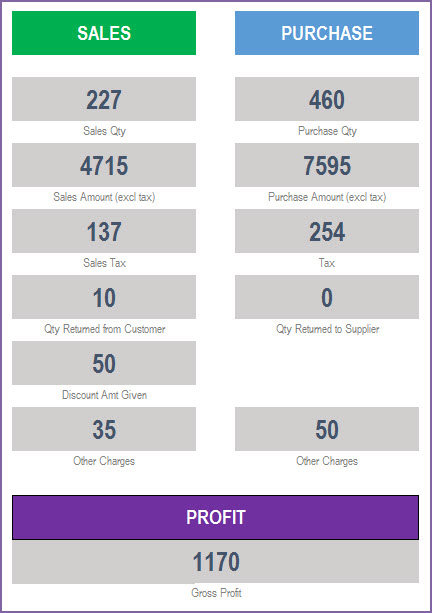
- SALES
- Sales Qty: Total of quantity on Sale orders. Considers returns as well.
- Sales Amount: Total Order amount on the Sale orders. Includes product level discounts. Does not include tax, order level charges and order level discounts.
- Sales Tax: Total tax amounts on Sale Orders
- Qty Returned from Customer: Quantity returned by customers
- Discount Amt Given: Total amount of discount given to customers
- Other Charges: Total of other charges on all Sale orders
- PURCHASE
- Purchase Qty: Total of quantity on Purchase Orders. Considers returns as well.
- Purchase Amount: Total Order amount on the purchase orders. Includes product level discounts. Does not include tax, order level charges and order level discounts.
- Tax: Total tax amounts on Purchase Orders
- Qty Returned to Supplier: Quantity returned to suppliers
- Other Charges: Total of other charges on all Purchase orders
- PROFIT
- Gross Profit: Sales Amount – Cost of Goods Sold
- Cost of Goods Sold is the sum of purchase price of products sold. Purchase price is the price of product as of Sale order date.
- Gross Profit: Sales Amount – Cost of Goods Sold
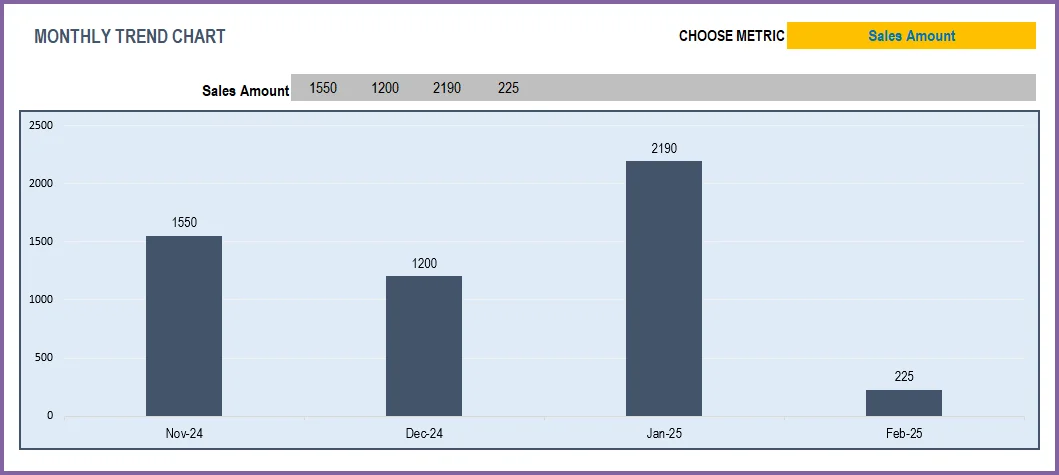
We can view these metrics by month, for 12 months at a time.
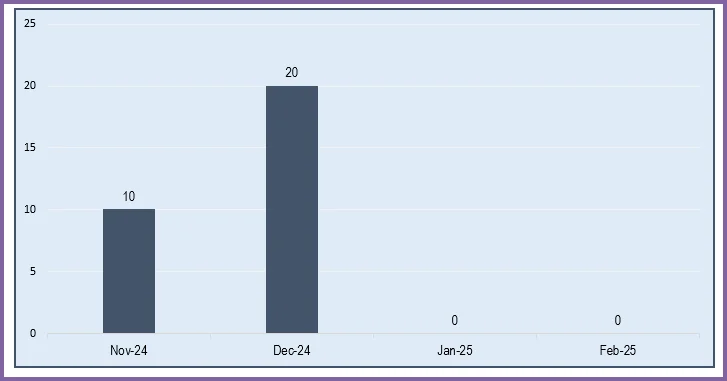
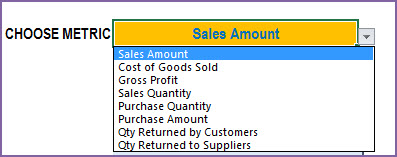
We can choose one of the metrics to display data on a chart showing trends over 12 months.
Top 10 and Bottom 10 Products
One of the important pieces of understanding business performance is knowing which products are selling the most and which ones are not. We have 3 ways of measuring sales – Quantity, Amount and Margin. This allows us to understand the true impact of the products to the business.
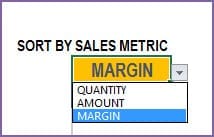
We will see top 10 and bottom 10 Product Categories by the selected Sales metric.
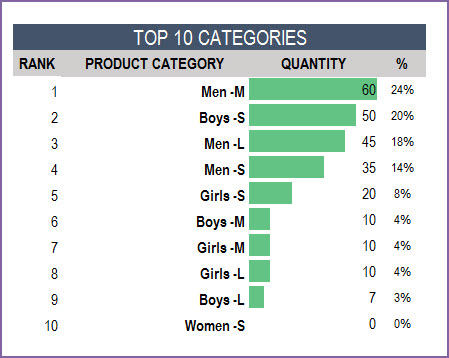
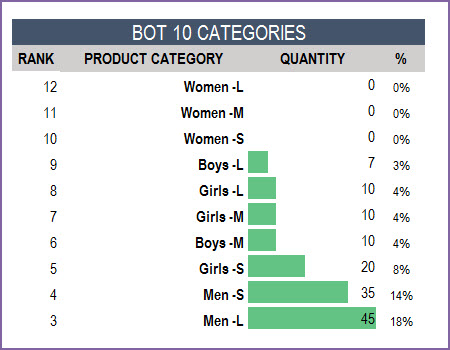
Similarly, the top 10 and bottom 10 Products by sales metric.
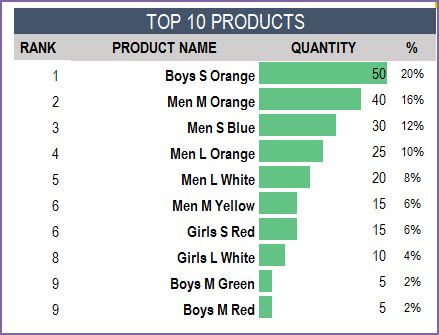
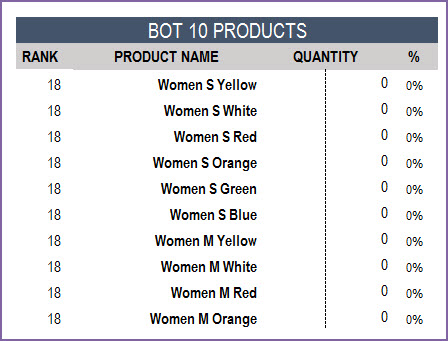
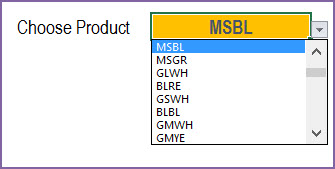
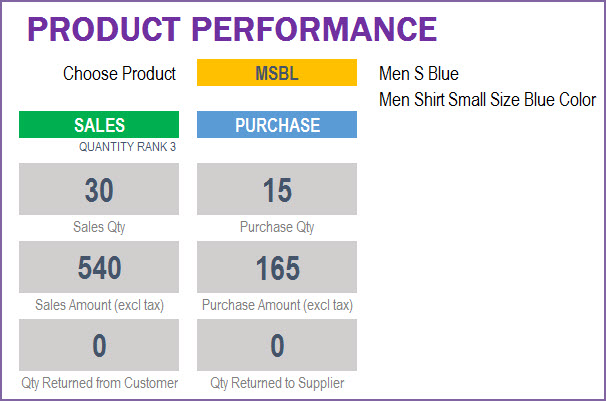
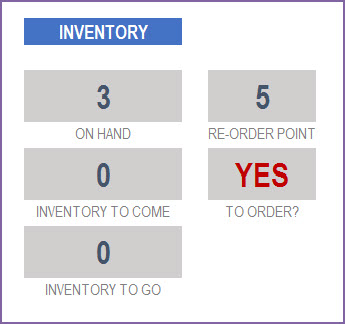
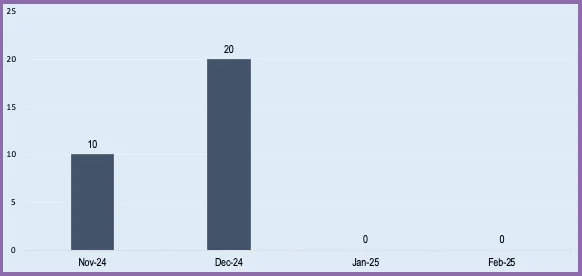
If we want to look for details of a specific product, we can choose the product ID from the drop down.
Partner Performance
Another important aspect is to understand best partners (customers and suppliers).
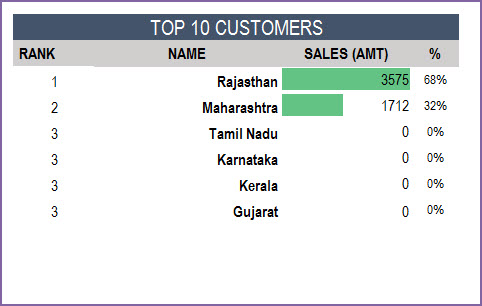
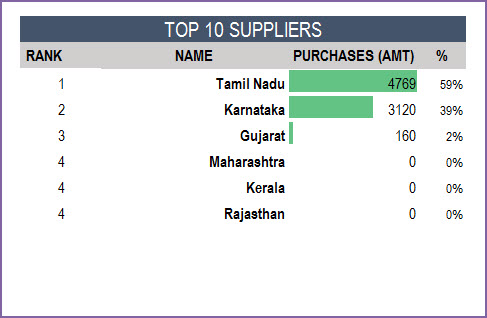
We can then see the details of one specific partner at a time.
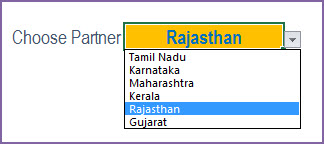
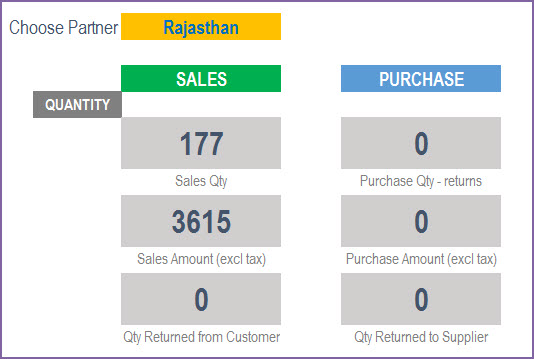
Use this retail inventory template to handle all your inventory management requirements. If more details are required please visit customer support for this retail inventory management excel template.
Recommended Templates
For more features like
- Invoice Generation (Customizable design)
- Checks inventory availability in invoice
- Purchase Order Generation
- Accounting – Track payments made and payments due
-
 Retail Business Manager – Excel TemplateOriginal price was: $50.$40Current price is: $40.
 -
Retail Business Manager (Pro) – Excel Template (Multiple Locations)$50
-
Retail Business Manager – Google Sheet TemplateOriginal price was: $50.$40Current price is: $40.
212 Comments
Great post! Thanks for sharing this valuable information. Keep up the excellent work.
Thank you so much for the kind words — glad you found it helpful! We appreciate you taking the time to share this.
This Excel template looks incredibly useful for managing retail inventory! I love that it’s free and easy to use. Can’t wait to give it a try in my store and streamline my inventory process! Thank you for sharing!
Thank you so much for your kind feedback! We’re delighted to hear that you found the Retail Inventory Tracker useful and easy to use. We hope it helps streamline your store’s inventory process and makes management more efficient. Wishing you great success, and we truly appreciate you choosing our template!
Best wishes.
Thanks for providing the great template. I am using the free version to monitor sales and total revenue. It has worked great for the last year, however the “Monthly Metrics” section of the Reports tab is not picking up data for April 2023 onwards. I have checked the formatting and the fields across the different worksheet tabs but cannot figure out the solution.
The central part of the report tab ie the Report with sales,purchase and profits is working fine and displaying updated stats for April 2023.
Would appreciate if you can suggest a possible solution.
thanks you.
Thank you for using our template and sharing your valuable feedback.
Please share your sheet to us at the below link to assist further:
https://support.indzara.com/support/tickets/new
Best wishes.
Good Morning All,
I want to thank you for providing the Retail Inventory tracker spreadsheet. It has been very helpful. My wife and I have an online retail business selling clothes. I was wondering if I could add two more columns for the size and color of the clothes.
You are welcome.
You can add additional columns without impacting sheet’s calculation.
Best wishes.
Hi. Hello.
Thank you for such great template!
However, I had some issue when entering *ORDER_DETAILS* in which, Price Check return as -3
Please help me out
I thank you for such great effort! Looking for to purchase upgraded version!
Thank you for showing interest in our template.
It shows as -3 when the price is not available for the selected product for the order date.
If you have price of the selected product entered in Price table for the order date, please share your sheet at the below link to assist further:
https://support.indzara.com/support/tickets/new
Best wishes.
Hi there,
Where can I get and try the free version of the Premium template?
https://indzara.com/product/retail-inventory-and-sales-manager-excel-template/
Regards,
Thank you for showing interest in our template.
Free version with limited features of the Retail Business Manager template is available at the below link:
https://indzara.com/2017/02/free-retail-inventory-management-template/
Best wishes.
Dear sir
can i get the report as PDF document(retail inventory tracker free template) to be saved in the local computer
kalinga gananath.
Thank you for showing interest in our template.
You can just press CTRL+P to export as PDF. The print area in report is already set to provide 6 page PDF.
Best wishes.
Hi there,
I need a stock management excel sheet with everything included, the stocks in and out, the sold stocks, the stocks transfer to other branch, the stocks sold daily, the complete report, the costs of each goods, the overall profit from sold items, the stocks that need to be reordered, etc. I don’t know wether all these include in your templates. If not can you add all the features that I need to the template and give it to me.
Thanks,
Mehdi Bayat
Hi Mehdi Bayat,
Thank you for showing interest in our template.
All the requested features are available in our Premium version of the template. Following is the link to the same for quick reference:
https://indzara.com/product/retail-inventory-and-sales-manager-excel-template/
Best wishes.
Hi there,
Thank you so much.
Where can I get and try the free version of the Premium version of the templates?
Regards,
Dear Sir it will help me alot if you can upload Template for Wooden Door’s and Hardware category Raw Material Inventory Sheet because i have searched every regarding wooden doors raw material not even single place i find inventory sheet for wooden doors and there hardware’s like Door handle, Door Nail’s, Door lock, Door Paint, Door Hinges, Door Veneer, Door Formica Sheets.
Plz sir help to make 1 Excel Sheet according to above mention Items
Good Day to all,
I just want to ask if you have inventory management for our type of business in which we provide product samples for a duration of time indicated in the contract that we have to reach a certain target. We also want to monitor the equipment’s used every time it was borrowed to our logistics department.
I need a real time tracker of our goal (target vs reached) and will also show our current inventory.
Thank you
Thank you for showing interest in our template.
We have a template to monitor the borrowed equipment’s and following are the link to the same:
https://indzara.com/product/rental-inventory-sales-manager-excel-template/
Trail Version:
https://indzara.com/2016/08/free-rental-business-excel-inventory/
Regarding target vs reached,
You can tweak our Resource capacity planner template to plan for each equipment’s as resource target as capacity and demand as reached to get an output related to target vs reached. Following is the link to the template for quick reference:
https://indzara.com/product/resource-capacity-planner-excel-template/
Best wishes.
Good day, Sir, do you have an inventory management system for the type of business we have, our business is about Agricultural products, we are a retail and wholesale store, and we also have manufactured products. One thing I’m looking for that will perfectly match our situation is that there is a particular area wherein we could input data on our customers who have a long list of borrowing from us. In the different areas of our town, we have a lot of customers who owe us money, who first borrow a lot of items and will pay them later on after some months. If you would please recommend me something that will be of great help to our business, thank you very much!
Thank you for showing interest in our templates.
We have separate templates for Retail and Manufacturing business. But you can use our Manufacturing business template for Retail as well as for Manufacturing by entering the retail products as Raw material and product and compose the BOM (Bill of Materials) with the same product name and raw material name. Following is the link to the template for quick reference:
Manufacturing Business Manager:
https://indzara.com/product/manufacturing-inventory-sales-manager-excel-template/
Trail version:
https://indzara.com/2016/08/free-manufacturing-inventory-tracker/
For tracking the end to end cash flow of the business, please check our Small Business Finance Manager template at the below link:
https://indzara.com/product/small-business-finance-manager-excel-template/
If you just want to track the invoice, please check our invoice manager template at the below link:
https://indzara.com/product/invoice-manager-excel-template/
Trail version:
https://indzara.com/2016/07/invoice-tracker-template-free/
Best wishes.
Good day Sir, I’d like to download this free template, how can I download this please? This will be very helpful in our business. I’d like to try this first and maybe upgrade later on if my mom approves of this. Thank you very much!
Thank you for showing interest in our template.
You can download the template from the download link present in the article. Following are the direct download link for quick reference:
Sample:
https://indzara.com/wp-content/uploads/2017/02/Retail_InventoryTracker_ExcelTemplate_2_v1_1_Sample.xlsx
Blank file:
https://indzara.com/wp-content/uploads/2017/02/Retail_InventoryTracker_ExcelTemplate_2_v1_1.xlsx
Best wishes.
we have cloth business, we purchase cloth from a dealer in bulk and then sell-in suit wise and second we have tailors when someone purchase suite from us then often the give back us for sewing. and the tailor sewing for us as commission base per suite. now we want to have such type of format to control my business for the long term.
Thank you for sharing your requirement.
I believe, our manufacturing business manager template will help you track the consumption of cloth material on tailoring a suit. You can add the tailoring commission as other charges in the order. Following is the link to the template for quick reference:
https://indzara.com/product/manufacturing-inventory-sales-manager-excel-template/
We also take customization project for a fee. If the above mentioned template does not suit your need, please share us more details about the requirement in an excel sheet with sample input and sample output to support@indzara.com for estimation.
Best wishes.
Hello, I really appreciate this free template it can really help me in my business. I have one qustion. Can I import this to google sheets without having any issues with formulas?
Thank you for showing interest in our template and sharing your valuable feedback.
No, our excel templates are directly not supported in Google Sheet template. You can use our Google Sheet version of the template built separately for Google Sheet. Following is the link to the same for quick reference:
https://indzara.com/2020/03/retail-inventory-tracker-free-google-sheet-template/
Note: Our Google Sheet template will not work offline as Excel template. But you can upload our Excel template to Microsoft OneDrive and use Excel online, which is similar to Google Sheet and Google Drive.
Best wishes.
Hi Indzara,
I’m very happy with the product and kudos to the developers who did this template, appreciate if you can assist me, how do i can fulfill column inventory to come and inventory to go? could you tell me, step by step to do that? thanks a lot
The inventory to come and inventory to go will be auto filled with the future dated purchase or sale orders.
If the same is not getting populated at your end, requesting to share your sheet with sample date of the highlighted issue to support@indzara.com to check further.
Best wishes.
For months, this file helped me a lot with our growing business. Using this, we were able to track how our business is doing. So kudos to the maker! You’re helping a lot of people.
But I’m just wondering. I just noticed that the price of starting inventory wasn’t recorded in the Purchase section of the Report. How should I add its price to the total? Thanks.
Thank you for sharing your valuable feedback.
You can add a dummy purchase order instead of starting inventory to enter the cost.
Best wishes.
Okay, I understand. Once again, I would like to thank you for creating this wonderful tool!
You are welcome.
Best wishes.
I want to mataine stock in excel ZONE WISE RACK WISE BEEN WISE LOCATION WISE
Required stock mataine in excel
Below Report Required
Inventory Transaction Reports
Store Location-wise Report
Inventory Item-wise Report
Vendor-wise Stock Report
Inventory Valuation; and
Inventory Closing Balances and Values
Stock transfer report
Thank you for reaching out to us.
Requesting to check our Retail Business Manager Pro at the below link:
https://indzara.com/product/retail-inventory-and-sales-manager-excel-template/
We take customization project for additional fee. You can write to support@indzara.com with your requirement for estimation, if your requirement is not fulfilled in the above mentioned template.
Best wishes.
So I have being using this free template to track my inventory and to be honest it’s very useful and it helped me a lot .. and I just need a small help from your side I notice that the returned from customers inventory doesn’t show in the reports even when I add as an ADJUST and it doesn’t reflect on the sales or the profit so can you please give the right formal so I can add it
Thank you sharing your valuable feedback.
You can use SUMIFS formula in products tab mapping the order type, product and report duration. Then you can take top 10 and bottom 10 from it in report tab.
We take customization project for additional fee. You can write to support@indzara.com for estimation.
Best wishes.
This is so good. I need a template. How can I get it
Thank you for showing interest in our template.
You can scroll down the page and click the blue coloured download button to download the template.
Best wishes.
First of all I’m very happy with the product and kudos to the developers who did this template, appreciate if you can assist me, would like to inquire if how can i customize this template. like to know below information in a weekly basis
1. Fast selling product per categories, current template knows only the top categories but cant break down to products
2. Weekly trend of the product, would want this in our forecasting on when to order the fast selling product
3. Most profitable produce per categories
Let me know how can we customize this.
Thank you for using our template.
We take customisation projects for additional fee. Requesting to share your requirement to support@indzara.com for estimation.
Best wishes.
RE: RETAIL INVENTORY TRACKING SYSTEM
Please let me know how to expand the template to accommodate up to about 20,000 line items of products.
Also, whether I can transfer products from one location to another using barcode scanner for the transfer as there
are many items to transfer each time.
Thank you for showing interest in our template.
Regarding template’s limit:
Currently, the template does not have limit on number of product, but having 20000 products might reduces the sheet’s speed.
Regarding barcode,
Currently, our template does not support barcode scanning.
Regarding transferring of product from one location to another,
This feature is available only on our Retail Business Manager pro template. Following is the link to the same:
https://indzara.com/product/retail-inventory-and-sales-manager-excel-template/
Best wishes.
Just starting business (retail business). want to learn how to record inventory and sale, make reports, etc
Thank you for reaching out to us.
Requesting to check our Retail Business Manager to manage inventory and sales. Following is the step by step user guide on how to use the same:
Template link: https://indzara.com/product/retail-business-manager-excel-template/
User Guide: https://support.indzara.com/support/solutions/articles/62000151449-retail-business-manager-excel-step-by-step-user-guide
Best wishes.
Hello.
Thank you so much for your templates.
Unfortunately, while I am using this templates no unit price is generating on my order details (sheet).
Please help me fix this. thank You so much.
Hi,
Thank you for using our template but we are unable to replicate the issue from our end. Hence, requesting to share your sheet to our support team at support@indzara.com to further check on your concern.
Best wishes.
Thanks for this template! The only issue I see so far is the “inventory on-hand” does not update as products are being inputted into data fields? Any advice?
GOOD EFFORTS…
NEED TO KNOW MORE ABOUT YOUR PRODUCTS
Thanks for your message.
Please write to us at contact@indzara.com
Best wishes
Indzara,This is great! I have some questions. Is this the recommended template for an “Ebay store?” I have an online business where I accrue the shipping cost for customer orders in order to advertise “free shipping”. I factor in the shipping into the cost. How can i account for this esp when im analyzing monthly metrics and so on?
Thank you
also the same products sell at different prices if i sell locally via facebook market place. How should I account for this?
Thank you.
In the free template, Operational expenses are not separately recorded. In the premium template, https://indzara.com/product/retail-business-manager-excel-template/
if you put the shipping cost as part of the operational expenses, it will be tracked separately from cost of goods sold (which is the purchase price of product from your supplier).
Please let us know if any questions.
Best wishes.
hi indzara, it seems that the return quantity is not showing. how do we input the data to show the return of quantity in the report? Thank you
Thanks for using our template.
At times a missing link or a deleted formula can be a reason behind these issues. Please download the template again and in case the issue persists, please share the file along with the list of issues to contact@indzara.com.
Best wishes
Dear Indzara,
We are looking to purchase this excel of retail business manager, however we wanted to get expiry dates in the dashboard since our business deals in food items.
Can you kindly advise if there this option whereby it alerts us on expires coming up provided the limit time has been assigned
Best regards.
Nash.
Thanks for using our template.
You may add the expiry date in the products tab, in column I. However, you need to track the expiry date on a regular basis.
Best wishes
required jewellery management and production tempelete
Thanks for your message.
Please review our Manufacturing – Inventory and Sales Manager at https://indzara.com/product/manufacturing-inventory-sales-manager-excel-template/.
Best wishes
Hi..
Its highly appreciated for your unequaled templates.
Unfortunately while i am using this templates no unit price is not generating on my order details (sheet).
Please help me to fix this.
Thanks for using our template.
Please ensure that none of the formulas or links are deleted. In case the issue persists, please share your file along with the list of issues to contact@indzara.com.
Best wishes
Hi! Thanks for sharing a lot of helpful templates. I am currently using your retail-inventory-management-template but for some reason, the Sales Qty, Discount Amt Given and Profit data are not generated in the Report Sheet. How can this be fixed?
Thanks for using our template.
Sometimes a broken link or a formula can be a reason for this.
Please check the file. In case the issue persists, please email your file with the list of issues to contact@indzara.com
Best wishes
Thanks for sharing. I appreciate your effort in building this template.
I have several customers at different selling prices, how would I enter those and keep track of my inventory?
Thank you.
Thanks for using our template.
There is a provision for offering a discount. You can change the discount amount for each customer and then generate orders.
Best wishes
You’re a genius!
I greatly appreciate your time and effort you’ve put into building these spreadsheets, they are amazing!
Take care.
Hi,
Thanks for sharing the above template, however it seems more as a frozen worksheet n my pc.. Is it meant to be like that?From your comments my understanding was that it is free to use. In my pc al the buttons are inactive even the copy paste in order to add any data..
I would appreciate is you give me some help with that.
Thank you!
Thanks for downloading our free template.
It seems your file is “read-only”. Please download a fresh copy and use it with full rights.
If you still face issues, please email your file with the list of the issue to contact@indzara.com
Best wishes
hi
can you please email me the template..
much appreciated..
Hello
We understand that you are using the above template now. However, we would like to know the reason behind the error messages.
Therefore, please share the Excel version, Windows version and a screenshot of the error.
Best wishes
Hello,
This template looks really great. Where can I download it?
Thanks!
Thank you.
Please use the download link in the post above. https://indzara.com/2017/02/free-retail-inventory-management-template/
Best wishes.
Hi, I can’t download the template. Can you please assist?
Hello
We have shared the file through email.
However, we would like to know the reason behind the error messages.
Therefore, please share the Excel version, Windows version and a screenshot of the error.
Best wishes
May I have the template too? Thanks for your effort!
Hello
We understand that you are using the above template now. However, we would like to know the reason behind the error messages.
Therefore, please share the Excel version, Windows version and a screenshot of the error.
Best wishes
Good Day! Can you email me the template please? I can’t download it
Hello
We understand that you are using the above template now. However, we would like to know the reason behind the error messages.
Therefore, please share the Excel version, Windows version and a screenshot of the error.
Best wishes
Can you email the template to me, please? I can’t download it.
Hello
We have mailed you the template.
Thanks
This is an amazing template for small businesses like my own. Everyone should get one!
Thanks for your compliments!!!
Hi, this template looks nice. Can I please have the file sent to my email regino_0030810@yahoo.com. Thank you.
Hello
We have shared the file. Meanwhile, please let us know what issues you faced while downloading the template from the webpage.
Best wishes
Hi, this is a very good template!! When i’m buying the same product for the second time on a different price and i’m entering it on a new row. How can i calculate the average purchasing price of the item?
Hello
Send Me Files through n2bra@yahoo.com
Hello
We have shared the file. Meanwhile, please let us know what issues you faced while downloading the template from the webpage.
Best wishes
i am using your templates it is very usefull for us i am using retail inventory tracker but i am having problem in price collum our price are changed client to client not date to date how could i adjust it in sale price because when i set the sale price twice on same date last price are subject to change on all same date customers but my customers sale price are different
Thanks for using our template.
Please ensure that none of the formulas of links are broken. You may download the template again. In case the issue persists. Please email your template with the list of issues to contact@indzara.com
Best wishes
Hello Dear
Send Me Files through JavedIbrahimi24@gmail.com
Hello
We have shared the template through email.
Best wishes
Hi Dear
How can I take the template copy and save it in my Pc
Hello
You may prepare copies of the template.
Best wishes
Hi there, i am having issues with the report section of my excel sheet. I wish I can screen-grab it to explain better. I have imputed all the fields correctly. But the Report section is not updating. It still has same information as at when I downloaded it.
Thanks for using our template.
Please send your file along with the list of issues to contact@indzara.com
Best wishes
Hello,
Great template, I’ve been using it for a while now but column headings no longer stay on top of the page when I scroll down.
Also, I am using two copies of this workbook to track two separate warehouses that stock the same inventory. If I upgrade to your paid version that allows multiple warehouses, will I be able to transfer over my data easily?
Thanks
Thanks for using our template.
You may freeze the top rows to keep the column heading visible.
You have to enter the data manually to the new file.
Best wishes
Send file to this Email: marakthorng123@gmail.com
Hello, thank you for this template. I just downloaded it and the formulas in the Inventory to come and the Inventory to go do seem to be working. I have completed the spreadsheet as instructed and refreshed, but they are still at a 0.
Thx,
Melissa
Thanks for using our template.
Please share your file along with the list of issues to contact@indzara.com
Best wishes
file are not downloading. please send me on zafarasim9315@gmail.com
Thanks
Hello
We have sent the file through email.
Thanks
Hi Indzara,
First of all, thank you for sharing this great template.
I’m using your free retail inventory management template and it was running fine for almost 2 months.
But suddenly, this morning I found out from the report page that some of the data value was not populating the correct sales prices which suppose remains used the ‘effective from date’ in the Prices sheet.
How could I fix it in the Order Headers & Order Details to pick up the correct prices again?
I’m sorry, it was my bad. i found my mistakes, please disregard my message.
Thank you for the file!!
Dear Indzara Team,
thank you for your huge effort.
how can we feed the data on daily incoming and outgoing basis.
if i sold 5 items out of 40, how the remaining item will show 35
Thanks for using our template and sharing your positive feedback.
The product tab calculates the current inventory level. Suppose you get a sales order for 5 items, it would be deducted from the existing inventory and shown in the products tab.
Best wishes
Thank you so much for this product. Very helpful
Thanks!!!
Hello, amazing template,
we use tally for our business of a showroom of consumer appliances electronic goods, how do i input data into the excel sheets from tally, it’s a lot of data.
Thanks for using our template and sharing your experience.
As of now the data in the relevant columns are to be filled manually. However, we have noted your suggestion and will try to incorporate them in future releases.
Best wishes
Dear Sir
Thank you for the template. Its very useful for my small business. However I seem to be facing a problem with the template. The Unit Price, Amount before tax..etc.. in the order detail sheet are not automatically calculating the values. I tried to filter some data in the sample data template you have and I found out that if I select a filter in any of the sheet, the details on the order details sheet vanishes.
Thanks for sharing your positive experience.
At times a broken link or a missing formula can be a cause for these issues. Please check your file for these. In case you still have any issues, please share your file along with the list of issues to contact@indzara.com
Best wishes
Good Morning.
Very nice templates very useful and easy to use. I was wondering if this template will work on IOS . I am planning to use a Mac book to use these tool.
Thanks for your interest in our template.
Our templates work on iOS too. Please use Excel 2013 or later editions.
Best wishes
ONE MORE THING SIR I AM BUYING RAW MATERIAL AND PROCESSING WHERE I WILL GET WASTAGE FROM PURCHASER TO FINAL PRODUCT. RAW MATERIAL TO FINAL PRODUCT WASTAGE IS 1 %. HOW TO INPUT TAT DATA IN THIS SOFTWARE
This template is not designed for manufacturing business. This is for selling a product as it was purchased from supplier.
Sorry, wastage is not handled in the templates.
Best wishes.
THANKS SIR, NO ISSUES, ITS A AWESOME WORK YOU ARE DOING I AM USING THIS TEMPLATE AND ITS VERY USEFUL TO ME
Thanks for your positive feedback
GOOD TOOL, I AM RUNNING A SMALL BUSINESS SUPPLYING MILLETS TO VARIOUS SHOPS WHERE I WILL GET THE MONEY ONE MONTH AFTER DELIVERY, I DONT KNOW TO HOW TO TACK THIS IN THIS SOFTWARE IS THERE ANY WAY TO TRACK THIS
Thanks for using our template.
Please use our free Invoice tracker https://indzara.com/2016/07/invoice-tracker-template-free/
Best wishes
Thanks.
Payments are not tracked in this template. The premium version https://indzara.com/product/retail-business-manager-excel-template/ allows that feature.
Best wishes.
Is this template work to input into pos systems by chance.?
Sorry, the template is not built with POS systems and works independently.
Best wishes.
Very nice work. Sir How to maintain departmental inventory for non expendable items.
Thank you. Can you please clarify what the non expendable items are and what inventory management is needed for those?
Thanks & Best wishes.
nice job very useful
Thank you.
Best wishes.
Hi!
I was wondering if we are able to duplicate “PR CUST FIELD” column within the sheet? Will it affect those columns with Green colored label?
Hello
You may duplicate the column and store customised data. However, please ensure that none of the formulas are edited.
Best wishes
Hello,
Now in all sheets main product identifier is Product ID. Would it be possible to change it from Product ID to Product Name so it would be easier to find the product to fill in Order Details?
Hello
All calculations are based on the product ID. In case you want to use the name, you can enter the product name at in the id column as well. Please ensure the product name is unique.
Thanks
This Excel workbook looks amazing! Can you tell me whether or not I could successfully import our current Excel inventory data into your retail inventory tracker? Our church gift shop has over 15,000 items that need an inventory management program…
Thanks for your wonderful feedback.
Since it does not use a macro, you have to enter the data manually to the sheets.
Best wishes
Hi Indzara,
I LOVE this template – it is wonderful! However, because your spreadsheet is made in a newer version of Excel, it will not convert to a format I can use the calculated cells. I am SO bummed!
Do you have an earlier version similar to this template? I am working with Excel 2003. This is for my small office, so I am not able to update to a newer version.
Thank you!!
Thanks for your wonderful feedback. Our templates are designed to work on Excel 2010 and later versions.
Best wishes
There is an issue with sheet. I have quantity 10. I made a sale of 1 item and then made a sale return(customer return). Its showing as customer return but product is still showing inventory in hand as 9 and inventory to go as -1. which is incoorrect. it should have been changed to 10
Hello
Please email your file with data and the issues that you are facing to contact@indzara.com
Best wishes
Hi! I have entered data as required, but green columns like unit price in column F, G, H and last column Purchase price still appear blank and not auto-populated. Can you plea guide me for a successful trial of xls template?
Thanks for your interest in our template.
Please ensure that the details in the previous sheets are filled correctly. You can download the sample file with data to understand the flow of data from https://indzara.com/2017/02/free-retail-inventory-management-template/
Best wishes
Hello,
I have found this very useful in tracking inventory but I would also like to track sales to each customer. Is it possible to generate a report where I can select an inventory item and it will show me quantity sold to each of my customers in the given period?
Great spreadsheet, keep up the good work.
Hello
In the ‘Report’ sheet, you can choose a product and it will display total sales and purchases during the selected time period. It will not show the quantity sold to each customer.
In the ‘Order Details’ sheet, if you filter on product and date, you can see all the relevant orders. It does not aggregate by the customer though.
Best wishes
This template is really easy and very powerful . It would be great if there is a functionality for including credit payment, in that way we can know how much money we are owed from our customer, because at times instead of paying immediately, the customer can avail a credit of 3 months or so. It will be good, if such a functionality is available.
Thanks for the positive feedback.
We will try to incorporate your recommendations in the next release.
Best wishes
VERY USE FULL
Thank you!!!
Hello, I have an online retail business and your template has helped track my inventory. Quick question, after I receive the products from a Purchase Order is there a way to ‘accept’ the products in the template to update the qty’s or is entering everything manually the only way?
Hello
The products received needs to be updated.
Thanks
Really helpful template.
Is there any way in which this can be used in 2007 excel version as well.In the 2007 version the price is not getting picked up in the order sheet.
Hello
All our templates are tested with Excel 2010 and later. We cannot assure you about the older versions.
Best wishes
In the order_details sheet, how is the unitprice calculated? I am understanding the details in the formula.
=IFERROR(IF([@[ORDER TYPE]]=”PURCHASE”,[@[PURCHASE PRICE]],INDEX(T_PRI[SALES PRICE],[@[PRICE CHECK ROW]])),””)
what is [@[ORDER TYPE]?
Thanks.
Hi Indzara thanks for the template.
Would you have any template to create a Scheduled cycle count?Or how to create a inventory cycle count schedule.
Thanks,
Hello
Thanks for using our template.
We have noted your feedback. We will try to incorporate these features in the next release
Best wishes
Hello Mr . Indzara,
Thank you so much for this amazing template. I am now try to using
my question is if my starting inventory for 1 item ( 10 QTY for example ) and the cost was 10$ then i purchase the same item ( 10 QTY for example ) but i have an additional cost ( shipping ) so the cost must be changed to 12$ why the cost not change automatically also when i make sales for the same item ( 20 QTY for example ) the template tack the last cost so what about the first ???
i mean i have two cost for the item
waiting for your reply
Thanks a lot.
Hello,
Please input the shipping cost under “Other Charges” column in the “Order Header” sheet.
Regards
Hi.
I am trying to use your template for my tshirt business. Basically I have 2 tshirt designs that I am selling and I purchase tshirts from my suppliers, with sizes ranging from Small to 4XL, 4 different colors, and 3 different types of tees (hoodies, tshirts, or crewneck). I purchase the shirts as needed, so I don’t really keep a stock unless I order more of a particular size and a particular color. So I guess my question is, would I put the types of designs under the “category” section on the settings tab, or is there a better way to put in this info? I currently have the type of tee and size in the product category area, and then in the products tab under “product name” I have the color, type of tee, and the size.
Thank you.
Choosing how to categorize varies by each business. I would say 3 types of tees can be included as 3 categories. Having Type and Size in the categories would be fine too.
When you look at the report, do you feel that the categorization helps in getting good insights about the business? Which products are doing well? Where to spend more money and where to stop spending?
If that is productive, then categorization is working. if not, you can try to change the categorization.
Best wishes.
Thank you very much.
great work.
I have question, Where should I register the salary? and from where it will be discounted ?
thank you
You are welcome. Thank you for the feedback.
There is no place to track expenses separately in this template.
In the Retail business Manager template https://indzara.com/product/retail-business-manager-excel-template/ , we can enter expenses in the expenses table and they will be used to calculate net profit.
Best wishes.
I am following all the steps as mentioned. Problem is that unit price is not get automatically populated.. I couldn’t find any reason. Please help me sir with that.
The price population works only in newer Excel. If you are using Excel 2007 or older, it will not work.
Also, check if the product is entered in the prices sheet and the effective date is <= order date. Best wishes.
I am beginning to use this template and am wondering because all of our business is online can I use it on a daily basis for adding and subtracting inventory as the orders and pros=ducts come and go?
Do I just use the sales order forms everyday or weekly to properly track the inventory?
Or is there another way?
Thanks again for the free template, it looks to be just what I need.
Thanks.
If you have many orders every day and do not want to keep track of each order’s details, then you can create one sale order every day. In that order, you can enter the total quantity sold for each product (one product in each row). then the template will subtract those from the inventory. Similarly, you can create purchase order when you purchase products.
Best wishes.
I have been using it and it seems to work fine. Is there any way to print the purchase orders? Or does that require a different program template? And if I purchase the retail inventory manager can I easily import the info from the free template? And is it possible to print the purchase orders in the premium version ?
Thanks again.
Thank you. Glad to hear that it is useful.
Please see Retail Business Manager template https://indzara.com/product/retail-business-manager-excel-template/ that supports invoices, purchase orders, accounting and additional reporting.
Yes, you can print purchase orders and invoices.
Also, you can copy the (only input data not formulas) data from free template and paste (AS VALUES) in the premium version.
Please let me know if there are any questions.
Best wishes.
Dear Indzara,
First of all I must thank you for a very useful video, the templates and the description provided underneath. I have few queries however,
I don’t want to use Purchase Order or Partners. I purchase myself products from the whole sale market and sell the same through my small outlet. The number of products is more than 500 with quantity ranging between 5 each to 2000 each. This include small stationery items like, pencils, rubber, sharpeners, papers, copies and grocery items like rice, pulses, Flour, etc. I want to just know the items in hand, their value, reorder point, etc. Can I use these templates with some modification to suit my situation.
Thanks and best regards,
You are welcome. Glad to hear it is useful.
Yes, you can use it primarily to track inventory. You can modify as needed. Please enter required fields. If there are other fields not needed, you can hide them.
Best wishes.
i have started using retail inventory tracker it seems to be exactly what i am looking for but one question i have how do i enter my old stock which is there for some years, i have been able to update new order and products, but how do i enter or transfer my old stock from my stock book to this template. Also i was trying to buy retail business manager but there is problem with the payments, i have tried credit card as well as paypal but no success.
Thank you. Please enter the starting inventory in the ‘Starting Inventory’ column in PRODUCTS sheet.
I am sorry about payment issues. Please email screenshots of error message to support@indzara.com.
Best wishes.
Hi,
after submitting all data for products and prices.
the inventory value is still blank.
Could you suggest a solution.
Also what difference is there btwn this excel and the other Retail Inventory and Sales Manager – Excel Template
y should i buy it
Please email the file to support@indzara.com so that I can review why the inventory value is blank.
This template is for tracking only warehouse location’s inventory and does not have invoicing. Retail Inv and Sales Manager can track up to 10 locations’ inventory and it has invoicing feature.
Best wishes.
Hey
Thanks for this support. Can we get awareness about formula used in green highlighted cells
You are welcome. It would require some time and effort to write a tutorial on the formulas. I will try to do that in the future.
Best wishes.
This is really awesome template and easy to use. I have one question though, after encoding the products and prices the inventory value is not updating. i’m wondering maybe i committed some mistakes?
Thank you. Please email the file to support@indzara.com. Best wishes.
Hi
Good Day
i need inventory management data base how can i get
yours
You can use this free template on this page to manage inventory. You can download from above link for free. You would need Microsoft Excel.
Best wishes.
This is a very good template for my business and I have already started using it. But I’m just wondering why the reports are not updating. can you help me why?
sir there is no link for download this template excel
i see only photos in this page
Please search for ‘DOWNLOAD RETAIL INVENTORY TRACKER’ on this page. You will see links to download. They are right above the Video demo.
Best wishes.
no calculated in the order detail tab.. i already put my pricing in the pricing tab and i already follow the format of order date.. my MS version is 2007. than you
Automated pricing uses a function that is not compatible with Excel 2007. It requires Excel 2010 or newer. Sorry.
Best wishes.
Hello Indzara,
Thank you so much for making this template. I am now using it and would like to upgrade. The only thing we need is the bar code scanner function but just leave it for now.
May I ask a question regarding the report part? Is it possible that we have a salesperson column that can be made into a report like the partner report? Because we need to record every salesperson’s orders and see their performance. I tried to copy and edit the graph using one of the blue columns but failed.
Thanks a lot.
You are welcome.
In order to create sales person based report, add a column to Order Headers sheet and enter Sales person name associated with each order. Then, in the report, we need to add formulas that summarize the order amounts (from order headers sheet) for each sales person name. Please use SUMIFS function.
Best wishes.
Please help. Its not picking up price
Hi ,
Can you provide me simple inventory management where only we can like print suits, woollen suit, kadhai suit as a category and then a list of suits but No item Id. Basically, we want to note down how many categories of each product is available.
The two free inventory management templates I have for retail business are https://indzara.com/2013/07/inventory-and-sales-manager-excel-template/ and this one https://indzara.com/2017/02/free-retail-inventory-management-template/
Best wishes.
Please help. Its not picking up price
If price is not picked up, the reason could be that there are no valid entries for that product in the Prices sheet. Also, the Price effective date should be <= the Order date. Best wishes.
HELLO
THIS TEMPLATE IS VERY USEFUL THANKS FOR MAKING IT..
BUT I AM FACING PROBLEM IN GREEN COLUMN THAT ITS NOT PICKING UP THE PRICES FROM PRICE SHEET, AND I AM DEALING IN ONLY ONE PRODUCT.
SO KINDLY HELP
You are welcome.
If price is not picked up, the reason could be that there are no valid entries for that product in the Prices sheet. Also, the Price effective date should be <= the Order date. Best wishes.
Hello Indzara,
what an amazing template this is.
By way of brief introduction, my name is Chernor from Sierra Leone in West Africa and I am using this template to handle my retail business and hopefully will soon upgrade to the even more amazing RETAIL BUSINESS MANAGER. I really admire your wisdom!
my question is, if i choose to enter the shipping charges/cost on orders in the ‘OTHER CHARGES’ column, my basic accounting knowledge says that for Sales Orders it is carriage outwards and not included in the calculation of the gross profit (BUT INCLUDED IN THE NET PROFIT CALCULATION) and since this template ignores net profit, I’m fine with that. But for purchase orders it is carriage inwards and should form part of the cost of goods sold, hence included in the gross profit calculation. I don’t know how this template handles the other charges in the overall profit calculation, or at least gross profit calculation.
Thanks for your time. I would appreciate a response.
Thank you. You are correct. The ‘other charges’ are not included in calculation of cost of goods sold and profit. It is something I will implement in the next version of the template.
Best wishes,
Is there a way to use a bar code scanner to add and subtract inventory for purchase orders and sales orders?
It should theoretically be possible. But I am sorry, I haven’t had a chance to test with bar code scanners. Best wishes.
Great Template, My question is, in the Gross Profit box it calculates based on the sale and purchase price of the product. EX: I buy the item for $5 and sell it for $10 so gross profit is $5. Is there a box or area I am missing that maybe shows the Profit after all expenses such as Cost of product and shipping? So if it cost $2 to ship the above product my Net profit would be $3
Thanks. You are correct. The Profit calculation only looks at sales amount (before tax) and compares with Cost of goods sold. If shipping charges of sale orders are entered in ‘Other charges’ column for each order, then, we have to edit the profit calculation to subtract ‘Other Charges’ (cell O22).
What about taxes? What about shipping charges on purchase orders? Please let me know how you use it in your business.
Thanks. Best wishes.
Hi Indzara.
Thanks for your great template. I need to ask, how about if there is a new price for Cost of goods. How is the gross profit count, when there is still existing inventory with old cost and then i make purchase again with new price.
Thx
Fredi
You are welcome.
Cost of goods sold is based on the purchase price of the product at the time of sales order. It may or may not reflect the cost of the specific stock being sold.
Best wishes.
why it is not picking up product price???
Without seeing the data, it is hard for me to be sure. I guess there is no valid price entered for the product in the Prices sheet, with the effective date <=Order Date. Please let me know whether this solves it. Best wishes.
Please find out attached file for resolve…
check your email indzara@gmail.com
Thanks. I have replied.
Best wishes.
Dear Indzara,
This template is just exactly what I’m searching for.
I have a question : We do not keep stocks, we only make the purchase to our suppliers upon receiving an order from our client, therefore I wouldn’t need the inventory function. So do I just leave the inventory columns blank, or can I delete them?
I’ve download both this template and “Inventory and Sales Manager (Free Excel Template) for Small Business”.
I like the “Partner Performance” and the “Top and Bottom product performance” from this template, but I also like the “Report” from Inventory and Sales Manager (Free Excel Template) for Small Business, where I can filter by order year. Is there any way I can join these together?
Thank you.
Please do not delete columns. You can hide them if not needed.
In this new Retail Inventory Tracker, you can choose start and end date for your report. It gives similar functionality. It is not possible to just join the two files.
Please let me know if there are any questions. Thanks. Best wishes.
Hi Indzara,
Just finished watching your video & downloaded your template. It seems like a good template for small retail start ups.I’m not sure how the template will handle when you have many individual customers. I’ll definitely will try it out.
My question is if we want to use the Retail Business Manager later after using the Retail Inventory Tracker, will my datas from the Retail Inventory Tracker automatically updates at the Retail Business Manager or do I have to start fresh again?
Thank you.
Thanks for your feedback.
Can you please clarify why you believe it cannot handle many individual customers?
Copying and pasting the data from the free version to the premium Retail Business Manager is very easy. It has been designed that way. I will also help with it if needed.
Please let me know if there are any questions. Best wishes.
This template is absolutely amazing. We just started a small business and this will be a huge help for me. Thank you for providing it, and such good documentation on how to use it.
Here is a request if it isn’t too hard. The supplier we order from is calculating tax on the item as well as shipping and handling. This is throwing the calculation off a small bit for the Total Order Amount in the Order Headers worksheet (as well as in some other areas I would imagine). I tried to wrap my head around how the total order amount should be handled but so far, I haven’t been able to figure out how to change this calculation. Is this possible to do with the way this is setup?
You are welcome.
Please edit the Total order amount formula. In the formula you have to add (order’s Tax rate * Other Charges) .
Best wishes.
Hi Indzara – thanks so much for a great template! You are so talented.
Quick question. I’m a bit confused about the ‘Partner Page’; there is no way to differentiate between ‘customers’ and ‘suppliers’…so I don’t udnerstand how on the report page, it knows how to separate the top 10 customers and the top 10 suppliers?
I would like to keep customer list and supplier list separate. Isn’t this better?
Thanks so much again!
You are welcome. Thank you for the feedback.
The report shows customers and suppliers based on what type of orders were placed. It looks at all sales orders and then determines the top 10 partners – and labels them as customers. It looks at all purchase orders and then determines the top 10 partners – and labels them as suppliers.
It is possible to keep suppliers and customers in separate sheets, but that would add one more sheet to maintain. Keeping them together makes certain calculations simpler.
Thanks for the feedback. Please let me know if there are any questions. Best wishes.