


Manage student attendance at schools and educational institutions using this simple free Excel template.
Benefits of the Class Register Excel Template
- To use as an attendance register tool
- To create class attendance reports
- To create student attendance reports
- Can be used in schools and educational institutes
- Can also be used at work places to track employee attendance
For more advanced features, please see Student Attendance Register Excel Template
This template is an upgraded version of the School Attendance Register and Report (Excel template). The enhancements are 1) complete flexibility in choosing weekends and 2) accommodation of entry of late attendance by students.
Free Downloads – Class Register Excel Template
Features of the Class Register Excel Template
- Can track attendance for up to 50 students
- Late attendance by students can be tracked (in addition to Present on Time and Absent)
- Customizable academic window (up to 366 working days)
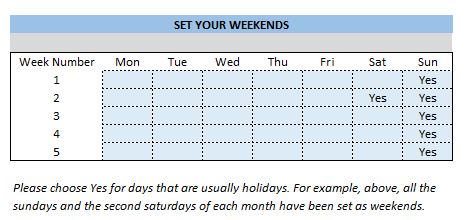
- Choice for Weekends: You can choose which days of the week and which week days of a month are considered weekends (holidays).
- Up to 20 school Holidays can be entered
- Customizable ‘pass requirement’ for attendance rate
- Ready to print Class and Student Attendance Reports
- Friendly features for easy data entry
- Data validation and tips to help identify errors in data
- No Macros
Video Demo – Class Register Excel Template
What is in the Class Register Excel Template?
The template has 4 worksheets.
- Settings
- Attendance Register
- Class Attendance Report
- Student Attendance Report
How to create student attendance registers in Excel?
- Enter information in the Settings worksheet
- Enter information in the Attendance Register daily
- View and print Class Attendance Report when needed
- View and print Student Attendance Report when needed
- Choose a student name to print
To restart, create a new document or delete all the attendance register entries and start with Step 1.
Settings
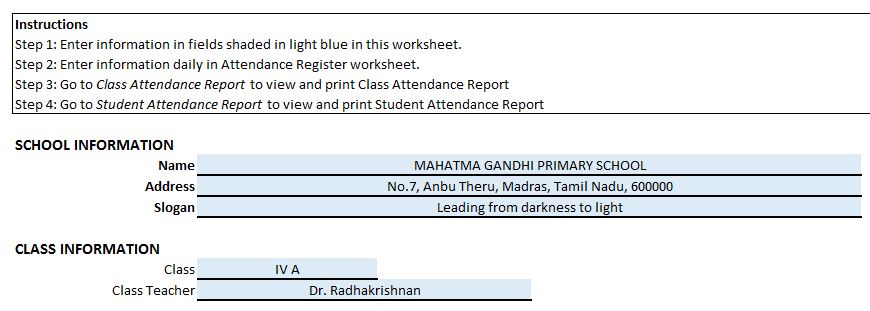
- Enter information in the fields shaded in light blue colour
- Make sure that there are no errors in your inputs
- Error messages will disappear after you correct them
- Reports will not be accurate until all the errors are corrected
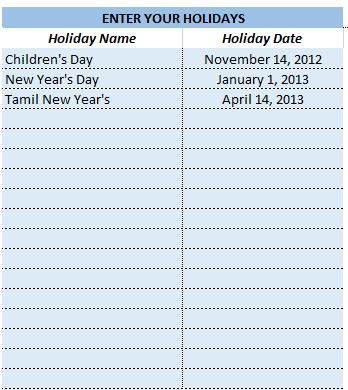
- Choose your weekends and enter your holidays so that they will not be considered as working days
Attendance Register

Instructions on how to fill student attendance register
- Enter Student Roll No.
- Enter Student Name
- Enter P for Present on Time, L for Present Late or A for Absent for each student for each day
- Do not change the cells shaded in Gray colour as they have formulas
- Student names should be unique
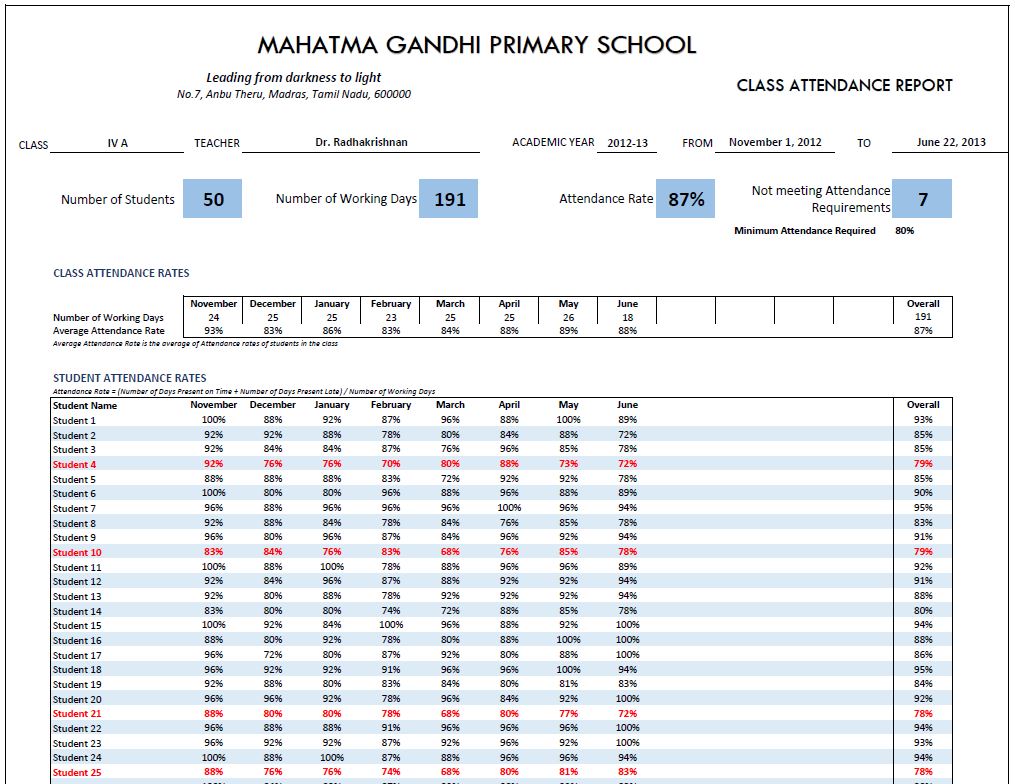
Class Attendance Report

- Fully automated
- Ready to print
- School Information
- Class information
- Monthly and overall summary of Class Attendance
- Month and overall summary of Students’ attendance
- Students not meeting attendance requirements highlighted
Student Attendance Report
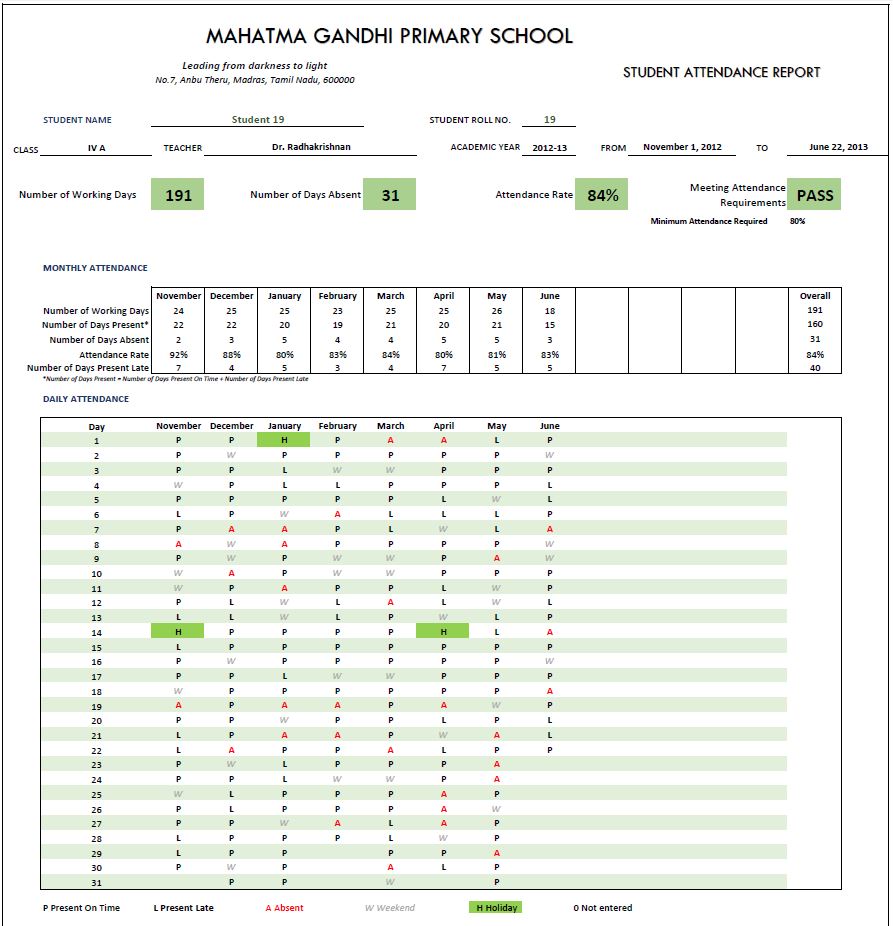
- Fully automated
- Ready to print
- Customized for each student
- School Information
- Class information
- Overall and monthly summary of Student’s attendance
- Students not meeting attendance requirements highlighted
- Student’s daily attendance
- Present On Time, Present Late, Absent, Holidays, Weekends and Not Entered
Please let me know if you find this useful or if your requirements are not captured in this school register format template.


213 responses
HI how to unprotect the sheet
Hi Akash, you can unprotect the worksheet using the password indzara. For a detailed step-by-step guide, please refer to the link below:
https://support.indzara.com/support/solutions/articles/62000137281-how-to-unprotect-sheets-
Feel free to reach out if you need any further assistance!
If we change the Begin Date and End Date to this new academic year to cover the dates from in 2024 to 2025 then it creates an error on the Class and Student Attendance Report. If we change it back to dates in 2023 to 2024 then it work again. It is as though it doesn’t like an end date in 2025
Thank you for showing interest in our template.
As per our email communication, we are glad that your concern has been resolved after entering the start date on or before the current date.
Best wishes.
Sir ,
How can we enter Summer Holiday (20 May to 30 June) in this sheet,
we can enter only 20 holidays in this sheet.
Please Support
Thank you for showing interest in our template.
You can unprotect the sheet using the password indzara and add more rows in-between the holiday list (For example, between row 40 and 41) to increase the holiday limit.
But usually the school starts after summer holidays and ends before summer holidays. Hence you can enter the begin and end date accordingly to avoid entering all dates in summer holidays.
Best wishes.
Good luck 🙂
Thank you.
Best wishes.
i have issue with end of term even when i go to setting and put a date it is not changing
We regret the inconvenience caused.
Please share your sheet along with some screenshot highlighting your concern at the below link to assist further:
https://support.indzara.com/support/tickets/new
Best wishes.
Hi
I am looking for something like a register to record who attends a church coffee morning weekly (term time only).
I have downloaded your sheet and I have done the set up with days (wednesdays), dates and holidays which is great. However you only allow 60 names. I want to kept a note of all attendees over the year so probably need 120. I cannot easily see how to extent the attendance table of names – can you help ?
Also any ideas on how I cold record how many children attend with their parents or maybe I need each child too – if that’s the case I may need 200 🙁
Thank you for showing interest in our template.
The requested limit is available in our premium version of the template. Following is the link to the same for quick reference:
https://indzara.com/product/student-attendance-register-excel-template/
Best wishes.
The password found here does not unprotect the spreadsheet and I would need to change the attendance codes to fit the school…..can you help at all please?
Thank you for showing interest in our template.
The password to unprotect the sheet is indzara.
https://indzara.com/faq/how-to-unprotect-protected-sheets/
Best wishes.
Hi this is a great template and thanks for sharing it. Do I need to delete the cells if I don’t have 50 students? And if I add more students in the future can I just add the rows back? Or should I just leave the 50 spaces you have already desigated?
Thank you
Hello,
Thank you for sharing your valuable feedback and you are welcome.
Regarding empty rows, I would suggest you to hide the empty rows and unhide it when adding more number of students.
For further clarifications, requesting to contact support@indzara.com.
Best wishes.
dear sir, what is the password of School Attendance Register and Report Excel Template, i want to change or adjustment in the report as per my requirement.
thanks and regards,
Sulaman Ali
I mean sheet protection passwords,
The password is YSE6852SHUUR the same will be available in the top right of the settings tab for future reference.
Best wishes.
Thank you, you’ve done a great work. Please need a little adjustment, I need it to be able to take attendance per subject.
Thanks for using our template.
You may use a template for each subject. As of now, this is designed for a class where students study all subjects and attendance is taken once.
Best wishes
How can I add new features to the attendance register like change the layout and add background photo
Hello
Can you please elaborate more about the features that you will like to add. Please write to us at contact@indzara.com.
We might be able to guide you to add some feasible changes.
Thanks
I downloaded the attendance register from your website. but could not increase the number of students in that document. To input that password. Please tell, whats the story of them big puppy’s …..
Thanks for using our template.
Please use “indzara” as a password.
Best wishes
Even though I entered the Begin Date and End Date, the report are not working well.
I entered begin date as Jan/1/2020 and end date as Mar/25/2021. Class attendance report and Student attendance report end date are default at May 26 2020, no working days are shown and no monthly information are shown.
Thanks for using our template.
Please note the academic window should not exceed 366 days.
Best wishes
Hello Sir,
How do I input the dates before I mark the register? And if it is a weekend school can I set all other days to be weekend other than actual weekends?
Thanks
Hello Sir,
How do I input the dates before I mark the register because cells for the dates are protected? And if it is a weekend school can I set all other days to be weekend other than actual weekends?
Thanks
Hello
Please use ” indzara” a pasword.
For weekend school, you can mark the weekdays as off or non-working days.
Thanks
Hello
Please use ” indzara” a pasword.
For weekend school, you can mark the weekdays as off or non-working days.
Thanks
Can i expect a reply soon from my question I recently asked?
A question was sent on the 24th.
Replied. Sorry for the delay.
Best wishes.
Hi
My comment is going to be a long one.
Regarding the school attendance, it is honestly one of the best; nicely and professionally presented. The “set your weekends” table was a good thinking. It can not only be used for selecting week-ends, but also those days where you are not working with a particular grade/group of students. For instance, I work with grade 10 on only three different week days, so I select those two also where I’m not working, including Saturdays and Sundays. So it’s great to have it. I don’t know though why you have only 5 week numbers!!!
However, there are certain things not working for me and I do have a few questions. Grateful if you could reply back to my email given below.
1. The “Class” in the setting page is set for only one grade, meaning that if I work with 6 different grades I will have to keep 6 different sets of excel documents and each time I will require to fill the other parts or paste information. Is there a solution for this? Can we have the possibility to change the grades on one setting and have specific information for each grade on the same sets of files?
2. Regarding the “Enter your Holidays” section, you have used an example of 3 national holidays and a remaining space of 17. Is this limited to 20 holidays only? Can’t we add more?
By the way, if I use all the national holidays in my country and the school holiday dates, then the list is quite long. I have tried to include all the holidays and changed the formula with the required column number, however, some holidays are taken care of and other are not. To be frank, this part is giving me issues!!! Plz check the change formala
=IF(SUM(IF(ISNUMBER(O26:O74),0,1))-Q25>0,”Error: Please enter only dates for holidays “,””)
I would love to ammend all these to make it work in a school setting.
But, i would not forget to say that you did a great job and I’m thankful to you.
Wish to hear from you.
Regards
Vikash
(from Mauritius)
Thanks for your feedback.
1. 5 week numbers: Since there cannot be 6 Mondays or 6 Tuesdays in a month, 5 was allowed as the maximum.
2. The template is designed for only 1 class. File has to be copied for second class. Making this for the whole school or multiple classes will be considered in a future version.
3. Holidays: The premium template https://indzara.com/product/student-attendance-register-excel-template/ allows any number of holidays to be entered in the table. If there are any further questions, please email file and specify.
Best wishes.
Ok,how much will that cost me if I buy the premium excel worksheet?
So, in the free template can we not change the formula to accommodate more holidays?
Please let me know.
Hello
The details of the premium Student Attendance Register are at https://indzara.com/product/student-attendance-register-excel-template/.
A free template has limitations, hence amendments will not be feasible.
Best wishes
Can this be customised to use as a department / individual teacher to track attendance at individual lesson? ie is it possible to put in a timetable for a class (eg Monday Period 1, Tuesday Period 4, Thursday Period 5, Friday Period 3). This would be really useful
Currently it is designed for only one class. The premium version also supports only two attendances per day (AM/PM).
Thanks for your feedback.
Best wishes.
how to add more number of student when no of students are more than 100, it is not allowing to add more number of students
Thanks for using our template.
Please review our premium Student Attendance Register at https://indzara.com/product/student-attendance-register-excel-template/. This template can handle upto 200 students.
Best wishes
Copy and paste not working
Thanks for using our template.
The data needs to be entered in a table format. Please refer to “Introduction to Excel Tables” at https://indzara.com/support/
Best wishes
this is very good template for tracking attendanc of student.
in this template how we make extra lecture entry on same day.
Thanks for using our template.
You can make an entry as am or pm for a morning, evening class respectively.
Best wishes
copy/paste is not working. sheet is protected, how to unprotect?
Hello
Please use “indzara” as a password.
Thanks
thank you so much.
what if I have between 4 and 10 different classes
and I teach them 2 hours every week.
You are welcome.
The template is for tracking attendance for one class. Please make a copy of the file for each class you have. In each file you can track students who attend that specific class.
Best wishes.
Hi I am TusharK this formula is not working in google sheets ( Sheet1) . Why ? Please suggest me
=IFERROR(SMALL(WorkingDay,ROW(A5)-ROW($A$2)),””)
Thanks for using our template.
Our templates are designed to work on MS Excel.
Some of the formulas will not work in Google Sheets.
Best wishes
I do really love your work but I wonder if it is possible for you to add the separate class period / section tab into the same worksheet. Most of the middle and high school teachers have several separate periods because each period have different roster.
Thanks for your suggestion.
The present template does not have this feature. We will try to incorporate the same in our next release.
Best wishes
Hi
am a student at university we have been given assignment to make a project now i have chosen to create a school attendance register, do have other procedures i can follow for me to create this project? I have downloaded this template.
Thanks for using our template as a guide.
We are not accepting any customized projects due to the workload. You may review our training page, https://indzara.com/excel-training/ for online Excel courses.
Best wishes
Hi:
Thanks for this great template!. I’m a teacher in a Catholic School in Puerto Rico. Here we have another recess periods in the school year, like: Holy Week (1 week recess) and Christmas ( two to three weeks recess). How do we enter these periods if the template only have up to 20 holidays to register?
Thanks for your positive feedback.
We have noted your suggestion, we might incorporate in the subsequent releases.
Best wishes
Sir it is a superb template for class attendance but their is a aslight confussion related to summer holidays how to enter summer holidays in the template It is showing only 20 holidays . Please make it clear I will be very thankful to you.
Hello,
Thank you for using the template.
You need to enter each day separately in the Holidays table. If we enter two dates and drag them down, Excel will fill automatically. This should help with data entry.
Best wishes
HELLO
CAN I SEARCH Student Attendance Report BY STUDENT ROLL NO?
Hello
In a report, a name seems more relevant as it gives the observer a quick recall about the student. Hence the name is used.
Thanks
Started using the template to customize it is promoting to enter the password
what is the password
Hello
Please use “indzara” as a password.
Best wishes
how can i extend the number of rows for entering data?
Hello
The reports are designed to handle a maximum of 50 students.
Hence extending the rows would affect the reports.
Thanks
Could you please send me template used in an international school situated in Gulf countries, at the earliest.
Thanks and regards
Hello
We do not have a template for a specific geography. You may customize it according to your needs.
Best wishes
Hi,
I have downloaded this template as we are a very small school. How do I customise the holiday dates to support holidays that are more than one day, e.g. half term (october, february and June) and 2 weeks at christmas/easter?
Hello,
Thank you for using the template.
You need to enter each day separately in the Holidays table. If we enter two dates and drag them down, Excel will fill automatically. This should help with data entry.
Best wishes
its a superb template well done. can i get a template for patients daily attendance in the hospital?
Thank you for the positive feedback.
We are not accepting any customized project now. We will definitely design a similar template in future.
Best wishes & regards
Hello sir,
How can I download two times in a day attendance excel sheet
Hello
In that case, each working day will have two sessions. alternatively, you can have one register for session 1 and another for session 2
best wishes
Hello,
You can use our premium template ” Student Attendance Register – Excel Template ”
https://indzara.com/product/student-attendance-register-excel-template/
It can handle more than one session
Best wishes
Hi great work, But here is possible to calculate prefix or suffix leave.
Hello
Please elaborate about what you mean by “Prefix”or “Suffix” leave.
Best wishes
Dear Sir/Madam
Thanks for your Fantastic Template. but in my class 65 Students, Its possible to increase 65 students in that excel template, and the attendance will calculate FN & AN Wise., (Twice a day), any solution for this, Waiting for your kind reply.
Thanks
Hello
Thank you for using the template.
The “Class Attendance Report” is formatted for 50 students only. In case you increase the count, the print for the report will get distorted. Hence, you can use two files, one for first 50 students and the rest in another file. Else you can try our premium template https://indzara.com/product/student-attendance-register-excel-template/
This supports more students.
Best wishes
Thanks for your excellent Template. But I am dealing with over thirty Classes and wished I could get a single Template/file which can Handle all the classes. Or otherwise I have to create single template for each class. That is over 30 Templates/Files. Thanks for the great work.
Hello
This template is designed to track attendance for one class. You can have maximum 50 students.
Best wishes
Respected Sir,
Suppose someone leaves school at the middle of the term, then How to manage attendance?
There is no built-in way to handle this scenario.
In the Student Attendance Register https://indzara.com/product/student-attendance-register-excel-template/ we have 5 possible tracking values. We can use one to represent ‘Not applicable’ and then use it when students start late or leave mid-way.
Please let me know if there are any questions.
Best wishes.
If a student starts mid-way, will using NA on days prior to start-date cause percentage to be calculated from start date?
hI IT wont let me add more students I have 25 students I need to add a few more but it wont let me
The template should allow 50 students. If there are further questions, please email file to support@indzara.com
Thanks & Best wishes.
Hi Indzara,
Great work and thanks for providing password, this made me to learn excel formulas.
Would it be possible to create one template for fee tracking for different classes and provide us to learn.
Appreciate your efforts
Thank you
You are welcome. Glad to hear.
Can you please specify what features are needed in fee tracking? I don’t have a template yet, but will try in the future.
Best wishes.
Won’t let me add a student or any data. But keep telling me ……………. is on a protected sheet. To make changes…………….. a password is required. what’s the password?
Hello
The password to un protect the sheet is indzara.
Best wishes
Hi Indzara, Great template. Is it possible to add another 2 function to the attendance Register section “not required” and “leave”. These would be omitted from the final calculation of attendance.
Many thanks Kylie
Thank you. Please see https://indzara.com/product/student-attendance-register-excel-template/ which allows customizing the attendance tracking values.
Please let me know if there are any questions.
Best wishes.
Hello
Thanks for the great and dynamic job. I am using this sheet for attendance in the University where there is semester system. I need to have the following information along with others to be printed:
1. Semester (Spring or Fall)
2. Subject Name
3. Session.
Also, information about :
1. Long (more than a month) winter vacation
2. Long (more than a month) summer vacation.
Please update this with these, although it’s alrady rocking in design, accuracy and flexibility.
Thanks
Sincerely
Abdur Rahman
You are welcome. Thanks for feedback.
Please try the Student Attendance Register template. https://indzara.com/product/student-attendance-register-excel-template/ which allows long list of holidays and multiple tracking options.
Best wishes.
Thanks alot. May you prosper in all walks of life.
You are welcome. Thanks for the wishes.
Best to you as well.
THANKS DEAR INDZARA.
I AM VERY GLAD TO SEE YOUR THIS TEMPLETE.
You are welcome. Thanks for feedback. Best wishes.
Hello, I am wondering what the password is to take it out of pretected mode?
Thankyou
Please use indzara as password. Thanks & Best wishes.
I want same sheet for 100 students. In Place of School write collage.
Please Upload or provide the password
Please see Student attendance register that will allow 100 students. https://indzara.com/product/student-attendance-register-excel-template/ Password for the free template is indzara.
Best wishes.
Good afternoon.
Thanks for sharing this fantastic tool!
T
fantastic and very nice tracker. Can we record more than fifty students at this tracker sheet?
Please see Student Attendance Register that can handle up to 200 students. https://indzara.com/product/student-attendance-register-excel-template/
Best wishes.
Dear sir,
Namaste !
very nice your planning. i Am Kunal, i am running coaching centre in morning section and evening section. how i will take attendance for two section a day.
please send to kunalgupt@gmail.com
Thank u sir
Thank you. In the Student Attendance Register template, we can take 2 attendances per day. https://indzara.com/product/student-attendance-register-excel-template/ Best wishes.
Hi, how do I increase the number of the learners as I have 120 learners?
Please see Student Attendance Register https://indzara.com/product/student-attendance-register-excel-template/ that supports 200 students. Thanks. Best wishes.
hi,can i import data from a database into the excel template ,i want to use an electronic system whereby the students register by swipping in an RFID tag
You can take data from any database and paste in the template as long as the columns are aligned. The template does not have connection to any other system such as RFID. Sorry.
good to see your responds , kindly let me know the monthly wise report possible with no of present and absent ,,.. ect details
In the template above, we can see present and absent for each month for each student in Student report, and for entire class in Class report. Thanks. Best wishes.
Please see the https://indzara.com/product/student-attendance-register-excel-template/ which allows tracking 2 attendances per day.
Please let me know if there are any questions. Thanks. Best wishes.
dear Sir,
i am try to use this attendance excel format for my office , kindly help us to get 1/2 (half day ) present how an i use.
Hello sir
You are doing good work .
I have a question .
We have 9 class in school
How can we add more class in sheet ?
Thank you
Thanks for the feedback.
The template is to track attendance for one class. To track for multiple classes, you can create a copy of the file for each class.
Best wishes.
Hi, Yes its very interesting, but I have two major problem. First, I have more than 50 student, can I add more than 50?. Second I need a report shows the Absent for each students by month? can you make this changes?
Thanks and very nice work
Thank you. Please see the https://indzara.com/product/student-attendance-register-excel-template/ template for supporting more than 50 students. The report sheet shows the monthly count for each attendance tracking value.
Best wishes.
Hello indzara,
Your template is very functional. I use it to register attendance to my UHD classes. But, in some classes i have double lectures which the template does not have option for. How can I modify the template to be able to register double lectures?
Thank you in advance
Thank you.
Please see the https://indzara.com/product/student-attendance-register-excel-template/ which allows tracking 2 attendances per day.
Please let me know if there are any questions. Thanks. Best wishes.
its Awesome but i have 150 student and this file consisted of only 50 student so plz help me….
Thanks. Please try https://indzara.com/product/student-attendance-register-excel-template/ which allows 200 students. Best wishes.
Hi, Yes its very interesting, but I have two major problem. First, I have more than 50 student, can I add more than 50?. Second I need a report shows the Absent for each students by month? can you make this changes?
Thanks and very nice work
Thank you. Please see Student Attendance Register template https://indzara.com/product/student-attendance-register-excel-template/ which allows 200 students. It has student report and class report. Please see the product page for specific details and screenshots. Thanks. Best wishes.
Hi there,
This is a brilliant attendance spreadsheet! We run a small Saturday and Sunday school and this works very well for us as the spreadsheets allows to filter out weekdays.
I just wanted to ask if there is a way of adding another field to record student ‘authorised absence’ (AA). This would be for hospital appointments or exceptional circumstances where it would not effect students overall attendance as this is beyond their control.
Thank you for sharing…
Many thanks.
Thank you for the great feedback.
Please see Student Attendance Register template https://indzara.com/product/student-attendance-register-excel-template/ which allows customizing up to 5 different tracking values and assigning whether to count as attended or not. Please let me know if there are any questions. Thanks. Best wishes.
sorry My email is bensone28@yahoo.co.uk and was written without 28 in previous message
Please feel free to edit the file with the password indzara. Best wishes.
Thank you very much I got it, all the best
You are welcome. Best wishes.
Hi it is very very good well done for the job.
I like to use this template and wanted to add up something like term attendance report but no way to make a change it is protected.
Here there is only yearly report and how should I build a first, second and third report before using your one as the last main report
Please help me
HI the template is just too good. we have attendance on hourly basis can that be modified on the template. and more number of students be added
The Student attendance register https://indzara.com/product/student-attendance-register-excel-template/ supports 2 attendances per day. I am sorry I don’t have one that tracks hourly attendance. Best wishes.
whats the password to unprotect it
Please use indzara as password. Thanks & Best wishes.
sir please add register number, birth date, cast, 40 holidays list and need 90 students register also add cast category example : OBC, NT, DT, SC, OPEN
Thanks. Please email me at indzara@gmail.com if you need customized template. I can let you know the cost once I understand the specific requirements. Best wishes.
आपका कार्य अच्छा है. विद्यालय के हिसाब से इसमें कई कमियों भी हैं . जैसे 1 दो पारी उपस्थिति 2 कार्य दिवस की संख्या 3 अवकाश 4 अधिक छात्र संख्यां 5 आधे दिन की उपस्थिति 6 सत्र के बीच मै प्रवेश / त्याग 7 स्त्तम्भ मे घोषित अवकाश का विवरण . ये कमियां दूर करैं तो काफी अच्छा रहेगा .
Thanks for feedback. Best wishes.
how to you change the value for P, L, and A?
Plus when I look at the class attendance report I says #Div/0!
Please email the file to indzara@gmail.com and I will take a look why the error is appearing. Thanks & Best wishes.
The template https://indzara.com/product/student-attendance-register-excel-template/ allows modifying the values easily. Thanks & Best wishes.
thanks a lot for sharing
You are very welcome. Best wishes.
this is 2016 and from the part of the world i come from this is like the future lol thank you boss
You are welcome. Best wishes.
Can you please tell me how to fix the “Error: Please enter only dates for holidays” message? I have entered only dates, but the entries do not resolve the issue.
Please ensure that it is in DATE format (from the cell format menu at the top). Sometimes it may appear as date in the cell, but Excel will accept only certain date formats. And they also may vary with different country versions of Excel. If the issue continues, please email me the file (indzara at gmail dot com) and I will look into it. Thanks.
Comment…sir mujhe attendance sheet par absent aur present ka fomulas chahiye p sur a ko count kis trha karte hai
Thanks. You can see all the formulas in the sheet. Please unlock sheets using the password indzara and you can see the formulas. Hope this helps. Best wishes.
hiii sir please provide unprotect sheet password
You can unlock using ‘indzara’. Thank you.
Hi, please can you send me a template which allows you to work with each day split into AM and PM? I am aware that others have asked the same question and I just cannot work out how to change this myself.
Wonderful work, thank you so much!
Thanks for your message. Can you please review this template
https://indzara.com/product/student-attendance-register-excel-template/ ? It addresses attendance taken once or twice per day. Please let me know if there are further questions.
Hi, i find your templete very helpful for my school.And Thank you very much for providing it free download.
But i have a little problem with the “End date”. I could not customise it in setting. Even though i change the date in the setting, it doesn’t change in ” class attendence report and student attendence report”.
Note: my school’s academic session is winterly basis..i,e january -december.
Sir please help me in sorting out this issue. Thank you
I am glad that it is helpful for your school. You are welcome.
The Template shows only data until today in the Class Attendance Report and Student Attendance Report. For example, since it is Jan 24th today, it will only show until January and will not show February. That’s because Feb has not happened yet. In a couple of weeks, you will see February automatically appear. Everything seems to be working as designed. If this does not address your concern, please e-mail your file and I can look into it.
Thanks & Best wishes,
Hi.sorry i sent the same this message into inventory forum
Thanks for your effort
but i just confused little bit about Attendance Register
i tried to add the drop down list “Holiday or H”
to be like this
P
A
H
L
so i need instruction to do this
i hop you help me anyone
thnks
You are welcome.
You can enter the holidays in the Holidays table in the Settings. Days entered in the Holidays table will not be displayed for attendance register. In the attendance register, you can choose P, A or L.
Thank you,
Hi sir Its Very Use-full
Please tell me that conditional formatting in extra bordering under the Today date
thank you
Thank you.
This is the formula used for conditional formatting today’s date. =D$8=TODAY()
Hope that helps.
Thanks for sharing the template. Is there any way to add 100+ students? Also, Is there any way absences can be excused (E) or unexcused (U)? I would appreciate any help. Thank you.
A new version of the template will be available this month (Feb 2015). It can handle more than 100 students and will be flexible on how attendance is recorded.
Thanks,
hello, i am constantly getting ‘error’ concerning the begin and end date???
please help me as i need this register ASAP! thank you.
Please e-mail file (indzara at gmail) so that I can look into it. Thank you.
But its tooo difficult use that type .
Kindly help me pls..
I am sorry. I am not sure what you need. If attendance needs to be taken for each subject separately, a separate file can be used for each subject.
Hey there ur template is tooo gud and with great ideas. I am working in a Ltd. Coaching institute. There are three section like lowest junior ( 7,8 ) junior ( 9,10, ) senior ( 11,12 ). The lowest jr. Class has phy, chem, maths, mat subjects 2 days in a week with two subjects. The jr. Section has phy, chem, maths, bio and sst subjects 3 days in a week with two subjects. Sr. Section has phy, chem, maths subjects 3 days in a week with two subjects.
So kindly replace ur one day absent, present in subjectwise. And I am also want to email parent student attendance report daily basis through outlook in ur student report format.
Kindly pls pls help me.
My email address is
Perpendicular.khan@gmail.com
Thank you.
Currently, the template is for a class as a whole and not for separate subjects. You could make a copy of the template and use it separately for each subject.
You can save as a PDF and e-mail via outlook.
Hey there ur template is tooo gud and with great ideas. I am working in a Ltd. Coaching institute. There are three section like lowest junior ( 7,8 ) junior ( 9,10, ) senior ( 11,12 ). The lowest jr. Class has phy, chem, maths, mat subjects 2 days in a week with two subjects. The jr. Section has phy, chem, maths, bio and sst subjects 3 days in a week with two subjects. Sr. Section has phy, chem, maths subjects 3 days in a week with two subjects.
So kindly replace ur one day absent, present in subjectwise. And I am also want to email parent student attendance report daily basis through outlook in ur student report format.
Kindly pls pls help me.
My email address is
Perpendicular.khan@gmail.com
Hi! Great Template! I would like to add 250 students. Is there a way to do this? I only seem to be able to add 50
Thank you. Please e-mail at indzara at gmail.
Can I also have the same template? Great work =)
I have e-mailed the file. Hope it helps.
Hi, firstly thanks for the project. Any possibility that more studant could be added perhaps double thanks .
You are welcome. I have responded to your e-mail with the template. Hope that helps.
Best wishes.
first of all, Thank you very much. The Program is very useful and easy to learn, but just a question? In our school, we have long holidays Maybe 15 days or 5 days not just one day, how can I edit these holidays in programs.
Thank you
Please e-mail me at indzara at gmail and I will send a version that allows 150 holidays. Hopefully soon, I will upload that here, as I have received multiple requests for that feature. Thanks.
Hi your templates are very useful. I would love to use them, but I need AM/PM and I need to specify whether authorised or unauthorised absence. Would you be able to help me with this.
Thank you.
Thanks for sending the e-mail. I have responded with a template that I had built earlier. Unfortunately, I cannot do more customizations at this point due to other projects.
Hope that helps,
Hi Ind Zara, thank you for the great work. We have between 4 and 9 subjects per learner depending on which phase they are in at our school. A learner will typically have classes for around 4 of the subjects per day in periods of between 45 minutes and 90 minutes each. How can I track attendance per subject per day.
Hi a wonderful software you have made and it is very helpful. Thank You.
But i am facing a problem i.e. what if i have 2 lectures in a day in a class??? How to add two credits in one day?
Thank you. Please e-mail me at indzara at gmail.
I was wondering if you could add number of hours for attendance column. In our schools system, some classes are scheduled shorter than hours and there for P may equal two hours or P may equal 45 minutes. How can we track the number of hours in this template ?
I don’t think I understand your question correctly. Can you please explain?
Please e-mail me at indzara at gmail with your specific requirements.
and one more thing i need to add here is ,i need “leave” option in dropdown and it will be considered as a present in attendance sheet.
please help me.
Hi sir,Its really working fine but I am working on a project where i need to manage more than 50 students ,is there any way to increase the number of students?
I am trying to use this for my Cadet Unit for that I need to change Students into cadets and Schools into Cadet Unit how to I do it please?
How to add more than 50 students ?
Please e-mail me at indzara at gmail.
Hello INDZARA,
Excellent Work! I would like to change the formulas for the P, A, and L. I want it to be 1 for each hr of class missed and .33 for late. So 1=absent and .33=late and 0=Present. We enter by the hour because some students do not come the first hour of class, but come the second hour.
Regards,
Gary
Hi ind zara
first of all, I would like to thank you for this very nice work that you’re sharing,
I have one or two questions if you don’t mind:
for the holidays dates: how does it work? from what I understood you just enter the day of your holiday but it seems that it doesn’t take into account for how long you’ll be on holiday? could you please explain to me if for example your on holiday from 05/11/2013 to 17/11/2013 how do you figure out this?
also what would be the solution if the attendance is recorded twice a day (morning+afternoon) ?
Thank you.
Currently, you enter holidays one day at a time.
If you would like to customize the template to accept more holidays and twice a day recording of attendance, please e-mail me at indzara at gmail.
Hi, Yes its very interesting, but I have two major problem. First, I have more than 50 student, can I add more than 50?. Second I need a report shows the Absent for each students by month? can you make this changes?
Thanks and very nice work
Thank you. Please e-mail me at indzara at gmail with your requirements.
This is a great template, the best I’ve found online…I was curious like Ainana Leo how to input looong summer and winter breaks in the holiday field…
Thanks. I need to make some tweaks to the template to accommodate that. I will try to do that in the next few days and inform you. Please e-mail me at indzara at gmail.
I have prepared the new version which allows 150 holidays. If you would like a free copy of this new version, please e-mail at indzara at gmail. Thanks.
Dear sir,
Namaste !
very nice your planning. i Am Ananda, i am running coaching centre in morning section and evening section. how i will take attendance for two section a day.
please send to plusacademy4@gmail.com
Thank u sir
briliant work
but
in most school there are like one month summer and winter holidays etc then how to add these holidays in to settings
plz update any idea
and thanks for this brilliant project
Hello Ainan Leo,
Thank you.
It can be done. Please e-mail me at indzara at gmail.
in studend attendence report it is showing only student 50 how to select please i am using office 2007 & 2003
The template by default handles only up to 50 students. Are you trying to use this for a class with more than 50 students? Please explain your question.
student report and class report not working. error message #DIV/0! and ##### and also not adding up attendance records for days or months on both class and student report. HELP? i thhink it may have something to do with no matter what end or start date you input into settings the template always reads 12 august 2013 as the end date on both class and student report???
Thanks for using the template.
The template does not count dates from the future. This enables the calculation of Attendance rate to be always current and accurate. As the days go by, the number of working days will automatically increase. For example, now the template will not count dates from August 13th, since those days have not happened yet. But once August 13th comes, the template will count that as a working day automatically.
Regarding the error messages, please e-mail me your document and I can help fix the issue.
Fantastic template!
I have one question. My students only study 2days per week,which can be any two days. How can I do this with your template?
Many thanks.
Thanks, Alex James.
I am assuming your 2 days a week vary from one week to another. If so, I don’t think this template design will work.
If you only enter Absent, Present Late and Present On Time for your 2 days and leave the other days blank, the report should still calculate the number of days present, absent, late, etc. However, the number of working days, Attendance rate % and PASS/FAIL rating will be wrong.
If you need any help, please e-mail (indzara at gmail) me with the requirements. I am currently working on other projects and may not be able to get to this immediately. However, I will add this to my queue and work on it when time permits.
the days are fixed. I entered ‘yes’ as a weekend for all days except the study days. This works, but the end report doesn’t work properly.
Fixed days should work. You are doing the correct thing by selecting ‘Yes’ for weekends. Can you please explain what you mean by the end report not working properly?
If you can e-mail the screenshots, that would be even more helpful for me to troubleshoot. Thanks.
Ind Zara, I love you project planner. My only issue is I need a longer period that 60 working days. Also I need to be able to add more than 25 project, add additional holidays and Paid Time off.Can you please help in expanding the template
I am glad you like the template, fifi. Thanks.
Do you have specific limits on the period (days) and number of projects/number of tasks? I will take a look. I am worried about performance if I increase the number of tasks and the period by a lot. Also, I will have to think about factoring in the paid time off for each employee/resource.
Please send me an e-mail with the details. I will do my best to customize the template for your needs.
Please provide us excel sheet password
Hello Matilda Hilarious,
You can unlock using ‘indzara’.