
Combinations Generator Excel Template 2023 – Free
A few months ago, I published a video (on YouTube) on how to create combinations of values in 2 lists. There have been requests to expand that to more than just 2 lists. So, here we go. I updated the formulas to accommodate 6 lists and made it into an easy-to-use free template.
Free Download
How to create combinations in Excel?
This Excel Combinations Generator is one of the simplest templates published on indzara.com.
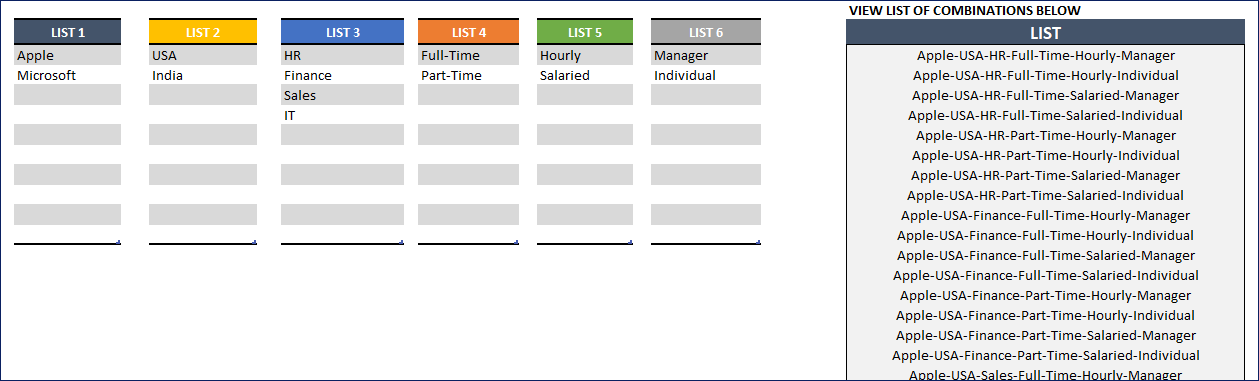
Just enter your values in each list (max 6) and see the combinations automatically calculated and displayed.
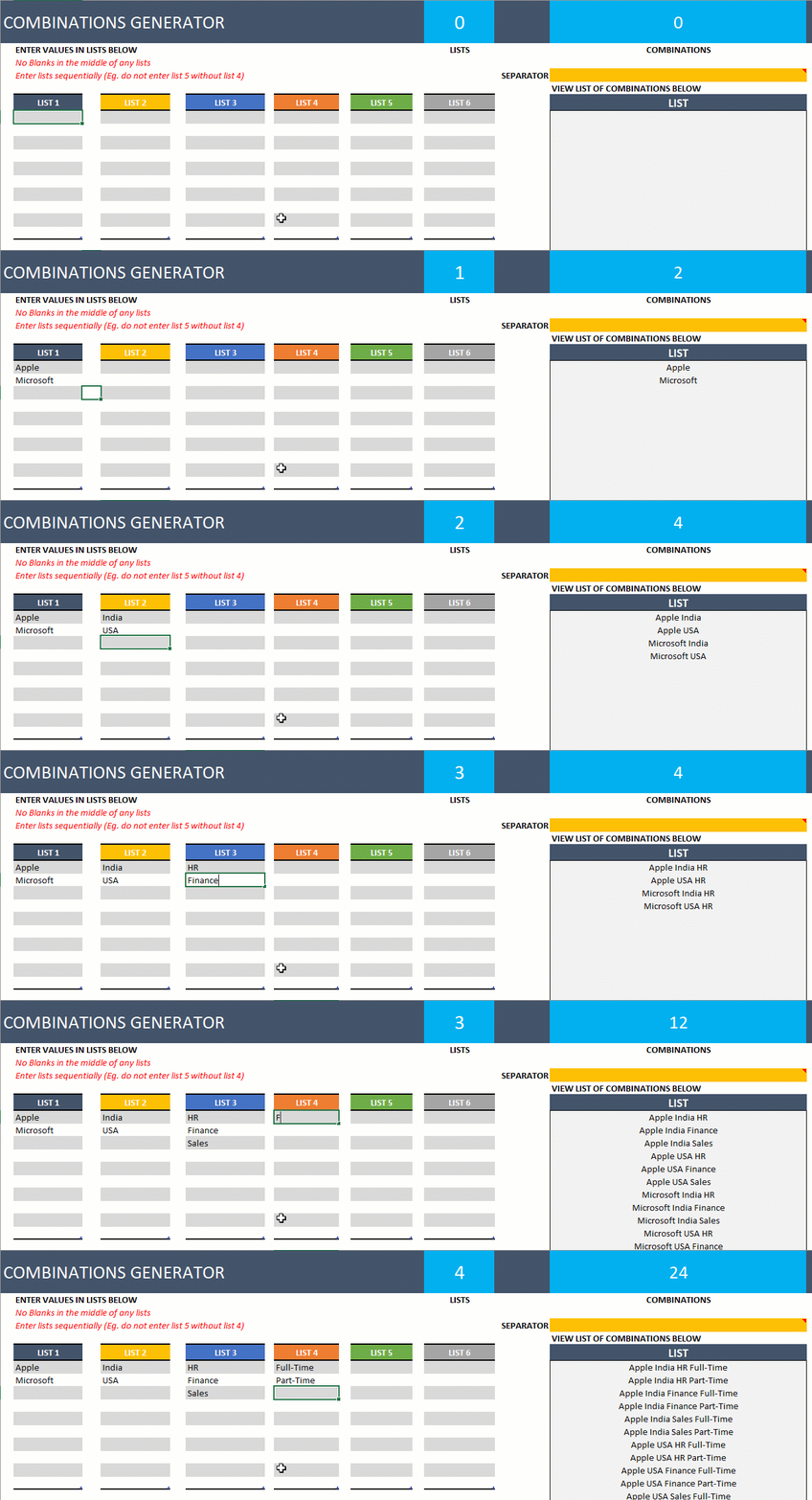
You can also change the separator (character that separates the values in the concatenated string of values)
When entering data, ensure the following are avoided
- No blank values in the middle of any list
- Enter lists sequentially (eg. please do not enter list 6 when list 5 is empty)
Video Demo
Limits
- You can enter up to 6 lists
- 500 combinations are supported by default. The formulas are hidden in the HELP sheet. You are welcome to edit and expand to more combinations if needed.
Recommended Template
For more functionality, please try our Combinations Generator toolkit
- Single List: N = 20, R = 7
- Multi-List: 10 lists, 20 items in each list

47 Comments
How to ad one more additional list
Thank you for showing interest in our template.
You can purchase our premium template with 10 list combination generator from the below link:
https://indzara.com/product/combinations-generator-toolkit-excel-template/
Following video contains the tutorial to create combinations from two list:
https://www.youtube.com/watch?v=Fu8Xw6_iz4Y
The calculations described in the above mentioned video is available in hidden HELP sheet.
Best wishes.
I need combinations with larger than 500 results. I see that I can change this in the HELP sheet, but I am having trouble locating the HELP sheet.
Thank you for showing interest in our template.
The help sheet is hidden. You can right-click the tab name and click unhide to unhide the help sheet and expand the formulas more than 500 rows to increase the limit. If you are still facing issue, please write to support@indzara.com for pictorial information on the procedure.
Best wishes.
Hi
I am looking for sum combinations of 15-20 unique numbers.
are you able to make a customise sum combination generator
Thank you for reaching out to us.
Please share sample input numbers and sample list of output required in an excel sheet to support@indzara.com to check further.
Best wishes.
Great Job! How can I combine using text and numbers in the tables but with no – between or no separators. AppleUSAHR no spaces?
Thanks
Thank you for showing interest in our template.
You can add text in one column table and numbers in one table to combine together and you can delete the values in separator to remove the space between text and number.
Best wishes.
First of all, really thank you for this work; it saved a lot of time. I have one query, what if I wanna generate combinations of 7 or more items at a time from lists of 6 or less than 6?
Thank you for using our template and you are welcome.
Requesting to check the video link below to learn how to extend the lists:
https://www.youtube.com/watch?v=Fu8Xw6_iz4Y
You can also send the number of list required to support@indzara.com to take it as a customization project for a fee.
Best wishes.
Thank You
You are welcome.
Best wishes.
you are genius and i am a big fan and subscribed to your channel and will follow you guys in anything you do on social media
can we have an excel sheet with up to 99 lists …
Thank you for subscribing to our channel and thank you for sharing your valuable feedback.
We take customization projects for additional fee, requesting to contact our support team at support@indzara.com to get an estimate for the same.
Best wishes.
how do i increase the number of combinations?
Thanks for using our template.
Please unhide the help tab and extend the combinations table to accommodate more combinations.
Best wishes
This has been a time saver. Thank you!
Welcome!!!
Is there anyway we can get access to the HELP sheet that is used in this generator?
Hello
Please right-click on the tab to unhide the hidden sheets.
Thanks
HI
I NEED COMPLETE LIST OF 1 TO 49 NUMBER 6 COMPINATIONS- WITH OUT REPAET IN EXCELL FORMAT
Thanks for your message.
We are not accepting any customized projects due to a heavy workload.
Best wishes
I have fifteen (15) lists how do I update the template or get a template for 15lists with more than 500 combinations.
Thanks; Best regards.
Thanks for your message.
This template is designed for six lists and 500 combinations. Due to the heavy workload, we are not accepting any customized projects.
Best wishes
Am really waw! Too nice for me not commend. BRAVO.
Please I need further help, i want to have all the possible outcomes for three letters eg. ABC with 15 Lists.
How do i go about that.
Thanks in anticipations.
i.e One of the outcome can be all sigle of the letters
AAA AAA AAA AAA AAA
BBB BBB BBB BBB BBB
CCC CCC CCC CCC CCC
BAA AAA AAA AAA AAA
CAA AAA AAA AAA AAA
Thanks for using our template.
This template can handle upto six lists.
Best wishes
Hello,
Thank you very much for your very valuable and helpful template. Also, I would like to apologize for my naïve question: I have 2 columns, the first one has 365 values and the second one has 2800 values. Their combination gives 1022000 values. Which value should I change in the Help portion of the template in order to increase the limit from 500 to 1022000? Could you please guide my (i.e which cell value must change)?
Thank you for your time
Thanks for using our template.
You need to extend the number of rows. Also, extend the table on the main page to accommodate the combinations.
Best wishes
Thank you for your reply
I have extended the table on the main page and I have extended the number of rows (this is the F column in Help right?) but unfortunately only the first 500 value still appear. There is also another column/row that I should change?
Thank you for your time
One of the most useful templates I have seen. Thanks for permitting us to know the logic also. I have one question to you. I noticed that if I select on entry in the DROP DOWN LIST , I am unable to keep it blank again. It is possible only if the work book is closed and reopened. Can you suggest a solution please.
Thank you.
Can you please select the cell and press the Delete key to clear the value? Let us know whether that worked.
Best wishes.
Can you please make an tamplet for generating combination of a cricket team out of 22 players with 11 players out put combination please .
Thanks for your message.
We are not accepting any customized projects due to a heavy workload.
Best wishes
This is wonderful. I’m trying to expand to 10 lists but and struggling. Any help would be greatly appreciated. TIA
Thanks for using our template.
As of now, this template can handle 6 lists. You may unhide the help sheet and make modifications to add more lists. Please ensure, the links and formulas are not broken.
Best wishes
Is there any work around to expand the list maximum, I know that there are argument caps, but could you put an addition some how?
The hidden sheet has the formulas. That can be expanded down to more combinations.
Best wishes.
Thanks for this ! Could you please help me making list of all the combinations to create a team of six players if we have total 8 players?
You are just outstanding, one stop solution to all my problems
Thanks !!!
Really nice template. Thanks for creating it. I expanded it to more columns.
Thanks!!!
Would you mind sharing? I’m trying to do 10.
Great workbook. Thank you for the excellent knowledge share.
Thanks for sharing your positive experience.
Best wishes
This is exactly what I was looking for. Thank you.
Thanks for sharing your positive experience.
Best wishes