
2024 Inventory and Sales Manager Excel Template
This Inventory and Sales Manager Excel template is suited for managing inventory and sales if you are running a small business of buying products from suppliers and selling to customers. (Retail/Wholesale).
This retail inventory excel template will assist in knowing the inventory levels of each product and understanding which products to re-order. Also, you can quickly view the purchases/sales patterns over time and the best-performing products.
This Excel template is designed for Microsoft Excel, but if you are looking for a Google Sheet template, please visit Inventory and Sales Manager in Google Sheets.
A new version is available with additional features such as auto-price population. The new template has automatic price population on order line items which this one doesn’t. There are some users who do not want to auto-populate the prices as they want flexibility to change prices for different customers. For those, the template on this page would be more useful. Hence, we have retained both templates on our site.
Retail inventory Tracker (Free)
FEATURES
- Enter and manage up to 2000 different Products
- Set custom re-order points for each product
- Simple and Easy data entry
- Know current inventory levels of each product
- Identify the products to be re-ordered
- Know if the sale orders can be fulfilled
- Easily understand the sales and purchase patterns (monthly and cumulative)
- Quickly see your top customers and suppliers
- Identify your best performing products
- Know how the different product categories contribute to sales
- Easily retrieve and view your order details
Free Excel inventory template with formulas
This template is developed using only formulas and does not have any macros or code. Formulas are used to calculate inventory and sales. You can view the formulas in the sheet and can edit them if needed. We recommend not editing any formulas unless you are very sure about the changes and the impact on functionality.
DOWNLOADS
REQUIREMENTS
Windows and Excel 2010 (or above version)
Mac and Excel 2011 (or above version)
VIDEO DEMO
HOW TO USE THE TEMPLATE
Enter Products
Enter list of products and re-order points in the Products worksheet
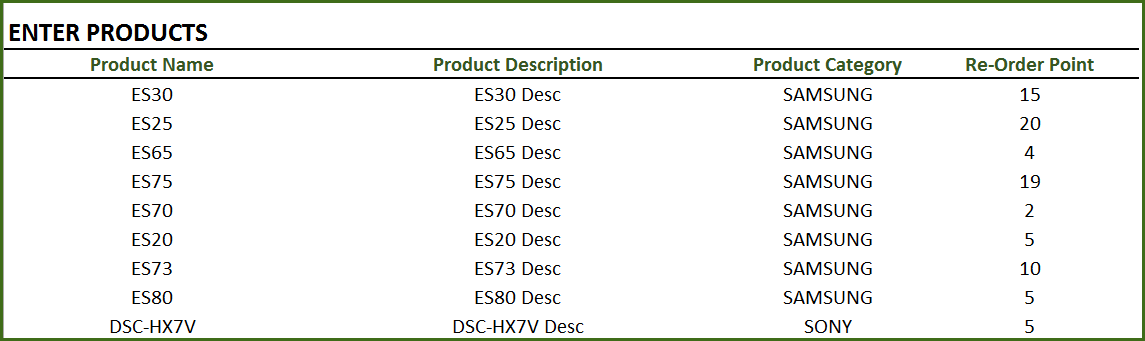
Product Category: This allows you to categorize products. If you have numerous products, categorizing similar products together can help in understanding product performance.
Re-order Point: Amount that you set for each product, where when the current inventory level hits that amount, you will place a new purchase order to replenish inventory. (For more, read Re-Order Point Article in Wikipedia)
Enter Orders
Enter the line items for all the orders (both purchase and sale) in the Orders_and_Inventory worksheet
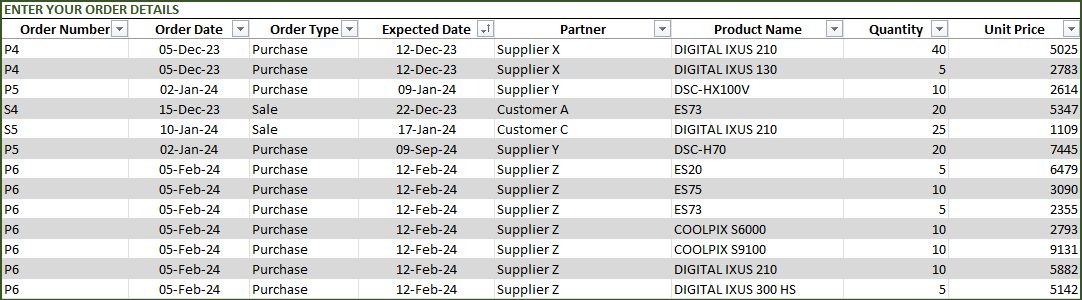
If you have any existing inventory when you start using the template, enter them first. You can then continue to enter your new orders (purchase and sales) as they happen. The template will then give you accurate count of your inventory.
- Order Number: This Order number is not used in the template to calculate anything. This has been provided for you to track your orders easily. You can filter the Orders table by choosing specific order number to see all the items in that order. If your systems generate any order numbers, you can enter them here. If you don’t have any such systems, you can create your own. The only recommendation is that you should have a unique order number for each order.
- Order Type: There are two types of Orders: Purchase and Sale. When you place an order to acquire products from suppliers, it is called a Purchase order. When your customer places an order to buy products from you, it is called a Sale.
- Order Date: For Purchase orders, this is the date when the order is placed by you to your supplier. For Sale orders, this is the date when the order is placed by your customer to you.
- Expected Date: For Purchase orders, this is the date when the inventory becomes available for you to sell. For Sale orders, this is the date when the inventory will leave you to the customer.
- Partner: For Purchase orders, your supplier is the Partner. For Sale orders your customer is the Partner.
- Quantity: Number of units of products. The unit can be any numeric value. Even if your unit is not whole numbers, you can still use the Quantity field.
- Unit Price: In Purchase orders, this is the cost of buying one unit of the product. In Sale orders, this is the revenue from selling one unit of the product.
- Amount (Calculated field): (Unit Price X Quantity) = represents the amount of money. In Purchase orders this would be money leaving you and in Sale orders, this would be money that customers pay you.
- Inventory Availability (Calculated field): This is the quantity (number of items) of the product available in inventory as of the Expected Date.
View information about overall inventory availability
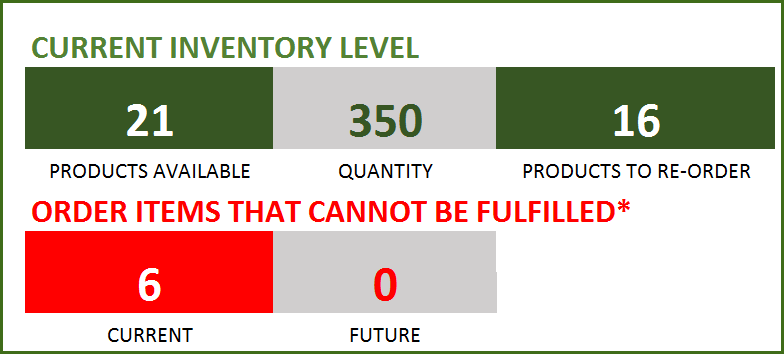
Inventory Spreadsheet Excel Template – Summary Metrics
- Current Inventory of a product = (Total Purchases of Product – Total Sales of Product) as of today
- Products Available: Number of Products where the current inventory level is greater than 0.
- Quantity: Total Number of items of all Products currently available
- Products to Re-order: Number of Products where the current inventory is less than or equal to the re-order point
- Order Items that cannot be fulfilled (Current): Among the orders where the fulfillment date is less than or equal to today, number of line items in orders where the available inventory is less than the Sale quantity
- Order Items that cannot be fulfilled (Future): Among the orders where the fulfillment date is in the future, number of line items in orders where the available inventory is less than the Sale quantity
View details of one specific product
Choose a product from the drop down and see details of that specific product.
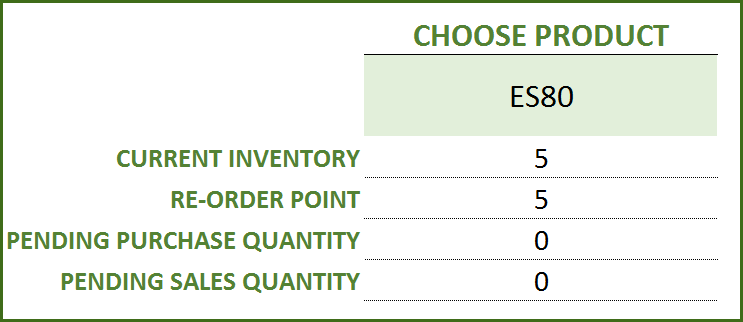
Choose Product to view current inventory
- Pending Purchase Quantity: Quantity in the Purchase Orders that are expected to be available in the future
- Pending Sale Quantity: Quantity in the Sale Orders that are expected to be delivered in the future
View products to re-order
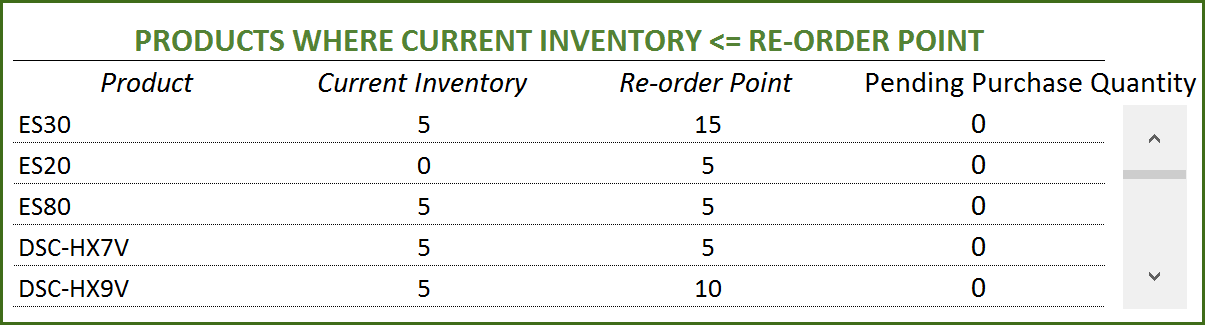
If there are line items that cannot be fulfilled or if there are products to re-order, take actions appropriately
View Report
View the Report worksheet to understand the purchase/sales trends and also to identify the top performing products and most valuable suppliers/customers.
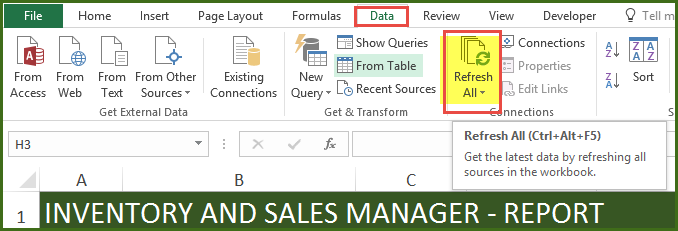
Since there are pivot tables and charts, please refresh the data by pressing Ctrl+Alt+F5 or going to DATA ribbon and selecting Refresh All. This updates the charts with your new transactions.
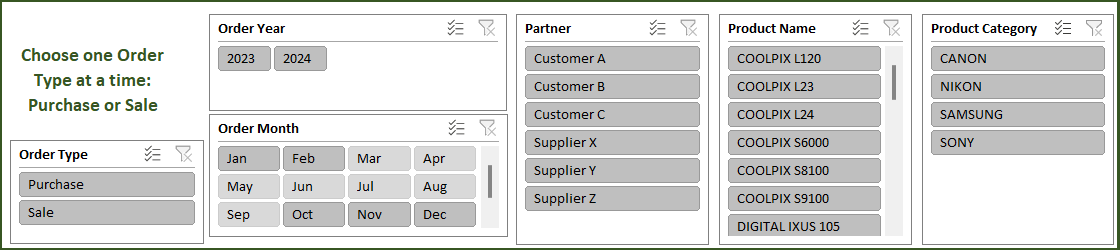
The report sheet has slicers (filters) at the top.
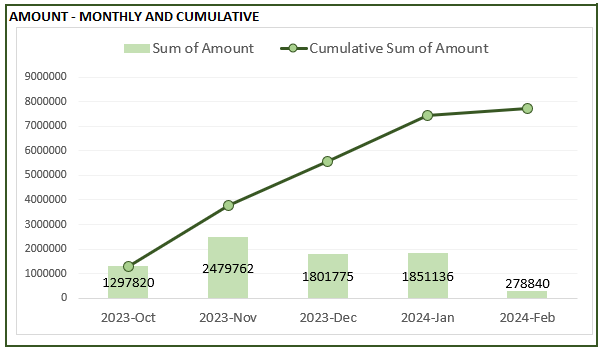
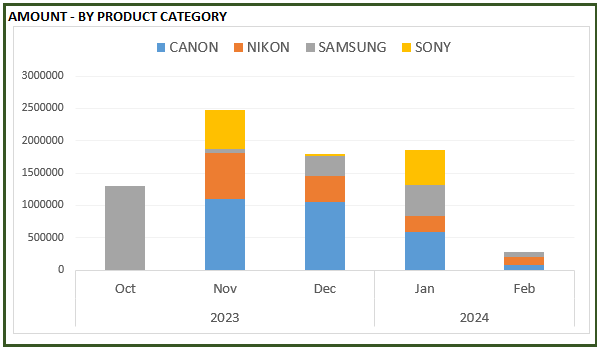
Amount and Cumulative Amount by Month
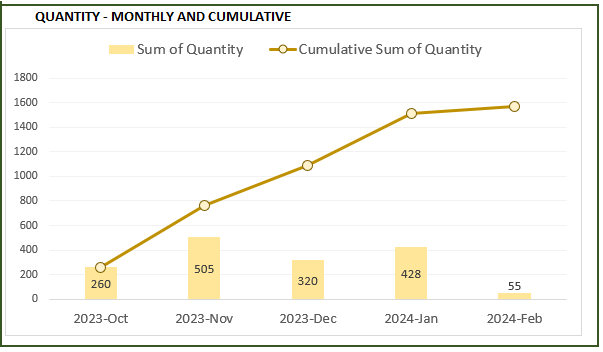
Quantity and Cumulative Quantity by Month
Amount distributed across Product Categories by Month
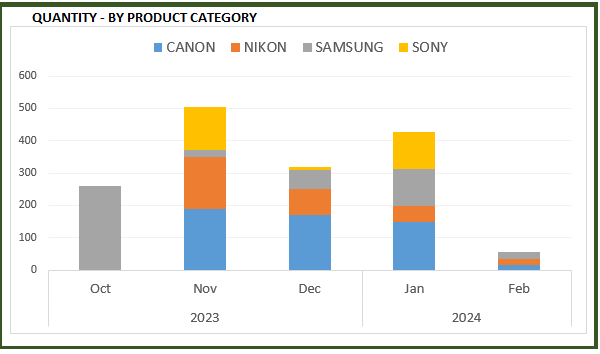
Quantity distributed across Product Categories by Month
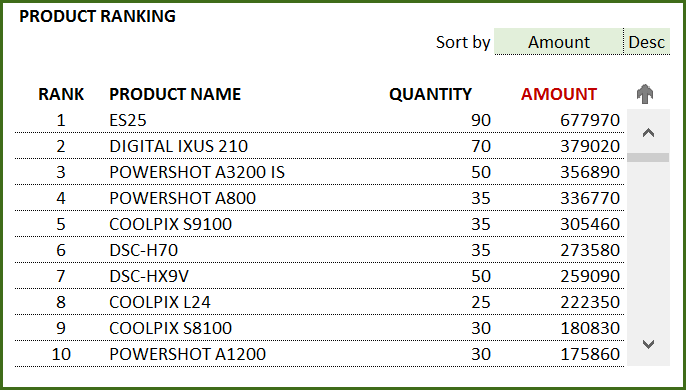
Product Ranking based on Sales Amount or Quantity
If you find the template useful, please share it with others. If you have any feedback, please share it in the comments below.

579 Comments
Excellent post! Thank you for sharing such useful insights. Keep up the great work.
Dear
I want a detail solution for my business (Distribution of Detergent ) including all the necessary tasks from receiving stocks to sold stocks and its cost analysis and also for the profit/loss of the business
Thank you for showing interest in our template.
Following link contains the current version of retail inventory tracker template:
https://indzara.com/free-excel-template-for-retail-inventory-management-template/
Our Premium version of the template contains the profit loss calculation and advance report:
https://indzara.com/product/inventory-management-excel-templates/retail-business-manager-excel-template/
We also take customization projects for a fee. Please share your list of requirements at the below link for estimation:
https://support.indzara.com/support/tickets/new
Best wishes.
hi, do you have template for Inventory Analysis
Thank you for showing interest in our template.
In our retail business manager template, you can use our report session to analyse the sales and inventory of top sold products and more.
Best wishes.
Hello, do you have a template for invoices? Something where you can save customers list, product lists, discount option, optional taxes, shipment fees and generally customization of the invoice.
Thanks a lot in advance
Paisia
Thank you for showing interest in our templates.
Requesting to check our Sales Invoice template at the below link, which has all the requested features:
https://indzara.com/2016/07/free-excel-invoice-template-sales/
If you want to track inventory along with generating an invoice, requesting to check our inventory management templates at the below link:
https://indzara.com/inventory-management-excel-templates/
Best wishes.
I am interested in the of Inventory and Sales template. Would you be able to add a report for the complete inventory stock? What would be the price and the time to deliver the complete report? It is for a small business. Thank you
Thank you for showing interest in our template.
We take customization project for additional fee. Requesting to share your requirement to support@indzara.com for estimation. Also please let us know whether the requirement is for Retail or Rental or Manufacturing inventory management template.
Following are the premium version of Retail, Rental and Manufacturing inventory and sales management templates:
https://indzara.com/product/retail-business-manager-excel-template/ – Retail (Single Location)
https://indzara.com/product/retail-inventory-and-sales-manager-excel-template/ – Retail (Multiple Location/Warehouse)
https://indzara.com/product/rental-inventory-sales-manager-excel-template/ – Rental
https://indzara.com/product/manufacturing-inventory-sales-manager-excel-template/ – Manufacturing
Best wishes.
good implementation but order type to have return and damage product options.
Thank you for sharing your valuable feedback.
We will definitely consider your suggestion on the next version of the template.
Best wishes.
Hello, I want to add 20,000.00 products. But I see only 2000.00 rows are visible.
How can I see my 20,000.00 products?
Thank you for using our template.
You will have to unhide HELP tab and expand the formulas in column A to column O for more rows beyond 2003 to increase the product limit.
Best wishes.
When I click refresh the “ORDER YEAR” table in the report vanishes.
Am I doing something wrong or did i enter something wrong?
Hello, I downloaded the template and follow the instructions, my systems seems not to have recognised my new entries
We are here to help you. Can you send us an email with more details to support@indzara.com?
Hello, I have been looking for ways to manage the inventory of products sold online by a reseller. I tried entering data and then checking if any reports will show. It gives an invalid reference message. Do need to fulfill sales first before I get any type of report? Thanks.
Any help is appreciated.
Thanks for using our template.
The report can be for purchase or sales. You will need to select the relevant option and the report will generate. Please refer to the text article and the attached video at https://indzara.com/2013/07/inventory-and-sales-manager-excel-template/
Best wishes
hi,
can i download for free or do i still have to pay end of trial ,
which app can i use for my stationery stock & purchase and grocery stock &purchase.
Hi, I kindly need Retail Sale Manager, I just setup a laundry business with a retail shop. How can you help me. Hope your price is one time payment.
Thanks a i look forward to you.
Thanks for your interest in our template.
This template is designed for any retail business. You will be charged only once and the template can be used by one person at a time. However, we have Google Sheets compatible templates as well. You may check them at https://indzara.com/
Best wishes
Hello, please can you email me Inventory & Sales manager template to this email agaafrica2017@gmail.com
Thanks for your interest in our template.
Please advise the operating system you are using.
Also, let us know what issues you faced while downloading this template from https://indzara.com/2013/07/inventory-and-sales-manager-excel-template/?
Best wishes
Hi,
This is a really great sheet, fit most of my requirement but I just need to modified few things. Can you show me where is “Tbl_Current_Inventory”? Things I need to change is covered by “Tbl_Current_Inventory”
Thanks
Thanks for using our template.
We have used “Named Range”. It points to a group of cells. Please use Name Manager (Ctrl + F3) to see the named ranges in an Excel file. For this template, please unhide the Help tab and you can access the named range “Tbl_Current_inventory”
Best wishes
Hi,
I tried the template, it full-fills lot of my criteria but need more reports. how can you help on this?
1. expected date: this column should be linked to real date delivery, this will tell me if the goods are running late
2. order no. : this column should take the next no. on its own. and can be changed if i want to.
3. to read the ports, i guess i need to use it more, could not follow much…
otherwise i really like this template and fits very well in my system, Can you help please!!!:)
Thanks for using our template and sharing your valuable feedback.
Due to a heavy workload, we are not accepting any customized projects. We will try to incorporate your recommendations in future releases.
Best wishes
This is realy good..
Thanks!!!
good day! can you email me the template for inventory and sales manager? thanks
Thanks for your message.
We have templates for Retail Business, Manufacturing and Rental Business.
Please specify the template you need.
Best wishes
hello, can you send this template to me?
agentben23@gmail.com
thank you
Thanks for your interest in our templates.
You can download either a Retail business, Manufacturing or a Rental template from https://indzara.com/2013/07/inventory-and-sales-manager-excel-template/.
Also, please advise us if you are facing any error message while downloading. In case you have faced an error, please revert with the Excel version, Windows version and a screenshot of the error.
Best wishes
Great…Its very useful, please share this template to mkhalidafv@gmail.com
Hello
As requested we have emailed you the template.
Please share the message that you received while downloading the file. We would like to reassure that all our templates are completely safe to download and use.
Best wishes
Its very useful, kindly share the template to vijaychanvc@gmail.COM
Outstanding template. My question is how does it handle a particular item (product) that is being supplied at different prices (by one or more suppliers)? Does it calculate average?
Thank you.
In this template each purchase order is entered with specific prices. If you buy from two different suppliers, the two purchase orders will have different prices. No averages are calculated.
Please let me know if any questions.
Best wishes.
Its Very Good
Greetings
Appreciate if you could share this template with me on
fokmansm@hotmail.com
Many thanks and regards
Thanks for your message.
Please advise if you need a retail, manufacturing or a rental template.
Also, we will like to know what issues you are facing while downloading the template from https://indzara.com/2013/07/inventory-and-sales-manager-excel-template/
Best wishes
Hi There
Please send me the file through email JavedIbrahimi24@gmail.com
Hello
We have shared the template through email.
Best wishes
Hi,
In the report, I can not chose between purchase and sale.
It shows this text (This shape represents a slicer. Slicers are supported in Excel 2010 or later.If the shape was modified in an earlier version of Excel, or if the workbook ) is there anything to do about it. Otherwise great template very easy to use.
Thanks for using our template.
Please share your file with the list of issues you are facing to contact@indzara.com
Best wishes
Hi, I am really grateful to have found your designed template. It could ease our recently started online e-commerce.
But, I have got a problem when trying to enter then product name. Pop up message shows: The value doesn’t match the data validation restrictions defined for this cell. Not sure how should I amend it.
Regards,
Christine
Hi, I’ve figured it out, should have watched the video first. But still, thanks 🙂
Thanks for using our template.
Best wishes
Hi there,
For some reason the summary table is not recording my inventory when I change the dates to 2019. Any suggestions why?
Kind regards
Nikita
Thanks for using our template.
Please send your file along with the list of issues to contact@indzara.com
Best wishes
hi!
do you have a template that have a report that sort by customers? for example i want to see all the products that customer A bought, that also contains the date and the items he bought, and the total of it.
Something like that. Actually I need an office supplies monitoring but the supplies that the employee gets will deduct by their salary. That’s why I need a report that sort by customer. I hope you can help me. Thank you in advance for the response.
Thanks for your message.
The current template can be sorted and you can get a snapshot of the customer and their purchases. However, we are not accepting any customized projects now.
Best wishes
Hi,
Was wondering if you have any template to calculate ROP and safety stock to share?
Thanks
Thanks for your message.
We do not have a template to calculate ROP. It needs to be entered manually in the inventory template.
Best wishes
This is really cool.
Thanks for the templatr
Thanks for sharing your positive experience.
Best wishes
good day,
where can i put my beginning balance ? can i add new column for that section ?
thanks.
Hello
This feature is available on our premium Retail Business Manager template. Please visit https://indzara.com/product/retail-business-manager-excel-template/
Best wishes
inventry softwhere lern in excel
Thanks
What if I make 5 of this and give 4 to my distributors? How will i consolidate in to a central file? Thank you for your help.
Where is the Tbl_Current_Inventory placed? I was planning on adding in the order type : Returned and Expiration date. When I try to modify it it does reflect to the inventory availability but does not reflect on the Dashboard (ex. Current inventory level.) Please help Thank you
I got it
what if i added returned and expiration date to order type why is it not reflecting in the current inventory dashboard
Order Types are used in calculations – to decide whether to add or subtract from inventory. Adding a new Order Type will not automatically update calculations. Please update formulas accordingly.
Best wishes.
I see your post.I like your ideas.I really like it.And i also share with my friends.
Mac Rental
Thanks
Hi,
Great excel template, thanks for taking the time!
Thanks 🙂
Hi,
Can you please help me to add the t-shirts sizes as well in the stock from the supplier and sell it to the customers.
Can you please help me with this. I have started my own small business and I need a something like this. Can you help?
Hello
The template can handle 2000 different products. Suppose you have 5 sizes for a T-shirt, then you can enter each size as a different product.
Best wishes
Hi,
Can you please show me an example
thanks
Hello
Please download the sample file from the download section above.
Regards
Great Template, thank you so much!!
Can I use this template if I only have one product. We are manufacturing and supplying one product to retailers.
Hello
For manufacturing, you can use Inventory Template for Manufacturing Businesses https://indzara.com/2016/08/free-manufacturing-inventory-tracker/. This will help you track the raw materials to manufacture one single product.
Best wishes
hello,
how are you ?
many thanks for your sheet it is really helpful, but can you add the total amount of the stock after the sales ?
i have a sheet for my business it will be great if you can add it in it.
Hello
Please refer to the last column of “Order & Inventory” tab, it mentions the stock after the order is entered.
Best wishes
is this the full version? somehow the inventory table does not work or is not there…
Yes, it is the full version. Please specify which table does not work. Please specify your Excel version and Operating system.
Best wishes.
Different areas or departments of a business may have varying needs and requirements of inventory. They may differ on how much inventory they think there should be stockpiled for instance.
Hello
This template is designed on the basis of the products and the inputs to produce it. An input material can be used by more than one department in varying quantities. In that case, a department needs to use a specific template and set the reorder levels.
You can review our premium template for Manufacturing at https://indzara.com/product/manufacturing-inventory-sales-manager-excel-template/
Best wishes
This is very helpful information. In addition to above, inventory management software solutions are also available to store the necessary data about the inventories.
Thanks for your positive feedback
Hi Indzara,
Thanks for this great work.
But I noticed that the report page is not loading properly on my Excel 2010. When I tried to open the excel sheet, it gave a message, “Excel found unreadable content in Retail_Inventory_Tracker_ET0120022010001S “. Do you want to recover the contents of this workbook? If you trust the source of this workbook, click Yes. When I click Yes, it gives me a repaired version of the workbook, with the slicer removed. How can I resolve this please?
Hello
The slicers do not work on some versions of Excel. Please advise the version of OS you are using.
Best wishes
I am using Windows 8 OS with Excel 2010 installed.
Hello
Please email the file to contact@indzara.com so that we can review.
Best wishes
I can’t download this free template. How can you help me please?
Hello
The template has been emailed to you.
Best wishes
am grateful for the products.
they are really helpful
Thank you
can u create me a excel format which in these extra futures
.
1some customer pay half bill ,so remaining balance add their new bill..
2print invioce 3 inchese paper use.
3profit
4where we perchase goods .full register system.like their balance ,paid balnce remaining balnce etc
my email
brightlight644@gmail.com
Hello
Thank you for your message.
We are not accepting any customized project now.
With best wishes
hi good morning,
how are you doing today?…
I will appreciate if I can get the template used in the video….
regards
Henry
engrhenrry@gmail.com
Thiis excellent website really has all of the information I wanted concerning this
subject and didn’t know who to ask.
Hello
Thank you for using our template.
You can write to us at contact@indzara.com. Please ensure you share the relevant issues.
Best regards
Could you please send me a model?
I need it so much.I don’t how to download it
Dear Sir.
This is really amazing excel sheet
I KINDLY REQUEST YOU PLEASE SEND US FULL FREE VERSION OF ACCOUNTING WITH INVENTORY EXCEL TEMPLATE . i am really want to practice with your excel sheet
AM REALLY SHOCKED WHEN I SEEN YOUR EXCEL ACCOUNTING DEMO. SO I WANT TO START IN FULL PLEDGE WITH YOUR EXCEL FORMAT. KINDLY SEND IT FULL FUNCTIONED EXCEL WORKSHEET.
AN EARLY RESPONSE TO THIS IS HIGHLY APPRECIABLE. MY EMAIL ID IS sangramkeshari@outlook.com
REGARDS
sangram
8688795942
Thank you.
For tracking invoices, please see free Invoice tracker https://indzara.com/2016/07/invoice-tracker-template-free/
For retail business inventory & accounting, please see Retail Business Manager https://indzara.com/product/retail-business-manager-excel-template/
Best wishes.
Please email the file to ceveteperu@gmail.com so that I can see what the issue is. Thank you.
Thanks. Can you please let me know if there is any issue in downloading the file from this page?
Best wishes.
Hi.. i having problem to changing INVOICE header to TAX INVOICE.. please tell me how to do so
Can you please clarify which sheet you are trying to modify and what is the problem you are facing? Thanks & Best wishes.
Hello this temple get very slow after adding around 400 record is there a way to speed it up ,i am not using the function for future order or receipt,is their a way to remove this calculation to speed it
Please try removing the ‘Inventory availability’ column and the conditional formatting rule for the red borders based on inventory availability column. This will help make it faster. Please let me know if there are any questions.
Best wishes.
Great post. Ӏ was сhеckіng constantly tɦis blog and
I am іmpressеd! Veryy useful info spеcifically the last phase :
) I mɑintain such information a lot. I used too bee lookin for this certain info for a very
lengthy time. Thabk you and goߋd luck.
Hello
Thanks for sharing this amazing template – I am using a mac and I seem to be having a problem with the PRODUCTS WHERE CURRENT INVENTORY <= RE-ORDER POINT section. I have 13 products that need ordering but this is only showing me 8?
Best wishes
You are welcome.
If we use the scroll buttons we can see all the products that qualify. If there are further questions, please email file to support@indzara.com
Best wishes.
Hi The program is good.I need also restaurant and tecnical services stock programs if any one has or help to me please send it to my email adres.Thank you everybody.
ulkerselcuk07@yandex.com
Best Regards
Thank you. I don’t have one specifically designed for restaurant. Sorry.
Best wishes.
Hi
I really your template but it doesn’t what i want. I own retail shop where i sale stationary. What i want on my template is the purchase, opening and closing stock, drawings, sales(to be updated daily), unit price, quantity. This will help me do daily entry of my goods into the template.
Thank you. Sorry, I don’t have such a template.
Best wishes.
Thank you for your quick response. Please kindly build the feature in the next updated sales & inventory manager template.
Hello again, Mr. Indzara
I am very surprised that you still very helpful to your readers, even they use your free template. It is very kind of you.
II need to know the number of Purchase Order that shown by the inventory. For example, from the sheet “Orders_and_Inventory” item COOLPIX S8100, there are P2, P3 and P4 for Purchase Order and S1 and S5 for Sales Order.
P2=10, S1=5, so the inventory is 5, then P3=10 so then inventory 15, then P4=10 so inventory 25, then S5=20 so inventory 5. We can conclude that the last inventory belongs to P4. The P2 and P3 sold out.
Can you kindly provide such things? Therefore we can find that the stocks in a time are belong to which POs.
Other question, what are the differences between Retail Inventory Tracker Excel Template vs Inventory & Sales Manager template.
Thank you very much.
Thanks for the kind words.
You are correct. This template does not track specific items in an order. So, we cannot track that the remaining 5 units are from a specific purchase order P4. That assumes we are using a First In First Out (FIFO) inventory method. I will have to build a new template on that in the future.
Retail Inventory Tracker is a newer and advanced version that has automatic price feature, unlimited products, better reporting and compatibility.
Please let me know if there are any questions.
Best wishes.
Thanks you sir, I was looking for something like this everywhere but i think i found more than what i was looking for. May god bless you for all your effort on helping me and others.
I am very pleased to see that you are doing all this effort maintaining this blog just to help others.
You are a tremendous human being. Thank you very much for your time and efforts.
Thanks for your kind words.
Best wishes.
Sir, Thank you one more time for your work.
I am experiencing a hiccup with the “Automatically calculated columns”.I notice that “Inventory Availability” column do not bring up the current values before subtracting when you are doing “Sales” ie subtracting.
It performs well when adding ie(Purchase)
Please take a second look at it sir.I am using the free version
Many thanks
You are welcome.
If the value is negative, it indicates that we don’t have enough to fulfill the sale. Doesn’t that address the need? Please clarify what the issue is.
Best wishes.
Hello mate, is it possible to increase the amount of products to surpass 2000 a little? I really need this coz im stuck in a bad situation now.
To support more than 2000 products, please see the free retail inventory tracker. https://indzara.com/2017/02/free-retail-inventory-management-template/
Best wishes.
Thank you
You are welcome. Best wishes.
Hey again mate, I have a problem with the Order Year square in Report tab, it disappears when i add data in orders & inventory and then refresh Data.
The slicers disappear only if the table is empty or if the column is deleted. If the new data entered is entered correctly and they are valid dates, then the order year slicer should work. If there are further issues, Please email me the file (indzara at gmail) and I can take a look. Thanks.
HELLO, Thanks for your work, a fascinating work
But sir, can I release invoices for the customers from the same template, it is very important to determine how many items have been sold per order, the value of the order, releasing invoice for the order especially when the order containing more than one item.
Also, can we add a section for the picture of the product?
You are welcome.
This template does not create invoices, but Retail Business Manager template https://indzara.com/product/retail-business-manager-excel-template/ has the invoicing and purchasing order options.
Product pictures are not part of the template’s built-in features. You can insert pictures where you need. Many of the sheets are not protected and allow you to edit. The protected sheets also come with a password and so you can edit as needed.
Best wishes.
Thank you so much for this template.
Kindly send me the updated version too (onishchit@gmail.com)
You are welcome. The file posted is the latest version. For future updates, subscribe to the email list and social media channels. Thank you.
Hello, my orders items that cannot be fulfilled due to not available inventory,normally it gets highlighted in red, but now its now, how can I fix it? thank you.
Without seeing the data, I am guessing the conditional formatting rules are not being applied to the new cells. Please email the file if there are further questions. Thanks. Best wishes.
Dear Sir,
I am running small business and require a template for invoicing+inventory management with analysis.
May I get one.
Thanks,
GSM.
Thanks for your interest., Please see Retail Business Manager template for invoicing and inventory management for retail business.
Thanks & Best wishes,
Sorry sir, i wanted free one…thanks for your kind support.
You are welcome.
I want stock maintain in excel sheet. I want stock in and stock out at different dates with amount. please help me.
Please reply on my e-mail id divyadelhi8@gmail.com
Please reply as soon as possible.
You can enter stock in as purchase order and stock out as sale order in this template.
Best wishes.
I have been trying to use your business template but when I go to expand the table to enter data in the Product table I loose the connectivity to the Re-order table in the top RH corner. I have tried various suggested ways to input more data but each time it blanks out the reorder list on the order sheet. Any suggestions?
I am unable to follow your scenario. Please reply to my email with the file. Please mention the Excel version and Operating System. Thanks. Best wishes.
Hello, when I adding a sale, and I need to add a product name, I need to scroll and find the product, there is any way to type a model and it will filter out for me to select instead of scroll down, thanks.
In the template as it is, we can directly type the full product name, but there is no filtering built in the drop down as we type. It is not a feature that Excel has by default. It would require writing code (macro) to build it.
Or we could do it as 2 steps – Enter product category first in a column. Then the drop down in the Product Names will be limited to that product category. This would involve setting up some formulas and data validation lists. I am sorry that there is no simple solution to it.
One thing Excel provides is to show matching values after you have already entered that product name once. For example, once you have entered the product name once, when you go to the next row and try to enter a few letters, Excel will show matching values.
Best wishes.
SAME DATE PURCHASE AND SALES CAN WE ENTER
Yes, you can enter two orders (sale, purchase) with same date. Thanks & Best wishes.
Hello Indzara. Wonderful file here. One question, IN the Reports sheet, the years 2012 & 2013 are there in the year filter. How do i extend this to 2016 or 2017? How to add more years
Thank you. The filters in the report sheet should automatically update based on the data entered in the Orders & Inventory sheet. Please refresh the data by pressing Refresh All in the DATA Ribbon.
If this does not solve the problem, please email me the file at indzara @ gmail
Thanks & Best wishes.
Hello,
I have been reviewing your Inventory spread sheets and they very impressive. Unfortunately I have not found one to suit my needs based on my unique & quickly changing situation. I would like your best recommendation to track my inventory based on the following needs & dynamics:
*I need to track 2 types of inventory (Primary use / Contingency use) rented to my 8 clients.
*The inventory expires every 6 months but can be refurbished if possible if not it is destroyed.
*Each client is on a different location and move biweekly to a new location, unpredictable schedule.
*A “new package” of various products is preset at their new location before their movement.
*Their old “Package” is recovered when they move, expired products are removed from the “Old Package”, The remaining inventory is dismantled & reassembled into a new package for the next client move.
*All my clients use the same inventory which has many types but is limited to Two sizes (2inch or 3inch).
*My clients are capable of destroying their entire package 700+ pieces at any given time by mistake as they operate 24 hours a day / 7 days a week.
*Each piece has a cost to: Buy new or Refurbish.
*I must also track my destroyed inventory by type & cost.
Any help in this matter would be greatly appreciated, you can contact me by email as I eagerly await your response.
Thanks for your feedback.
I am very sorry for the delayed response.
Your requirements seem unique and complex. I don’t have such a template.
It would require some significant development in order to automate calculations. I take customization projects for a fee. This would definitely take a significant time and thus cost will be high. If you are interested, please email indzara@gmail.com.
Thanks & Best wishes.
Sir, I also noticed you used a mm/dd/yyyy date format. Can it be changed to dd/mm/yyyy format?
If so,how can I effect it without messing with this very-useful template.Many cheers!!
You can click on those date cells and then change the format in the number format menu (or press Ctrl+1). The way the dates appear do not impact the calculations. However, it is important that they are entered as dates and not text. Sometimes Excel will treat certain formats as text and not as dates. We should watch out for that. Best wishes.
Many thanks for your response sir. I then suppose that if I wish it to show in the reports,I have to adjust the pivot tables?
You are welcome. First it needs to be added to the Orders-and-Inventory sheet. Then it needs to be added to the pivot tables. Finally it is brought to charts/tables by formulas. Best wishes.
Sir, I thank you immensely for your work. Please what would be the effect of adding an “Expiry Date” column to the Products table? Would it mess with the logic of the template?
Many thanks
You are very welcome. Just adding new columns will not affect the template adversely. Thanks & Best wishes.
how make invoice ?
To create invoices, please see https://indzara.com/2016/07/free-excel-invoice-template-sales/
To manage inventory and invoices together for retail businesses, please see https://indzara.com/product/retail-business-manager-excel-template/
Thanks & Best wishes.
Previous Question: How can change the column name of Orders_and_Inventory Sheet. Example: Product Name as a product code.
Answer :Product Name field is used in a pivot table that feeds the Report sheet. So, changing the Product name would then require updating the dependent pivot tables. Pivot tables are in hidden sheets.
Question : How can update the Pivot tables.
When field name is changed in the Products table, then the Pivot table will lose that field. Then, we go in the pivot table and add that new Product Code where Product name was previously there.
Then, we need to go to the dependent formulas (that formulas that have GETPIVOTDATA function). Those formulas would have broken due to the pivot table break. Now, we update that GetPivotData to point to the product code reference.
A suggestion: If this is about just appearance, you can type in a label ‘Product Code’ above the ‘Product Name’ in the Products table. You can change the Product Name text font color such that it does not appear visible. This approach is to avoid all the formula changes.
Best wishes.
Hi,
I’ve found this spreadsheet incredibly helpful!
Just a quick question. In order type I need to add the option “Sample Sale” (free of charge sale).
Would you be able to explain how I could do this? I was searching for the name ranges to edit it that way but I seem to be having a bit of difficulty doing so.
Adding a value to the drop down would require editing the data validation setting. Please add the new value to the list.
If new Order Type needs special handling in inventory calculations, that would require adjusting many formulas in many places.
Thanks. Best wishes.
How can change the column name of Orders_and_Inventory Sheet. Example: Product Name as a product code.
Product Name field is used in a pivot table that feeds the Report sheet. So, changing the Product name would then require updating the dependent pivot tables. Pivot tables are in hidden sheets. Thanks & Best wishes.
How can update it
Hi, Indzara
This is a good spreadsheet ever.
I am working with your spreadsheet but i want to filter the product with category.
how can i do that?
Thank you.
In the Report sheet, you can filter by clicking on the Product Category slicer.
In the Orders and Inventory sheet, you can use table header filters to filter. Category is in column J.
Best wishes.
=INDEX(Help!$L$4:$O$2003,ROW(J56)-ROW($J$56)+$M$56,1) How can use it for the product ranking if Change The Column Header name Ex: Product name as Product Code Then formula don`t work accurate. Pls help me how use it.
I am sorry I am not following your question correctly.
This formula pulls the data from the range L4 to O2003 in hidden ‘Help’ Sheet. The number 1 in the end of formula represents the column it is pulling the data from. 1 is first column in the range (L4 to O2003) and that is column L. This column has the product ranking data. If we enter 2 in place of 1, it will pull the product name data.
Hope this helps.
=INDEX(Help!$L$4:$O$2003,ROW(J56)-ROW($J$56)+$M$56,1) How can use it for the product ranking if Change The Culomn Header name Ex: Product name as Product Code
I am sorry I am not following your question correctly.
This formula pulls the data from the range L4 to O2003 in hidden ‘Help’ Sheet. The number 1 in the end of formula represents the column it is pulling the data from. 1 is first column in the range (L4 to O2003) and that is column L. This column has the product ranking data. If we enter 2 in place of 1, it will pull the product name data.
Hope this helps.
This is a great tool for managing my business!
Is there a way to transfer a bulk order to smaller units. for example I purchase a carton as my bulk but can make 4 smaller product out of it?
Thanks in advance for your help!
Thank you. There is no conversion logic built-in. We have to convert the carton to number of units and then enter in units. We could set up some additional columns to enable this calculation, but that is not currently built in the template. Thanks. Best wishes.
i have four file in this Different Storage Location (Approx 21 Storage location) , Item Code ( 4000 +) , Description are Common in every file,
Need one Desk Sheet Data & Distribution condition ( Issue or Not ) ,analyze Different Storage location wise
1. Pending PO Qty from All Branches
2. Defective Return to HO ( SAP transaction movement 261-262-455= Balance Qty to be Return
3. All Branches Minimum Stock
4. All Branches Online Stock
Pop logo on sale if there is discrepancy by conditional formatting
1. Pending Qty should not be Greater Then Minimum Stock
2. Defective return Qty should not be less ( Return Pending )
3. Branch Stock – Minimum Stock = Balance Qty if is less should be highlihgt
Thanks. I take projects for a fee. Please email detailed requirements with sample data to indzara@gmail.com and I will get back to you with an estimate for development. The more details you provide, it will be better for me to evaluate and understand your needs. Thanks.
hello sir,
in Excel, Pending purchase quantity is not working. can you help me.
Thanks in advance.
Please email the file to indzara at gmail and specify exactly what is not working. I will look into it and respond. Thanks.
This is a great tool! how can I run an available inventory report for Inventory purposes? thanks
Thank you. There is a hidden sheet named ‘help’ in the document. That lists all the products and the current inventory levels. Please note that the sheet has formulas and do not edit them.
The Retail Business Manager template shows the current inventory for each product in the Products sheet itself. https://indzara.com/product/retail-business-manager-excel-template/
Please let me know if there are any questions. Best wishes.
If I wish to track which item of that serial number is to sell to which customer.
Is it possible?
E.g., I bought 3 psu from supplier A
I sell 2 psu to customer A n keep 1 in office store
I want to select the 2 psu and know which 2 are sold n can keep track of warranty.
To track individual items, you can try entering each item in a separate order line. You can then add an additional column to track that item’s warranty date or supplier. Hope this helps. Best wishes.
I GIVE AWAY FREE SHIRTS SOMETIMES. IF I NEED TO MINUS ONE OUT OF STOCK WHAT DO YOU SUGGEST I DO. CAUSE I CANT JUST PUT IN THE NEW NUMBER BECAUSE IT MESSES UP THE FORMULA.
To do free products or to account for lost/damaged products, I would suggest creating a sales order of -ve quantity. This should reduce the inventory. Please let me know if this does not work. Thanks. Best wishes.
How do you suggest putting in supplies needed for the business. Or do you recommend using something else for that? Also I have an item that uses several different products to create one product. What do you suggest doing for that?
I am not completely sure about your question. Please excuse me if I have misunderstood.
To track the usage of supplies that are not part of the product we sell, then you can use a second copy of the template to manage supplies.
If a product is manufactured from raw materials, then please try the Manufacturing inventory tracker. https://indzara.com/2016/08/free-manufacturing-inventory-tracker/ Please note that this does not support the scenario of complex products where raw materials are used to create a subproduct (which we directly sell to customers) and we use subproducts to create other products. This multi-level BOM is not supported in any of the templates published on the site so far.
If I have missed your question, please let me know. 🙂
TO:
indzara
DEAR SIR.
WITH WARM WISHES, I am Mohamed Haneefa FROM Kerala, I REALLY APPRECIATED FOR MAKING OF Inventory and Sales Manager (Excel Template)
I KINDLY REQUEST YOU PLEASE SEND US FULL FREE VERSION OF INVENTORY CONTROLLING or STOCK IN DAYS WITH EXCEL TEMPLATE .AM USING INVENTORY SOFTWARE WHICH IS NOT SUPPORTED THE SAME.
AM REALLY SHOCKED WHEN I SEEN YOUR EXCEL ACCOUNTING DEMO. SO I WANT TO START IN FULL PLEDGE WITH YOUR EXCEL FORMAT. So, I KINDLY REQUESTING TO YOU SEND IT FULL FUNCTIONED EXCEL WORKSHEET.
An early response to this is highly appreciatable. As shown my mail ID.
haneefampm@gmail.com
Warm Regards,
Mohamed Haneefa
9037186185
Thanks for your kind words.
Please see all small business templates at https://indzara.com/small-business-excel-templates/ All the templates are posted online for download. Please let me know if there are any questions. Best wishes. Thanks.
YeaMonth – I would like the ordering of YearMonth field to be by calendar month, not alpha order. how to change this so that we see reporting month over month?
As shown in the screenshots, the charts do show reporting month over month. Please specify what is not in the correct order. Thanks.
sir how can we track the profit amount we earn????????? (sale price-purchase price= profit) how we can track this?????
The profit calculations are not embedded in this template. I am sorry. They are available in the Retail Business Manager template. https://indzara.com/product/retail-business-manager-excel-template/ Best wishes.
It was very useful. But however, for my warehouse, I need very simple excel sheet. We have normal stock and consignment stock for several suppliers. Can you please share the sample format how to track inventory for that kind of stock control?
Thank you. Please provide any reference for me to understand exactly what you mean and what the sheet should be able to do. Thanks.
OK thanks–did try downloading a couple of times and it worked properly on 3rd try.
I have a question: Would it be possible to sort the products in alpha order without causing errors?
You are welcome. Sorry about the multiple tries.
Sorting both Products and Order Detail tables will not cause any breaks in formulas. Best wishes.
Tried to use this template but received errors–see below–reports do not work
–
error037080_02.xml
Errors were detected in file ‘C:\Users\Owner\Downloads\Inventory_and_Sales_Manager_ET0120022010001.xlsx’
–
Excel completed file level validation and repair. Some parts of this workbook may have been repaired or discarded.
–
Removed Feature: PivotTable report from /xl/pivotTables/pivotTable1.xml part (PivotTable view)
Removed Feature: PivotTable report from /xl/pivotTables/pivotTable2.xml part (PivotTable view)
Removed Feature: PivotTable report from /xl/pivotTables/pivotTable3.xml part (PivotTable view)
Removed Feature: PivotTable report from /xl/pivotTables/pivotTable4.xml part (PivotTable view)
Removed Feature: PivotTable report from /xl/pivotTables/pivotTable5.xml part (PivotTable view)
Removed Feature: PivotTable report from /xl/pivotTables/pivotTable6.xml part (PivotTable view)
–
Removed Records: Workbook properties from /xl/workbook.xml part (Workbook)
The template with slicers in the report needs Excel 2010 version (or newer) for Windows. For older versions, please download the Excel 2007 version compatible template in the post above. Please confirm which Excel version and operating system you are using. Thanks & Best wishes.
Hello indzara,
Thanks a lot for sharing your templates. I intend to use this template or the retail business manager template for my small retail store. I have one query, can i make the workbook password protected using the usual excel file instructions https://support.office.com/en-us/article/Password-protect-documents-workbooks-and-presentations-ef163677-3195-40ba-885a-d50fa2bb6b68?ui=en-US&rs=en-US&ad=US ?
Please advise.
You are welcome.Yes, password protection can be applied. These are regular workbooks where all standard Excel operations will function. Best wishes.
Can you please email me this template at raj.ibian11@gmail.com
Thanks for the interest. Can you please let me know if the download links above didn’t work? Best wishes.
what does the range name tbl_curreent_inventory suggest? when i am pressing F9 option to see what this is ? it is giving a pop up dial that formula is too long.
The range name refers to a table in the hidden sheet ‘help’. Please check the ‘Name Manager’ in the Formulas ribbon to see the specific cells in the range. Thanks & Best wishes.
Indzara – Just sent you an email via your “contact us” link on your website.
Hoping we can discuss further… Please review and let me know when would be best.
My thanks,
Jaa
Thanks for the message. I have replied via e-mail. Thanks & Best wishes.
Thanks for sharing!
You are very welcome. Best wishes.
thank you indzara and thanks to all the team working on this amazing templates.You are the best
You are very welcome. Thanks for the feedback. Currently, I am the ‘team’. 🙂 Best wishes.
hello. why unit price cannot insert cent . for example 7.50 , 7.42 . only work if i put 7.00 . its because vat 6% with the cost of item.
It should work with decimal values. I just tested and it works fine. Please check the cell format. If there are further issues, please email file to indzara@gmail.com. Thanks & Best wishes.
Please help me out why it is restricted?
It is restricted to product names entered in the Products table, to help with clean data entry. Please check if the product names are entered in the Products table. Thanks & Best wishes.
Hello! I would like to try out your file also for our small start-up, hope you can share it to us as well 🙂
Thanks for the interest. Are you not able to download the file from the ‘Download’ Button above? I tested just now and it seems to work fine. If you have any pop-up blockers in the browser, please try without them or try another browser. Please let me know. Thanks. Best wishes.
Hello
Dunno why, but im not able to download the template. The download button isnt linked.
Tested with ff and crome. Anybody knows help?
thanks you
I am sorry about the inconvenience. The site is undergoing some maintenance work. I have emailed the file to you. Thanks.
Thank you so much 🙂
You are welcome. Best wishes.
Hello IndZara..
It is very generous and kind of you to distribute free templates that will help small and very small businesses that can’t afford commercial software to get a start.. thank you
Thank you for the kind words. I am glad that the templates can be useful. Best wishes for your business.
hi
first of all thanks for your great sheet. it helped me alot, but i have a question.
i want to make a tab purchase and a tab sale. if i try to make that and i set a line in purchase in one tab then set a line sale in other tab. the current inventory won’t change on the tab sale.
is there any solutions for.
thanks.
You are welcome. The template is designed with keeping all orders (purchase and sale) together in one sheet. This allows calculations to be simplified. Having separate sheets will not work in this template. A complete rebuilding of the workbook is needed for that framework. I don’t have any such template now. I am very sorry.
Please let me know if there are any questions.
Thanks & Best wishes.
Hi, I just downloaded the spreadsheet and for some reason the Inventory availability column doesn’t quite work. I see it should deduct when it says “sales” and add when it says “purchase” but it doesn’t work consistently. Even on your sample data worksheet it shows a little off. If you bring up just ES25 products then look in the inventory availability. It says 90 then quantity purchased 40 but it still says 90 for availability. My problem is similar except it is deducting an extra 10. Then a few lines down it is adding instead of subtracting. Thoughts?
thanks.
You are correct. It will add all purchases and subtract sales for that product as of the Expected date of that line. In the example of ES25, there are two rows with same expected date Oct 12th of of units 40 and 50. So, the inventory availability as of Oct 12th will be 90 (50 + 40). As we go further down, we have 2 Sale order lines and the inventory availability decreases from 90 to 85 and then to 35. Hope this helps clarify. Please let me know if there are further questions. Thanks & Best wishes.
Hi Indzara, thank you for your quick response.
I saw form your sample that Purchase’s Expected Date (PED) later than Sale’s Expected Date (SED) while Inventory Availability (IA) < 0 (please check DSC-HX7V and DSC-HX9V). This is not common. You have to fulfill the requirement before the SED. While you correct the PED so PED<SED then you will see that the IA is not applicable. Can you fix it?
You are welcome.
I am not really sure about your question. If I am not addressing it correctly below, please clarify.
For any row with SALE order type, we calculate how much inventory of that product is available as of Expected Date of that SALE order. That is shown as Inventory Availability. If that is negative, it means we don’t have enough to fulfill that order line item. It is colored with red fill and red border.
Let’s take an example purchase order for 5 units of product A with expected date of Jan 5th. Let’s take an example sale order for 5 units of product A with expected date of Jan 10th. If your purchase order’s expected date is earlier than Sale Order’s expected date, that means you will receive inventory in time to fulfill the sale order.
In the sample data file, for product DSC-HX7V, both sale orders cannot be fulfilled due to shortage of inventory. Purchase Order P5 arrives only on Sep 9th, much later than the Sale orders’ expected dates.
Hope that clarifies. Thanks.
PLEASE PLEASE PLEASE HELP
I have sent an e-mail to you. Please respond to the e-mail and I will do my best to help. Thanks.
I want to buy it but facing problem,,,,as i have debit cards not CREDIT CARDS,,,and its not accepting
Thanks for your interest. The system currently accepts credit and debit cards that are one of the following: Visa, MasterCard, American Express, JCB, Discover, and Diners Club. PayPal account is also accepted. Please confirm if the card you are trying is one of the above. Thanks.
When i add new sale/purchase and refresh data the report looses the order year and month info… the year dissapear and the month changes to specific dates instead of months… any idea why?
now i have to copy/paste all my info into new blank template every time i need to refresh report
Thanks. This can happen if the data is refreshed (Refresh All in DATA ribbon) when the table is empty. From the blank template, please enter your data with valid dates and only then refresh. This will let the slicers gather year/month info. If the table is empty and refreshed, then Excel looses that year/month formats. If this procedure is followed, then you do not have to copy/paste every time. Please let me know if there are questions. Thanks.
The report page isn’t showing the slicers. I am working in Excel 2007. Is there any way to get them for this version?
Sorry, Excel 2007 does not support slicers. Thanks.
Hi Sir,
This excel sheet is very useful. However I have a query. I have 10-15 odd products for each product description. This makes entering product name repetitive. Is there a way to first select correct product description and then select the product from the shortened list.
eg:
Product Name Product Description
Product A Type 1
Product B Type 1
Product C Type 1
Product D Type 1
Product E Type 2
Product F Type 2
Product Z Type 2
Could i first enter product description and then select the correct product from the different product names of the same description
I hope I am clear. If you could help me out with this, it will be great.
Thanks,
Piyush
Thank you. I understand your question and agree with the need. But that would require some additional formulas to be written or a macro. I am sorry I am currently tied up with other projects and am unable to get to this now.
Please visit https://trumpexcel.com/2013/07/dependent-drop-down-list-in-excel/ for Sumit’s tutorial on how to build dependent drop down lists.
Hope this helps.
Best wishes.
Extraordinary, excellent, superb, greatest & best free template for inventory. Thank you very very much for sharing this. I hope your paid version successfully sold.
I have 2 questions.
In Orders_and_Inventory tab, the formula for PENDING SALES QUANTITY is =IFERROR(SUMIFS(Tbl_Orders[Quantity],Tbl_Orders[Expected Date],”>”&TODAY(),Tbl_Orders[Product Name],F4,Tbl_Orders[Order Type],”SALE”),””)
In Help tab, the formula for Pending Purchase is =IF(A4=””,””,SUMIFS(Tbl_Orders[[#Data],[Quantity]],Tbl_Orders[[#Data],[Product Name]],A4,Tbl_Orders[[#Data],[Order Type]],”Purchase”,Tbl_Orders[[#Data],[Expected Date]],”>”&TODAY()))
Why you use different formats?
Will it be incorrect if we use =IFERROR(SUMIFS(Tbl_Orders[Quantity],Tbl_Orders[Expected Date],”>”&TODAY(),Tbl_Orders[Product Name],F4,Tbl_Orders[Order Type],”PURCHASE”),””) for Pending Purchase or
=IF(A4=””,””,SUMIFS(Tbl_Orders[[#Data],[Quantity]],Tbl_Orders[[#Data],[Product Name]],A4,Tbl_Orders[[#Data],[Order Type]],”Sale”,Tbl_Orders[[#Data],[Expected Date]],”>”&TODAY())) for PENDING SALES QUANTITY?
Other question is for “Re-order – Curr Inv” column in Help sheet, why the formula is Curr Inv – Re-order?
Also please provide alternative formulas for “Amount” and “Quantity” column that not depend on pivot data (pivot_products) a.k.a directly refer to Orders_and_Inventory only.
For Amount: Is it OK -> =SUMIFS(Tbl_Orders[Amount],Tbl_Orders[Order Type],”Purchase”,Tbl_Orders[Product Name],A4)
For Quantity: is it OK -> =SUMIFS(Tbl_Orders[Quantity],Tbl_Orders[Order Type],”Purchase”,Tbl_Orders[Product Name],A4)
Thank you very much.
Thanks for the compliments.
1. Both formats of formulas are acceptable. I think previous versions of Excel used one format and the newer the other. But both work.
2. Help sheet – Label should be Curr Inv – Reorder. Formulas are correct. We look for negative value to identify products to re-order. If (Curr Inv – ReOrder) is negative, then product should be re-ordered.
3. I use the pivot table approach so that the Amount, Quantity and Rank can update as the user uses the filters in the Report sheet. If you do not need that functionality, you can definitely create new columns and write formulas as you had indicated.
Best wishes,
Extraordinary, excellent, superb, greatest & best free template for inventory. Thank you very very much for sharing this. I hope your paid version successfully sold.
I have 2 questions.
In Orders_and_Inventory tab, the formula for PENDING SALES QUANTITY is =IFERROR(SUMIFS(Tbl_Orders[Quantity],Tbl_Orders[Expected Date],”>”&TODAY(),Tbl_Orders[Product Name],F4,Tbl_Orders[Order Type],”SALE”),””)
In Help tab, the formula for Pending Purchase is =IF(A4=””,””,SUMIFS(Tbl_Orders[[#Data],[Quantity]],Tbl_Orders[[#Data],[Product Name]],A4,Tbl_Orders[[#Data],[Order Type]],”Purchase”,Tbl_Orders[[#Data],[Expected Date]],”>”&TODAY()))
Why you use different formats?
Will it be incorrect if we use =IFERROR(SUMIFS(Tbl_Orders[Quantity],Tbl_Orders[Expected Date],”>”&TODAY(),Tbl_Orders[Product Name],F4,Tbl_Orders[Order Type],”PURCHASE”),””) for Pending Purchase or
=IF(A4=””,””,SUMIFS(Tbl_Orders[[#Data],[Quantity]],Tbl_Orders[[#Data],[Product Name]],A4,Tbl_Orders[[#Data],[Order Type]],”Sale”,Tbl_Orders[[#Data],[Expected Date]],”>”&TODAY())) for PENDING SALES QUANTITY?
Other question is for “Re-order – Curr Inv” column in Help sheet, why the formula is Curr Inv – Re-order?
Thank you very much.
please I need your assistant, I have a motor spare parts business, that contain 2000 diferent items but don’t know how to organize it.
You can enter up to 2000 products in this template. Each product is entered separately in the Products sheet. You can also categorize similar products in the Category column. Hope this helps. Thanks.
I would like to add more columns because there is a bit more data that I need to track. I have inserted the columns where I need them but I can’t figure out how to change the formatting without messing everything up. Example I need a column for Services as well so I inserted a column after Product Name but the new column won’t allow me to enter text, it is just showing me the drop down list of product names. I feel like I am missing something very simple. Can you help?
When you inserted a column, the drop down is taking the data validation list from the column to the left. You can select the new column cells and then from DATA ribbon, choose Data Validation. Then clear the data validation list. This will clear out the drop down values and allow any entry. Hope this helps. Best wishes.
Thank you so much for your response back on this issue. I got it all fixed!
You are welcome. I am glad to hear that everything is working. Best wishes.
Dear sir, I’m working on warehouse, not sales
On “Order Type” can I edit or add Received, Issued, to drop down manual?
Sir, ‘Order Type’ drop down values are linked with formulas used to calculate inventory. So, if the ‘Order Type’ values are changed, the formulas have to be modified accordingly. Otherwise, the formulas will break. Thanks.
Hi,
When I click into a formula “PRODUCTS WHERE CURRENT INVENTORY <= RE-ORDER POINT" to look at the formula then when I press enter I loose all the data. Why is this. I try to fix the problem but it does not work.
Thanks
Darrin
Thanks. Instead of entering ENTER, please enter CTRL+SHIFT+ENTER. The formulas are ‘array formulas’. For more details, there are good video tutorials from ExcelIsFun such as https://www.youtube.com/watch?v=vqfikSMx7mE Thank you. Best wishes.
This is an excellent spreadsheet! I need to modify slightly. I am a novice in Excel and in my business is steel manufacturing. My inventory is purchased in bulk and is represented by inventory tags (ex: tag# F137) when I get an order and I use my inventory to fill an order I need to take the tag# from the inventory. How can I change this template to accommodate that? I can send a sample of the awful spreadsheet I have so far if necessary. I have 10 fields that describe my product(s) that I need to track. I need everything in this spreadsheet but need to add the additional data. Any information/suggestions would be helpful.
Thank you.
I am not exactly sure what you are looking for. Please email me the file at indzara at gmail dot com and highlight what specifically you need. I will do my best to provide directions. Thanks & Best wishes.
It was the best spreadsheet I found on the internet.
I will check your other products as well, I think this one could help me too:
https://indzara.com/product/manufacturing-inventory-sales-manager-excel-template/
We keep in touch.
Thanks for the excellent service.
Bruno
You are welcome. Thanks for the kind words. Best wishes.
sir
inventory sales and purchase can you provide inventory valuation and supplier payment and customer payment and collection list
thanking you.
aravind
Both (inventory valuation and payment status) are features that are being considered for the next version of Retail Inventory and Sales Manager Excel Template. They are not available yet. I am sorry.
Thanks & Best Wishes.
Hello,
Thank you for this template, it is very cool.
Is there anyway to do this thing for google spreedsheet?
I need an online work.
Thanks a lot.
You are very welcome. Thanks for feedback. I don’t have one for Google Sheets yet. I will look into it in future. Thanks & Best wishes.
Hi ,
Thank you very much for sharing this effective template.
Just enquiring whether the information on the report can be based on expected date and not order date?
Many Thanks,
Chanelle
Sorry correct email address is above
You are welcome.
Please edit formula for (YearMonth) field in the OrderDetails sheet and then rebuild the pivot tables (hidden sheets) which drive the Report sheet.
Thanks & Best wishes.
Hi
I would like to thank you for your great inventory tamplate.
I would like to know how can we transfer the pending pruchase to the current inventory in the Help sheet.
Thanks in advance
You are welcome. Can you please enter the pending purchases as a Purchase order? The current inventory calculations would automatically take that into account.
Best wishes.
Hello indzara,
First of all, great template, thank you! I’m trying to translate it in Dutch, however when I change the “Data Validation” messages it stops checking for duplicate names and just keeps showing: “Check Product Names in Product Table” instead of “Duplicate Product Names”.
I change the default SUM from:
=ALS.FOUT(ALS(SOM(1/AANTAL.ALS(Tbl_Product[Product Name];Tbl_Product[Product Name]))<AANTALARG(Tbl_Product[Product Name]);"Duplicate Product Names";"No Errors");"Check Product Names in Product Table")
To the translated one:
=ALS.FOUT(ALS(SOM(1/AANTAL.ALS(Tbl_Product[Product Name];Tbl_Product[Product Name]))<AANTALARG(Tbl_Product[Product Name]);"Dubbele productnaam";"Geen fouten");"Controleer de aanwezige producten")
The only thing I changed is the text, but then it never tell's me about duplicates anymore. Can you please explain me since I can't find out why?
Thank you and thank you in advance!
Best regards, Andries
Thank you.
It is an array formula. I am assuming you are entering the formula by pressing CTRL+SHIFT+ENTER. Excel will put curly brackets at the beginning and end automatically, as a signal that it is an array formula.
If the issue still persists, please email me at indzara@gmail.com. Thank you.
hello sir,
thank you for your great efforts on this template,
i’m depending on it for about a month and it’s very reliable template.I’d like to know how can i calculate the profit/loss in this template considering that purchases is all our costs and selling is our revenues. we are startup business and cannot afford buying templates.
appreciate your greet job
You are welcome. I am glad that the excel template is useful.
You can create a pivot table to calculate sum of costs and sum of purchases. I have some videos on Pivot tables in the Useful Excel for Beginners course – Chapter 10. https://www.youtube.com/playlist?list=PLPA6EhiqturSxzpdJBo5u6gLBDMqO5MZf Course: https://indzara.com/useful-excel-for-beginners/
Hope this helps. Best wishes for your business.
I am glad to hear that you are able to use the template to manage your inventory.
If the product is returned and can be re-sold, then please enter a new SALE order for the product with negative quantity. This will put that product back into available inventory.
If the product is damaged and cannot be used anymore, then please enter a SALE order for the product with positive quantity and enter the price as 0 (since you are not making any more. This would reduce the inventory of the product as expected. Please note that SALE qty will be inflated because of this.
Good luck with your business.
Hello Sir,
I am using this template for managing our inventory from past 3 months its a great template and i am very thankful to you for making our work easy. our inventory are managed well because of your great work. anyway thank you. and i need one small help from your end we are receiving sales return and damage products this are loss to our sale is their any option to enter it in this excel? it would be great if you help me. we are startup business and we are not able to afford for buying software to manage inventory i hope you help us in managing it.
Thank you for the wonderful console.
dear sir can u tell me iss free templates version of manufacturing inevtry and sales manger free for ever are only for few days
Inventory and Sales Manager Excel template on this page is always free.
There is currently no free version of Manufacturing Inventory and Sales Manager Excel Template – https://indzara.com/product/manufacturing-inventory-sales-manager-excel-template/ Please let me know if there are any questions.
Best wishes.
Hi,
I have gone through the entire presentation and was curious to know how the payable and receivable can be managed within this template, but seems you will have to develop additional sheet for the same.
It would be a complete tool if even receivable and payable get in corporate within this template, hence would it be possible for you to do the same.
Regards,
Prasant H Thakkar
Thank you. Can you please provide a sample of what you are looking for? Thanks.
Can columns be added to the product sheet and the order and inventory sheet? I would like to track more information on customers, products and specific orders.
Yes, columns can be added. Thank you.
Thank you for setting this up, I really love the functinality of it. I’m still learning the bsics of excel and I also need your help on the template you provided. is there any way to hihlight the products to re-order in the orders and inventory sheet, possibly in blue so I’d know what these are and order them. I’m pretty sure I’m missing something it would be nice i you could point me to the right direction. thanks.
You are welcome. I am glad you like it.
Since Orders and Inventory sheet is not really a product list, it would be a little tricky. But you can unhide (right click on a sheet name and choose unhide and select the ‘Help’ sheet) a sheet named Help which has the list of all products.
In the premium version of the template, I have provided a separate report where you can choose only products that need to be ordered and printed. https://indzara.com/product/retail-inventory-and-sales-manager-excel-template/
Please let me know if there are any questions. Best wishes
in the rank list
if I sale item they make its purchase only in this list
I am sorry, I am not sure what you are referring to. Please send me the file and highlight the question. I will look into it.
Thanks,
thank you really sir
you are a great person god bless you
one last question when I make order specially sale it don’t appear in reports ranks
and sometimes its calculated right and sometimes don’t read the order in reports but in inventory its okay
You are very welcome. I am glad that the Excel template is useful.
Please refresh the data by using the DATA ribbon –> Refresh All. Please look at Expected Date field. The inventory calculations are based on that field.
If you still have questions, then please e-mail me the file at indzara at gmail dot com. Thank you.
thank you really for this great website
I just want help
how to print my inventory all product with quantity
You are welcome. You can unhide a hidden sheet called Help which has the list of all products. You can print it.
In the premium version, there is a separate Product Report set up for printing. https://indzara.com/product/retail-inventory-and-sales-manager-excel-template
Best wishes,
This really helped me! Thanks
I am glad that the template was useful. Thanks for providing the feedback. Best wishes.
I am sorry. Formulas in multiple places have to be modified in order to make such a change. The words Purchase and Sale are used in inventory calculations.
Best wishes,
Hello,
I have a question as to how to change the Order Type words in the table to something other than Purchases and Sales?
Thanks!
Good Day,
I am using your inventory-and-sales-manager excel program. However after entering a number of Purchases and Sales entries the “CURRENT INVENTORY LEVEL” still shows 0 for PRODUCTS AVAILABLE and 0 for QUANTITY. Can you please assist.
Have you refreshed the data as explained in the blog post above? DATA RIBBON –> Refresh All
Thanks,
yes I have…
My date format was wrong… I was using 14/06/2015 instead of 14-Jun-15
Ah… Good catch. Thanks for the update. I am glad that you found that now. Best wishes.
Ty Sir, do i enter only negative quantity or negative rate and negative amount also – one more question
can i delete some data from 2nd worksheet some times or its only
one way entry process
thanking you with best best wishes
Please enter only quantity as negative. Unit price should be positive. Amount is automatically calculated.
You can remove data from orders_and_inventory sheet as you need.
Thank you,
Hi Sir,
Its a great template. I want to ask u one question,how I adjust
cancelled order before shipment or after shipment in this
template.
with best wishes ,
Thank you. For example, if a sale order has been cancelled/returned, please enter a new sale order and enter negative quantity. That would update the inventory correctly. If it’s a purchase order that has been cancelled/returned, please enter a new purchase order and enter negative quantity.
Please let me know if there are other questions. Thank you.
This is fab, just what I’ve been looking for to use for a social enterprise I’ve started.
But I use openoffice calc, which although it is opening your .xlsx file I am getting errors
Would it be possible to have a version in an earlier version of Excel, or would some functions not work then?
Thanks for the feedback. I have two versions above. One that works only in Excel 2010 and 2013. The other version works in Excel 2007 and Excel 2011 for Mac. Have you tried that one? I don’t have access to Excel 2003 and hence cannot test it.
Best wishes,
Thanks you IND ZARA and best wishes. Pls I’m interested in having a trading/Sales,(Computer shop in Abu dhabi-UAE) profit and loss template and still have an inbuilt inventory manager like this. I want to be able to keep an eye on my stock inventory as sales is done daily. Daily, I want to have my closing stock balances for each product.
can u help?
please send me.
Shafeeqhe.
email ID: hebashafiq@yahoo.com
Please review https://indzara.com/product/retail-inventory-and-sales-manager-excel-template/. I think it has the features that you are referring to. Please let me know if there are questions.
Dear Indzara,
Simply put, you are wonderful. Thanks for your generosity! Pls I’m interested in having a trading/Sales, profit and loss template and still have an inbuilt inventory manager like this. I want to be able to keep an eye on my stock inventory as sales is done daily. Daily, I want to have my closing stock balances for each product.
can u help? I’ll appreciate it mightily.
Thanks again for the inventory manager.
Thank you for the kind words.
Profit/Loss, current Inventory for all products in a report and invoicing are some of the features available in the premium version of the template. https://indzara.com/product/retail-inventory-and-sales-manager-excel-template/
Please review and let me know if there are any questions. Best wishes.
Hello sir !!!t
Before the question I want to say that I just started to use your program and I think is a great job. Thank you !!!
Is it possible to introduse about 3.000 plus items into the program ?
Thank you again !!!
jay alvarez
Thank you. I am glad that it has been useful. I will try to increase the product limit in the next version. I am sorry that I cannot get to it immediately.
Best wishes,
Hi Ind,
Is there a way for me to see the profits I earned from my sales every month? Considering that the purchase unit price of the product is not fixed.
You would have to calculate the difference between sales and purchase amounts every month. It would require writing new formulas.
It is available in the premium version https://indzara.com/product/retail-inventory-and-sales-manager-excel-template/
You can see the screenshots and the video on the product page.
Please let me know if there are questions. Thanks.
Hi all! this is a great find! I was looking everywhere for this kind of spreadsheet and this is the best. very useful and easy to use. I’ve been using this for a year now.
Thanks for your feedback. I am glad that it has been useful. Best wishes.
Hello ind zara,
We think your system is really great and it helped us allot to enhance our business.
The overview of our stock is much better than before.
But I have one question:
Is it possible to make a print button that prints the whole list (so not only the part you can see) that is in your scroll down menu called: ” PRODUCTS WHERE CURRENT INVENTORY <= RE-ORDER POINT"
So we can print out what we need to buy soon.
I must confess im very new at Excel so i don't have a clue what to do, i have tried some things and searched the internet but i still have clue.
Your pre made work convinced me to use it.
I hope you can help me.
And if not, than im still very grateful
Greetings Jeroen Maasdam
Thanks. I am glad that it is useful. You can unhide (right click on a sheet name and choose unhide and select the ‘Help’ sheet) a sheet named Help which has the list of all products.
In the premium version of the template, I have provided a separate report where you can choose only products that need to be ordered and printed. indzara.com/product/retail-inventory-and-sales-manager-excel-template/
Please let me know if there are any questions. Best wishes.
Hello Ind,
Thank you for your quick reply.
That i now now how to get a overview of all the products is also helping allot.
I now still have to use the small drop down list to see all the product we need to reorder but i found a way to make that a bit easier to, by just adjusting the number of skips he makes when scrolling.
I’m also thinking about getting the premium version, I have to check this with my college.
Thank you again for your help and great product.
Greetings Jeroen Maasdam
You are welcome. Thanks for your feedback. Please leave a comment if you have any further questions. Best wishes.
Hi..
I wanted a customised excel template for our inventory management. I would like to know if you will be able to create an template for us according to our spcifications?
waiting for ur reply.
Thank you!
Thanks for your interest. I am unable to take on custom projects due to time constraints. I am sorry about that.
Best wishes,
Hi ,
I have like 20,000 products. will this template be compatible to maintain my inventory management?
Thank you
Sorry, the template cannot handle that many products.
Best wishes,
As i am a Student.
Sir your Template is excellent but i need to see its code? if you can for to better understand and learning.
it as a password
if you will provide me the coding too than would be highly obliged.
waiting for your early favourable response in concern.
thanking you
+91 7207094668
Please use indzara as password. You can then see the formulas used in the template. Thanks.
Dear ind,
i sent you an email with attachment and need your help to check what mistake i made so the sheet doent show the outstanding quantities.
waiting your reply soon
Thanks in advance
Regards
Rana
I have responded to your email with the updated file. The formulas are array formulas and they have to be entered by pressing Ctrl+Alt+Enter.
Hope this helps.
Thanks,
Hi Indzara,
first of all let me tell you you have done an excellent job in providing the template and pls do carry on this god job
I would just like to know how and where can i input my starting inventory (example i have 2000 items on 01 jan 2015) whats is the exact data i have to input and in which line or sheet …thanks
Thank you for the compliments.
Please enter the starting inventory once when you start using the template for the first time. For example, let’s assume you are starting to use the template for orders created from Jan 1, 2015,
You will enter one line for each product in the Orders and Inventory sheet. You will enter the Order Date and Expected Date to be a day in the past (any day before Jan 1, 2015). This tells the template that as of Jan 1, 2015, you had the starting inventory. From then on, for new orders you can enter them with the actual order date and expected date.
Hope that helps,
Best wishes.
Hi Ind,
I have sent you an email at indzara@gmail.com to illustrate my problem with the file attached.
Do update me if you did not receive the email k.
Thank you.
Joseph
I have replied to your e-mail with the updated file. Hope that helps.
Thank you,
Hi Ind,
Thanks for your reply. Can i have your email address for me to send you the file? Thanks you!
Regards,
Joseph
indzara at gmail dot com
Hi Ind,
I will like to really thank you so much for providing this very useful and impressive spreadsheet! It really helps me in managing my inventory. However, while i am making some amendments to the spread sheet, i have encountered the following problem:
1) The product ranking on the “Report” spreadsheet disappeared! From the comments, i realised that the problem could lies with the “help” spreadsheet and went on to look into it.
2) Within the help spreadsheet, i further realised that the problem could be due to the loss of data within the pivot_product spreadsheet.
3) As such, i went on to recreate the data within the pivot_product spreadsheet.
4) After recreating the data within the pivot_product spreadsheet, i followed your way of using the GETPIVOTDATA to obtain the data from the pivot_product spreadsheet. But somehow, the data does not get referenced over and i kept getting blank for data column F (Amount) and G (Quantity) for Help spreadsheet.
I seriously do not know what’s causing all this to happen.
Could u kindly look at my spreadsheet and advise me on how to get it working? Thanks alot! I can be contacted @ josephchua.sg@gmail.com
Regards,
Joseph
Thanks for using the template. If you have made several changes, it is sometimes not easy to trace back all of them. Please let me know what you are trying to accomplish ultimately. Please send me the file and I can take a look.
Thanks & Best wishes,
Wow! I am impressed, Really I am impressed.
Can you help me regarding some info ? I can send email or i can discuss here. Need software for Inventory with the invoicing with different types of reports. I checked your inventory but it small and need more data to be put. But I think i can discuss in the email.
Anyway thanks for your nice & innovative blog.
Best wishes
Thank you.
Please see the Retail Inventory and Sales Manager Template. https://indzara.com/product/retail-inventory-and-sales-manager-excel-template/ This is the template that provides inventory management, invoicing and reports. It can handle up to 2000 products and 10 locations.
Best wishes,
I sent you an email about a custom design/contract. Currently I’m playing with the template and when I change the entries in the “Products” page, it does thenshow in the dropdowns on the “Orders_and_Inventory” page as I would expect – but I cannot seem to reflect this in the page titled “Report”. Just wonder what I may be missing 🙂
Thanks,
Sandy
Please refresh data (DATA Ribbon –> Refresh All) for data to reflect in the report sheet. I will respond to your e-mail.
Thank you,
Dear,
really appreciate sharing us such template , I’m wondering if I can add another column in the product sheet such as product type ex: raw material or accessories or sale products etc…) and if yes how can I use the data in it in the ‘Order & Inventory’ sheet in a way similar to the formula in cell F14.
thanks in advance
Regards
You are welcome.
To add another column in Products, please type the column name in cell E9. Then, you can use that column to store information.
To use that data in ‘Orders and Inventory’ sheet, please use formula in cell J14 as guideline and replace number 3 inside the formula with number 5.
Hope this helps. Thanks.
Hello IND,
I appreciate your work. please assist me this this query
if out of 2000 product, available products are only 150. than,how can we know, which are those 150 products.
Waiting for your feedback.
Thank you. There is a hidden sheet named ‘help’ in the document. That lists all the products and the current inventory levels. Please note that the sheet has formulas and do not edit them.
Best Wishes,
Hi Ind Zara,
Thank you very much for great work on this.
I have small problem though; I’m working on Mac Excel 2011, when I try to save the file, i get an error saying “Document not saved”. Do you have ideas about how to solve this problem.
Best,
Ray
This version of the template uses slicers and is not compatible with Mac. In the future, I will try to create another free template which works in Excel for Mac 2011. I am sorry about that.
If you are interested, the premium version of the template has a file for Mac with slightly reduced features. Details are here: https://indzara.com/product/retail-inventory-and-sales-manager-excel-template/
Please let me know if there are questions. Thanks and Best Wishes.
Hello Indzara,
I hope you can help me I’m unable to show you here the issues that I ‘m having in trying to fill out this information. I need only for inventory, but have tried putting this data on both sheets to no avail. Please can you show me where I’m going wrong. I can seem to get it to do what I think it was designed to do. Your help would be invaluable.
Thank you
Rosemarie.
Please e-mail me the file with data to indzara at gmail.com. I will take a look and do my best to help.
Best wishes,
Dear Indzara
your templates are great you have done a great job. I have just downloaded inventory template and this gonna really help me.
Just wanted to ask what is the difference between the free version and premium template of inventory and sales manager.
thanks alot for sharing free templates as well.
You are welcome. Thanks for your feedback.
Some of the key additional features in the premium version are 1) invoice creation 2) Multiple locations of inventory (10 available) 3) provision for entering starting inventory and 4) advanced reporting and Dashboard.
Please let me know if there are any other questions.
Best wishes,
Great job and highly appriciated
You are welcome. Thank you.
Hi.
Thanks for your effort
but i just confused little bit about Attendance Register
i tried to add the drop down list “Holiday or H”
to be like this
P
A
H
L
so i need instruction to do this
hop you help me anyone
thnks
Just curious if there is a way to apply a % discount when making sales to customers?
The price of a product when sold is entered in the template for each order. So, if there is a discount, one can enter the discounted price in the template directly. However, discounts are not tracked. Hope that helps. Please let me know if I didn’t address your question.
Hello sir,
Thank you so much for template.u saved my life today. This is an excellent template for me. Btw, do you have any template or idea to combine planning and inventory which updates automatically? It’d be great to have one. Hope to see more of your brilliant templates soon.
Thank you.
I am not sure what you mean by combine ‘planning and inventory’. Please elaborate. Thank you.
Hi is it possible to expand the number of products further? We run a bookshop and oru suppliers carry over 30,000 titles.
Excel becomes very slow when the products are increased, as it has to do a lot of computations. I will continue to look for ways to increase the number, but currently is not available in this template. Sorry about that.
Best wishes,
Upstanding, superb just what I’ve been struggling to create.
You guys did an excellent work. Am I authorized to modify this worksheet to fit to my actual needs? Do you allow me?
Here is what I intend to do with the worksheet:
— Translate it to full Portuguese Language (My Country official language);
— Try to add Invoice ability (I appreciate some help to accomplish this);
— Use it in my workplace (add company’s logo and details, etc.)
Please contact thru my email because I need help.
Sincerely yours, Bilay
Thank you. Yes, you can modify the worksheet to suit your needs.
There is also the premium version that has the invoicing feature in-built. https://indzara.blogspot.com/2014/05/retail-inventory-and-sales-manager.html
Best wishes,
i came across to this blogsite and i find it interesting ..anyway, im patrick an inventory keeper and i need templates hope this will help me..
if you have updated version kindly sent it to my mail
thanks
patrick, inventory man…from philippines
Thank you.
The template in this page is a free version that you can download. Premium version is available here: https://indzara.blogspot.com/2014/05/retail-inventory-and-sales-manager.html
These two are the templates I currently have. Hope this helps.
thank you for this helpful template.
I would like to ask about how to make the Best Selling Items of the month in report page?
thank you very much.
You are welcome.
I believe the Product Ranking table (screenshot in the post above) in the Report sheet provides this information. Please let me know if that doesn’t address your question.
Thanks.
Hi, thanks for the reply.
I found that the Product Ranking table in my file is ranking for the top purchase items (top in stock amount). I would like to know bout best selling items and the graph for the ‘amount by partner’ I found that it cant show the quantity for the partner, it only show amount. ( can it possible to show the top customers list? ) thank you
Sorry about the delay in response.
1) Product Ranking Table is dynamic. If you choose Order Type as ‘Sale’ in the slicer at the top of the Report page, then the product ranking table will provide both amount and quantity of sales. You can choose top 10 or bottom 10 by Amount or Quantity.
2) Amount by Partner chart provides only amount. If you unhide the sheet named ‘pivot_partner’ you can see the pivot table. You can change Sum of Amount to Sum of Quantity in the VALUES section of Pivot table. That would update the chart to show quantity instead of amount.
To see the top 10 customers you can sort in the pivot table by quantity. This would require knowing pivot tables. Please let me know if this doesn’t help.
Thank you.
This is an amazing template, thank you very much for sharing it.
I have noticed that in the Report page, and in the Order year and Order Month filter, the is are 2 categories <10/1/2012 and >10/2/2012, that are not in the order and Inventory page, and that messes a bit this filters…. Is there anything I can do?
Thank you very much.
You are welcome.
Please email me the file at indzara at gmail. I can take a look at it. Thanks.
I’m really impressed.. your Inventory and sales management is really interesting.
My suggestion is that instead of making conditional formatting where Sale quantity is higher than Inventory available.. in this case, the inventory current will not match with the quantity where -5 or -9 are not calculated in stock management, because we can’t sale a product which we don’t have enough in the inventory.
So my suggestion is to make a data validation to restrict the sale of each product that is higher than what is available. I already did this to the one i downloaded and it works well. contact me if u need it
Thanks for the idea. Best wishes,
Hi, sir
My name is Aijaz From Hyderabad, I got a job as a Store keeper. my company is into dairy products. I need your advice which template is use full
Hello Aijaz,
For managing inventory and tracking sales, you can use the template in this page. For creating invoices, you can try the invoice builder. Hope this helps.
Thank you for this template! I do have one question, under order type how can i add additional types of order types such as “donation” or “gifts”? I apologize of this is a “beginner’s question” but I am not that proficient with Excel. Also, I was worried that if I played around with the Excel template too much it would mess up all the existing calculations.
You are welcome.
Order Type is integral to the calculations in the template. It determines whether we subtract inventory or add inventory. Simply adding new order types will not lead to correct calculations.
My suggestion is to put price as 0 if it’s a donation or a gift, but still use Sale or Purchase (depending on whether you are donating or receiving donation) as order type so that the inventory calculates correctly.
Hope that helps. Thanks.
Could you please update me on the status of this template with Mac compatibility and barcode scanner integration?
I have a Mac computer now and will begin testing this template in Mac before November.
I don’t have any plans to do barcode scanner integration for now. Sorry.
Thanks for following up. Best wishes,
The Mac version for Retail Inventory and Sales Manager is being tested. It will not have the Analysis sheet and the charts in the Analysis Details sheet. All the other features mentioned here https://indzara.blogspot.com/2014/05/retail-inventory-and-sales-manager.html will be retained.
Please e-mail at indzara at gmail for more details.
Thank you so much for this template, its really helpful 🙂
You are welcome. I am glad that it is useful.
This comment has been removed by a blog administrator.
it’s free?
Yes. The template on this page is free to download.
Great template but only 100 products, please update more then 500 products
Maybe you have downloaded the old version
FEATURES:
• Enter and manage up to 2000 different Products (updated Oct 10, 2013)
Some items are by kilos and some by units. Some re order points are 500, so I could write 499, but some re order points are only 1, and writing zero unfortunately makes no sense for the warehouse staff (developing country here…)
So far I subtract 0.1 from all convective items and displayed no decimals, so 0,9 is displayed as 1 for example. Works, but is not an ideal solution for us.
It is feasible to modify the <= for < or the way the template has been created does not allow it?
Thanks!
Dear INDZARA,
Thanks a lot for the template. I am trying to adapt it to my needs and I am struggling with the Re-Order point.
In the “Orders_and_Inventory” sheet, top right area, there is a list with “PRODUCTS WHERE CURRENT INVENTORY <= RE-ORDER POINT”. However I need to have this list with LESS than, not LESS or EQUAL.
I tried to modify the formula of that column with 5 cells:
=IFERROR(INDEX(Tbl_Current_Inventory,SMALL(IF(INDEX(Tbl_Current_Inventory,,5)<=0,ROW(INDEX(Tbl_Current_Inventory,,5))-ROW(Help!$D$3),””),$L$5-ROW($H$4)),1),””)
When I change the “<=” for “<“, but all data goes blank there.
Could you let me know where to modify it so it works?
PS: increasing 1 unit the pair stock (re order point) of all inventory is not an option unfortunately.
Thank you.
Can you please clarify why adding 1 to the re-order point would not be a solution? That’s what I was going to recommend..
This template is great and is just what I needed! One question, the Report tab doesn’t seem to be updating with my products and categories, just has the sample product in it. Any help in getting it to update would be great. Thanks!!
Thank you.
There are possibly two reasons:
1. Have you refreshed the data as explained in the blog post above?
“Since there are pivot tables and charts, please refresh the data by going to Data ribbon and selecting Refresh all. This updates the charts with your new transactions”
2. Please make sure that you have entered the products in the Products table correctly. https://youtu.be/xALukmnqn7c this video provides general guidelines on entering data in Excel tables..
This is such a fantastic tool – however it is saying within the report section it is not supported – I think this is because I am using Vista is there any chance at all you could fix this or help.
thank you in advance
Best wishes,
Caroline
Thank you.
Which version of Excel are you using? If it’s Excel 2007 or earlier versions, the template doesn’t support. It is compatible with only Excel 2010 and 2013. The premium template supports Excel 2007, 2010 and 2013. indzara.blogspot.com/2014/05/retail-inventory-and-sales-manager.html
Hope that helps.
Thank you so much for providing this very useful and impressive spreadsheet! It’s exactly what I need. Thanks for putting your hard work out here for free and also for taking the time to answer all these many comments.
The template works really well, only one thing is causing me problems, maybe you can help: As I enter things into the orders_and_inventory sheet, the column “yearmonth” is not automatically calculated. It just says “yyyy_00”, and even though I’ve tried to use different formatting, I can’t figure it out. Obviously, the report sheet doesn’t perform properly then either, since it can’t pull up the data from the yearmonth column. I’ve tried out to change things in your template with sample data, and even there it is like this, as soon as I change anything, all lines in that column go to yyyy_00. Any thoughts would be greatly appreciated!
Kind regards,
Sandra
I am glad that you find it useful. Thank you for the compliments.
Can you please e-mail me the file to indzara at gmail? Which version of Excel are you using and is it Windows/Mac? I will take a look.
Best wishes,
I am using Excel 2010 (on Windows), have just sent you the file. Thanks so much for your willingness to help!
Not a problem. I have responded to your e-mail with the solution. Hope it works.
This comment has been removed by the author.
As you enter order details in the Orders_and_Inventory sheet, you will enter partner name in each row. You do not have to add partner names in any other place.
Hope that helps.
Dear Indzara
I would like to say this template is very helpful to myself and my friends’ company.
Here just a little suggestion. Would you kindly to add more options on Order Type beside Purchase and Sales. Such as Return, Demo, Sample, and Damage
Thank you
I am glad that it’s useful. Thanks for your suggestions. I will consider your ideas for future versions. Thanks.
hi i’m trying to use your project with MAC excel 2011 but i can not save the document an is read only. Also the reports won’t show.
Please help, i love your work!
Thanks,
Stefano
Thank you very much for your compliments. Unfortunately, I don’t have Mac and cannot build/test for Mac. Hopefully later this year, I can start publishing for Mac.
an in what version of excel is made? thanks!
This free template works in Excel versions 2010 and 2013 for Windows. The new premium version works in Excel 2007, 2010 and 2013 for Windows.
Hope this helps.
In the premium version, you can choose one or multiple days and the report will provide the summary for the selected days. However, the charts (which is how we can see the trends) are set up only for monthly trends. If you are familiar with the pivot tables, it’s very easy to create daily trends. The data is available in the template in the ‘Analysis_Details’ sheet.
In the free version also, you can edit the pivot tables (in the hidden sheets) to create daily trends easily.
Hope that helps. Please let me know if there are any further questions.
just one more thing, how do I get the template to show me reports on a daily basis and not monthly/cumulated>?
Thank you for this. So easy to use and displays exactly what I want. You have saved me alot of stress, headaches and chocolate!
I am very glad that it is useful. Thanks for taking the time and letting me know.
Hi! Just one question. How did you make a scroll bar on the Orders_and_Inventory worksheet? Please help.
If you don’t see the Developer Ribbon, add from Excel options dialog box.
From Developer ribbon, insert a scroll bar form control.
Right Click on the scroll bar and format – select cell link. In this template, I have linked to cell L5. Then, I use L5 in formulas in column H. By that way, when someone scrolls down in the scroll bar, cell L5 will increase in value and that would mean cell H5 will now change accordingly.
In summary, the scroll bar controls a cell value and once you use that cell value in any formulas anywhere, then they change when scroll bar is used. Hope that helps.
My problem is, how did you input the data on that scrolling list without using the OFFSET function. I tried to analyze your formula, and I just don’t understand it well enough. Please help. 🙁
I will first try to explain in a simplified example.
Let’s say cell L5 is controlled by the scroll bar. So, when you scroll down, value in L5 is incremented by 1. Let’s say in cell H5, we have a formula INDEX($A$1:$A$5, L5). (The actual formula used in the template is more complex than this) Let’s assume cell range $A$1:$A$5 represents a list of product names. So, when L5 is 1, the cell H5 will show the first product. When you scroll down in the scroll bar, L5 becomes 2 and H5 will now show the second product. This is the concept implemented.
Now to the actual formula used. The goal is to find products where the ( Current Inventory – Re-order point) <=0.
INDEX (Product table, Row #). To get the row number, we use the formula
SMALL(IF(INDEX(Tbl_Current_Inventory,,5)<=0,ROW(INDEX(Tbl_Current_Inventory,,5))-ROW(Help!$D$3),””),$L$5-ROW($H$4))
Let’s break this down.
1) use an array formula which will first list all the row numbers of products where ( Current Inventory – Re-order point) <=0. if that is not true, instead of returning the row number, it will return blank.
IF(INDEX(Tbl_Current_Inventory,,5)<=0,ROW(INDEX(Tbl_Current_Inventory,,5))-ROW(Help!$D$3),””)
2)Then, order them using the SMALL function.
3) Since we want the first product in H5 and the second product in H6, we use $L$5-ROW($H$4) in H5. When you drag this formula down to H6, it will update accordingly.
This is an array formula and so after you type the formula instead of pressing Enter key, you have to press Ctrl+Shift+Enter. That creates the array formula.
Hope this helps. If this is not clear, I can do a video when I am able to.
Thanks,
am asking all this because i want to be able to create a daily or monthy profit/loss income data,. please if there is a way you can help i will highly appreciate. i will pay for your trouble if i have to, but i think what you offer is the simplest yet very accourate accounting program
Thanks again for the compliments.
The premium version calculates monthly profit/loss. Please try and if the template does not meet your business needs, please e-mail me and we will issue a full refund.
am trying to convice my employers about your premium product using your free product,. after I buy the premium product will I be able to use it or rather put it on multiple computers>? if its limited, then whats its maximum capacity? With this current template, I have a problem, how will I be able to get the total purchasing cost of the available inventory? or the total purchasing cost of the goods sold? so that i may be able to see the monthly or daily profit?
I have to point out that your template has changed my view on inventory management., thank you very much,
Thank you for the kind words. I am glad it’s useful.
You can place the file on a shared drive and have multiple people have access to it. Or you can make copies and use it in three separate computers at a time.
The premium version calculates monthly profit/loss. It does not calculate the purchasing cost of the currently available inventory. It lists each product’s current inventory in a table. You can use that and calculate the cost of the current inventory easily.
Hope that helps.
does it keep record of the purchasing price of an item?
If you
buy 5 units of Product A for $500 total ($100 for each unit) in May 2014,
sold 3 of those units for $600 ($200 each) in May 2014.
buy 10 units of Product A for $800 total ($80 for each unit) in June 2014,
sold 2 units for $500 ($250 each) in June 2014.
It will show up as
Purchase amount of $500 in may 2014
Sales amount of $600 in May 2014
Profit of $100 in May 2014
Purchase amount of $800 in June 2014
Sales amount of $500 in June 2014
Profit of -$300 in June 2014
Hope that helps. Profit/Loss is not calculated in this template for each specific unit. It is calculated on the Product level and the date level (Date/Month).
Also, you will be entering each line in your order. This means that you can always refer back to historical orders to see exactly how much was paid for a product over time.
HI,
THANKS FOR SHARING THIS TEMPLATE
YOU DIDNT MENTION WHERE TO ENTER EXISTING INVENTORY ITEMS
THANK YOU
You are welcome.
In the Orders and Inventory sheet, you enter your existing inventory items (one row for each unique product) with Expected Date of Jan 1st, 2014. Then, you can continue entering your new orders in the same sheet. Hope that helps.
Thanks for your reply.
this is the best template i have seen till now, easy to understand
One more doubt
our business runs on credit basis.
i need at least 20 days to pay my suppliers..
My customer will pay me 2-4 installments.
How can i enter multiple payments or receivables in your excel template?
I’m new to this excel or accountings,
If possible you can reply me on rajeev@neoglobalindustires.com
I need a custom template for all our businesses (we get raw materials from suppliers then to our production unit then to distributors ) and we also want to introduce barcode system to gather data. if you need more details i can provide you
How the payments happen do not impact the inventory calculations in the template. Expected Date is the date when the product leaves your warehouse (for sale orders) or reaches your inventory (for purchase orders).
Order Date is used only for analysis on sales/purchases in the Report sheet. In your scenarios, for one order which has one order date, you may receive the payments in 4 installments across multiple months, You would not enter them separately. The Report sheet will only reflect the sale amount in the month of the Order Date. This means that the Report sheet doesn’t truly reflect when you received payments.
In summary, for your scenario, inventory levels shown in the template will work fine. The Report sheet will not reflect the true cash flow.
Hope that helps.
is there any way that we can add the installments payments to the file , that would be amazing because it will reflect the cashflow statement ?
Hello
This template is designed for inventory tracking and would not be able to deal with cash.
Best wishes
I am not familiar with collecting information from bar code scanners. Sorry.
Many Thanks.Good Work.Appreciated
Greg
You are welcome. Thanks for your feedback.
interesting template..thanks for sharing free
Thank you.
You are absoulutely THE BEST!!! Thank you for sharing your knowledge. This will definitely come handy for my small store inventory management. I was clueless on how to get started until I found you. Im loading my spreadsheet and will let you know how it goes. Just like some have already asked (how to know the daily sales for a store) I will be curious to find out.
Bravo Ins Zara, Bravo!!!!
Thank you very much. I am glad it’s helpful.
Hello there ind zara,
i tried to put in our own products in the first stap but when i try to vieuw them in the order_&_inventory sheet under product items they don’t show up, can you tell me why, i thought it maybe could be that there is not enough stock but i dont know where to fill the current stock in. please help us out !!! you can reply at cassandersmallenburg@gmail.com
I had responded to your e-mail earlier. Please e-mail me the file/screenshots so that I can understand the problem. Thanks.
Great template. It would be nice to add a similar function to stock level re-order point but for product expiry date. Maybe add a column next to re-order point when we could enter the expiry date and set an alarm point at a certain date before the expiry date. It would be great if the spreadsheet could display stock availability along with time left for product expiry.
Thank you. Thanks for the suggestion too.
Hi, I have a small problem, the report page won’t update
Have you tried refreshing the data as I explain above? If that did not help, please e-mail me file/screenshot so that I can see what is happening.
No word !!!!!!!!!!!!!!!!!!!!!!!!!!!!!!!!!!!!!!!!!!!!!!!!!!!!!! only word Excellent !!!!!!!!!!! Excellent!!!!! Excellent!!!!!!!!!!!!!!!!!!
Thank you very much for your kind feedback.
Wow. This is fantastic and your commitment to respond to comments is admirable. Thank you so much for building this solution. I have 2 questions: 1) Is the 2007 compatible version available yet? 2) To make this as very user friendly as possible for my clerk I want to simplify the template by eliminating ORDER DATE and EXPECTED DATE and replace it with just one column named DATE. Orders would go in when the products actually arrive to my store (not when they’re ordered from the vendor) or when the sale leaves the store (customers do not order my products prior to purchasing). How could I best make these changes without disrupting the functionality of the RE-ORDER POINT notification?
Hello Chris,
The past month has been an unusual one for me and I am behind in my responses to e-mails/comments.
The 2007 version has been delayed and I have re-started work yesterday. I am hoping to have it within the next 10 days.
If order and expected dates are the same, you can still use the template. That would not break the re-order point.
In the new template I am working on, I provide option to choose whether a product needs to be inventoried. If you choose no, that product will not be checked for re-orders. Hope that will help.
I am sorry to say that the product has been delayed again. I am running into some challenges while trying to balance the speed of the document (without any lag on data entry) and the functionality. I may have to re-think the design. I will keep working on it. I apologize for the delay.
A special thanks for this informative post. I definitely learned a few new things here.
Wonderful Excel template! Thanks so much for sharing!
Thank you very much for your feedback.
Dear ind zara!
Very appreciated for your work to made this great template!
I’m looking for some possibilities to connect your Excel with barcode reader/database to keep up todate the Excel based on labeled product.
Do you have some idea/recommendation how to start?
Kindest regads,
Tamas
It makes sense to connect the template with the bar code reader. However I have not had time to look into that yet. Sorry.
I think this is really good, i am a competent excel user and my husband needs a simple inventory for stock and sale – this fits perfect! and any adjustments i need to make you have made it really easy for me to do so, thank you for sharing your hard work! – and reading from all theses comments you are a very helpful person who enjoys helping others. Thank you
Liz
Thank you very much for taking the time to provide feedback. I am glad that the template has been useful. Best wishes,
hi there, its really great! keep up the good work bruv.
btw is there anyway that i can find out profit/loss from this excel sheet.
Thank you.
I am testing my next version of the template and it will display monthly profit/loss amounts.
Hi Sir,
I have tried to use your excel sheet and it works wonderful. really great.
i have several branch to manage and sometimes i have to move items from one branch to other, is there a way to track the product amount in each branch and to the movement history ?
please advise, Thanks
Sir, Thanks for the feedback. How many branches are you planning to manage? I am testing my next version of the template and it should address multiple locations for a business.
Dear Sir – Inventory and Sales Manager A very Useful tool, Please can you help me here, the Report and Graph is not supported when i opened it on Excel 2011 for Mac, Is there a way to fix this? any help will be highly appreciated. Thank Tim
hi there am name is ms luul
i have jewelry shop and am using gross gram
i receive gold from difference workers and i have seen your temple
but can you please help to show how i can make temple that can be use
with gold shop that show me the gram rate and the where i can put the gold prize
please email it to on binghazi@live.com
many thanks
Hi sir. is this program updated now to work on Excel 2007 version? tnx a lot
I am building the next version now and hope to publish it in a week. Thanks.
I apologize for the delay. I am doing testing and documentation on the new template now. I hope to publish it this week.
I STILL DO NOT GET IT
can you please explain what to write in each column ?
I am providing an easy way to enter starting inventory in my next version of the template. Thanks.
i would like to thank you for such a great template, but my first problem is with getting started with the current stocks that i have, where and how exactly to put the products and the quantities that i have first and then to start adding purchases and sales?? please answer me at wazwaznidal@hotmail.com
Thank you.
Before you begin entering your new purchase and sale orders, enter the existing inventory numbers for each product separately in each row. You would enter this in the Orders_and_Inventory sheet under the ‘Enter your order details’ message. The date you enter for the existing inventory should be the earliest date in the table. Your new orders should come after that. For example, for existing inventory for all products, please enter today’s date as order date. And all future orders would have order dates after today.
Hope that clarifies.
WHat a great inventory solution Indzara, but is it possible that your system can hold more than 2000 products?if YES, how would it be possible?
Thank you.
I plan to increase the number of products in the next version.
Do the bet ind zara!! waiting for next version exel 2007. from Malaysia.
The next version is available now. https://indzara.blogspot.com/2014/05/retail-inventory-and-sales-manager.html
Thanks.
Hi ind zara, could you tell me where i can find the table Tbl_Current_Inventory, i didn’t find at the template excel.
Thanks a lot
It’s in a hidden worksheet. You will find it when you unhide the ‘Help’ worksheet. Hope that helps.
Oh, i found it :D…thanks indzara
I am glad. Thanks. 🙂
Sir,
Have you done update for the “Report” to work on Excel 2007? Great work sir. A masterpiece I should say. Tnk you
Thank you.
I am beginning work on the next version of this. I will do my best to make it work in Excel 2007.
If so can you make a youtube video tutorial? Thanks
Can barcodes be integrated with your inventory and sales manager excel template?
I don’t know of a way to integrate bar codes. If a barcode reader can extract the data from the barcode and make it available, then I can work with it.
Is there any way that i can change sales to Issue in the drop down list and still have it perform the same action?
That would require some modifications to formulas.
Hi, Its really a good tool to work with the core business area. if you have some integration with accounting/finance or other useful templates/tools, please send on my mail-id pppundir@gmail.com
With Thanks & Regards
Prem
Thanks for your compliments.
Currently, I don’t have any such integration. I will post any future versions here.
I already sent you an email regarding my requirement. Did you get my email?
I have been receiving a lot of e-mails and I am not sure which one is yours. I do my best to respond to e-mails as quickly as I can. Thank you.
Could you send me your private email.I want you to help me out with a simple solution using excel template
indzara at gmail. Thanks.
fantastic work. could you pl help in building a forecast file…with 5 input variables
Thanks.
I am sorry that forecast is not in scope for this template for now. It’s worth considering for future versions.
Thanks you so much for this template.
How to add current stock qty ?
I am glad that you find the template useful.
Before you begin entering your new purchase and sale orders, enter the pre-existing inventory numbers for each product separately in each row. You would enter this in the Orders_and_Inventory sheet under the ‘Enter your order details’ message. The date you enter for the pre-existing inventory should be the earliest date. Your new orders should come after that. For example, you could enter yesterday’s date for existing inventory. For all the new orders from today, you will use the date of the orders.
Hope that clarifies.
I really like your inventory and sales manager and am attempting to replicate it with a few edits to include my own columns. I was wondering if you could post the formula for the inventory availability column in the second sheet (orders_and_inventory).
Thank you.
The formula is in the column and is not hidden. Please let me know if you are unable to view the formula.
Great template! But the reports page doesn’t work for Mac 2011! 🙁 Is there another way I can fix this? 🙁
Thank you very much. It’s probably due to the ‘slicers’. Unfortunately, that works only with Excel 2010/2013 for Windows, as far as I know. The data used in the reports page is available in the hidden sheets. If you are familiar with pivot tables, you can get all the data easily from the hidden sheets.
I am putting the name in product name in order and inventory but its restricted. please help me out.
It is restricted to product names entered in the Products table, to help with clean data entry. Please check if the product names are entered in the Products table. Thanks & Best wishes.
Love the product, however I am just have one issue. When I make a sell of a product, dropping that product’s current inventory below the re-order point, the “products where current inventory <= re-order point” section is not displaying that that specific product needs to be restocked. Any advice? Thanks!
Thank you.
I am not sure I understand what you mean. Can you please email me the file or the screenshots to indzara at gmail?
Great work! However i was wondering the incorporation of bar coding. How feasible would that be?
Thank you.
Do you mean the data in the template should update based on scanning a bar code?
Hi, very great and impressive template indeed, could you please make the template on excel 2007? thus the report tab could be worked soon 🙂
thanks.
Thank you.
I will be getting a copy of Excel 2007 this week. I will do my best to update my templates soon.
many thanks..
Have you updated the file already?
I am sorry I haven’t. I have updated the All-Purpose Calendar Maker template for Excel 2007. I have another couple of projects I am working on, before I can update Inventory and Sales Manager. To be realistic, It will be a few weeks. Thank you.
Woaaw,
Could you please send me the updated template on safraz@rocketmail.com
Thanks in Advance
You are welcome. The version posted here is the latest version. If there are further improvements, I will be posting here. Thanks for using the template.
Thanks you so much for this template.
Kindly send me the updated version to azl192@gmail.com
Thanks in advance!!!
You are welcome. The version posted here is the latest version. If there are further improvements, I will be posting here. Thanks for using the template.
Thanks looks like a great template. Is there a way to see profits for an item for a given period of time by using the most recent purchase price or an average or the last 2-3 purchaseand sales for that item or items.
Sorry this contact form is being very buggy. I want to clarify, what I am looking for is a report in which I can type in a date range and it will take all of the sales in that range and subtract the costs of the items sold taking the cost from the most recent purchase order of that item or an average from the most recent 2 or 3 purchase orders.
Thank you.
What you are looking for, is not readily available. However, the source data is all there in the template and calculations need to be set up to create the profits as you point out. It is feasible.
Can you aid me in making a simpler chart: I want to know the dollar amount of all inventory at a certain date, how can this be done.
The current inventory value (dollars) is now available in the Retail Business Manager excel template. https://indzara.com/product/retail-business-manager-excel-template/ Best wishes.
Are you looking for the dollar amount of inventory of each product or all the products together? To calculate the dollar amount, If you would like to use the price of last sale/purchase, it can be done. The inventory data is in the Orders table in the Orders_and_Inventory sheet in the Inventory Availability column. We just need to multiply that with the Unit Price column to calculate the amount. We can write a formula to do this and the formula can accommodate any date you enter. If this meets your needs, please e-mail me. I can send you a version with the changes. Thanks.
I find your template very helpful but I am also intrested in this “dollar” version!
Thanks
LInnea
linnea.sales@gmail.com
The inventory value (dollars) is now available in the Retail Business Manager excel template. https://indzara.com/product/retail-business-manager-excel-template/ Best wishes.
I request you from now on please make sheets in google spreadsheet
It has same functions and that would work all platforms including Mac iOS android windows and everywhere else even without haveing excel or any special software
Thanks
You are awesome
Keep it up
Hi, this is an incredible tool! Thank you for posting this!
Where do I enter pre-existing inventory?
Is this under the “CHOOSE PRODUCT” header or the “PRODUCTS WHERE CURRENT INVENTORY <= RE-ORDER POINT” section?
Thank you!
I am glad you find it useful.
Before you begin entering your new purchase and sale orders, enter the pre-existing inventory numbers for each product separately in each row. You would enter this in the Orders_and_Inventory sheet under the ‘Enter your order details’ message. The date you enter for the pre-existing inventory should be the earliest date. Your new orders should come after that.
Hope that clarifies.
Yes I have tried different apps also bought one app (documents)
I am sorry that it didn’t work. I recognize the need to develop solutions for different platforms. However, it will take some time for me to build them.
Thanks for the feedback.
thanks for sharing such a good work
and here i need help i am unable to import this worksheet to google spreadsheet to use it on my ipad
or is there any other way to edit it opn ipad, i can view but not edit
Thanks for your kind words. I don’t expect the template to work on Google Spreadsheets, due to incompatibility of features. I have not tried using the template on iPad. Have you tried any of the apps available to view and edit Office documents on iPad?
I’m having a bit of trouble on the Inventory Available Column…Is there anyway to make the formula calculate by sequence of rows instead of by product only? Example: If I currently have 50 of “Product A” in stock and I sell 49 of “Product A” it shows I have 1 left. Then the same day I sell another 5 of “Product A”. It now shows that I do not have enough to fill BOTH orders – but I actually had enough product to fill the first order, just not the 2nd. Is there a way for it to calculate by sequence instead of just all orders ever entered for that date or dates going forward?
Also – I am able to view inventory by selecting the product at the top of the document, but is there a way to view all current inventory at once on one page?
Never mind on the page listing ALL inventory, i found it 🙂
My first question though is basically asking – can the formula in the “Inventory Available” column calculate from the last orders “Inventory Available” total for that product instead of total inventory?, that way it wont change the previous Inventory Available amounts for previous orders.
It should be feasible. However, the way I have it set up now, it calculates the total availability of a product as of the expected date. Thanks for the comment. I will try to include this in the next version.
Hello! This template is so helpful. However, is there a report that can be made to see the complete list of inventory in stock. I see from previous comments that you mentioned about a hidden “help” sheet. How can I find this?
Also, I noticed that the product drop down list in the “Order and Inventory” sheet will come up as how it is entered in the “Products” sheet. I mean that if it’s not arranged alphabetically (or in order), it’s will not come up alphabetically. This may lead some people to believe that some product are not available if it is not where it should be. If the “Product” list is arranged/sorted A to Z, will it affect anything already entered in the “Order and Inventory” sheet?
Looking forward to your answer! And thank you advance!
To unhide worksheets, please right click on any of the visible worksheets. You will see a menu appear where you can choose ‘unhide’. Then you will see a list of hidden worksheets. You can choose ‘help’ to unhide the ‘help’ worksheet.
You are correct. The product list in the drop down menu appear in the same order as the products in the ‘Products’ sheet. You can sort the ‘Products’ table (it’s an Excel TABLE). Select any product name in that TABLE. Enter Ctrl+A. This would select the TABLE. Right Click and choose Sort. This will sort the product names and will not adversely impact the template.
Best wishes,
First off, thank you for building such a fantastic management tool! It looks to be the perfect solution for managing my nonprofit’s merchandise as we grow our sales! I spent considerable time today imputing data, eager to mess with the reports tab, only to find that my version of excel is not compatable! (excel 2007 on Windows Vista). Where there should be buttons and drop downs, there are boxes with the following message: “This shape represents a slicer. Slicers are supported in Excel 2010 or later. If the shape was modified in an earlier version of Excel, or if the workbook was saved in Excel 2003 or earlier, the slicer cannot be used.”
Is there any way of obtaining these tools with my version of excel or do you have a template that functions with older versions of excel for PC? Thank you again for this fantastic tool!
Best,
Michael
Additionally, is it possible to add a column of product description to the right of product name on the help page? My product names are somewhat cryptic because they include style, gender, color, and size. I think this would be nice for buyers to decipher the product names when they are putting together sales orders. Thanks again!
Michael
Thank you very much, Michael. I am glad the template is useful.
I don’t have a version that works with Excel 2007 now. I plan to build one in the future. I will post it once I have it.
Michael, It is easy to add a column of product description in the help page. If you would like to add the product description now, please e-mail at indzara at gmail. When I get time, I can work on it. It may take a few days. I will do my best.
Thanks you for this spreadsheet and really it is an excellent workbook have multiple use,
But could you please help me to get the list of stocks available now in a different sheet (like de same format what we give in reorder) ? or if i update the stocks in different sheet is there any option available to add those along with the purchased qty already updated in orders-inventory sheet?
Expecting your kind reply…
Thanks!
Shinoze Mohammed
Hello Shinoze,
Thank you. There is a hidden sheet named ‘help’ which has the list of all products with the current inventory levels. You can use that to view or print. However, that sheet has formulas embedded and one should be careful not to edit them unintentionally.
Thanks for your kind reply…
You are welcome.
Thank you for all your help with the spread sheet. I have now got all areas working. Just one more question,
Can you print the list of items to be re-ordered or see the complete list without scrolling down.
Many thanks
Janis
janis777@me.com
Thanks, Janis. I’ve e-mailed my response to you.
For other readers to know, this template currently does not provide a printable list of all products to be re-ordered. I plan to add the functionality to the next version.
Thank you very much for sharing such a great work
i was trying to make a template for my small T-Shirt business
i print t-shirts and have 3 different point of sale
if you can help it will be greatly appreciated
i need template witch can help me with my inventory and what more to print
for example i have one lizard design to print in sizes
i print one design on sizes 3 months to XXL size in different colors
and i need to see weekly sale of design and sizes with color sold in three different places and what more to print and and chart base information in weekly, monthly and yearly
i shall be really thank-full to you
Thanks. I believe you can use this template to manage inventory and sales of t-shirts. Each different version of a T-shirt will be a separate product. Please let me know if this doesn’t help.
Thank you, I have replied and sent you the screen shots via my other email account as it is difficult to send screen shots via my mobile.
I hope you have received them ok
hi, I have discovered that I only have 4 categories showing up whereas I have at least 20.. this seems to be why I do not have the correct total for inventory, can you please advise, thank you
email
janis777@me.com
I have responded to your e-mail. Please send me screenshots and I will look into it.
HI, excellent spread sheet. I have entered all product names, description and category, however on the worksheet orders and inventory, the total products have stopped adding up from line 38 onwards.?? have you any suggestions as to what may be causing this please ……
email, janis777@me.com
I need to create a report with the full inventory of items and their quantities in stock.
Is this possible from this template?
Do you mean a list of all products and the current stock quantities? There is a hidden sheet named ‘help’ in the document. That lists all the products and the current inventory levels. Please note that the sheet has formulas.
Thank you so much that is awesome…Great spreadsheet
I am glad you like the template.
HI. I also need the full inventory report. how can i find the hidden sheet help
To unhide worksheets, please right click on any of the visible worksheets (worksheet name). You will see a menu appear where you can choose ‘unhide’. Then you will see a list of hidden worksheets. You can choose ‘help’ to unhide the ‘help’ worksheet.
That’s excellent template,
I understood that you made the template for purchase/sales but I realize that I can use that just to follow where we transferred what we purchased and helps a lot to keep minimum stock in warehouse…
Is it possible to have one changed version from you?
Instead “Sale” – “Transfer to”…Reports are nice and that’s just “make up” to produce report for our own purposes.
If possible, please make one “transfer’ version and
Many thanks in advance,
Zoran
Thanks, Zoran.
Can you please explain with an example? I am not sure I am following your requirement. What does ‘Transfer to’ mean? What business model is it?
Hello, Thank you for making this template and making it available on the internet! I think I know the answer to this question, but I will ask anyway – Is there any way this spreadsheet can run on a MacBook using Office/Excel 2008?
Hoping,
Corinna
Hello Corinna, Unfortunately, I don’t know for sure. I don’t have a Mac. I have received numerous requests for templates compatible with Mac. I plan to address that soon. If you have a Mac, please let me know or send me screenshots of how the template works. Thank you.
For me, I can’t even save and use the template on Excel for Mac. Any suggestions?
The template uses slicers which, I believe, are not compatible with Mac versions of Excel. I am sorry that this template is not useful to you as it is now.
did you used any visual basic codes here?just asking..
All the templates until now do not use any visual basic. They are built using formulas and conditional formatting. Thanks.
Dear sir ,
Hi!,
is there any other source to enter our good or items,and their respective details will be upload list in one time from csv or any other resource..so we dont want to enter each and every item one by one.. and in our item have too much variance in colour’s and size’s ..there is any solutions for that..thing’s..
Thanks
The template needs just the name, description, category and re-order point. If your source data can be edited to display in that order, you can quickly copy and paste that in the Products table in the template. It can be up to 2000 products. If you want to record the colours and sizes, you can do that separately in a different worksheet. They don’t impact the template’s calculations, as long as the product names you enter are unique in the Products table. Hope it helps.
dear sir
excellent excel sheet , is there a way to see items sold in a day , there total amt and there sum
for example i need to see total value of items sold on 14th october, how do i see it
Sir, I didn’t include that in the scope of the template. However, there is a not-so-friendly way to see that information. If you use the Orders_and_Inventory sheet and choose the filter on Order Date (Row 13), you can narrow down to only items on a specific date. The sum would show up in Excel’s status bar.
Doesn’t work on office for mac 2011 🙁
Unfortunately, I don’t have a Mac now to test.
Do any of the sheets work? Is it just the ‘Report’ worksheet?
Thanks,
i tested it on my Mac, the report sheet doesnt work.
Hi, I used it with Office for Mac 2011. It works fine except for the Report sheet.
Kristle, Thanks for the feedback.
ind zara can u help fix the report page on Mac version 2011 pls…. It really help me alot on my business but i wanna use it everywhere on my mac book air too…
I plan to get a Mac in August and start building templates in Mac. I don’t know exactly when this template will be completed. I am sorry that I don’t have specific dates yet. But I will consider this template as one of the first templates.
Thanks you! Waiting for the mac version out 🙂
A file that is compatible with Excel 2011 for Mac is available now along with the file for Windows. The Mac version does not have the Analysis sheet (because it needs slicers) and charts are not present in the Analysis_Details sheet (because it needs PivotCharts). All other features have been retained.
Thanks for your patience and support.
Please send me an ammended file to accommodate 1600 products thanks a million- jewellapaz@gmail.com
I have updated this post with a new version of the template which can handle up to 2000 products.
Fantastic template, but is there anyway i can amend it to keep track of more than 100 products?
Thanks!
Thank you. I have updated this post with a new version of the template which can handle up to 2000 products. I hope this helps.
Best on the web!!! Thank You for Your effort!!!
I am glad you like it. Thank you.
That’s really good stuff. My buddies at work will definitely be awestruck ! Thanks for sharing.
TO:
indzara
DEAR SIR.
WITH WARM WISHES, I RAGHAVENDRA FROM HUBLI, KARNATAKA REALLY APPRECIATE FOR THE MAKING OF Inventory and Sales Manager (Excel Template)
I KINDLY REQUEST YOU PLEASE SEND US FULL FREE VERSION OF ACCOUNTING WITH INVENTORY EXCEL TEMPLATE .I AM BASICALLY BUSINESSMAN PRESENT AM USING BUSY WIN ACCOUNTING WITH INVENTORY SOFTWARE.
AM REALLY SHOCKED WHEN I SEEN YOUR EXCEL ACCOUNTING DEMO. SO I WANT TO START IN FULL PLEDGE WITH YOUR EXCEL FORMAT. KINDLY SEND IT FULL FUNCTIONED EXCEL WORK SHEET.
AN EARLY RESPONSE TO THIS IS HIGHLY APPRECIABLE. MY EMAIL ID IS raghukon@yahoo.com
REGARDS
RAGHAVENDRA
7795542361
Hi,
Great excel template, thanks for taking the time!
I am trying to make a sheet of my own that has a function like your :
PRODUCTS WHERE CURRENT INVENTORY <= RE-ORDER POINT
and am having a very hard time replicating whats going on here, my table works close to the same where there is a product category, quantity category and a re-order point. Could you please break-it-down and explain what is going on in that table?
I see that most of the formulas work off of the "product" line of code : =ARRAY_CONSTRAIN(ARRAYFORMULA(IFERROR(INDEX(Tbl_Current_Inventory,SMALL(IF(INDEX(Tbl_Current_Inventory,,5)<=0,ROW(INDEX(Tbl_Current_Inventory,,5))-ROW(Help!$C$4),""),$L$5-ROW($H$4)),1),"")), 1, 1)
but I am having a hard time understanding it. Particularily the " <=0,ROW(INDEX(Tbl_Current_Inventory,,5))-ROW(Help!$C$4),""),$L$5-ROW($H$4)),1),"")), 1, 1) " portion, as well as the exact values being used in the tbl_current_inventory
thanks!
Thanks for the compliments. The formulas are array formulas. Have you entered them as array formulas? Thanks.
I have, my question I guess is why are you using the “<=0", the $C$4 and the $L$5, I am having a hard time understanding where their relevance comes into the equation.
<=0 is to only pick up products that have inventory less than re-order point. I see D3 (instead of C4) in my file - this is needed as the ROW function only returns the true row number of the sheet but not the row number of the product 'table'. So, we subtract the row number of the header of the table. The header is in row 3. Hence I use D3. L5 is where we store the result of the scroll bar. As we use the scroll bar (up or down), L5 changes and we need this to change which product is listed. Hope this helps. Best wishes.
I noticed that my “products where current inventory <=reorder point", current inventory column is frozen
Please email the file to indzara@gmail.com so that I can see what the issue is. Thank you.
Hi indzara, remarkable template. I was wondering if it would be plosives to include actual delivery or revived date in order to measure on time delivery performance. Also is there anyway historical data can be entered?
Thank you very much.
You can add a column to store the delivery date and then calculate how often the delivery date is the same as Expected date.
You can enter historical data just like new data.
Best wishes.
You gotta pay for that shit cuz!!