
Personal Finance Manager 2025 (Free Excel Budget template)
This is a simple free Personal Finance management excel template that focuses on making it easy for you to know what’s happening with your financial situation especially when you have multiple bank accounts, credit card accounts and cash.
This Excel Budget template also helps you set budgets and see how you are actually doing against your budget.
With simple data entry, the template provides you instant access to actionable information in a consumable form that can answer key questions regarding your personal financial situation.
Specifically, the template helps you in knowing the following:
- How much money is in my different bank accounts?
- How much do I owe on credit cards?
- On what items am I spending my money on?
- Am I exceeding my monthly budget? If so, in which categories?
- How are my expenses trending over time?
- Am I spending more on any specific expense category over time?
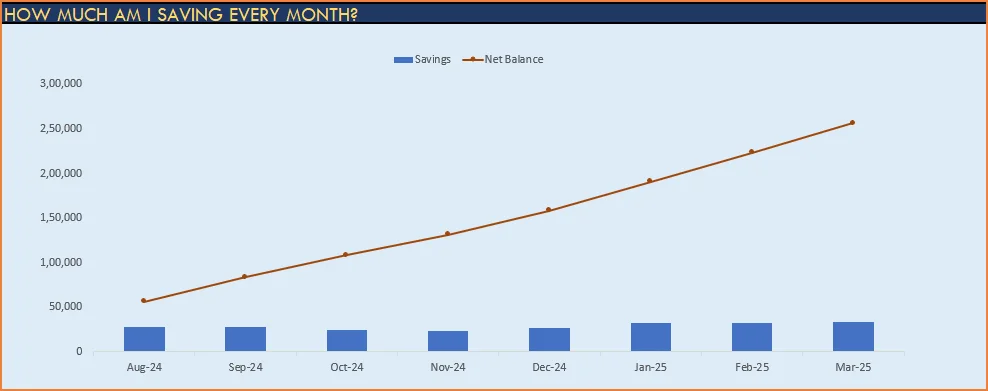
- How much am I saving every month? How does that add to my net balance?
Free Downloads
This version doesn’t use Pivot Tables and Slicers. 4 Charts that are available in Excel 2010 file are not available in this.
Requirements
Excel 2010 and above for Windows
Excel 2011 for Mac
Video Demo
How to track personal finances in Excel?
The template has 3 worksheets: 1) Settings 2) Transactions and 3) Report.
STEP 1: Enter information in Settings worksheet
- Enter Accounts (bank accounts, Credit Card Accounts and Cash Accounts)
- Set your starting balances of accounts
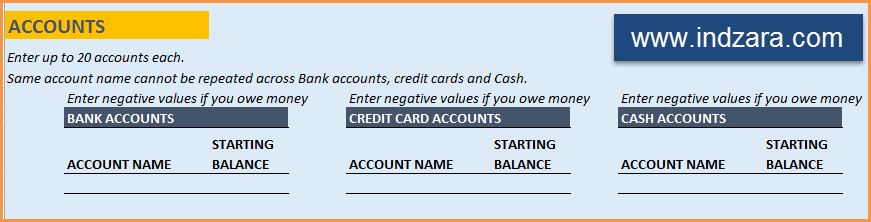
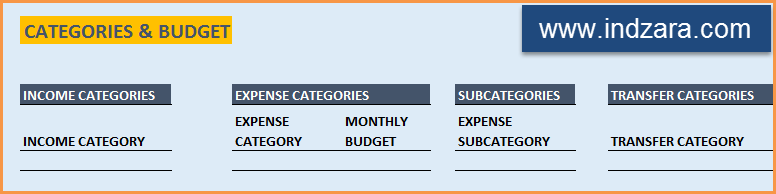
- Create categories & Subcategories (trust me, this helps)
- Set your monthly budgets

STEP 2: Entering transactions in the Transactions worksheet
When you open the template, there will be no records in the Transactions worksheet (as shown in the image below). Start entering your own transactions.

3 Types of Transactions
- Income and Expense: By default, all the Income and Expense transactions should be entered as positive amounts.
- Special case (Refund): If you purchased an item at a store, you would enter an Expense transaction with positive amount. If, a few days later, you returned the item to the store for some reason and get a refund, then you should enter the refund as a new Expense transaction with negative value.
- Transfer: When money is transferred from one account to another, create two records
- ‘Transfer’ type with negative amount from the account you are taking the money from.
- ‘Transfer’ type with positive amount for the account you are depositing the money into.
- Examples of Transfers are Credit Card Payment (transfer from Bank account to Credit Card account) and ATM withdrawal (transfer from Bank account to Cash)
- Drop down menus are available for easy data entry in these fields (Type, Category, SubCategory, Account).
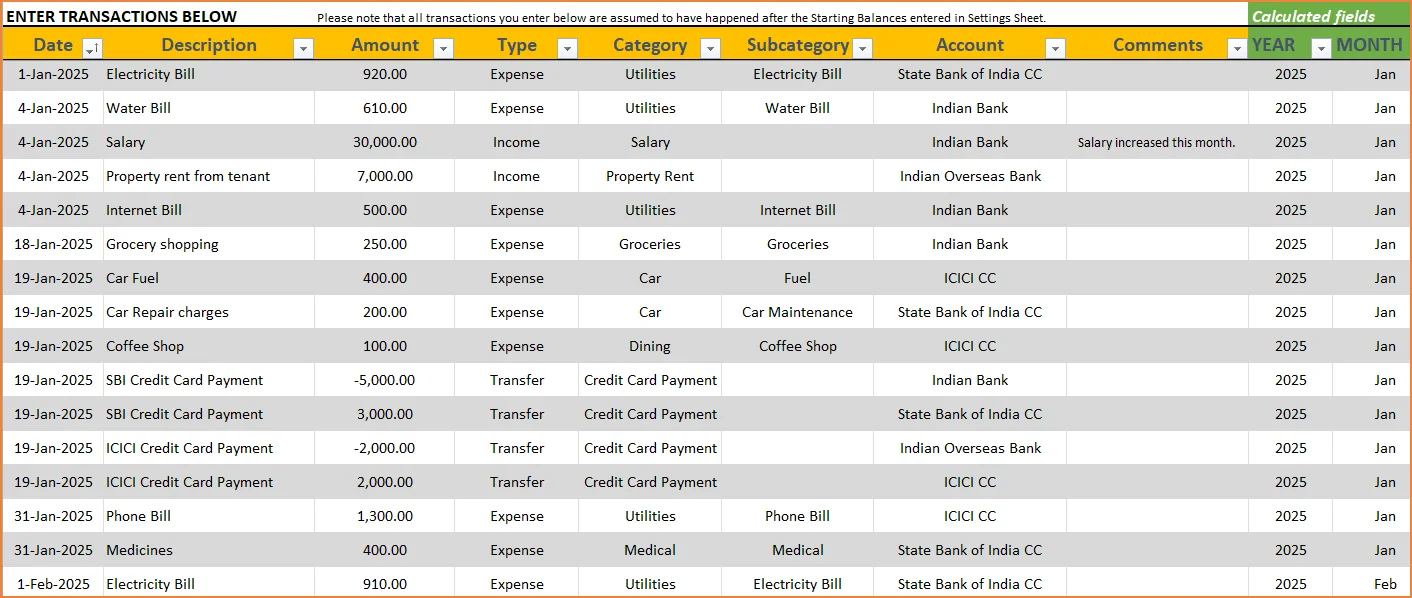
After you enter your transactions, the Transactions worksheet would look like this image below.
STEP 3: View Report
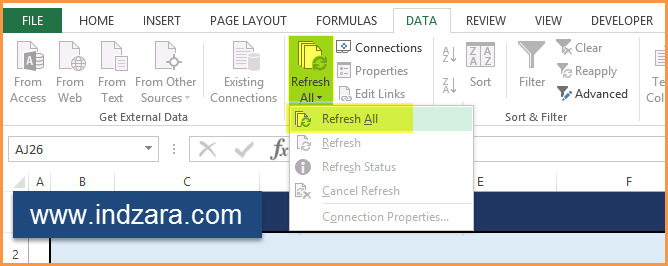
Since there are pivot tables and charts, please refresh the data by going to Data ribbon and refresh all (or keyboard shortcut Ctrl+Alt+F5) . This updates the charts with your new transactions.
Report sheet is locked to prevent accidental editing of formulas. To unlock, use password indzara
The report has four pages.
1) Summary
- Summary of your current financial status
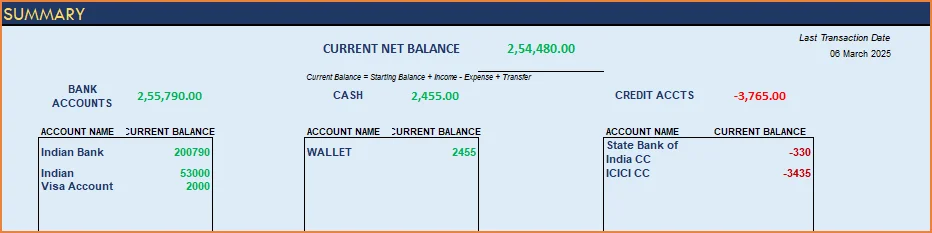
You can find balances for any period in each of your accounts using this personal account template.

This can be helpful when your bank statements and credit card statements actually have their billing cycles different from calendar months. This allows you to compare your statements with the data you have in this template and confirm that you have not missed any transactions.
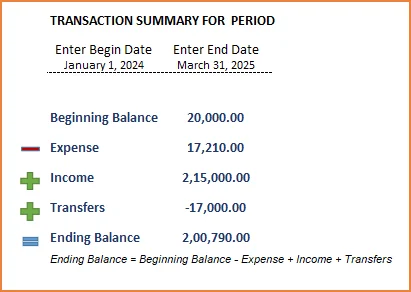
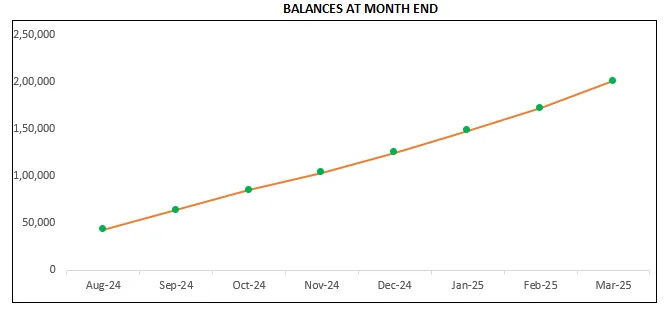
The chart shows the trend of month-end balances in the account chosen.
2) Monthly Financial Analysis
This multiple bank account management excel template can also help in monthly financial analysis. Please choose one month at a time using the slicers at the top.
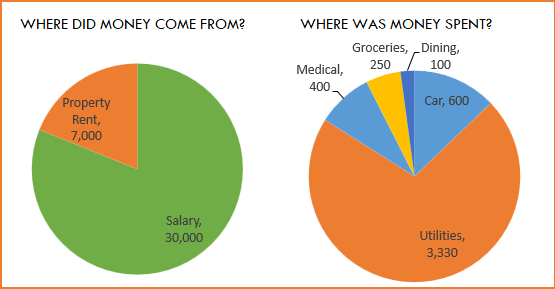
View total Income, expense and savings

Understand where the money came from and where it was spent, in the month
- Track whether you have exceeded the monthly budget.
- Also see the comparison of expenses to budget by each category
- Categories that exceeded budget will be highlighted in red
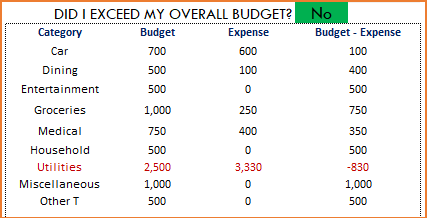
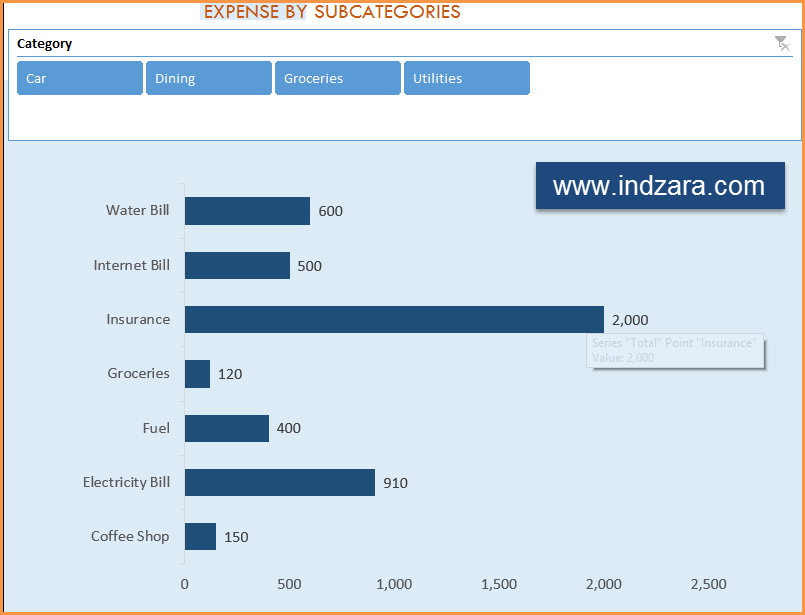
Understand expenses by Subcategories.
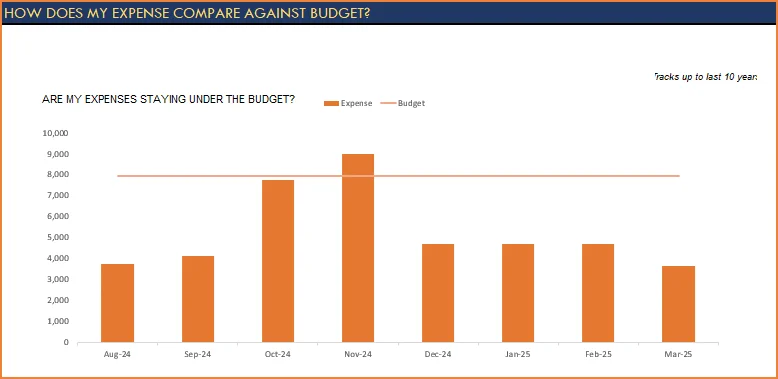
3) Trends of expenses, savings and net balance
Trend of expenses over time and comparing against monthly budget
Trend of savings and net balance over time
4) Trends of transactions by Categories and Sub Categories
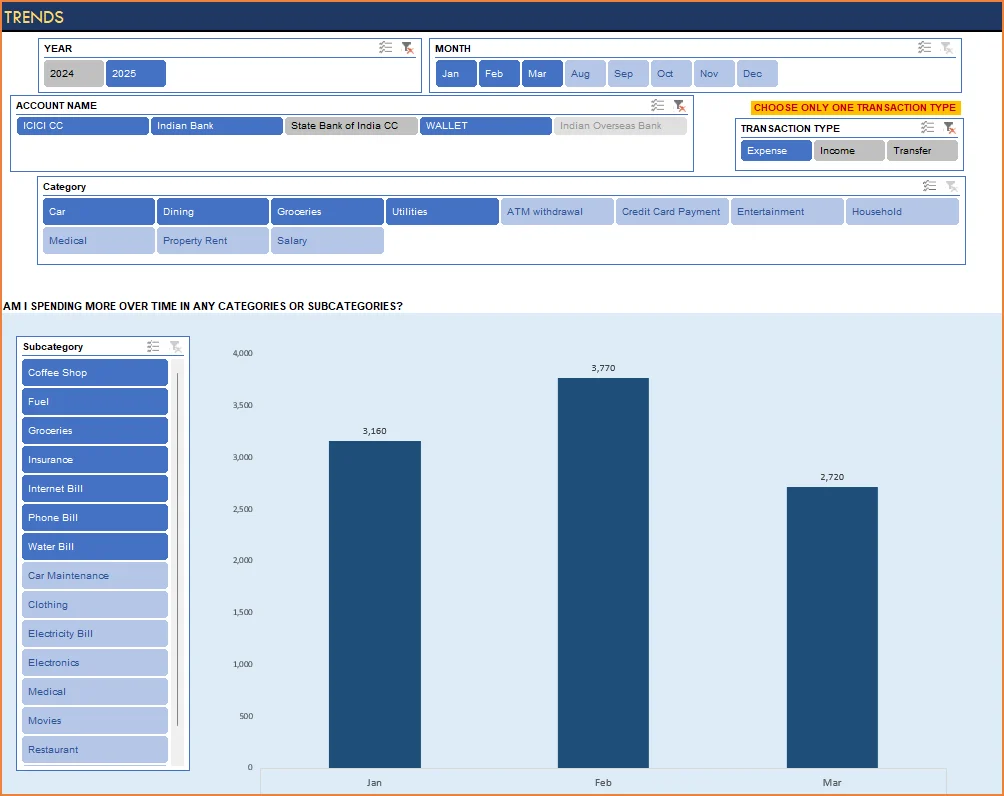
I hope you find this personal finance management template excel useful in managing your personal finances easily.


352 Comments
hello, thanks for this efficient template.
how to account for fixed expense for savings?
where to add them if doing withdrawal from them?
Thank you for your kind words about the template — glad it’s been helpful!
To account for a fixed deposit (or similar fixed expense savings account), here’s how to handle it:
Setting it up:
Add the fixed deposit as a separate bank account in the template.
Recording interest earned:
Enter the interest received as an income transaction linked to that account.
On maturity or withdrawal:
When the fixed deposit is closed or you make a withdrawal, record it as a funds transfer from the fixed deposit account to your regular bank account.
This approach ensures your savings and transactions are tracked accurately without affecting your regular expense flow.
Please let us know if you need any further assistance!
Hi,
First let me say that I really love this template since it is based in Excel. I would like to know how I can have 1 category with multiple sub categories? For example I spend $100 at one store and from that $100, I spend $40 for groceries and $60 for clothing. Is there a way to break that $100 accordingly? Thank you very much
Thank you for using our template and for sharing your valuable feedback.
At present, the amount needs to be entered as **two separate entries** with the same main category (store name) and different sub-categories (for example, *Groceries* and *Clothing*). Automated splitting of a single transaction amount across multiple sub-categories is not supported in the current version of the template.
Thank you for reaching out to us. If you have any further questions or need assistance, please feel free to email us.
Best wishes.
I cannot seem to access the “report” section of the template. I know the instructions are to enter the password “Indzara”.
Where would I enter this password? I cannot seem to locate an area to enter the password!
Thank you!!
Thank you for reaching out to us.
To edit the report section, you’ll need to unprotect the worksheet using the password indzara. The article below provides step-by-step instructions on how to do this in Excel:
https://support.indzara.com/support/solutions/articles/62000137281-how-to-unprotect-sheets-
However, if the Report tab itself is not visible, it is possible that the sheet may have been accidentally modified or deleted. In that case, we recommend moving your input data into a fresh copy of the template to restore full functionality and display of the report.
If you need any assistance with this, please feel free to let us know — we’ll be glad to help.
Best wishes.
Thank you fur this amazing template, i have one doubt can we add personal finance borrowing details? for example, i borrowed Rs. 10000 from A. later i returned Rs. 5000. If there is any option for personal ledger?
You are welcome. Thank you for showing interest in our template.
You can enter Borrow as a credit card and track the borrowed amount and paid amount.
Best wishes.
Dear Sir
Integration of 1 to n subcategories per main category and related evaluation options & Give to add & remove category & subcategory
2) Tracking of fixed vs. variable expenses
3)How to Split expenses & Income
4) How can add More types like (Expense,income ,transfer,Journal,advance,Saving Exps.
5) can you add PMT (Cash,Bank Direct,Check,Direct deposit,Credit card,Debit card,Gift card,Other)
6)Cycle (Regular,Irregular)
7)Nec/Lux (Necessity,Luxury)
8)Memo (use for Spilt Transaction)
9)needs,wants,savings
10) can you add Symbol of category
11)fix expense,variable expense
If select tpes in Expense Showing only expense relate category in dropdown if select expense particular expense categaory like utilty sowing in subctegory dropdowna only utility realted
Thank you for sharing your requirement.
We take customization projects for a fee. We will review your requirement and send you the estimation through email by tomorrow.
Best wishes.
Hello, I just started using this template and I see is very complete, but I would like to add another pivot table in the report slide that presents me the actual budget for each category, and if I did not use all the budget for each category in the ” month 1″ adds that amount to the initial budget of each category of the “month 2”
Category Initial budget (same for each month) Expense Month 1 Initial budget Month 2
Food $100 $50 ( $100 + $50 of the first month)
Car $350 $250 ( $350 + $100 of the first month
Is there any possibility of doing that ? and How?
Thank you for using our template and sharing your valuable feedback.
Yes, it is possible. We take customization projects for a fee. Please write to us at the below link for estimation:
https://support.indzara.com/support/tickets/new
Best wishes.
this template is very helpful for me, i really like the format
but i want to adjust something, is there any way to adjust the “did i exceed my overall budget” tab, not monthly
for example, from 25th august to 25th september
Thank you for using our template and sharing your valuable feedback.
Yes, it is possible. Formulas in the hidden Monthly_Summary_Table needs to be modified. For example, we used EOMONTH function to get the last date of the month, you will need to add 25 in it.
We take customization projects for a fee. To proceed further with the customization from our end, please write to us at the below link for estimation:
https://support.indzara.com/support/tickets/new
Best wishes.
I just wanted to say thank you for this brilliant and helpful template. It has become so handy for me as I use it everyday. I wanted to know if there is a way to have automatic reminders for daily/weekly/monthly deposits/bill payments so that there is less potential for these type of things to be missed when entering it manually. For example, how can I have a popup or some sort of notification every month that I have a phone bill for company XYZ due on the 15th of the month for $100?
Thank you for using our template and sharing your valuable feedback.
The requested feature to pop up a remainder on certain dates is possible using Macro but we do not use macro in 99% of our template to ensure it is simple enough for our customers to go through the template modify it as per their requirement.
You can use our Event Calendar template to schedule your bill payments and it will show the same on the calendar. Following is the link to the template for quick reference:
https://indzara.com/product/event-calendar-maker/
Best wishes.
Hello Indzara!!!!
First of all, I would like to tell you that I’m HUGE FUN of your work which is AWESOME!!!! Thank you for providing us with such a useful and fantastic tools to make us lives easier!!!
I recently downloaded this excel, but I have a problem with the “Transactions sheet”. For some reason, after I completed some of the lines with a few transactions and every seemed to be ok so far, I continued with a few more, and suddenly the cells which automatically filled with the month, stopped and changed to “MMM”. As a result, I cannot have the reports as supposed to be… I tried to erase the dates and fill in them again from the start, but it didn’t work out.. Can you please help me?
Thank you for showing interest in our template and sharing your valuable feedback and you are welcome.
Yes, we are glad to assist you. Please share your sheet to us at the below link:
https://support.indzara.com/support/tickets/new
Best wishes.
Hello again!
Well, I figured out that the problem was the conflict between the languages…different language at laptop, different language in excel and so on…. I’m apologizing for the inconvenience!!!
Many bravo again for your awesome work!!!
Kindest Regards,
Hi
This excel sheet is fantastic. Is there a new upgraded version of this template
Thank you for showing interest in our template.
We have a premium version of the template for small business. Following is the link to the template for quick reference:
https://indzara.com/product/small-business-finance-manager-excel-template/
Best wishes.
Hi
And awesome template!!!
I loved your work. However I have few doubts and addition request if possible to this template as given below.
1) If we have borrowed money which is our debt as loans or specifically borrowed from close friends where to account that as we would be closing on monthly or yearly etc.
2) Is it possible to see our total income, expense and saving per month in one graphically represented chart.
Thank you again for sharing this with us.
Accept my Gratitude.
Thank you for sharing your valuable feedback.
1. If it is a long term loan it can be added as a credit card balance and if it is one time, take it as a expense.
2. Adding all income and excel in one chart will make the chart clumsy.
Best wishes.
Amazing!!
Is there any possibility to, also, create subcategories for income?
Thanks for the amazing work!
Thank you for sharing your valuable feedback and you are welcome.
I would like to inform you that the requested feature is currently available in our Small Business Finance Manager template. Following is the link to the product:
https://indzara.com/product/small-business-finance-manager-excel-template/
Best wishes.
Hello Sir,
Your template is very helpfull! I learn a lot from your templates.
Could you explain what is happening in the table on the hidden sheet “Monthly_Summary_Table”
I understand that all te graphs are made from this table. It would be very helpfull if i undersood what for formulas are there. (it is protected so i cannot check it out myself)
Kind regards,
Wesley
You are welcome. Glad to hear.
Please use indzara as password to unprotect and view the formulas.
Best wishes.
Thanks for this great personal finance template.
My only comment is that I cannot seem to see and enjoy many of the charts you cited above.
Thanks for using our template.
This template works well in Excel 2010 or later editions. Please check your version of Excel. In case it’s still not working, please email your file along with the list of issues to support@indzara.com
Best wishes
Thank you so much for this template. It is really useful and comprehensive!!
Would like to seek your assistance please as it seems that the report section (budget part) does not seem to be updating? I have input the monthly budget but it seems the categories and amounts are not appearing in the report. Can you help me please?
You are welcome. Glad to hear.
If the values do not appear, typical reason is that the entries are made outside the table.
Please email file to support@indzara.com along with your question. We are happy to review and help. Please remove any sensitive data before sending file.
Best wishes.
Hi indzara
You have done good work thinking all these over and helping people who find difficult to manage the finance . It would be very helpful if you can think of Adding the SIP fund tracker , Shares Tracker to see the asset live updated in this . It would be good if you think of adding LIC & Other saving stuff all together.
It will be much better if you can think to make it a app because Most of the time the spendings happen on the go and we might miss or forget to enter it in excel later as the excel in mobile is tedious to enter these data.
Thanks for using our template and sharing your valuable recommendations.
We will try to incorporate them into our future releases.
Best wshes
I’m using this template past six months it works good,
I’ve one doubt in this excel sheet, Credit accounts paid amount also a part of monthly expense but it not show in monthly financial analysis . how to add credit amounts to expenses .
I request you to clarify this .
Regards,
Thanks for using the template.
If you are referring to credit card payment, it should be considered as a transfer transaction and hence not part of expenses. As we are entering each expense transaction already we should not enter the credit payment again as an expense.
Please let us know if any questions.
Best wishes.
Thank you very much, for your kind reply…..
Regards
Hi Indzara,
First of all I would like to express my sincere gratitude for the sharing of these valuable resources.
I am facing an issue with this excel sheet; it is getting corrupted when I use it for some time. Also very difficult to save transactions on the go.
I request you to share Google sheet equivalent for this excel sheet. It would mean a lot to many of us.
Thanks a lot.
Thanks for using our template and sharing your positive experience.
This template is designed to work on MS Excel. The list of template compatible on Google sheets are at https://indzara.com/free-google-sheet-templates/.
We are in the process of making other templates compatible with Google Sheets gradually.
Best wishes
The sheets are protected and hence i’m unable to change anything.
Hello
Please use “indzara” as the password
Thanks
hi I’m unable to refresh data on Report sheet of the file PErsonal Fianance. Hence the years are not changing to current year and date and data is not publishing
Thanks for using our template.
Please share your file along with the list of issues to contact@indzara.com
Best wishes
Hi very nice tool and thanks for making it available for the community. I am intending to use your template to manage invoices for purchased materials not for sales. I am thinking of adding 2 columns, Vendor & Sub-Sub-Category. Will they be taken into consideration by the reports ?
Thanks for using our template.
Please ensure that all the formulas and the links are intact.
In case, the issue persists, please share your file with the list of issues to contact@indzara.com
Best wishes
I’ve noticed that there’s a named range in the template called ALL_ACCTS. This range refers to the following formula:
=OFFSET(Monthly_Summary_Table!$W$4,0,0,Monthly_Summary_Table!$X$2,1)
Screen shot can be seen here:
https://imgur.com/9vvb97L
But I can’t find the Monthly_Summary_Table range. Where is it, and what does it refer to?
It is a hidden sheet. Please unhide hidden sheet Monthly_Summary_Table.
In the Transactions sheet, under the ACCOUNT column is a drop-down list, where I can select different types of accounts, from bank account, to credit card account, to cash account. It references a name ALLACCTS. How did you do that? Is it a table or a named range? I want to add another type of account, namely online account to this ALLACCTS , but I can’t figure out how to do that.
Thanks for using the template. ALLACCTS is a named range which uses a formula with OFFSET function. It will just create a list of accounts pointing to a hidden sheet. In the hidden sheet I combine the different types of accounts into one list.
Best wishes.
Thank you so very much for this amazing template.
I wanted to learn about an issue.
There are transactions and personal lives where we borrow or lend money from friends and family. Can you suggest how we can make an entry for these transactions? Is it possible to create an account for a particular friend, say, Mr. XYZ and adjust the borrowing and lending from and to that friend accordingly so that at a particular point of time it shows the current financial status?
Dear Indzara Team,
Please let me know if you have any answer to my question.
Sorry for the delayed response.
Yes, you are correct. If you need to track specific friend, then a separate account is needed for each friend. If you want to only track total of all friends, then one account for all friends would be fine.
Please let us know if any questions.
Best wishes.
Thank you for offering a free version of your personal finance manager template! I’m very eager to use it, but I see that it is designed for 2011 version of Excel and I’m using Excel version 16 on my MacBook Pro with Mac OS 10.12.6
What do you suggest I do? Can I purchase a template designed for Excel 16?
Or do you recommend I uninstall Excel version 16 and install Excel version 11?
Thank you so much for your generous assistance!
Thanks for using our template.
The latest version of the Personal Finance Manager works on Excel for MacBook 2011 or later editions. Please download the latest edition.
Best wishes
The drop down menus are not working.
It appears to be read only.
How do get a working copy?
Thanks for using our template.
Please use “indzara” as a password to unlock the sheet. In case the issue persists, please email the file with the list of issues to contact@indzara.com
Best wishes
I can’t get the formatting to continue down the rows. Using v.2. I’m sure theres an easy way to extend the formatting.
Thanks for using our template.
Please extend the table below to continue the formatting.
Best wishes
Hi,
For some reason the Report sheet isnt updating. Kindly help
Thanks for using our template.
Please ensure that links and formulas are intact. In case you are not able to sort it, please email your file with the list of issues to contact@indzara.com
Best wishes
Very nice template but I needed multi currency template to track two different currency as I working out of India
Can you try to builtin a feature where you take your bank account statements and auto populate the transactions rather than entering every transaction one by one.
Thanks for using our template.
We have not used any kind of automated features like macros in our templates yet. We will try to incorporate your suggestions in our next release.
Best wishes
In Personal Finance Manager, how can we change monthly budget to annual budget? this would be helpful for annual planning?
Thanks for using our template.
Annual planning is not a feature yet. We will try to add it in the next release.
Best wishes
Will this template work in MacOs “NUMBERS”?
Hello
Our templates are designed to work on MS Excel 2013 or later on Mac OS.
Best wishes
Thank you ! 🙁
The “calculated fields” don’t seem to be calculating which is affecting the monthly financial analysis, please provide direction on how to make them calculate the date. Otherwise great spreadsheet!
Hello
Please ensure that all the formulas are intact and their sequence is not broken. In case it still does not work, please email the file along with the list of issues to contact@indzara.com.
Best wishes
your template is very useful, but i am facing some problem.
whenever i save and close the program, message shows “excel has stopped working”.
what to do now.
Please help.
Thank you.
Hello
Please ensure that you have adequate disk space to save the file. Also, the template is designed for Excel 2010 or a later version.
Thanks
Hi Team Indzara.
Liked your template very much. your works has benefited me a lot as compared to many accounting software. its ease of use. i just wanted to request you that can i modify reports sheet as per income, expense, category and sub-category wise. i am having 10,000 entries and i find it to be difficult to see.
Hello
Thanks for your feedback.
Please share more details on what is difficult to see.
Thanks
please add the savings column for FD , LIC etc.
Thanks for feedback.
Best wishes.
Hi
I want to ask you “Why I can’t see the account names, subcategory, and transaction type in the Trends?
Thanks for sending the file. It appears that the field names in the Transactions sheet have been renamed and that broke the pivot table. I have sent the file to you by email.
Best wishes.
Hi
please provide password
Hello
The password is indzara.
regards
how does one log 2 types of currencies, pertaining to 2 different bank accounts in different countries
Hello
Transactions can be logged in one currency only.
Best wishes
Hello dear
I need this templates for MAC if you could please provide me the templates .
Thanks
Hello
You can download a copy for MAC from https://indzara.com/2013/05/personal-finance-manager-excel-template/. It’s the second option in the free download section.
Best wishes
Hi Indzara Team,
Thanks for your feedback on updating the PIE CHART section of the reports. Request you to please advise if there is a similar method to exclude certain income and expense categories for the following reports:
1) How does my expense compare against the budget ?
2) How much I am saving every month ?
Appreciate your inputs on the same.
Thanks and Regards,
Hi,
Good Morning. Thanks for building the awesome template. I have been using this as a primary tool to track income and expenses. Request you to please advise if in the PIE CHART option which we have in the reports section, we can exclude certain income and expense categories / subcategories.
Appreciate your inputs on the same.
Thanks,
Dhruv
Hello Dhruv,
Please unhide the sheets and deselect the categories that are not required from the Pivot tables.
Best wishes
Hi Indzara Team,
Thanks for your feedback on updating the PIE CHART section of the reports. Request you to please advise if there is a similar method to exclude certain income and expense categories for the following reports:
1) How does my expense compare against the budget ?
2) How much I am saving every month ?
Appreciate your inputs on the same.
Thanks and Regards,
Dhruv
Hello
Please refer to the reports tab. It gives you a graphical representation of your expenses with respect to your budget. Also, shows savings every month.
Regards
Hi Indzara team,
I am using 2010 v2 sheet on macOS highSierra v10.13.2. on excel for Mac 2017 and the monthly review is not showing the plot, which i really miss about, cos it gives the overview. Can you maybe help why this might be?
Thanks.
Hello
This sheet is tested on 2011 Excel for Mac OS and after.
If it does not show results properly. Please send a copy of your file to contact@indzara.com
Best wishes
Love this template and used it for 2017. Now that I am entering 2018 transactions, they are not showing up on Year slicer. I can select 2017 but the rest of the buttons listed are 42737, 42737 etc. Is there a way to correct this?
Hello,
Thank you for using the template.
Please ensure that you hit “Refresh All” in the data ribbon. The data in the transaction sheet needs to be updated to reflect the fresh inputs.
Let us know if that works.
Best wishes
Hello indzara , Thanks for your Template .I am now using your financial Template proudly.However , I would like to change chart color and its row thickness. May I know its password to edit it.Thanks with best Regards
Hello
Thanks for using the template.
The password to unprotect the sheet is “indzara”
Best Wishes
I have entered all income and expenses payment from Bank account. Entered Opening balance in Bank account. All expenses charts are updated with refresh. But Bank account summary – Op+Income-Exp is not getting updated
What could be my error ?
Sorry for the delayed response.
Please check the start and end dates. If there are further questions, please email file to contact@indzara.com
Best wishes.
Additionally, everytime I close the file, I get an error. I am afraid I will not be able to access this file in sometime. Please help resolve as I would like to continue using the excel sheet. Thank you
ERROR:
Microsoft Error Reporting log version: 2.0
Error Signature:
Exception: EXC_BAD_ACCESS
Date/Time: 2017-08-24 11:28:02 +0000
Application Name: Microsoft Excel
Application Bundle ID: com.microsoft.Excel
Application Signature: XCEL
Application Version: 14.2.2.120421
Crashed Module Name: MicrosoftChartPlugin
Crashed Module Version: 14.2.2.120421
Crashed Module Offset: 0x00158ceb
Blame Module Name: MicrosoftChartPlugin
Blame Module Version: 14.2.2.120421
Blame Module Offset: 0x00158ceb
Application LCID: 1033
Extra app info: Reg=en Loc=0x0409
Crashed thread: 0
I am really not sure what the error is. It says the MicrosoftChartPlugin crashed. Are you using any other add-ins/plugins in your Excel installation?
I have not had any issues with the file. I am using Excel 2016 for Windows.
Best wishes.
Hello,
Your Personal finance manager excel sheet is amazing! Will you be releasing a new version with pivot tables and slicers for excel 2011 for Mac soon?
Also, how does one log 2 types of currencies, pertaining to 2 different bank accounts in different countries?
Thanks
Thanks for the feedback. Glad to hear.
If you are using Excel 2016 for Mac, you can try the Personal Finance Manager file (windows). I believe the pivot tables and slicers may be supported (but not all the pivot charts, may be). But it does not work in earlier versions of Excel for Mac.
There is currently no built-in support for 2 currencies. We have to convert them to one currency and enter. Or we have to maintain them in 2 separate accounts which do not transact between each other.
Best wishes.
Bhai download nahi ho raha hai download link bhejo na plz..
The links are above. I tried again just now. The link words. Can you please clarify what is the error message? Which browser?
Thanks. Best wishes.
Can I alter the language on the sheets without altering the funcionalities?
It depends on what words are going to be changed. If they are used in the formulas, we need to change them in the formulas too. Sorry that I can’t give a definitive answer without knowing what words are to be changed.
Best wishes.
Hello,
Thanks for the awesome tool. I have been using this since last year replacing a complex tool. This has been awesome but I found out this month that 2017 is not showing up in the report pivot table (Monthly financial analysis-Year). It only has 2016 in display now where as I have filled transaction for whole of January. Only when I delete all the 2016 transactions, 2017 appears.
Please help.
You are welcome.
If you are referring to the filter at the top left, it should automatically show new years. I will email you about this. If you can reply with the file or screenshots, I can take a look to see why this happens.
Best wishes.
hi…
if i lend money to my friends and they pay me in 3 month (installment) … how to record it ?
thanks
Lending can be one expense transaction. Then, when it is returned, it is an income transaction. If there are 3 installments, they will be 3 income transactions.
Best wishes.
Love this template. As suggested before, it would be great to have a more flexible budget. For example where I live the water company payments come every two months, so some months I expend less than the budget and the next one more.
Also it could be great to have different budgets for different periods.
Thank you for the feedback.
I completely agree that having varying budget across months would be useful. It brings along potential restrictions, but I will look into ways to address them.
Thanks. Best wishes.
Hi,
I have two tipes of money euro and my countryes money, in cash and alsow at the bank
I wish if you could implement in the template a second money and with a courency to convert the euro from my accounts to a local money => the balance of all my money showing in the local money.
Thanks
Thanks for the feedback. I will definitely consider this when I work on the next version of this. As of now, I don’t have a time frame yet.
Best wishes.
Hello,
Is there a template that I can use to manage a real estate rental portfolio?
Thank you
I am sorry. I don’t have such a template. Are there any details on what the template should accomplish? Thanks & Best wishes.
Help, unable to save
Please let me know the version of Excel and operating system. What error message do you receive and when? Thanks.
version 2010,
operating system is i5, window 7
i was unable to save and close the excel after i make any changes on the template, i even try to delete and download, but it goes the same every time.
i tried the 2007, 2010 and sample version
Excel 2010 in Windows 7 should be compatible. I am very sorry that I don’t know why Excel would not allow you to save the file. Can you try saving (while downloading) to a different folder in your computer? Thanks.
Further to my above suggestion, I would like to add that under REPORTING, we should also have an option to select the period for YEARLY PIE-CHARTS (like JULY 2014 – JUNE 2015 OR JAN 2014-DEC 2014). This will also help for people to calculate their expenses/income for Income-tax purposes as well.
Thank you for the feedback. Best wishes.
Hi .. I have observed that though the design of this template is excellent, needs some improvement.
SETTING : (1) While setting Expense Categories (EC), it should also allow to set sub-categories for that EC. This in turn should help recording transactions. (2) It should also allows us to set Monthly Budget for each sub-category, which in turn SUMS-UP for Expense Category as Monthly Budget.
TRANSACTIONS : While recording expense transactions, when we select an Expense Categories (EC), the corresponding sub-categories (set for that EC) only should appear and not all (as is the case now) which will facilitate correctly recording the expenses.
REPORTING : There should also be another page having 2-PIE CHARTs reflecting (1) Yearly INCOME – Category-wise; (2) Yearly EXPENSES – Category-wise; (3) and List of Income and Expense Categories with Amount below the Charts (like in monthly analysis)
With these improvements, your this EXCEL TEMPLATE will be more attractive and useful.
Thank you for the observations. I will definitely consider your feedback when I work on the next version. Thank you.
Hello, Dear!
What if I have different currencies? I am traveling a lot and live in different places. What if I have more than 5 types of currencies? Sometimes I might live 2 months in a country and then move to another, then 2 weeks in this country and then come back again after 6 months. How can know my income, expenses and transfers in different currencies?
Thanks a lot for this amazing template!!
Thanks. I am sorry. The template doesn’t support multiple currencies and exchange rate conversions automatically. We would have to make the currency conversion by formula and then type in the converted value in the Transactions sheet.
Thanks & Best wishes.
In the “How does my expense compare against budget?” part, the budget line doesn’t appear. I have Windows 8 and Excel 2010.
Is there a way to fix this?
PD: In the sample sheet works fine.
I solved it, don’t worry (the problem was that I had only 1 month of data, so the line didn’t appear).
Thanks for this amazing tool.
You are very welcome. Thanks for following up and confirming. Best wishes.
Brilliant idea…but drop down not working when logging in spends….how do I solve this?
Thanks. Drop downs work only inside the transactions table. Please make sure that your cursor is inside the table. I have an article for data entry in Excel Tables, if you are new to it. https://indzara.com/faq-items/introduction-excel-tables-data-entry/ If this doesn’t solve, please email me the file (indzara at gmail) and highlight specific cells you are trying to use. Thank you.
Dear indzara,
Any chances of using multiple currency now. Please let me know.
Sorry, I haven’t had a chance to work on this. Please clarify how multiple currencies should be handled and what do you expect to see? Thanks.
Hi. Am I right in thinking that there is no way of setting up routine payments automatically? Eg monthly income, annual insurance ?
You are correct. This template does not automate recurring expenses/incomes. Best wishes.
Thanks for the great template. I”m trying to use this on Google Sheets (since Excel on my laptop often crashes and I don’t want the sheet to be lost). However, the categories and other drop-down menus just say loading on Google Sheets, but don’t load?
The template has not been designed for Google sheets. I am not sure why Excel crashes for you. Which Excel version are you using? Thanks.
Hi,
\thanks for this template. this is really helpful.
Below are my few concerns:
1. The records for Transfers to ATM CASH Withdrawal – Can the withdrawl amount be added to CASH account ? suppose if I withdraw some CASH amount and spend it on Expenses. Under what category it will be recorded ?
2. I also wanted to maintain the amount deducted from my acount for Investment purpose. Like monthly 10k to SIP account. how do I manage this in your sheet ?
Regards
Santosh Dias
You are welcome.
1. Yes, transfer transaction can be made from a bank account to the ‘cash’ account. Then, when you spend that amount on expenses, it will be an expense transaction.
2. can you have that as another bank account and transfer money? Any interest income should be added manually as an income transaction on that investment account.
Best wishes.
Can you have sub-category selection based on the category selection built into this excel. I hope this will be a useful functionality addition.
Thanks for feedback. It will definitely be considered for the next version. Best wishes.
Dear indzara,
Thanks for the amazing template. I have below 2 problems,
1. My Transaction Tab is not showing any update, it is showing the same amount as I entered in setting.
2. After opening the excel template, its taking too long to close. I mean got hanged.
Please solve my problems and thanks in advance.
1 point further detail……. Transaction Summary for Period in third page.
You are welcome.
I have replied to your email.
Can you please send me a screenshot of the Transactions tab so that I can see why the summary appears the way it is?
Which version of Excel are you using in Windows? Please let me know. Have you made any changes to the file? I would have to see the file to further determine why it is taking long to close. In my copy, I have not come across this issue.
Thanks & Best wishes.
Hey,
I wanna thank you so much for this very very awesome program that you just made, i have been searching for a long time for a great program like this at last i found it, it is very useful, easy to use and almost everything that i need is here
But i want you to tell that it will be really good if u can figure-out a way to calculate the bank interest and add it in to this
Thank You
You are very welcome. Thanks for taking the time to provide feedback.
Wooow!! This is exactly what I wanted and you made my day happier. Thank you so much for the endless works behind this beautiful Excel Sheet.
You are welcome. Very glad to know. Thanks for taking the time to provide feedback. Best wishes.
Thank you for a fantastic template. Is it possible to create more rows on the Transactions worksheet? On the version I have, everything works great up until Row 205, after this point it stops working.
Thanks in advance.
You are welcome.
There is no row limitation. The row height may be the default row height after 205. But the functionality does not change. Please send screenshot and highlight what is not working. indzara@gmail.com. Thanks.
Hi, Strange occurrences where the Category drop down box arrow is missing from some lines and not all the Categories are being shown on the list when I click the top Category tab.
I have some pics which hopefully will show what I am trying to say.
How can I upload the pics for your attention.
Thanks for sending the email with screenshots. I will respond to your email shortly. Thanks & Best wishes.
Dear sir
Monthly and yearly report is not work at below format is not working …please let me know what to do..
indzara_Personal_Finance_Manager_2010_v2
Thanks for the comment. Which Excel version are you using? What have you entered and what does ‘not working’ mean? If the data is input inside the tables correctly, and the data is refreshed, the report should update. Please let me know exactly what has been entered and what the issue is. Thanks & Best wishes.
Hi there, Can I use this for multiple currencies? I am paid in Euros but have a UK credit card also, so I use two different accounts depending on where I am. Or should I use two spread sheets? One for my UK accounts and one for my euros?
I know that is says for use with dollars and rupees, so does that mean I shouldn’t use it at all?
Thank you!
The template is currency agnostic now. You can format the cells with any currency format as needed.You can have both accounts (euros, UK) in the file as long as they don’t have to be converted. If you are expecting two currencies to co-exist with conversion rates, that is not built in. Please let me know if there are any questions. Thanks & Best wishes.
Hello Indzara,
Thanks a lot for your suggestion and link to your tutorial, it’s so awesome that you reply to the comments!
I’ve been trying to program this function (running balance for each account after each transaction) into your finance manager but I haven’t been able to do it correctly. There is a lot of criteria and ranges I am not sure what to input. Could you program this for me and I’ll send you a paypal donation? I already spent a lot of hours trying to do it without success.
I am using this manager for my business so I really need the running balance on the last column of the transactions sheet. If you could program this correctly I will be willing to send you a fair amount for your time and knowledge. I am sure this feature will be very useful to all your customers as well. Please let me know if you agree, here is my email for any further questions, max.azcona@gmail.com. Thank you very much for your awesome excel template Indzara, hope to hear from you soon!
You are very welcome. I am glad to help. Please try this formula in a new column created in the TRANSACTIONS table.
=SUMIFS([Amount],[Date],”<="&[@Date],[Account],[@Account],[Type],"Income")+SUMIFS([Amount],[Date],"<="&[@Date],[Account],[@Account],[Type],"Transfers")-SUMIFS([Amount],[Date],"<="&[@Date],[Account],[@Account],[Type],"Expense") Basically this will add up (Income + Transfers - Expense) as of the current transaction date for that specific account. Please let me know if there are any questions. Best wishes.
Hello!
Thank you for this great tool! It has been really helpful. One question, how could I program another column on the transactions sheet showing the active balance after each transaction?
I really need to see the balance on certain days after certain transactions and the report section only shows the net balance. I would really appreciate if you could help us out with this, thank you very much!
Have a great day!
You are welcome. I have not had the time to build this. But this would be my suggestion: we need a formula with SUMIFS function. Sum all transactions with INCOME type + Sum all transactions with TRANSFER type – Sum all transactions with EXPENSE type where Account = ‘the account in the current row’ and transaction Date <= 'date in current row' This should give the balance for that account as of that transaction date. For help with SumIF function, please see my video https://youtu.be/jM1AuYmFdAc. Please let me know if this doesn’t help. Thanks & Best wishes.
hi thank you for your great work i want conirme that is work perfect on office 2016 for mac i have the version excel for mac v 15.17 and there is no problem.
Best regards
Great. Thank you for the update. Glad to know. Best wishes.
Hi,
Sorry for the long delay of response.
On Mac, v15.17, reports are not working. I see only ones and zeros in front of the subcategories).
Thanks.
Thanks for the update. Please send the file or screenshots to indzara at gmail dot com. Thanks.
I sent you the file. Did you receive it?
Yes, I have received your file. I opened the file in Windows Excel 2016 and some things appear different from your screenshots. I will install Excel 2016 in Mac this week and I will let you know. I am tied up with other projects and hence there may be a delay. Thanks & Best wishes.
Thank you very much.
Thanks for your patience. I installed Excel 2016 for Mac and found that 4 charts in the Windows version file still don’t work in Mac. This is because they use pivot charts and Excel 2016 for Mac still does not support pivot charts.
The data can be found in the hidden sheet (pivot_tables) where it is correctly displayed. However, the charts in the REPORT sheet are not picking up that data.
Thanks & Best wishes,
Thank you.
Hi,
Thanks for this great tool, really appreciated here.
Are you planning an update for Office 2016 for Mac? Maybe this new version is compatible with the features not available for Office 2011.
Thanks again.
Thanks for the kind words.
I have not used Office 2016 for Mac yet. If you have one, please try this template and let me know. According to Microsoft’s news, Slicers are available now for Mac. So, I am assuming this template now works in Mac. Thanks.
Thanks for this – had got tired of wrangling with tools like YNAB and (being on Mac) I missed MS Money… Anyway, this is really simple and easy to understand. Thanks for building this!
Only downside of the Mac / Office 2007 version is the lack of Income By Year. Still, not the end of the world. Thanks!
You are very welcome. I am glad you find it useful. Best wishes.
Happy New Year.
The file seems to be working perfect.
The only missing feature is to be able to use multiple currencies. As you can imagine in today’s global world, money flows in and out in different currencies.
I recommend you to add the currency and exchange rate features as soon as possible.
Regards
Selahattin
Thanks. Happy New Year. Thanks for the feedback. I will definitely consider multiple currencies in the next version. Best wishes.
Hi – great template! one problem: I presume that once I have entered my categories and sub categories etc, I should be able to update, and then these categories will become the contents of the drop-down menus on the Transactions TAB?
This is not happening. I am using Office 2013
Thanks
Ok -sorted! thanks!
Great. Thanks for letting me know. Best wishes. Happy 2016!
Great Template !!! Thanks for sharing it !!!
I would love to use it, but unfortunately excel crashes every time i attempt to close. And this is the only excel file that makes this crash.
When i see the details of the error, it gives me LCID: 1033 and SKULCID: 1033.
I am not certain about this, but It looks like this is something related to add-ins in the 3rd sheet. Can you point what could be the potential causes of this crash and how to solve them ?
Thanks again
Please let me know which Excel version you are using and which operating system. Slicers are used but there are no add-ins in the template. Please email me the file and I can test if it crashes on my Excel 2016 for Windows. Thanks & Best wishes.
Thanks for your quick response. The original file that i downloaded from here is the one that crashes.
I am using Excel 2010 on Windows 7.
I am copying the problem details i get from excel below:
Problem signature:
Problem Event Name: APPCRASH
Application Name: EXCEL.EXE
Application Version: 14.0.4756.1000
Application Timestamp: 4b9c0870
Fault Module Name: oart.dll
Fault Module Version: 14.0.4756.1000
Fault Module Timestamp: 4b9c0c91
Exception Code: c0000005
Exception Offset: 00000000001887e2
OS Version: 6.1.7601.2.1.0.256.1
Locale ID: 1033
Additional information about the problem:
LCID: 1033
skulcid: 1033
Appreciating your help.
I am sorry. If it crashes before any data is entered, then I am unable to troubleshoot this. I don’t have Windows 7. Since there are so many minor flavors of Excel installations, it happens once in a while. I am very sorry about this.
Best wishes.
Hello,
Yes, I am working with windows. I have entered information but, the amounts on the first page don’t change to reflect the changes in my transaction page and the tables page is blank as far as numbers as well.
Please email the file to indzara@gmail.com and I can look at it and let you know. Thank you.
Dear Sir Its a wonderful template….can we change the type of the Graph like the one which is explained in the blog becoz the file which i have downloaded does not contains the Graph as explained in the Blog….
I have Downloaded it from the following link
https://indzara.com/2013/05/personal-finance-manager-excel-template/
Thank you for the kind words. Please confirm that you have downloaded the file named ‘indzara_Personal_Finance_Manager_2010_v2’ . There are two files and this is the one that is compatible with Excel 2010 and above. This has all the charts shown in the post above. Best wishes.
Thanks for the prompt response i really appreciate,
There are around 1180 + rows , exactly it will close , with a error saying ” Microsoft Excel has stopped working ” A problem caused the program to stop working correctly …
Getting this error will close.
Thank you. 1180 rows should not cause issues.
Which version of Excel are you using?
If I understand correctly, it’s not that the screen turns gray. Excel will close/crash and give a dialog box saying Excel has closed. Please confirm. Please email screenshots to indzara @ gmail. Thank you.
Hello,
When I download this for excel 2013 an error message comes up saying file format and extension of the 2010 download. I do have 2013 excel and I am really excited to try your system. I’m really confused please help.
Thanks. Please clarify what the error message says. The file is the same for Excel 2010 and 2013. Best wishes.
It says the file format and extension of ‘indazara_Personal_Finance_Manager_2010_v2(1).xls’ don’t match. When downloaded the first page is mostly blank and doesn’t have most of your tables I can see the the first lines like the credit card accounts to transfer categories and 3 lines under that. Other than that the setting page is blank.
The file extension is .xlsx. So, I am not sure why it appears different to you. I re-downloaded the file again now and it works as expected in Excel 2013 for Windows. The first page has empty tables for the user to enter data. For example, Credit Card Accounts have to be entered by the user. Are you able to enter anything? Are you able to see other sheets? Please confirm you are using Excel 2013 for Windows. Thanks.
First I would thank you for a wonderful tool. I updated 1 year data to this; it was all fine till last week.
All of a sudden when every i open this file i can save but, i cannot close excel. Manually i need to kill.
I have taken good amount of time putting all my data to this file. How to make sure will not go corrupt or damage.
Please help!!! One more question when will be the next version release will happen and will there be import feature?
Thanks!!!
I am sorry about the inconvenience. I have not come across this issue in the file so far. How many records have you entered? How long did you wait while closing? Sometimes, Excel may appear to be not responding (greyed out screen) but if you give it a few extra seconds, sometimes a minute), it will close properly. Please try this and let me know.
I am currently working on other projects and hence do not have any specific timing on the next version of this template. Thank you.
This template is still missing the validation tables and it does refresh.
I have responded to your email. Hope everything is clear now. Thank you.
Hey! Thank you so so much! Best template on the web!
I was trying to personalize it and edit the savings = “Income – Expense – Allowance (Category of Income)”
What will be the formula for getting the sum of allowances ? Please help me out! Thank you.
You are welcome.
Please enter the following in cell AC6 which is where Savings is calculated in page 2 of report sheet.
=IFERROR(U6-Y6-IFERROR(GETPIVOTDATA(“Amount”,pivot_tables!$J$4,”Category”,”Allowance”),0),””)
Please enter the following in cell G4 in the hidden Monthly_Summary_Table sheet. This will update the Savings Trend chart in page 3 of the Report sheet.
=IFERROR([@Income]-[@Expense]-SUMIFS(Tbl_Transactions[Amount],Tbl_Transactions[Type],”Income”,Tbl_Transactions[Category],”Allowance”,Tbl_Transactions[Date],”<="&Monthly_Summary_Table!$B4,Tbl_Transactions[Date],">“&EOMONTH(Monthly_Summary_Table!$B4,-1)),””)
Best wishes.
Hello, I just have another quick question. What do you do when your budget is different almost every month? Is there a way to set up my budget to account for planning for things that don’t happen every month? For instance, I’m getting ready to move, so my rent will be different next month than it is this month, plus I have been setting aside money for my wedding, but after next month I won’t need to do that anymore (because the wedding is next month). Just wondering if this was possible.
Thanks again. I had some trouble setting up the budget template, but that’s really only because I didn’t pay close enough attention to the videos. Being able to read back on all the comments really helped too. Awesome template.
Thanks. I am glad you find it useful.
Only one budget can be set in the current template. In the next version, I will try to include flexible budgets. I am not sure when I will be able to get to it though. Please subscribe to indzara.com by email or on social media channels so that you will receive an update when the new version is released.
Thanks,
Hello,
Thank you for this powerful tool. It is exactly what I was looking for. I just have a logistical question. If I am taking money out of my checking account and plan on spending that money and not recording what I’m spending it on, wouldn’t that be considered an expense instead of a transfer? I guess I am unclear why an ATM withdrawal is considered a transfer.
Thank you. I am glad you like the template.
You are absolutely correct. If you do not plan to track the cash withdrawn, then it is an expense immediately. If you plan to track the cash, then it would be a transfer and every time the cash is used to spend, then it would be recorded as expense.
Best wishes.
Congratulations INDZARA!!! Nice template and it very hand to use.
Is there any possibilities that portfolio tracker and or the savings uder fixed deposites, mutual funds could be maintained under the same workbook.
Thanks for the feedback. The template could be extended, but I haven’t had a chance to do that yet. It is in my list of things to do.
Best wishes,
We hope the new version would come soon with all the things on “TO DO LIST”.
All the best and Thaks for creating such a nice template.
Thank you.
Hi sir,
this is an excellent template.i have a question,i take a lone from
bank of india and credited this in another bank how i entry those
accounts and what type of entry both positive or one positive
one negative and what type of categories income and transfer
or only transfer
with regards thanking you
Kaushik Mukherjee
Thank you. I am glad that you like the Excel template.
I suggest that you treat the loan as a credit card account. Name the account ‘Bank of India Loan’.
Enter ‘Expense’ transaction for the ‘Bank of India Loan’ account.Create a new expense category ‘Loan Taken’
Enter Income transaction for the bank account that you are depositing the money into. Create a new income category called ‘Loan’.
Please try the above and let me know if this helps.
Thanks & best wishes.
Hello Indzara,
Thank you very much for the template.
Is there a way to have some accounts in different currencies and have the exchange rates reflected when a transfer is made from one account to another account in a different currency?
All the reports and results, budget etc could be expressed in only one base currency, but the exchange rate should be updated periodically.
Is there a way to add this multi-currency functionality?
Thank you very much again.
I believe it is possible to add multiple currencies, but it would require some formulas. Automatically getting the exchange rates is a different topic though and I have not attempted to do so yet. Definitely interesting additions to think about. Please feel free to edit the template if you plan to, and let me know. Thank you.
I find your template planning quite useful for making up my capital account for filing IT returns. If two more types asset and libilities are added then it becomes a complete accounting package. I am sure you must have thought about it but
probability some difficulties are there. I am just trying to learn spreadsheet software.
But I am not able to save categories and subcategoriesevend though the setting pages show them but when I go to input
transactions those don’t appear. Instead categoreis shows error 508, subcategories shows err 509, subcategores shows all, top10, standard filters as selection account shows err 502, comments also shows all, top10, standard filters.
Is there any button to save the settings before entering transactions?
Your reply will be greatly appreciated.
I am sorry for the delayed response. I didn’t get an e-mail notification for this comment which I should have.
The settings should take effect immediately. I am not familiar with errors you are referring to. Please send me the file and I will look into it.
Thanks,
Hi,
I don’t know if this was discussed in the prior threads. I indicated our monthly budget on the settings tab and it worked out just fine. But then, there were some items that required cutting back. If i trimmed the budget down on the settings tab, the prior months would get affected and it will looked over budget. Any remedies to this problem? Thanks!
You are correct. Currently there is only one budget that you can set in the template. I need to think of a way to accommodate varying budgets. I have added this to the list of potential enhancements. Thank you.
Hi,
how
I don’t know if this was discussed in the prior threads. I indicated our monthly budget on the settings tab and it worked out just fine. But then, there were some items that required cutting back. If i trimmed the budget down on the settings tab, the prior months would get affected and it will looked over budget. Any remedies to this problem? Thanks!
Hi,
Sorry for my previous feed back.Every thing works fine. Thank you for your excellent template
Not a problem. I am glad that everything works for you. Thanks for taking the time to let me know. Best wishes.
Hi Indzara,
Thank you for the great Finance Manager. I have downloaded the latest version indzara personal finance manager 2010 v2 and I am using office 2013. When I enter the income it is not reflected in the balances. What may be the reason for it?
Dear sir,
Thank you very much for the templates. I was so impressed. May I ask if you have the excel templates for managing inventory and sales for manufacturers where the raw material are the input and the out put are semi-finished products and finished products. If so, may I learn the details of that spreadsheet? Besides, may I order an spreadsheet with our requirement? Please respond me when convenient. Thank you in advance for your response.
Sincerely,
Dorothy Ha.
For the ‘manufacturing’ scenario, how many raw material items would be needed to create one product? I plan to create a template for that in the future. Unfortunately, I cannot take up custom projects now due to time restrictions. Thanks for the interest.
Best wishes,
Hi Ind Zara,
I found it nice & too much helpful. But while i am trying to modify the Data, it telling that worksheet is protected? Is it normal?
I got the answer in your comments box anyway thanks
its “indzara”
Best wishes to get more templates from you.
Thank you. I have uploaded the next version of the template. The download links are in this blog post. There is a new file for Excel 2007 and Excel for Mac 2011 as well.
I look forward to feedback on the new version. Thanks.
Wow! I am impressed, Really I am impressed.
Can you help me regarding some info ? I can send email or i can discuss here. Need software for Inventory with the invoicing with different types of reports. I checked your inventory but it small and need more data to be put. But I think i can discuss in the email.
Anyway thanks for your nice & innovative blog.
Best wishes
Hell Ind Zara,
I found out what happened. I was able to copy all of my settings and transactions over to the new re-downloaded template and then clicked refresh to prevent the “year” slicer from disappearing. I had to redo the drop down list for the Accounts column but everything transferred over fine and everything works as it should now. Thank you so much for this template!!!
You are welcome. I am glad that you find it useful. Thanks for following up.
Hello,
First of all, I’m happy I came across this template. Only have one issue, It appears that I’m not able to filter out the months accordingly on the “expense by sub categories” where the 2 pie graphs shows your income and expenses. Will this automatically adjust? I entered in all of my Feb transactions, and just entered a few for today (March 1st) and has not filtered out Feb/March yet. It shows trans only by specifics dates. Any suggestions?
Hi indzara. The monthly report series in the report tab where is shows income/expense/savings/budget at the top is showing categories for every day that transactions are entered, rather than grouping into month. How do I show data per month instead of date of transaction?
This usually happens if we refresh the data (DATA RIBBON – Refresh All) before entering any transactions.
Please follow the below and let me know if issue continues.
Please download a fresh copy of the template.
Enter some of your transactions
Only then, refresh.
No download link. How should we download the excel sheet?
Immediately after the first short paragraph, there are links to download. I migrated the blog to this site recently and the new default design does not make the links clearly visible. I will be fixing this soon.
Thanks.
Download link is not working (it is greyed out) Please send me a copy of both the template (personal Finance Manager) – thanks
Please email me (indzara at gmail) the screenshots. I would like to understand why the download link is not working. Which version of Excel are you using? I can send the template.
Thank you.
Hi indzara. May i ask how to add year 2015 into sheet report?
The report sheet pulls the data automatically from the Transactions sheet. Whatever dates are entered there should come through. Please make sure that you are refreshing the data from the Data Ribbon – Refresh All. This would update the Report sheet. Please let me know if this doesn’t address your question.
Best wishes,
I’m not able to download. Please send it to my email
Please clarify which file you are trying to download and what the error is. I am not noticing any issues. Thank you.
Dear,
I have office 2013. When I choose an option (expenses etc) in a drop-down menu the fonts are very small.
Can you please help me to change them to bigger one please?
Thanks in advance,
Mago
I am sorry. As far as I know, Excel doesn’t allow changing the size of the font in drop down lists. Can you please increase the zoom factor of the worksheet (increase beyond 100%) and see if that helps?
Thank you,
This comment has been removed by the author.
Fist of all I would like to thank u very much for this template it help me a lot also this template is the best what I found so thank u again .
But I have a question maybe u can help me with , about the money that I am saving in house where i can add it in the template .
Thanks for the kind words. I am glad that the template is useful.
Where does the money being saved come from? I am assuming the source of that money is already included in income.
If you are taking CASH (let’s say 100) from bank account, then you first would enter a transfer transaction from bank account to CASH. And then, when you use CASH money (let’s say 40) to buy something, then you enter an expense transaction from CASH. Then, the report would show current balance in CASH is 60.
Hope this helps.
Actually this helped me but you didn’t understand me clearly because I didn’t explain my problem very well sorry for that
Let’s say that I have income salary 1000, and bought gold by 600 , and i can’t act with this gold not less than one year or maybe more .
Do you know where I can add it in the template .
Please try having an Account called ‘GOLD’. If you buy gold using money from your savings account, then you enter it as a TRANSFER transaction from Savings account to Gold account. In this way, Gold account will have the amount.
I will do that Thanks you 🙂
Hi, Do you have any excel template for investment Management (stocks)
I am sorry I don’t have one yet. It is a good idea for an Excel template and is already in my list of things to do. Thank you.
Hello,
While close this Excel Format it shows the Error Microsoft Excel has stopped Worked. What can I do. This problem in your Excel File.
While other Excel File has no problem on Closing except this one.
I have not come across this error so far. Which version of Excel and what operating system are you using? Thank you.
Windows 7 & 8, Excel 2010 same Error
Hi ind zara,
I have a very little concern. On report tab page 2, the pie chart shows 1 color for income (green) and 1 color for expense (blue) regardless of categories. Is there any way it can show distinct colors for each category? Thanks.
Kyle
Each category should show in a different color as shown in the screenshot above. Did you download the file with the sample data and does that show different color for each category? Which operating system and Excel version are you using?
Thank you.
This comment has been removed by the author.
SUPER, REALLY THERE IS NO WORDS TO SAY ABOUT YOUR HARD WORK
EXCEPTIONAL WORK DONE BY YOU. MAY I KNOW YOUR GOOD NAME PLEASE?
AND CAN YOU PLEASE TELL ME WHERE ARE YOU FROM?
MAY I HAVE YOUR PERSONEL EMAIL ID OR CONTACT NUMBER
REALLY IAM VERY IMPRESSED BY YOUR WORK. I HAVE BEEN USING 3 PRODUCT FROM YOUR SITE REALLY THERE IS NO COMMENTS ABOUT THE PRODUCT.ONCE AGAIN THANK YOU SO MUCH
WAITING FOR YOUR MAIL
NOUSHATALAPADY@GMAIL.COM
Thank you for the kind words. I am glad that the products are useful. Please feel free to contact at indzara at gmail.
Also how do I deal with personal loans received?
Thank you
Can you please clarify how you would like to account for personal loans? If it’s just to include the amount, you can consider it as income and when you pay the loan back, you can note that as expense. You can categorize both the income and expense as ‘Loan’ to track them separately.
Hello Indzara
Can I increase the number of categories?
Thanks!
I plan to work on the next version of this template sometime soon. I will increase number of categories then. If you are familiar with Excel, you can also modify. If needed, use indzara as password to unlock the sheets.
Hi, is it possible to schedule by Q1; Q2 ;Q3; Q4 and view up to 20 quarters in a single template? Also, I’d like to allocate 100+ resources, is there a way to modify/customize the template?
Please clarify which template you are referring to. This is the page for the personal finance manager template. Thanks.
Im not able to see accounts in the account drop down box when adding new entry. All other drop down are working fine. Problem only with the accounts
Please send the file to indzara at gmail. I can take a look. Thanks.
Hi Indzara,
I need your help in making such finance manager. Can u please provide me your email id. so that i can attach a file and ask you certain questions there. Please Indzara help me.
My e-mail address is indzara at gmail. I am tied up with other projects and unable to spend time on new projects. I am sorry if I am unable to respond to your e-mail quickly.
Hi Indzara,
These are great templates but I’m not able to work or adjust them to Mac, is there a version compatible with MacOffice?
Thank you for your feedback.
I don’t have a Mac and I am unable to test my templates in Mac. I don’t have Mac compatible versions yet. Sorry I couldn’t help.
Hi Ind zara,
Great spreadsheet!!! Any update regarding the 2007 version?
Regards,
Hugo
I have not had a chance to create one for 2007 yet. I am sorry. There has been several other projects and I am not sure when I will get to this.
I am very excited about using your template. However, having entered a number of transactions for the month of January 2014 I have some issues:
1) When I enter a transfer from Etrade to Wells Fargo, the transaction shows up in Wells Fargo checking (as it should) but it does not get deducted from Etrade! I can’t figure out why.
2) I don’t seem to have anything useful in the Reports section of the template. Your online demo shows all sorts of graphs and plots, but I am seeing practically nothing useful. I am using excel 2o13 on Windows 7. I hope you can help me. I’m at my wits end using Quicken these days!!!!
Transfer transactions require two entries (Two rows). Did that not work?
If questions remain, please e-mail screenshots/file so that I can try to understand.
The template used in the demo is the same and the Report sheet has all the charts. I am not sure what you mean by nothing useful. Is there anything specific you are looking for?
Thanks for using the template.
Brilliant thing in most simple way, exactly what i was looking for. I have tried this both on 2007 and 2010. 2007 it is not working but 2010 it is working ok. Only little prob with updating pivot table on 2010. I am not getting month or year on the sheet even in 2010. Can you please help in this?
Thanks dear
I am not sure I understand your question. Please e-mail me a screenshot or file to indzara at gmail with your questions.
IN SETTINGS ONLY 5 ACCOUNTS CAN BE ADDED HOW CAN I ADD A SIXTH ACCOUNT?
If you are familiar with Excel, you can edit the template to add more accounts. But if you are not, it’s not straight forward.
I found here a lot of useful information on the last updates related with ecommerce website and internet development. I already bookmarked your blog and will come back for new posts.
Great template( Personal Finance Manager) Ind Zara,
have been looking for something like this for a long time.
Word Of God says “Freely you have received, freely give – Matthew 10:8”.
If you have excel 2007 version-pls.upload
Thanks for making this free.
God bless you!
Regards,
Joy
Thank you. I am glad that you like it. I don’t have a version that works in Excel 2007 yet. Sorry.
IN SETTINGS ONLY 5 ACCOUNTS CAN BE ADDED HOW CAN I ADD A SIXTH ACCOUNT
If you are familiar with Excel, you can edit the template to add more accounts. But if you are not, it’s not straight forward.
Hello Dear,
Excellent sheet you have provided. You have not included different currencies?
Do you have App prepared with same concept?
Good luck
Thank you. The currencies are limited right now. There is no app yet. Sorry.
Hello Prabhu, I am sorry. Unfortunately, it is not compatible with Excel versions for Mac.
Hi Ind Zara,
This is Prabhu here. Excellent template that you have made. After i spent an hour inputting my data into the transaction table, i was quite disappointed to learn that the tables and graphs are not visible on pg 2,3,4.Please help. I am using excel 2010 on mac OSX.
thanks
Hi Ind,
Thanks for the template. Looks great, but I’m a bit confused with transfer transactions specifically on Credit Card. You stated to enter 2 records for this type of transaction, however any Credit Card balance is caused by the expense you made using the card and this transaction is already captured as part of expense record. Why do you think isn’t needed to record Credit Card transactions this way?
Thanks,
Manish
Hello Manish,
Thanks.
You enter credit card expense transactions as just expense transaction (one per expense). However, your credit card payments (you pay the credit card company monthly by transferring from your bank accounts typically) are transfer transactions and they should be entered twice (one for your credit card account and other for the bank account where you take the money from). I hope that clarifies.
Hi Ind,
Thank you for this template.
Just wondering how to add sub categories (30 needed) and categories
You are welcome.
Subcategories are easier to add. Insert more rows below row 37. Change (expand) the Named range (Subcategories) in the Name manager in the Formulas ribbon. That should do it.
Categories are not so straight forward, since I use them in the reports and you need to make some modifications to that worksheet as well.
WOW this is an amazing template I really see myself using this template for the years to come in order to keep track of my money thank you so much for sharing it to everyone that need’s to get organized KEEP UP THE GREAT WORK!!!
Now if you’ll excuse me I am going to check out the rest of your site to see if there’s anything else I can use to get better organized you guys have my full support. 🙂
Thank you very much.
I want to understand about personal finance so I can understand to use my cash smartly at an starting age and generate income perform for me and not the other way circular.
Thank you. Small businesses can also use this template. Please share your requirements. You can e-mail at indzara at gmail, or use the contact form on the right sidebar.
Dear Sir,
We are very thankful for such a great excel. please let us know if you can do needful for us by creating the same finance manager excel sheet which we can use of our enterprise. By means of this we can get the business status of about profit and loss a/c
Thanks – Arjun Patil
Hi indzara thanks for your template. How to add year 2014 into sheet report?
nevermind for last question. I found it when I refresh report. silly me 🙂
the one I can’t yet solve is why every I close the program, excell get hang qnd blank and window error message pop up then restart the excell?
I use generic 2010 template and Im using excel 2010 in windows 7 64bit version
You are the third person I know who has come across this error. I don’t get this error and I don’t know why it happens for you. I would really like to understand. I will do some research on this. Thanks for letting me know.
Hi, would you mind sharing in a bit more detail how did you refresh the report. 🙂 Thank you. And certainly thank you ind zara for this beautiful and useful spreadsheet.
You are welcome.
Please go to the Data Ribbon and select refresh all. This updates the charts with your new transactions.
Does this version works on Mac
I don’t have a Mac and am unable to test it. I expect some of the features in the template not to be compatible with Mac versions of Excel. Thanks.
Hi, Thank you for the templates. They are wonderful. However, I have more credit cards than the spaces available for them. How can I add them to the template without affecting it?
Thanks for your compliments. As I say in a previous comment, adding more accounts would require inserting new rows, data validation changes, and formatting changes in all the sheets. You can unlock the file using the pwd indzara and make the changes. Unfortunately, it is not a simple one-step task. I am sorry. I will keep in mind that there is a need to have option for more accounts. Best wishes.
Hi. Congratulations for your work. How can you block the cells limiting the scroll bars. Thank you.
Thank you. You can select the rows (or columns), Right Click and choose ‘Hide’. The extra rows and columns are just hidden. You can unhide and bring them back if needed. I hope I answered your question.
How do I add more accounts?
Adding more accounts would require inserting new rows, data validation changes, and formatting changes in all the sheets. You can unlock the file using the pwd indzara and make the changes. Unfortunately, it is not a simple one-step task. I am sorry. I will keep in mind that there is a need to have option for more accounts. Best wishes.
hi,
i have seen your Personal Finance Manager (Excel template) and its one of the best i came across.
but one little problem is while closing template its showing “EXCEL HAS STOPPED WORKING” every time. when i reopen template all the data is lost.
can you plz help what to do ?
Thank you.
I do not come across this error. Which version of Excel and what operating system do you use?
i am using excel 2010 and operating system windows 8.1
I am using Windows 7 and I have tested in Excel 2010 and 2013. I don’t get this error. I am sorry I am unable to help further. I hope to have computers with different operating systems soon. I should be able to test then.
Best wishes.
hi,
iam not able to do referesh all .not appear DATA Coloum in my personal finance manager excel template.
I am not sure I understand your question. Please explain what you mean by not being able to refresh. Which column is missing?
Hi,
Do u have any template for 2007 version
Hello,
I am sorry I don’t have one yet. I will post it when I build it.
Thanks,
Thank you for your post. This is excellent information. It is amazing and wonderful to visit your site. It really gives me an insight on this topic.Here you can find many more tips about Self Improvement and Personal Finance.
Hi guys,
congratulations, your templates are great.
Thank you very much.
Hi ind zara,
This is EXACTLY what I have been trying to create for myself for about a year now… I have tried multiple formats and multiple templates and this is by far the most comprehensive and useful of any I’ve been able to find or create myself. I had a little trouble figuring out how to delete your dummy categories from the reports section in the beginning, but finally got it. My only suggestion for improvement might be to incorporate a debt section. In my case, I don’t have credit cards, but I do have debts such as student loans as well as owing my mom money. Maybe it is possible for you to create a section for those issues.
Thank you for providing such a great template for anyone to download!
Thank you for the compliments. Comments like yours give me the motivation to continue to share. Thank you.
I will consider incorporating debts in my next version. If it’s you owing some money to your mom (or any such scenarios), can you try using a dummy credit card name and entering that amount as balance. Because I am not calculating any interests automatically in the template, you can include such balances in the template like a credit card balance. I may be missing something. Please correct me if I am misunderstanding.
That’s actually what I’m doing for now. Using the credit card section for general debt is working well and I have been able to estimate when I’ll have me debts payed off by using your template. Great motivation to keep saving. Thanks!
I am glad to hear such positive stories. Best wishes.
It says I need a password to edit my own things into it. Is there something I need to do to get rid of the password?
The template is password protected to prevent unintended modifications to the formulas. It should not prevent the user from entering your own data to work with the template. Please clarify what you are trying to edit. You can use the word ‘indzara’ to unlock.
That’s a wonderful article, friend!
I have recently found a website, which will actually take care of all your bill payments.
Finovera provides an automatic bill pay service will pay your bills on your behalf. So, you will never have to worry about paying your bills.
It will be done on time, every time!
Finovera will send you an alert if a bill is unusually high or if you need to transfer funds to cover it.
Track household bills online using a safe and ultra-secure billing system, which will definitely get you rid of pain!!
You can manage all your financial statements and that is stored safe in Finovera.
Finovera is absolutely free to use and always will be!!!
on the report tab when i insert the expenses and everything and refresh the data the year colum disapears and the month is on days.
this happens on the last thing on the report tab.
I apologize if I have not responded to your comment. I somehow seem to have missed this one. Please e-mail at indzara at gmail, if you are running to any issues with the template. Thanks.
I have commenced entering data from 1-4-14 and as on today 28th april ,Under reports- page 2 shows the details date wise and not Year and month wise. under report page-4 shows only the date of 4th april. I have done refresh etc. I dont know whether the data would be corrected after completion of april 14. Please clarify.
When the transactions table in the ‘Transactions’ sheet is emptied (deleted all data) and then the sheet is refreshed, this can happen. Month and Year slicers you see are dependent on the Date field. If date field is empty, Excel doesn’t remember that it needs to create Year (and so it removes the slicer completely) and Month (Month becomes dates). I see that in your screenshots, this is exactly what has happened.
Please download the template again. After downloading the template, it is recommended that you enter some of your transactions (especially the date field) and only then do refresh. That would keep everything functioning correctly.
Thanks,
Hi,
I had been working on the example temple, but I can make the year- moth window work. It giving the reports by day
Thanks for using the template. Please clarify which version of Excel and which template you are using. Also, if you can e-mail me (indzara at gmail) the screenshots, I will take a look.
transfers to cash not working 🙁
unless if u call “cash”
Are you saying that the CASH summary in page 1 of the Report was not calculating correctly? Please clarify.
I have updated the templates (all versions of Excel 2010 and 2013) and they should work regardless of what you call CASH. Please let me know if this addressed your need. Thanks.
Thank you Indzara.
That was very helpful. I was looking for the refresh date button but couldn’t find it. I was looking in the actual spread sheet. My wife came over and refreshed the page in the date then refresh all. lol She saved the day thanks to your reply.
Thanks again, looking forward to your up date for 2010 excel. Have a great day.
Carlos.
Hello Carlos,
I have created a version that works in Excel 2010 for me. I had to modify page 3 (‘Trends of expenses, savings and net balance’)in the report by removing the slicers and having the charts update dynamically by another method. There is a slight loss in functionality (you can’t filter for specific years/months in page 3), but it is not a huge deal. None of the other pages or charts have been changed.
Please provide your feedback whether everything works as expected for you in Excel 2010.
Thanks for your help.
Hello Indzara,
This is Carlos. Thanks for your help the results are good. I was able to make it work. Thank you for your time.
I will recoment this to many friends.. Take Care
Thank you, Carlos. Please share the blog with your friends. Several other templates are also available.
If you have any suggestions for new templates, please let me know. I am looking for ideas for templates that will be useful for the community. Thanks.
Hello I am also looking template that works for Excel 2010 page three.
Please provide the link
Hello Dorian Morla,
I have updated the post with 2 new versions – one uses USD as currency and one without any currency formatting. They are compatible with Excel 2010. Please let me know if you see any issues with the new versions. Thanks.
Hello Dear,
This is jignesh with you. Page-3 in excel 2010 still not reflecting the month and year for tables.
Can u please help in this regard?
Thanks
My name is Carlos,
Can you link the one that is working on a comment. for some reason its not working for me. Could it be that I’m using excel 2010. I’m just running out of reasons. I have downloaded all three version and had no luck when i look at my report..Could there be something I’m doing incorrectly or not doing when I’m entering expenses. I am the person having the same problem as Paul Gernale was having. Sorry for taking so much of your time. Thank You.
Hello Carlos,
I tested https://indzara.com/uploads/indzara_Personal_Finance_Manager.xlsx in Excel 2010 today. I am noticing that the ‘Monthly summary’ page in the report works fine. However, the 3rd page ‘Trends of expenses, savings and net balance’ in the report does not work as designed. The table slicers I used for this page works only with Excel 2013. I need to change the design to make it work with Excel 2010. I will post an update as soon as I can, since I would like this template to be useful to as many as possible. Thanks for bringing this to my attention.
And a general tip: Before you hit Data-Refresh, make sure that there is data in the table in the transactions worksheet. If there is no data, the slicer for Year disappears (as Paul Gernale pointed out).
this is the problem I’m having. The report with the graphs aren’t working. Just like Paul Gernale. it means allot to me that your helping people with this blog. its awesome! Thank you very much.
https://farm8.staticflickr.com/7315/8985309328_d87d8cfb25_b.jpg
The new versions of the template in this post do not have this problem. Can you please re-download the templates and try again? Paul Gernale has confirmed that there are no problems now. I look forward to hearing from you.
Im getting the same problem as Paul Gernale. Cant find the updated one
Please clarify which template has the problem. I have tested the ones in this blog post and they work fine for me. Please post a screenshot or explain the problem you are facing. I will do my best to address it.
Thank you.
i m not getting drop down menu while entering data in transactions, please help
Yogesh Agrawal
yogesh@asharam.co.in
Hello Yogesh Agrawal,
Please see my video https://www.youtube.com/watch?v=9CkqYUbHDLY about the drop down menus. Please let me know if you still have any problems with the drop down menus.
Thanks for using the template.
Hi! How can I see years and months in the report? mine is not showing..look at this, please reply asap. Thanks!
https://farm8.staticflickr.com/7315/8985309328_d87d8cfb25_b.jpg
Hello Paul Gernale,
Thanks for pointing out this bug. I will look for a better solution to this.
For now, please try using the Sample data file and delete all transactions but any one record. That leaves the Year and Month filters/slicers in place. Then, you can overwrite that one record with your own transaction data and continue entering more records as usual. Please reply if this resolves this problem.
Hi indzara,
I wanna thank you so much for this very very awesome program that you just made, i have been searching for a long time for a great program like this atlast i found it, it is very useful, easy to use and almost everything that i need is here.
I just want to ask a permission by using your program, i would like to add some VBA codes for easy data entry and to refresh it automatically because most of the time i forget to refresh everytime i input something.
Thanks again and more power
MikeLP
You are very welcome. I am glad that the template is helpful. Please feel free to edit the file and make it more useful to you.
Best wishes,
Hello Paul Gernale,
I have updated the template and this blog post. Please read the section “Step 2: Entering transactions in the Transactions worksheet” above. Now, when you download the template, start entering your transactions by replacing dummy data in the first row with your own data. That should allow all the filters and slicers in the ‘Report’ worksheet function without any issue. Please take a look and let me know if you still have any problems with the template.
I appreciate your feedback. Thank you.
Hi ind zara! It’s working great now! Thanks for responding to our problem very quick. Thanks for sharing this template worksheet, simple, awesome and very helpful. Great job! Wish you all the best!